Engineering a Zero Trust Identity Architecture with Microsoft Entra ID

Table of Contents
Introduction
Most enterprises already use multifactor authentication (MFA) and Conditional Access, yet their identity environments can still contain security gaps. Administrative privileges accumulate, policy exclusions remain undocumented, and applications rely on different authentication systems with inconsistent requirements.
A Zero Trust identity architecture addresses these risks by connecting authentication, access policies, privileged identity management, and governance into a coordinated security design.
Microsoft Entra ID provides the identity foundation for this approach. However, effective implementation depends on understanding how its capabilities work together, which identities require different controls, and how access policies can be introduced without disrupting business operations.
What Is a Zero Trust Identity Architecture with Microsoft Entra ID?
A Zero Trust identity architecture is a security design that evaluates access using identity, device, and contextual signals while enforcing least privilege. Microsoft Entra ID supports this approach through authentication, Conditional Access, Identity Protection, Privileged Identity Management (PIM), and identity governance, helping organizations control access across supported cloud and hybrid applications.
Rather than trusting users because they are inside a corporate network, Zero Trust evaluates applicable access requirements and available risk signals.
The architecture must also account for application authorization, privileged permissions, and ongoing access reviews. Authentication alone does not establish whether someone should retain access to a resource.
How Do Microsoft Entra ID Components Work Together in a Zero Trust Architecture?
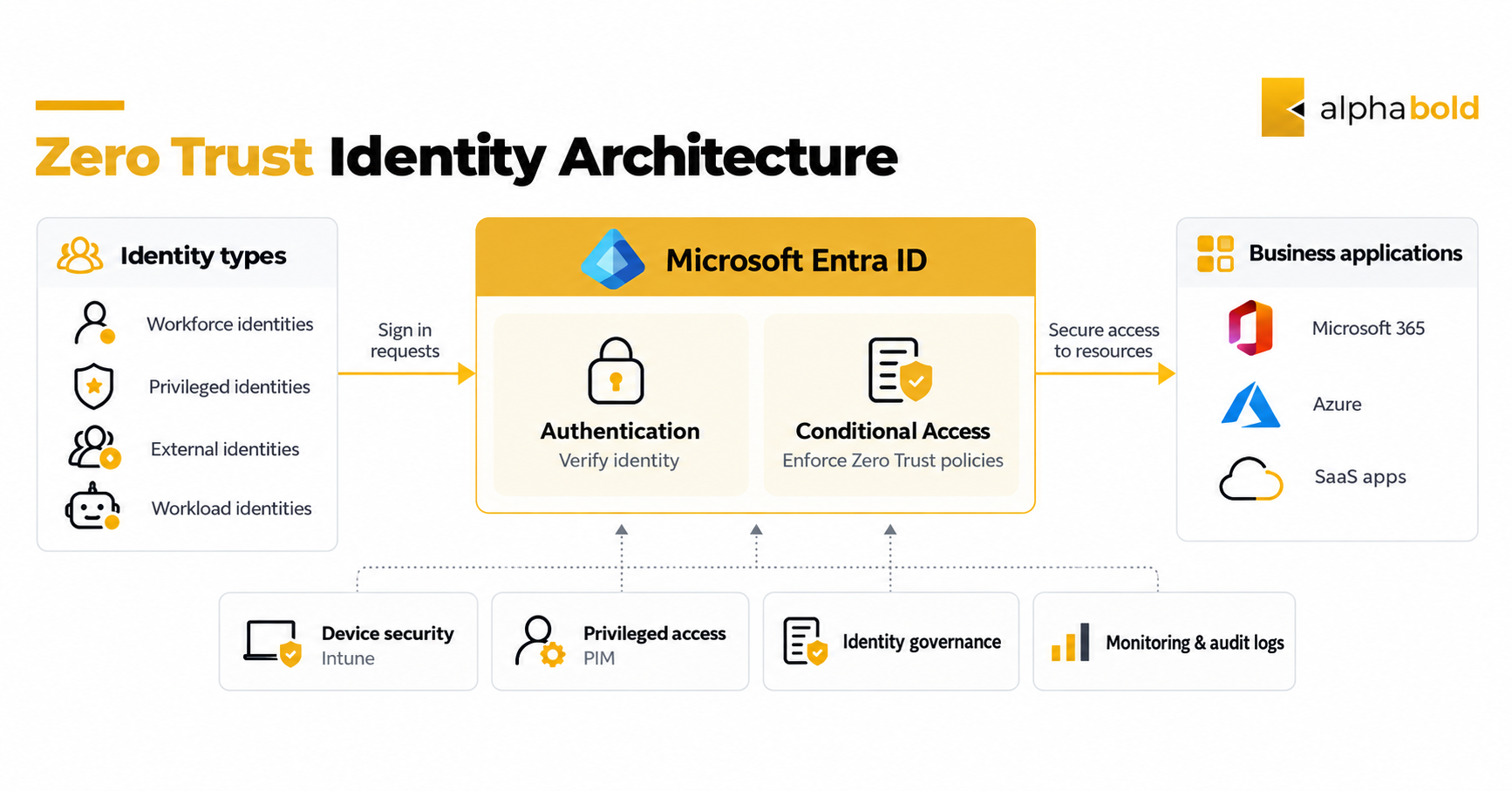
Microsoft Entra ID provides authentication and Conditional Access capabilities for supported applications. Other Microsoft services contribute device information, privileged access controls, and governance processes.
| Architecture layer | Microsoft capabilities | Responsibility |
|---|---|---|
|
Authentication |
Entra ID, MFA, passwordless methods |
Verify the identity requesting access |
|
Access policies |
Conditional Access, Identity Protection |
Evaluate applicable context and risk signals |
|
Device security |
Microsoft Intune |
Provide device compliance information |
|
Privileged access |
Microsoft Entra PIM |
Manage eligible administrative role assignments and activation |
|
Governance |
Entra ID Governance |
Review permissions and manage access lifecycles |
|
Monitoring |
Sign-in logs, audit logs |
Track authentication and administrative activity |
Consider an employee accessing a sensitive financial application.
- Authentication: Microsoft Entra ID authenticates the employee using an approved method.
- Policy evaluation: Conditional Access assesses applicable requirements, potentially using device compliance and supported risk signals.
- Application access: The application enforces its own authorization rules after the required identity controls are satisfied.
- Access governance: Scheduled reviews and lifecycle processes help determine whether the employee should retain access.
This matters because authentication, Conditional Access, and application authorization solve different problems.
Conditional Access evaluates policies at applicable authentication and access events. It does not independently verify every action performed inside an application.
How Should Different Identity Types Be Protected?
The architecture should account for identities beyond regular employees.
- Workforce identities: Apply authentication, device, and access policies appropriate to their responsibilities.
- Privileged identities: Require stronger authentication, controlled role activation, and monitoring.
- External identities: Govern guest and contractor access through appropriate assignments and periodic reviews.
- Workload identities: Manage application permissions, credentials, service principals, and managed identities separately from workforce accounts.
Microsoft Entra Conditional Access for workload identities can apply supported location- and risk-based restrictions to eligible single-tenant service principals. These policies require Workload ID Premium licensing and do not cover managed identities.
Managed identities can reduce reliance on stored application secrets, but they still require appropriate permission assignment, monitoring, and lifecycle management.
For related examples of identity-related security exposure, see AlphaBOLD’s article on Azure security gaps.
How Should You Design Conditional Access Policies?
Conditional Access is a primary mechanism for enforcing identity-based access requirements in Microsoft Entra ID.
Organizations should establish a consistent baseline before introducing policies for sensitive applications, privileged accounts, and higher-risk scenarios.
A practical policy design should address:
- MFA coverage: Require MFA for applicable users and resources, with controlled emergency access exclusions.
- Legacy authentication: Block legacy authentication methods that cannot satisfy modern authentication requirements.
- Administrative access: Require phishing-resistant authentication methods for privileged roles.
- Sensitive applications: Apply appropriate device compliance or other access requirements based on business risk.
- Risk-based policies: Use Microsoft Entra ID Protection signals to respond to risky sign-ins and users.
- Policy exceptions: Record the purpose, owner, and review date for every exclusion.
Microsoft Entra ID Protection distinguishes between sign-in risk and user risk. Sign-in risk concerns a particular authentication attempt, while user risk indicates the likelihood that an identity has been compromised.
For high-risk users, the Require risk remediation control supports recovery workflows for password-based and passwordless authentication. It applies to supported user-risk scenarios, not sign-in-risk remediation, and is not supported for external guest users.
Microsoft’s risk-based Conditional Access guidance explains the relevant policy requirements.
How Can You Prevent Conditional Access Lockouts?
Before enforcing new policies, use report-only mode, the Conditional Access What If tool, and representative pilot groups.
These methods help identify potential problems but cannot reproduce every application dependency or authentication scenario. Business-critical applications and integrations still require direct testing.
Organizations should maintain at least two cloud-only emergency access accounts with:
- Permanent active Global Administrator assignments.
- Independent phishing-resistant authentication methods.
- Securely stored authentication credentials and devices.
- Exclusions from Conditional Access policies that could prevent emergency sign-in.
- Alerts for account activity and functionality testing at least every 90 days.
These safeguards provide a recovery path when normal administrative access is unavailable.
Are Your Conditional Access Policies Creating Security Gaps?
Unmanaged exclusions and inconsistent access requirements can weaken identity protection.
AlphaBOLD can help assess Conditional Access coverage, authentication requirements, and administrative access risks across your Microsoft environment.
Request a ConsultationHow Does Privileged Identity Management Enforce Least Privilege?
Microsoft Entra Privileged Identity Management helps organizations reduce unnecessary standing administrative permissions through eligible, time-bound role assignments.
Instead of granting permanent access to every administrator, organizations can establish activation conditions appropriate to the sensitivity of each role.
Recommended practices include:
- Convert suitable permanent assignments into eligible assignments.
- Require appropriate authentication and justification for activation.
- Apply approval requirements to selected sensitive roles.
- Configure activation durations according to operational needs.
- Review privileged assignments and activation activity regularly.
Microsoft Entra directory roles and Azure resource roles have different scopes.
For example, a Global Administrator has broad directory-level permissions, while an Azure Owner assignment grants control over resources within its assigned Azure scope.
PIM supports privileged role governance in both areas, but each requires separate role configuration and review.
Securing directory administrator roles alone does not address every privileged permission across Azure subscriptions and resources.
How Do Identity Governance and Lifecycle Management Reduce Access Risk?
Identity governance focuses on whether assigned permissions remain appropriate as organizational needs change.
Employees change roles, contractors complete projects, and business applications are retired. Without defined access review and removal processes, permissions can remain active beyond their original purpose.
Microsoft Entra ID Governance supports several processes:
- Lifecycle Workflows: Automate supported joiner, mover, and leaver activities based on configured events and conditions.
- Entitlement management: Organize access requests, approvals, and expiration rules through access packages.
- Access reviews: Ask designated reviewers to confirm whether access remains necessary.
- External access governance: Review and manage supported guest and contractor access scenarios.
Effective governance depends on reliable identity information, defined approval responsibilities, and clear procedures for removing access.
What Microsoft Entra Licensing Does Zero Trust Require?
Not every Microsoft Entra capability is included in the same subscription.
| Licensing option | Relevant capabilities |
|---|---|
|
Microsoft Entra ID P1 |
Conditional Access and foundational identity management |
|
Microsoft Entra ID P2 |
Identity Protection, PIM, and eligible access review and entitlement management capabilities |
|
Microsoft Entra ID Governance or Entra Suite |
Advanced identity governance functions, including Lifecycle Workflows |
|
Microsoft Entra Workload ID Premium |
Conditional Access for eligible workload identities |
Certain entitlement management and access review capabilities are included with P2, while advanced scenarios require additional governance licensing.
Licensing also depends on which users, administrators, guests, and workload identities use the selected capabilities.
Organizations should validate requirements using Microsoft’s Entra ID Governance licensing documentation before finalizing their implementation plans.
How Should Enterprises Implement Zero Trust Identity in Phases?
Zero Trust implementation should begin with existing identity exposure, application dependencies, and operational priorities rather than enabling every available security feature simultaneously.
A phased implementation makes it easier to validate policies and manage disruption.
| Phase | Implementation activity | Expected deliverable |
|---|---|---|
|
1. Assess |
Inventory identities, applications, authentication methods, privileged roles, and exclusions |
Identity risk and dependency inventory |
|
2. Establish controls |
Test baseline authentication and Conditional Access requirements |
Documented access policy baseline |
|
3. Secure privileged access |
Configure suitable PIM controls and review device access requirements |
Privileged access model |
|
4. Govern access |
Implement applicable reviews, access packages, and lifecycle processes |
Access governance schedule |
|
5. Measure |
Monitor policy outcomes, privileged activity, and access lifecycle performance |
Identity security scorecard |
The implementation sequence should account for existing controls and business dependencies.

What Should Hybrid Organizations Consider?
Hybrid organizations may rely on different identity and authentication systems across cloud and on-premises applications.
Microsoft Entra Connect Sync and Cloud Sync help integrate supported on-premises identities with Microsoft Entra ID.
However, synchronization does not automatically extend cloud Conditional Access enforcement to every application using direct on-premises authentication.
Organizations must identify which applications rely on Entra-mediated authentication and which require additional integration or separate controls.
For identity-aware access to private applications, Microsoft Entra Global Secure Access addresses a related, but distinct, part of Zero Trust security.
How Can Organizations Measure Zero Trust Identity Maturity?
A successful Zero Trust implementation should be measured through policy effectiveness and reduced access exposure, not simply the number of enabled security features.
Organizations can establish an identity security scorecard using the following indicators.
| Metric | What to measure |
|---|---|
|
Authentication coverage |
Percentage of applicable identities meeting required MFA or authentication-strength policies |
|
Privileged access |
Percentage of selected sensitive roles governed through appropriate PIM configurations |
|
Policy exclusions |
Number of undocumented, outdated, or unjustified exceptions |
|
Legacy authentication |
Remaining activity using legacy authentication methods |
|
Access removal |
Time required to revoke access after a user leaves |
|
Access reviews |
Percentage of reviews completed and required remediation actions resolved |
These metrics should be evaluated together.
For example, high MFA coverage is beneficial, but it does not establish that privileged permissions are appropriately restricted or that inactive accounts have been removed.
Organizations should establish a baseline, define accountable owners, and review progress on a recurring schedule.
How Can Zero Trust Identity Reduce Security Risk and Administrative Overhead?
An integrated Zero Trust identity architecture can help organizations improve several aspects of security operations.
- Reduced exposure: Strong authentication and least-privilege controls limit unnecessary access.
- Administrative consistency: Standardized access policies reduce inconsistent manual decisions.
- Access accountability: Governance reviews establish clearer responsibility for assigned permissions.
- Operational visibility: Authentication logs, privileged activation records, and policy outcomes help security teams investigate potential issues.
- User experience: Appropriate access requirements can reduce unnecessary friction while maintaining protection for sensitive resources.
These outcomes depend on implementation quality, application coverage, and continued oversight.
How Can AlphaBOLD Help Engineer Zero Trust with Microsoft Entra ID?
Implementing Zero Trust requires decisions about how identity controls interact with business applications, administrative roles, existing authentication systems, and security operations.
AlphaBOLD helps organizations assess Microsoft security configurations and identify areas for improvement.
Depending on the engagement, this can include:
- Reviewing identity architecture and access policies.
- Evaluating Conditional Access and MFA configurations.
- Assessing privileged access and identity governance requirements.
- Identifying hybrid authentication and device compliance dependencies.
- Prioritizing configuration improvements and ongoing monitoring requirements.
AlphaBOLD’s Microsoft 365 Security Assessment uses BOLDSecOps to support configuration reviews, risk identification, and security posture visibility across Microsoft 365 environments.
Build a Zero Trust Identity Architecture Around Your Environment
Assess your identity controls, identify configuration risks, and develop a practical roadmap for Microsoft Entra ID access management and governance.
Request a ConsultationConclusion
A Zero Trust identity architecture requires authentication, access policies, privileged permissions, and governance to work together.
Microsoft Entra ID provides capabilities that support this design, but organizations must identify which identities and applications require protection, how policies should be enforced, and where additional controls are necessary.
Starting with an identity assessment, implementing controls in phases, and measuring their effectiveness helps organizations prioritize security improvements without unnecessarily disrupting business operations.
Frequently Asked Questions
Zero Trust is a security model based on explicit verification, least privilege, and the assumption that breaches can occur. Conditional Access is a Microsoft Entra ID capability used to enforce applicable access requirements based on supported signals and defined policies.
No. Microsoft Entra ID P1 supports foundational Conditional Access capabilities. P2 adds Identity Protection and PIM, while advanced governance capabilities and workload identity policies may require additional subscriptions. Licensing should be determined by the features and identity types included in the architecture.
Yes. Microsoft Entra ID can support hybrid identity architectures through synchronization and supported application integrations. However, cloud Conditional Access policies do not automatically protect every legacy application using direct on-premises authentication.
Organizations should assess application dependencies, test policies in report-only mode, validate them with pilot groups, and maintain monitored emergency access accounts. Phased enforcement and application-level testing reduce the likelihood of unexpected access interruptions.