Industry Use Cases: Power BI and Dynamics 365 Business Central integration

Table of Contents
Introduction
Microsoft Dynamics 365 Business Central and Power BI work best when businesses need clear visibility across finance, operations, and customer data. This blog breaks down how this integration is used in manufacturing, retail, and healthcare, with a focus on real operational impact rather than features alone.
Dynamics 365 Business Central acts as the system of record across finance, sales, inventory, and service operations. Power BI sits on top of that data and turns it into dashboards and reports that teams can actually use to make decisions.
When combined, teams can track performance, spot issues early, and act faster.
According to Aberdeen Group, companies using ERP and BI together improve decision-making speed by 26%. That gap usually shows up in areas such as reporting delays, missed trends, or slow operational responses.
Where This Integration Actually Works?
Most businesses don’t struggle with a lack of data. The real issue is how that data is scattered across systems, reports, and teams. Finance works in one view, operations in another, and leadership relies on summaries that are often delayed. This creates gaps between what is happening and what decisions get made.
This is where Power BI and Dynamics 365 Business Central start to show real value. Instead of pulling reports manually or waiting on updates, teams get a connected view of operations as they happen. It reduces reliance on static reports and gives decision-makers direct access to the same numbers everyone else is using.
This setup is most useful when:
- Data is spread across departments, but decisions need a single view
- Reporting is manual or delayed
- Teams rely on exports instead of live dashboards
- Leadership needs real-time visibility without asking analysts
How Does the Manufacturing Industry Use Power BI and Dynamics 365 Business Central Integration?
How do manufacturers keep production running smoothly when delays, supply chain issues, and quality gaps keep showing up across different systems?
What if production, inventory, and supply chain data could be stored in one place, rather than pulled from separate reports that are already outdated by the time they’re reviewed? That’s where this integration starts to change day-to-day decision-making.
Manufacturers deal with production delays, supply chain variability, and quality control issues. This integration helps connect those moving parts.
Production Visibility and Issue Detection:
Teams can track production metrics in real time and identify bottlenecks before they impact output.
- Monitor production performance across lines
- Identify delays in supply chain inputs
- Track defect rates and quality trends
Supply Chain and Inventory Control:
Instead of reacting to shortages, teams can use trend data to plan inventory and supplier timelines.
- Analyze supplier performance
- Align inventory with production demand
- Reduce overstock and stockouts
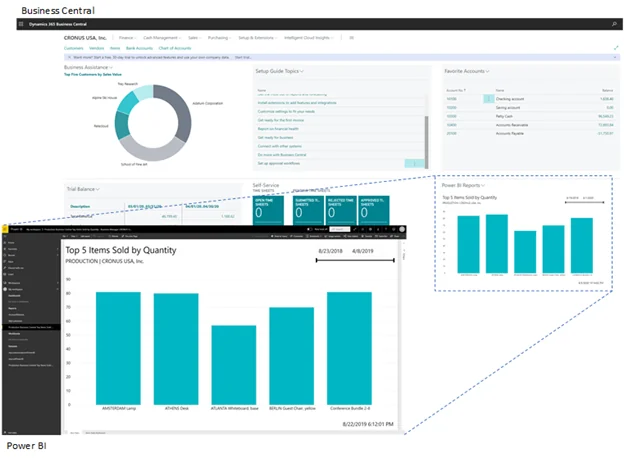
Operational Efficiency:
Access to unified dashboards reduces time spent switching systems or waiting for reports.
- Centralized reporting across departments
- Real-time KPI tracking
- Faster coordination between teams
Cost and ROI Tracking:
Manufacturers can track cost drivers and measure efficiency improvements over time.
- Monitor production cost trends
- Evaluate pilot initiatives before scaling
- Use the existing Microsoft stack to reduce additional tooling costs
Read more: Use Cases for Power BI NetSuite Integration
Get Started with Power BI and Dynamics 365 Business Central integration
Discover how Power BI and Dynamics 365 Business Central integration can revolutionize your business operations. Gain real-time insights, streamline your processes, and make data-driven decisions with ease.
Request a DemoHow Does the Retail Industry Use Power BI and Dynamics 365 Business Central Integration?
What changes when retailers stop relying on delayed sales reports and start working with live data on customer behavior, inventory movement, and store performance?
In retail, decisions often need to be made quickly. A missed trend, a stockout, or slow-moving inventory can directly impact revenue. When Power BI is connected with Dynamics 365 Business Central, retailers don’t just see what happened last week; they see what is happening right now across sales channels, products, and customers.
This integration helps retail teams move away from reactive reporting and toward decisions based on real-time signals across sales and inventory.
Enhance Decision-Making Capabilities:
Retailers can connect sales, customer, and inventory data into a single view, eliminating the need to work across separate reports.
- Sales Analysis: Track sales performance and identify top-selling products
- Customer Insights: Understand buying patterns and adjust promotions accordingly
- Inventory Management: Maintain optimal stock levels and reduce shortages or excess stock
Maximize Productivity:
Instead of switching between multiple systems, teams can access key reports in one place.
- Unified Reports: Centralized access to sales and inventory data.
- Real-Time Data: Act on updated information without waiting for batch reports.
- Device Flexibility: Access dashboards across devices for faster decisions.
Increased ROI:
Better visibility reduces operational waste and improves financial control across retail operations.
- Cost-Effective Setup: Leverage existing Microsoft environment
- Improved Efficiency: Reduce manual reporting and coordination efforts.
- ROI Tracking: Monitor performance through consistent reporting structures.
Competitive Edge:
Retailers can respond faster to market shifts and changes in customer demand.
- Market Trends: Identify demand shifts early.
- Competitive Benchmarking: Compare product and store performance.
- Accurate Data: Reduce errors from disconnected reporting systems.
Custom Reporting:
Retail teams can focus reporting on what actually drives sales and performance.
- Sales Metrics: Track revenue patterns and product performance.
- Customer Reports: Analyze demographics and buying behavior.
- Inventory Reports: Improve stock planning and replenishment decisions.
Increased ROI:
By integrating Power BI and Dynamics 365 Business Central , retailers can streamline data processes and reduce IT administration burdens. The minimal initial investment allows retailers to explore the benefits of Power BI, leading to improved ROI through better data management and insights.
- Cost-Effective: Utilize existing Microsoft 365 subscriptions to save on initial costs.
- Improved Efficiency: Streamline operations to reduce overheads.
- ROI Tracking: Monitor the return on investment with detailed reports.
Competitive Edge:
Retailers gain a competitive advantage with real-time access to sales and inventory data. This business intelligence helps them monitor market trends, analyze competitor strategies, and maintain data accuracy, ultimately enhancing their competitiveness.
- Market Trends: Stay informed about the latest retail trends.
- Competitive Benchmarking: Compare performance with competitors.
- Accurate Data: Ensure consistent and reliable data for decision-making.
Custom Reporting:
Retailers can create custom reports focused on sales metrics, customer behavior, and inventory levels. These reports help retailers make informed decisions, optimize operations, and improve overall performance.
- Sales Metrics: Track sales data to identify trends and opportunities.
- Customer Reports: Understand customer demographics and behaviors.
- Inventory Reports: Optimize stock management with detailed insights.
Transform Your Industry with Seamless Integration
Learn how integrating Business Central and Power BI can benefit your specific industry. From manufacturing to healthcare, unlock the potential of your data and enhance your decision-making capabilities.
Request a DemoHow Does the Healthcare Industry Use Power BI and Business Central Integration?
What happens when healthcare providers need faster access to patient data, better coordination across departments, and fewer delays in operational reporting?
Healthcare decisions depend on timing and accuracy. When information is fragmented across systems, it slows down both clinical and administrative workflows. By connecting Power BI to Dynamics 365 Business Central, healthcare teams can work with structured, real-time data rather than relying on manual reports or disconnected records.
This integration supports both sides of healthcare operations, patient care, and internal efficiency by giving a unified view of clinical and operational data.
Enhance Decision-Making Capabilities:
Healthcare providers can bring together patient, staffing, and operational data into a single reporting layer.
- Patient Data Analysis: Understand patient trends and treatment outcomes
- Resource Allocation: Optimize staffing, equipment, and facility usage
- Operational Efficiency: Reduce delays in administrative and support processes
Maximize Productivity:
With centralized access to reporting, healthcare teams spend less time gathering data and more time acting on it.
- Administrative Efficiency: Reduce manual documentation and reporting effort
- Real-Time Access: View patient and operational data as it updates
- Collaborative Tools: Improve coordination across medical and support teams
Increased ROI:
Healthcare organizations can reduce operational overhead while improving visibility across systems.
- Cost Reduction: Lower dependency on separate reporting tools
- Value Maximization: Use data insights to improve financial and clinical performance
- Pilot Programs: Validate impact before scaling across departments
Competitive Edge:
Faster, more accurate data access helps healthcare providers respond more effectively to both operational and clinical demands.
- Healthcare Trends: Track changes in patient needs and service demand
- Competitor Analysis: Benchmark performance across providers
- Data Integrity: Maintain consistent and reliable records across systems
Custom Reporting:
Healthcare teams can build reports focused on outcomes and efficiency rather than static summaries.
- Patient Outcomes: Track recovery rates and treatment effectiveness
- Resource Reports: Monitor usage of medical staff and equipment
- Operational Metrics: Improve workflow efficiency across departments
What Common Business Problems Does This Integration Solve?
Why do so many organizations still struggle with reporting delays, disconnected systems, and decisions based on incomplete data, even after investing in ERP and analytics tools?
In most cases, the issue isn’t the tools themselves. It’s how those tools operate in isolation. Finance, operations, and customer data sit in separate systems, and teams rely on manual exports or static reports to connect the dots. By the time insights reach decision-makers, the data is already outdated.
Across industries, the same issues show up:
- Delayed reporting cycles
- Data silos across departments
- Limited visibility into operations
- Decisions based on outdated data
Power BI and Dynamics 365 Business Central address these by connecting systems and making data usable in real time.
What to Consider Before Power BI and Business Central Implementations?
Many implementations fall short not because of the technology, but because the groundwork isn’t done up front. Teams often jump straight into building dashboards without aligning on data structure, business goals, or how reports will actually be used in daily operations. This leads to low adoption and reports that don’t support real decisions.
This integration works well, but only when set up correctly.
- Data structure in Business Central must be clean
- KPIs should be defined before building dashboards
- Access and governance need to be planned early
- Teams should be trained to use reports, not just view them
Without this, dashboards exist but don’t get used.
Get Started with Power BI and Business Central Integration
If your reporting still relies on exports or delayed data, this integration can fix that gap. The goal is not more dashboards, but faster and clearer decisions across teams. Review your current reporting process.
Request a DemoConclusion
Power BI and Dynamics 365 Business Central integration is most effective when businesses need visibility across operations, not just reporting. Manufacturers use it to track production and supply chains. Retailers use it to understand sales and customer behavior. Healthcare providers use it to improve both care and operations. The value comes from connecting data across systems and making it usable in real time. Businesses that get this right reduce reporting delays, improve decision speed, and operate with clearer visibility across teams.
FAQS
Basic features are included with Business Central, but sharing and advanced reporting usually require Power BI Pro or Power BI Premium.
Scheduled refreshes are common (every few hours), but near-real-time or live connections are also possible.
Yes. Prebuilt reports exist, but most teams create custom dashboards in Power BI.
The basic setup is simple, but strong dashboards and data models require expertise.
Security includes role-based access, encryption, and compliance within Microsoft’s ecosystem.
Yes. Power BI can combine data from entities, regions, and business units into a single view.