BOLDSuite Analytics – Your New-Age NetSuite
Power BI Connector

Eliminate manual reporting and spreadsheet dependency by connecting Power BI and NetSuite through a structured data pipeline, enabling real-time visibility and transforming ERP data into decision-ready insights across your business.

Power Up Your Data with a NetSuite Power BI Connector

Many organizations struggle to get accurate, timely insights from their ERPs due to manual exports, disconnected spreadsheets, and limited reporting capabilities. A structured Power BI NetSuite integration brings your data into one place, pulls directly from workbooks, and enables real-time, customizable reporting your teams can actually use.

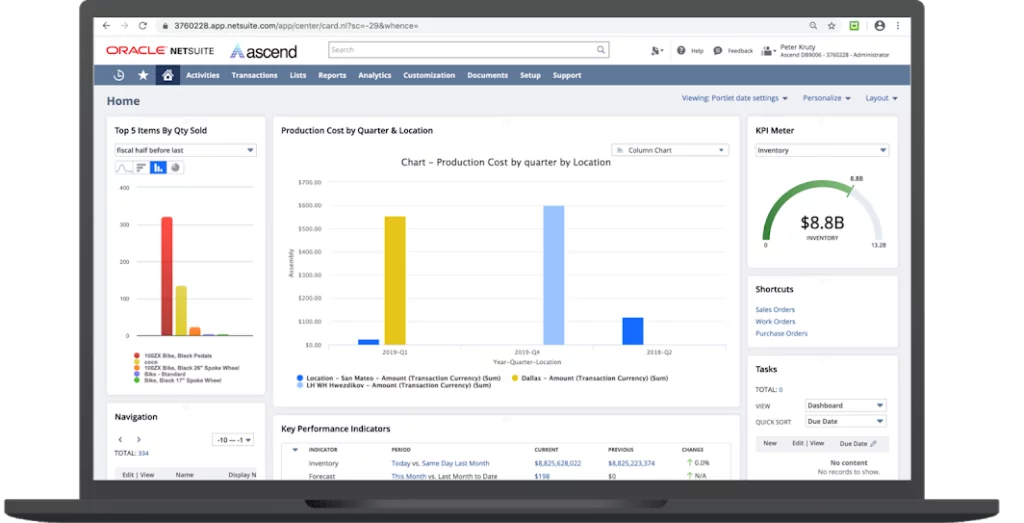
image shows NetSuite Power BI Connector - BOLDSuite Analytics dashboard

Features of BOLDSuite Analytics Data Connector

Direct NetSuite Workbook Integration

Pull data directly from NetSuite Workbooks without rebuilding complex data models or writing queries. Get accurate, business-ready data without manual restructuring.

Automated Data Pipeline (No Manual Exports)

Eliminate CSV downloads and spreadsheet-based reporting with a continuous data flow into Power BI. Reduce reporting effort and remove dependency on Excel.

No ODBC or Additional Licensing Required

Enable Power BI NetSuite integration without relying on SuiteAnalytics Connect or added licensing costs. Lower total cost while simplifying your architecture.

Real-Time and Incremental Data Refresh

Keep dashboards updated using incremental refresh, pulling only new or changed data. Access timely insights without slowing down reporting performance.

No Data Warehouse or Middleware Required

Connect Power BI and NetSuite without introducing additional infrastructure or ETL tools. Deploy faster and maintain full control over your data environment.

Ready to connect NetSuite with Power BI?

Get BOLDSuite Analytics running in your environment in days, not months.

Book a demo

Key Connectors Under BOLDSuite Analytics

BOLDSuite Analytics Pricing

BOLDSuite Analytics

BOLDSuite Connector - Base

Year 1 $3,500
Years 2+ $1,155

BOLDSuite Connector Preconfigured

Year 1 $7,500
Years 2+ $2,500

BOLDSuite
Analytics

Year 1 $18,000
Years 2+ $5,000
BOLDSuite Analytics Custom

BOLDSuite Analytics Custom

Year 1 $18,200
Years 2+ $1,155
Check Details

Includes: Initial install / config for one environment

Check Details

Includes: Configuration for one environment

• Includes pre-config for all std NetSuite tables

• Financials (base)

• Order To Cash

• Procure to Pay

• Projects

• Manufacturing

• People/HR

Check Details

Includes:

BSA Connector & Dashboards

• Financials basics

• Sales and Agent dashboards

• Project Management Dashboard and KPIs

• Manufacturing

• Warehouse Management & Distribution

• People/HR

Up to 20 hours consulting for personalization

Check Details

Includes: BOLDSuite Connector for one environment 1 Custom dashboard/report

Assessment @ $3,200

What if Your Business Could Do More With NetSuite
Power BI Integration?

BOLDSuite Analytics enables a seamless connection between Power BI and NetSuite, eliminating manual data imports and ensuring your data is always current and ready for analysis. Instead of relying on spreadsheets or complex pipelines, your NetSuite data flows directly into Power BI, giving you a consistent, structured view of your financial and operational performance.

In many organizations, access to NetSuite data is limited to a few users who can build Saved Searches or reports, creating bottlenecks and delays for even simple data requests.

  • Eliminate the need for a separate data warehouse
  • Avoid middleware and ETL complexity
  • Reduce manual data preparation and mapping

Tell us about your reporting needs and get a tailored demo of this NetSuite Power BI integration within a few business hours.

BOLDSuite Analytics Reports

With BOLDSuite Analytics dashboards, you get direct access to the metrics that matter most. This Power BI custom connector improves visibility across financial and operational data. Explore the videos below to see how it works in practice.

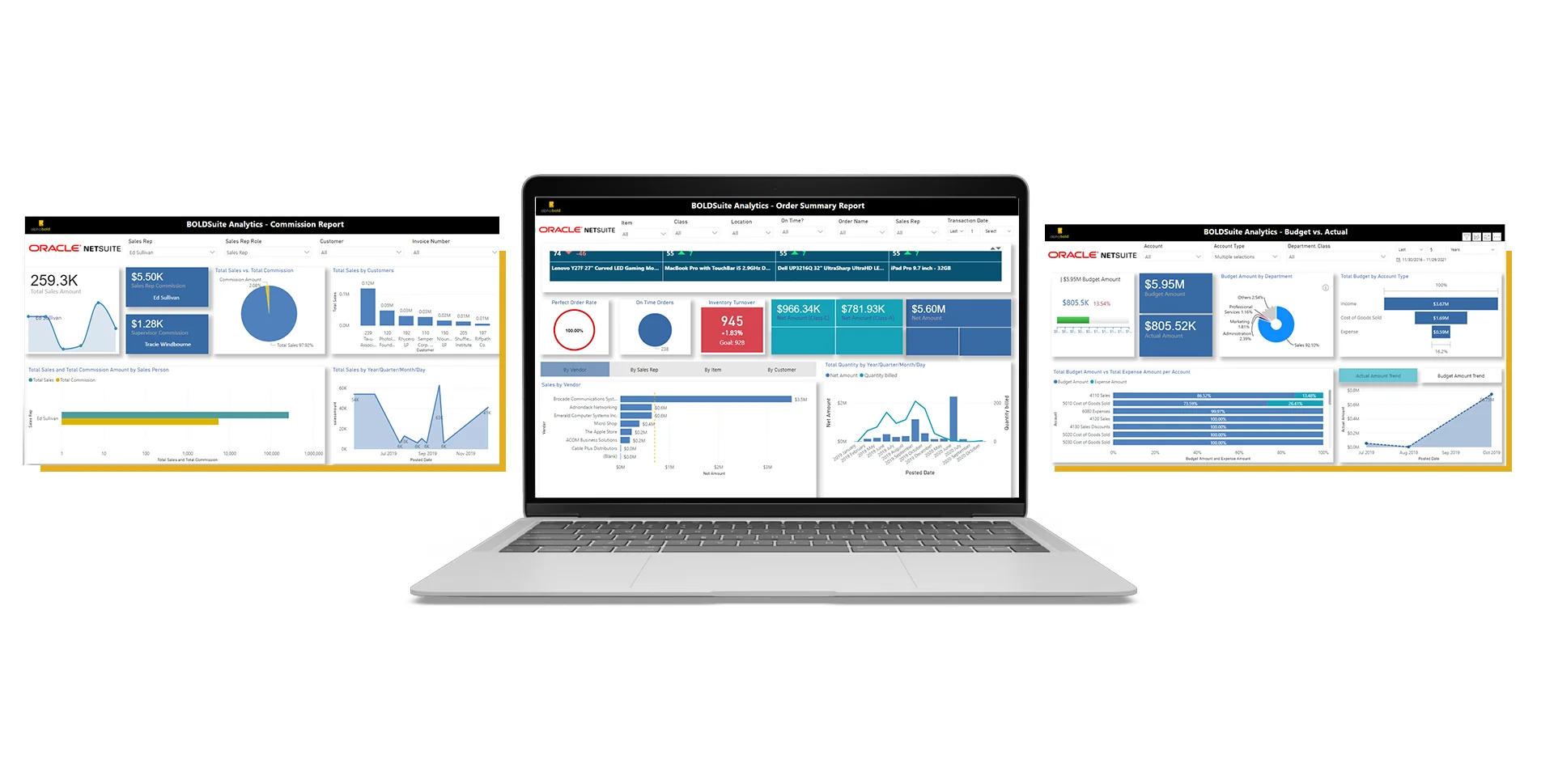
Image shows dashboards of BOLDSuite analytics

Budget vs. Actual Reporting

  • Budget vs. Actual – Real-time financial overview to manage day-to-day financial operations
  • Budget vs. Actual – Financials by the department, by account type on a daily/weekly/monthly, and yearly basis

Order Summary Report

  • Real-time inventory tracker
  • Order rate calculation
  • Sales amount by vendor, by sales rep, by items and by customers
  • Net amount vs. quantity billed comparison
  • Inbound/Outbound tracker

Sales Commissions Report

  • Automate monthly sales commissions
  • Executive view of total sales done by day/ month/ quarter/ year
  • Total sales summary by customer, by the sales rep with commission details

Project Management Report

  • Break down complex project data with drill-down charts and graphs.
  • Track outcomes in real-time for faster decision-making.
  • Keep projects on schedule and budget with detailed reports.
  • Analyze data to understand specific patterns and trends.

Common BOLDSuite Analytics Use Cases

BOLDSuite Analytics is ideal for generating comprehensive financial reports, including Budget vs. Actuals. Finance teams can seamlessly pull data from NetSuite into Power BI to create a unified financial view.

  • Identify budget variances early and take corrective action
  • Track financial performance across departments and time periods
  • Improve forecasting and support faster, more confident decisions

Leverage real-time inventory tracking with BOLDSuite Analytics. Monitor stock levels, track order rates, and analyze sales performance across vendors, items, and customers with up-to-date data from NetSuite.

  • Prevent stockouts and overstocking with real-time inventory visibility
  • Identify high- and low-performing products to optimize inventory decisions
  • Improve order fulfillment and vendor performance tracking

Analyze and improve sales performance with detailed, real-time reporting. Track revenue trends across time periods, monitor performance by customer and sales rep, and gain clear visibility into sales outcomes.

  • Identify top-performing and underperforming sales reps and customers
  • Track revenue trends to support better forecasting and planning
  • Automate commission tracking and reduce manual calculations

Track and manage project performance with real-time visibility into timelines, budgets, and resource utilization. Analyze project data with drill-down reporting to stay on schedule and maintain control over project outcomes.

  • Monitor project progress and identify delays early
  • Track budgets and control project costs in real time
  • Optimize resource allocation across teams and projects

Give leadership a clear, real-time view of business performance through customizable executive dashboards. Track key metrics across finance, sales, and operations in one place to support faster, more informed decisions.

  • Get a single, unified view of business performance across departments
  • Monitor key KPIs in real time without relying on manual reports
  • Support faster, more confident decision-making at the executive level

Build reports tailored to your business needs with flexible, customizable reporting in Power BI. Combine NetSuite data with relevant business data to create meaningful, actionable insights across your organization.

  • Create reports aligned to your specific workflows and KPIs
  • Combine financial and operational data for deeper analysis
  • Adapt dashboards and reports as business needs evolve

Improve operational efficiency by eliminating manual reporting, data entry, and periodic data pulls. BOLDSuite Analytics automates the flow of data between NetSuite and Power BI, ensuring your teams always have accurate, up-to-date information for analysis and decision-making.

  • Reduce time spent on manual reporting and data preparation
  • Improve data accuracy by eliminating duplicate and inconsistent data
  • Enable teams to focus on analysis instead of data management

Key BOLDSuite Analytics Capabilities

Connect NetSuite to Power BI to extend your reporting capabilities beyond standard ERP limitations. This NetSuite Power BI connector, with pre-built dashboards and simplified configuration, provides visibility into financial performance, sales trends, inventory levels, and project outcomes, without requiring additional infrastructure, licensing, or complex setup.

Gain faster Insights with Microsoft Power BI

Gain faster Insights with Microsoft Power BI

ROI & DYNAMICS 365

Smarter data-driven business decisions

User-Friendly Integration

User-Friendly Integration

Out-of-the-box at no additional cost

Out-of-the-box at no additional cost

Leverage Microsoft Power BI & NetSuite Together

Analytics, you can move beyond static reports and gain real-time visibility into financial performance, sales trends, inventory, and operations, without the need for complex infrastructure or additional tools.

If your team is dealing with any of the following:

  • Manual exports and spreadsheet-based reporting
  • Delayed visibility into financial and operational performance
  • Disconnected reports across departments
  • Time spent preparing data instead of analyzing it

A structured Power BI NetSuite integration can help you centralize data, automate reporting, and deliver insights your teams can actually use.

Get centralized, accurate, and actionable insights to improve performance and support faster decision-making. Request a personalized demo from AlphaBOLD to see how this approach fits your reporting and analytics needs.

BOLDSuite Analytics FAQs:

How does BOLDSuite Analytics connect to NetSuite?

We utilize a secure REST-based connection with token-based authentication, ensuring quick setup and smooth data access without complex configurations. 

What data can I pull from NetSuite with BOLDSuite Analytics?

You can access all your Workbook and saved searches data, including financials, sales, inventory, and customer information with our Power BI NetSuite connector.

Can I build custom dashboards and reports with BOLDSuite Analytics?

Absolutely! We provide pre-built dashboards for common scenarios, but you can easily customize them or create entirely new reports and visualizations using Power BI’s full capabilities. 

How does BOLDSuite Analytics handle large datasets?

Our optimized data engine is built for Power BI’s native data model, delivering lightning-fast performance and stunning visuals even with massive datasets. 

Where can I download BOLDSuite Analytics?

Ready to benefit from NetSuite Power BI integration? Click ‘Request a Demo’ on this page and a member of our team will reach out to you to get you set up. 

Can I get support for BOLDSuite Analytics?

Of course! We offer comprehensive documentation and FAQs on our website, and our friendly support team is always happy to help. 

What challenges does a NetSuite Power BI integration solve?

Organizations typically face several reporting challenges when relying on NetSuite alone, including manual data exports, spreadsheet-based reporting, delayed visibility into performance, and disconnected reports across departments.

A structured Power BI NetSuite integration addresses these issues by centralizing data, automating reporting workflows, and providing real-time visibility into financial, sales, and operational metrics. This allows teams to spend less time preparing data and more time using it to make decisions.

Who uses the NetSuite Power BI connector within an organization?

BOLDSuite Analytics, built as a NetSuite Power BI connector, is designed for multiple roles across the organization.

Finance teams use it for budget tracking, forecasting, and financial reporting. Operations teams rely on it for inventory and performance monitoring. Sales teams use it to track revenue, commissions, and customer performance. Executives use centralized dashboards to monitor key business metrics and support decision-making.

By providing a shared, consistent view of data, it ensures all teams are aligned and working from the same insights.


Browse the Blogs

Explore our insightful blog for thought leadership, industry trends, and practical tips to unlock the full potential of your technology investments