
Table of Contents
Introduction
Microsoft SharePoint is a key platform for collaboration, document management, and data storage across organizations. While it includes built-in security features, relying on default settings leaves sensitive information at risk. As threats evolve, it’s essential to take steps that go beyond out-of-the-box protection.
In this blog, we will discuss best practices for SharePoint security management. You will learn how to control access, monitor activity, and configure settings to reduce exposure to breaches. The focus is on practical measures that strengthen your environment without disrupting workflows.
By following these practices, organizations can better protect critical data, maintain compliance, and reduce the chances of security incidents. Implementing a proactive security strategy ensures SharePoint remains a safe and reliable platform for day-to-day operations.
What Are the Best Practices for SharePoint Security Management?
Effective SharePoint security requires a structured approach to access control, monitoring, and configuration. Applying best practices helps reduce the risk of unauthorized access, data leaks, and compliance issues while keeping the platform easy to manage.
Here’s a practical guide to securing your SharePoint environment.
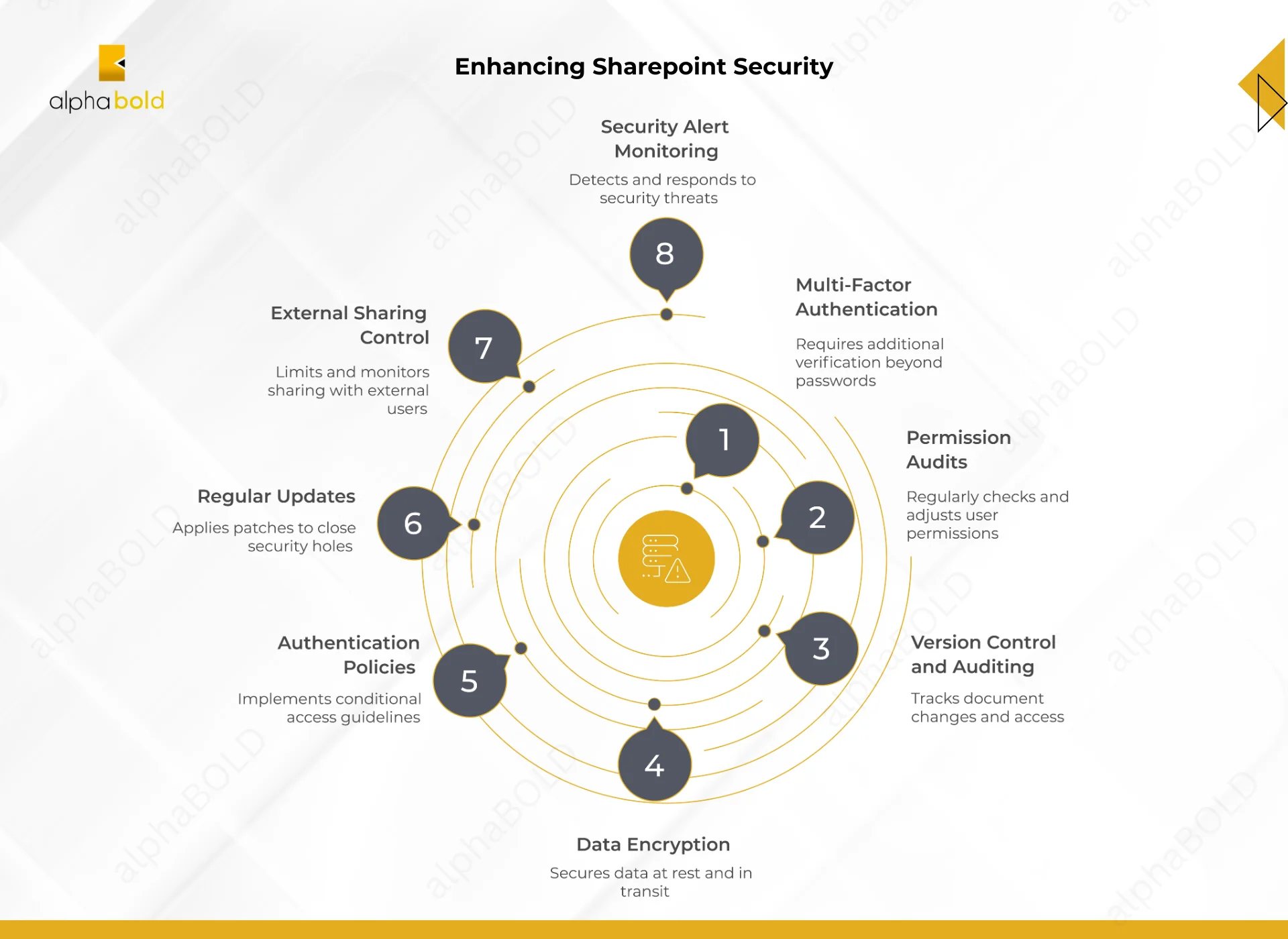
1. Multi-Factor Authentication (MFA):
MFA adds an extra layer of protection by requiring verification beyond a password, such as a one-time code sent to a mobile device or an email confirmation. This prevents unauthorized access even if login credentials are compromised. MFA is especially important for accounts with administrative privileges or access to sensitive data.
Best Practices:
- Enable MFA for all user accounts, prioritizing administrators and high-risk users.
- Use app-based or hardware token verification for stronger security.
- Regularly review and update MFA methods to ensure effectiveness.
- Educate users to recognize MFA prompts and avoid phishing attempts.
2. Check Permissions Periodically:
Users and teams can accumulate unnecessary access over time, creating potential security gaps and exposing sensitive data. Regularly reviewing permissions helps maintain control and ensures that only the right people have access.
Best Practices:
- Conduct regular permission audits to identify and remove excess access.
- Apply the Principle of Least Privilege (POLP) so that users have only the permissions needed for their roles.
- Use groups and role-based access to simplify management and reduce errors.
- Update permissions promptly when users change roles or leave the organization.
Enhance Your SharePoint Security Management
Protect your data with strong access control, encryption, and monitoring strategies with AlphaBOLD as your partner.
Request a Consultation3. Enable Version Control and Document Auditing
Keeping track of document changes and access can help identify unauthorized modifications and maintain a secure audit trail in case of a security incident. A 2022 study by McAfee found that 82% of organizations experienced accidental data exposure due to misconfigured cloud settings.
Best Practice:
- Enable versioning in document libraries to track changes over time.
- Activate auditing to monitor actions such as access, edits, and deletions.
- Review audit logs regularly to detect unusual activity or potential breaches.
- Use the insights from versioning and audits to support compliance and security investigations.
Further Reading: Benefits of Professional SharePoint Migration Services
4. Data Encryption:
Encryption protects SharePoint data both at rest and in transit, preventing interception or unauthorized access. Proper encryption ensures sensitive information remains secure even if systems are compromised.
Best Practice:
- Verify that all SharePoint data at rest is encrypted in accordance with strong standards.
- Confirm encryption settings in your SharePoint and Microsoft 365 environment.
- Use secure protocols like TLS or SSL for data in transit.
- Regularly review encryption policies to maintain compliance and address new security threats.
5. Implementing Strong Authentication Policies:
Clear authentication policies reduce the risk of unauthorized access by controlling how and when users can log in. Strong policies complement MFA and help enforce secure access across your SharePoint environment.
Best Practice:
- Implement conditional access based on user location, device, and risk level.
- Use Azure Active Directory (Azure AD) to manage and enforce authentication rules.
- Combine MFA with access policies for sensitive accounts and data.
- Regularly review and update authentication policies to address evolving threats.
Customize SharePoint for Your Business Needs
Work with AlphaBOLD to tailor SharePoint features, workflows, and permissions to your specific business processes, improving efficiency and user adoption.
Request a Consultation6. Keep SharePoint Updated:
Outdated software can leave SharePoint vulnerable to known exploits, making it easier for attackers to gain access. Regular updates close security gaps and protect your environment.
Best Practice:
- Apply updates and patches promptly for both SharePoint Online and on-premises versions.
- Schedule regular maintenance checks to ensure all components are up to date.
- Monitor Microsoft security advisories to quickly address critical vulnerabilities.
- Test updates in a controlled environment before full deployment to avoid disruptions.
7. Control External Sharing:
External sharing enables collaboration with users outside your organization but can introduce security risks if not managed carefully. Controlling how data is shared helps protect sensitive information.
Best Practice:
- Restrict external sharing to specific files, folders, or sites.
- Enable auditing to monitor what content is shared externally.
- Review and revoke unnecessary external access regularly.
- Educate users on secure sharing practices and the risks of over-sharing.
8. Monitor and Respond to Security Alert:
Security threats can arise at any time, and detecting them early helps prevent data breaches and minimize damage. Continuous monitoring ensures that potential issues are addressed quickly.
Best Practice:
- Set up alerts to notify administrators of unusual or suspicious activity.
- Regularly review security dashboards and logs to identify potential threats.
- Develop and follow a clear incident response plan to quickly mitigate incidents.
- Conduct periodic security drills to ensure the team can respond effectively.
Manage Your SharePoint Environment for Compliance and Data Protection
Partner with AlphaBOLD to secure your SharePoint environment, enforce access controls, monitor activity, and implement best practices that protect sensitive data and maintain regulatory compliance.
Request a ConsultationConclusion
Securing your SharePoint environment requires a proactive approach. Your team can mitigate risks and safeguard sensitive data by implementing best practices such as multi-factor authentication, regular permission audits, encryption, and continuous monitoring.
As cyber threats continue to evolve, strong Microsoft SharePoint security isn’t optional; it’s what keeps your data safe, your organization compliant, and your operations running smoothly.
FAQs
Mobile access increases flexibility but also risk. Use mobile device management (MDM) policies, enforce strong authentication, and restrict access to approved apps and devices.
Yes. Only approve trusted apps and integrations, monitor their permissions, and regularly review third-party access to prevent data leaks.
Implement regular backups for critical libraries and configure disaster recovery procedures. Test restores periodically to ensure data can be recovered quickly after an incident.
Enable versioning, maintain offline backups, restrict admin privileges, and monitor suspicious file activity. Educate users on phishing and suspicious links.
SharePoint Online relies on Microsoft 365 security tools like Conditional Access and Compliance Center, while on-premises requires patching servers, configuring firewalls, and managing local permissions.
Explore Recent Blog Posts