Table of Contents
As a business owner, you do not need to know every technical detail behind AWS scalability, but you do need to know what it protects. A scalable AWS application helps your business stay online during traffic spikes, avoid slow customer experiences, control cloud costs, and reduce the risk of outages that can affect revenue and reputation.
When your architecture is not built to scale, the problems show up quickly. Customers abandon slow websites. Campaigns generate traffic your application cannot handle. Teams pay for unused cloud capacity. Recovery takes longer than expected because backups, monitoring, or failover plans were not properly designed.
AWS scalable apps are built to help your systems adjust as demand changes. Instead of constantly adding servers or reacting after something breaks, your cloud environment can be designed to support growth, maintain performance, and align infrastructure spending with actual business needs.
Before increasing your AWS budget or waiting for the next outage to expose the problem, it is worth asking a simple question: is your AWS architecture ready to scale with your business?
Signs Your AWS Architecture May Not Be Ready to Scale
If several of these sound familiar, your AWS environment may be carrying hidden business and technical risk:
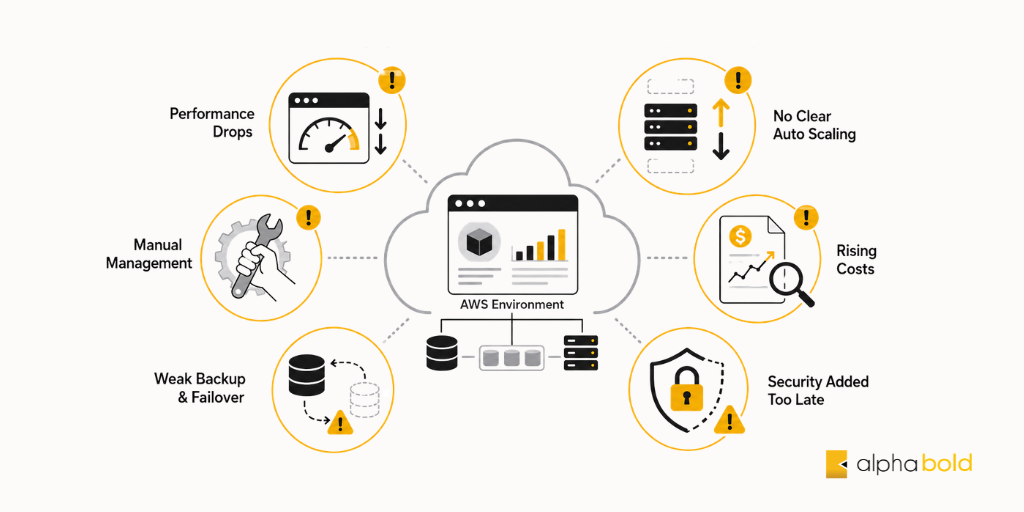
- Performance drops during high traffic: Slow load times can lead to abandoned transactions, lower conversions, and poor customer experience.
- No clear Auto Scaling policies: Teams either scramble to add capacity during spikes or overprovision resources to avoid outages, which increases cloud costs.
- Rising AWS costs without visibility: A growing bill that no one can clearly explain, allocate, or connect to specific workloads often signals poor cost governance.
- Manual infrastructure management: Changes made by hand increase the risk of human error and make recovery, scaling, and repeatable deployments harder.
- Weak backup or failover planning: Without tested backups, recovery objectives, and failover paths, a service disruption can lead to data loss, downtime, or a slow recovery.
- Security added after deployment: When access controls, web protection, monitoring, and network segmentation are handled late, security gaps become harder and more expensive to fix.
What “Scalable” Really Means on AWS
AWS scalable apps are applications built on Amazon Web Services that automatically adjust compute, storage, and networking to match real-time demand. The goal isn’t raw scale for its own sake, it’s reliable scalability: maintaining uptime, performance, and security as the system grows, whether traffic doubles overnight or climbs steadily over the years.
The Components of a Scalable AWS Architecture:
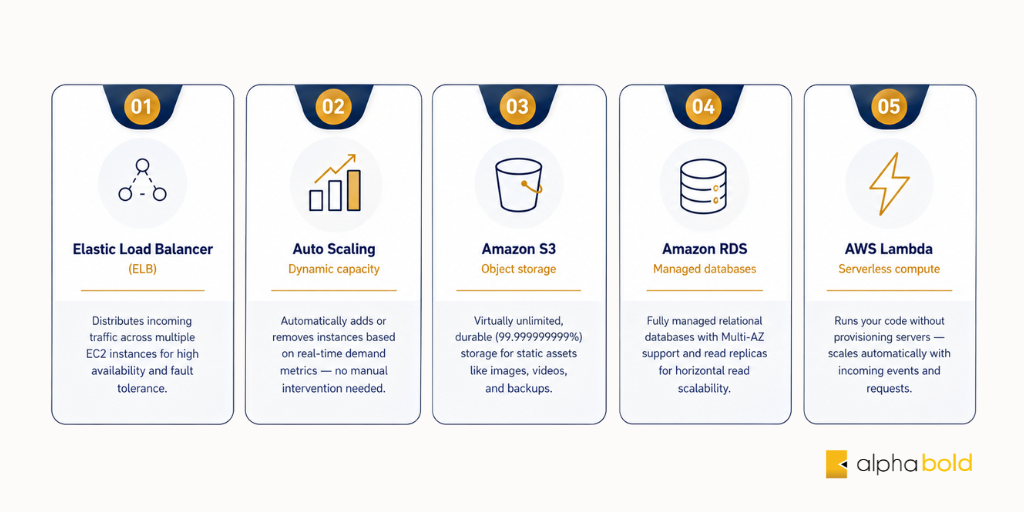
Robust scalable architecture combines a handful of core services, each solving a specific business problem:
- Elastic Load Balancer (ELB): Spreads traffic across multiple instances so no single server is overwhelmed, removing the “one server fails and the whole site goes down” risk.
- Auto Scaling: Adds capacity automatically during demand and removes it afterward, keeping the app responsive during spikes without paying for idle servers.
- Amazon S3: Virtually unlimited, highly durable storage for assets and backups, offloading static content from your application servers.
- Amazon RDS: Fully managed databases with Multi-AZ deployments for uptime and read replicas for handling more load, with less day-to-day maintenance.
- AWS Lambda: Runs code without managing servers and scales automatically to zero when idle, cutting cost and speeding up new features.
- CloudFront, IAM, WAF & VPC: A CDN keeps global users fast while access controls, web firewalls, and network segmentation build security in from the start.
Architecture Principles That Signal Readiness
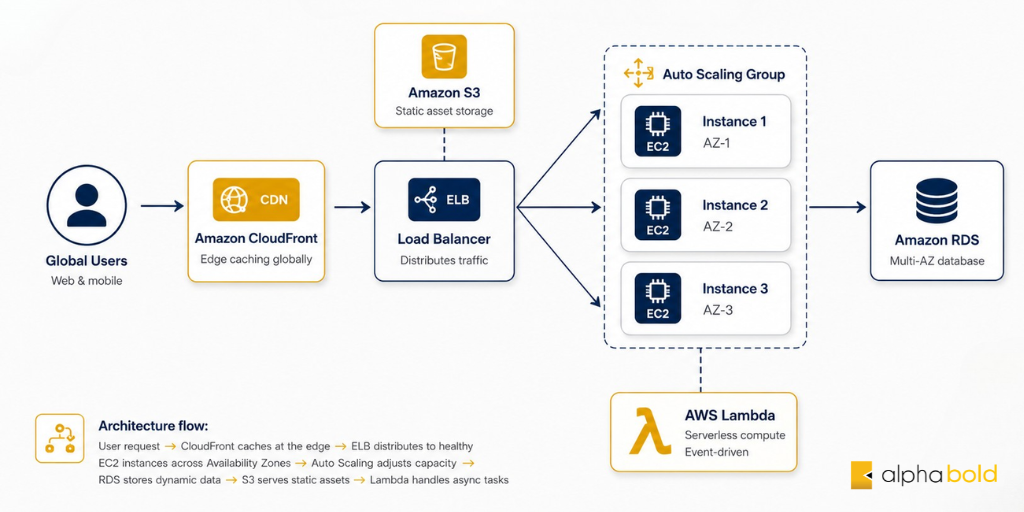
How those services are assembled matters as much as which ones you choose. Growth-ready architectures tend to favor modularity, loosely coupled services, so one failure doesn’t take everything down; horizontal scaling across Availability Zones for both performance and resilience; and a serverless-first mindset where it fits, to reduce operational overhead and idle cost. Together, these principles turn a collection of services into a system that scales reliably.
Proven Strategies for Reliable Scale
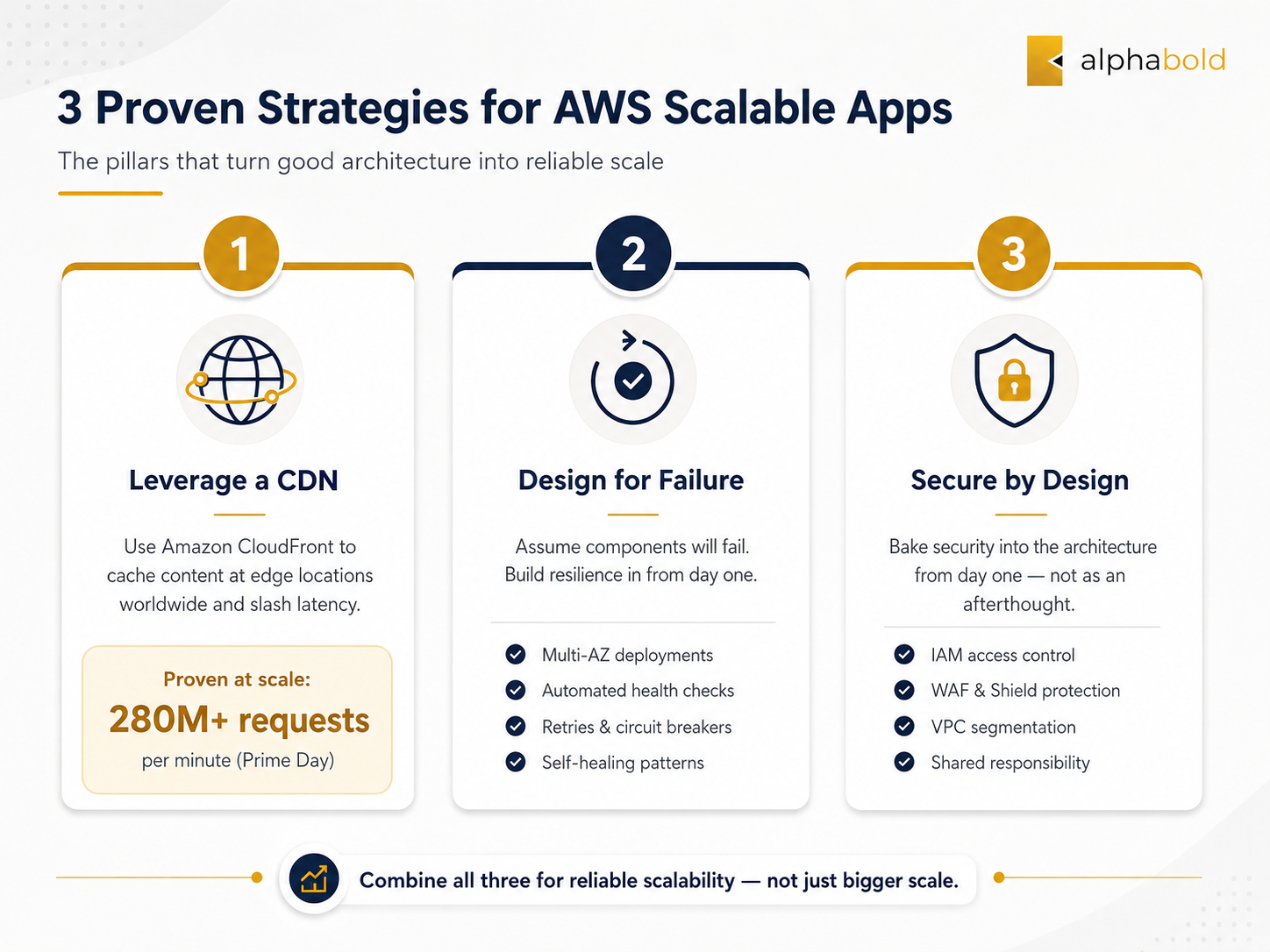
Three habits separate applications that scale reliably from those that only add more capacity:
- Cache strategically with a CDN: Use services like Amazon CloudFront to reduce latency, serve users faster, and lower the load on origin servers.
- Design for failure: Use Multi-AZ deployments, health checks, retries, and automated failover so the application can route around unhealthy components and recover faster when something breaks.
- Build security in from day one: Plan access controls, network segmentation, monitoring, and web protection early instead of adding security after deployment, when gaps are harder and more expensive to fix.
You may also like: AWS CloudWatch: Features, Use Cases, Integrations & Pricing
Is Your AWS Architecture Ready To Scale?
Traffic spikes, rising cloud costs, and slow recovery times can quickly become business problems. AlphaBOLD can assess your AWS environment, identify scalability gaps, and recommend practical improvements for performance, resilience, security, and cost control.
Request a ConsultationHow AlphaBOLD Helps
Knowing the warning signs is one thing. Fixing them requires a clear view of architecture, cost, monitoring, security, and recovery readiness. AlphaBOLD helps businesses review, optimize, and modernize AWS environments so they can better support growth, traffic spikes, security requirements, and cost control. Here is how that looks in real client work.
Architecture & Readiness Assessment:
In one client assessment, AlphaBOLD found an AWS environment with no cost alarms, limited workload monitoring, and no actionable CloudWatch dashboards. That meant overspend and operational issues could go unnoticed until they became expensive. We configured CloudWatch dashboards and alarms for better visibility, enabled CloudTrail logging to improve account-level auditability, reviewed and right-sized running servers, strengthened backups through AWS Backup, and added Lambda-based automation for monthly Lightsail backup workflows.
Cost Optimization:
Rising AWS costs do not always mean the business needs more infrastructure. Often, they point to workloads that need better visibility and optimization. In one engagement, AlphaBOLD used AWS Cost Explorer to trace a major cost driver to an Amazon RDS instance running at roughly $100 per day. After reviewing the workload and identifying high-cost, resource-heavy database activity, the team optimized the most expensive queries and reduced the daily RDS cost to about $50 per day, without reducing application performance.
Scalability & Resilience Review:
One client application running on ECS Fargate struggled whenever email campaigns created sudden traffic spikes. Requests built up, the application became unstable, and users experienced errors during peak demand. AlphaBOLD added an edge protection and caching layer in front of the AWS-hosted application, implemented WAF and caching rules to reduce unnecessary origin load, and adjusted how campaign traffic was rolled out. As a result, the application became more stable under peak traffic instead of buckling during campaign-driven surges.
Security Configuration:
Across these engagements, AlphaBOLD treats security as part of the architecture, not a final-stage add-on. That includes WAF rules and edge protection to filter unwanted traffic, access controls to limit exposure, network-level segmentation, monitoring, and account-level visibility to make the environment more auditable and easier to govern.
Well-Architected Guidance:
AlphaBOLD also supports AWS Well-Architected Reviews across the six AWS pillars:
- Operational excellence
- Security
- Reliability
- Performance efficiency
- Cost optimization
- Sustainability
This helps businesses understand where their AWS environment is strong, where it carries risk, and which improvements should be prioritized first.
Modernization Planning:
Beyond fixing immediate issues, AlphaBOLD helps businesses plan the next stage of AWS modernization. That may include moving from monolithic applications toward microservices, replacing manually managed servers with managed or serverless services where appropriate, and creating an architecture roadmap that keeps pace with business growth.
Build A Stronger AWS Foundation For Growth
Your AWS environment should support business growth without creating avoidable downtime, overspend, or operational risk. AlphaBOLD helps you modernize cloud architecture, optimize workloads, and prepare applications for reliable scale.
Request a ConsultationConclusion
Scalability on AWS is not only about handling more traffic. It is about keeping your business available, responsive, secure, and cost-efficient as demand changes. When architecture is not designed for growth, the impact shows up in missed revenue, poor user experiences, rising cloud bills, and slower recovery when something goes wrong.
The right AWS architecture brings together load balancing, Auto Scaling, storage, managed databases, serverless services, monitoring, backup planning, and security controls in a way that supports the business, not just the application. That means scaling capacity when needed, reducing unnecessary spend, protecting critical workloads, and giving teams better visibility into performance and risk.
If your AWS environment is already showing signs of strain, the best time to review it is before the next traffic spike, outage, or surprise bill. AlphaBOLD helps businesses assess, optimize, and modernize AWS environments so their cloud foundation is ready for growth, resilience, and long-term performance.
FAQs
AWS scalable apps are applications built on Amazon Web Services that can adjust resources as demand changes. They use services such as load balancing, Auto Scaling, Amazon S3, Amazon RDS, CloudFront, and Lambda to support performance, uptime, security, and cost control as traffic grows.
AWS scalability matters because poor architecture can lead to slow websites, failed transactions, outages, rising cloud costs, and customer frustration. A scalable AWS architecture helps the business stay available during traffic spikes while avoiding unnecessary spending on idle infrastructure.
Common warning signs include performance drops during high traffic, rising AWS bills without clear visibility, weak backup or failover planning, manual infrastructure changes, missing Auto Scaling policies, and security controls added after deployment. These signs usually mean the architecture should be reviewed before the next major traffic spike.