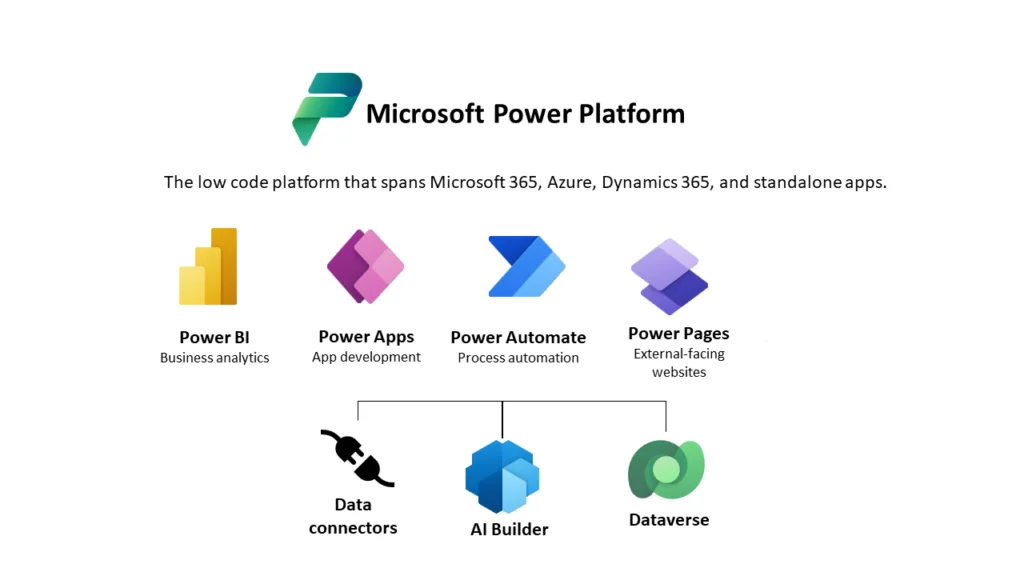
IT executives often face the choice of building a new solution, extending existing systems, or replacing outdated ones during digital transformation. Power Platform simplifies this with a modular toolkit: Power Apps, Power Automate, Power BI, Power Pages, and Dataverse, offering flexibility without relying on costly custom development.
With 56 million monthly active users and 27% year-over-year growth, Power Platform is one of the most widely adopted low-code enterprise platforms.
This blog provides a framework for making these decisions, focusing on app complexity, integration, governance, user experience, licensing, and long-term maintainability. Real-world examples show how the right combination of Power Platform components creates scalable, lasting solutions.
Let’s explore when to build, extend, or replace solutions, and link each approach to architectural and operational considerations to inform long-term decisions.
When to Build with Power Apps?
When a business need cannot be met by existing systems without heavy customization, building a new Power Platform application is the best choice.
Build when the process is unique, new, or department-specific.
For example, a manufacturer adding a safety inspection procedure can use Power Apps for a tablet-friendly interface, Dataverse to store results, and Power Automate for notifications. ERP or MES changes aren’t needed, and Power Platform provides the speed and flexibility required.
Build when user experience is important:
A dedicated app is often faster than modifying a legacy system if users need a mobile-first workflow or simpler interface. Power Apps supports modern UIs while Dataverse ensures secure data management.
Build for Speed:
Power Platform enables rapid prototypes in days, not months. Teams can test early versions while IT enforces security, data policies, and governance.
When to Expand Existing Systems Without Significant Customization?
When a system like Dynamics 365, SAP, or Oracle, is functional but needs specialized features, extending it is usually the most economical option.
Protect the Core System:
Create a Power App for partner onboarding, use Power Automate for approvals, and Power BI for dashboards instead of overloading Dynamics 365. This adds functionality without creating technical debt.
Connect Workflows:
A public sector organization can use Power Automate to sync updates with its case management system and Power Pages for citizen self-service portals, avoiding costly redevelopment.
Prioritize Integration:
Dataverse connects to hundreds of apps, letting organizations modernize processes and enhance user experience without rewriting existing systems.
Extend Your Existing Systems Without Adding Complexity
Add apps, automation, and reporting on top of Dynamics 365, SAP, or Oracle while keeping your core stable.
When to Replace Legacy Systems That Hinder Progress?
Building on top of a legacy foundation is not always the best architectural choice.
Scale limitations:
A 15-year-old claims system incompatible with cloud tools or analytics may cost more to patch than to replace. Power Apps and Dataverse can provide a modern platform, with Power Automate handling routing and Power BI providing dashboards.
Security And Compliance:
Outdated systems lacking audit trails, role-based access, or modern encryption pose risk. Moving workloads to Dataverse ensures enterprise-grade security.
Major process changes:
When business procedures are redesigned, replacing old apps with a Power Platform architecture ensures long-term adaptability.
Which Architectural Factors Should Be Considered for App Complexity
While multi-step, role-driven processes may require model-driven apps with Dataverse for relationships and security, simple forms and workflows may only require Canvas apps.
Data Integration: Dataverse with virtual tables or bespoke connectors should be included in the architecture if the application primarily uses ERP or CRM data.
Security and Governance: Early evaluation of ALM pipelines, DLP policies, and environment strategies is necessary for enterprise architects. The extent to which app development should be IT-led versus business-led depends on the maturity of the governance.
Cost and Licensing: When modeling licensing, consider Dataverse storage, automation volume, and user groups. Sometimes it is less expensive to extend an existing Dynamics 365 license than to create a stand-alone application.
Maintainability Over Time: The selected architecture should be quantifiable, upgradeable, and supportable. Technical debt often results from over-customizing core systems; Power Platform extensions help reduce this risk.
One of the most crucial architectural choices enterprise teams may make is whether to build, expand, or replace. With its single data backbone, modular tools, and enterprise-grade governance, the Microsoft Power Platform gives these choices more flexibility than before within a clear Power Platform architecture. Organizations can develop scalable, secure, and future-ready solutions without unnecessary complexity by adopting the right approach.
FAQs
When should an organization build a new solution on the Power Platform?
Build when no existing system can meet the requirement without heavy customization, and speed or user experience is a priority.
When is it better to extend an existing system rather than build a new one?
Extend when the core system is stable and the requirement can be met through integrations, workflows, or user-facing apps.
What signals that a legacy system should be replaced?
Replacement is appropriate when scalability, security, compliance, or business process changes can no longer be addressed through extensions.
How does app complexity affect Power Platform architecture?
Simple workflows may suit canvas apps, while complex, role-based processes typically require Dataverse and model-driven apps.
Can the Power Platform integrate with ERP and third-party systems?
Yes, Dataverse and connectors enable seamless integration with ERP, CRM, and external systems without requiring the rewriting of core platforms.
To provide the best experiences, we use technologies like cookies to store and/or access device information. Consenting to these technologies will allow us to process data such as browsing behavior or unique IDs on this site. Not consenting or withdrawing consent, may adversely affect certain features and functions.
Functional
Always active
The technical storage or access is strictly necessary for the legitimate purpose of enabling the use of a specific service explicitly requested by the subscriber or user, or for the sole purpose of carrying out the transmission of a communication over an electronic communications network.
Preferences
The technical storage or access is necessary for the legitimate purpose of storing preferences that are not requested by the subscriber or user.
Statistics
The technical storage or access that is used exclusively for statistical purposes.The technical storage or access that is used exclusively for anonymous statistical purposes. Without a subpoena, voluntary compliance on the part of your Internet Service Provider, or additional records from a third party, information stored or retrieved for this purpose alone cannot usually be used to identify you.
Marketing
The technical storage or access is required to create user profiles to send advertising, or to track the user on a website or across several websites for similar marketing purposes.
To provide the best experiences, we use technologies like cookies to store and/or access device information. Consenting to these technologies will allow us to process data such as browsing behavior or unique IDs on this site. Not consenting or withdrawing consent, may adversely affect certain features and functions.
Functional
Always active
The technical storage or access is strictly necessary for the legitimate purpose of enabling the use of a specific service explicitly requested by the subscriber or user, or for the sole purpose of carrying out the transmission of a communication over an electronic communications network.
Preferences
The technical storage or access is necessary for the legitimate purpose of storing preferences that are not requested by the subscriber or user.
Statistics
The technical storage or access that is used exclusively for statistical purposes.The technical storage or access that is used exclusively for anonymous statistical purposes. Without a subpoena, voluntary compliance on the part of your Internet Service Provider, or additional records from a third party, information stored or retrieved for this purpose alone cannot usually be used to identify you.
Marketing
The technical storage or access is required to create user profiles to send advertising, or to track the user on a website or across several websites for similar marketing purposes.