Table of Contents
What Is Copilot in SharePoint?
Integrating Copilot in SharePoint transforms how organizations manage content, automate workflows, and collaborate. It introduces AI-driven automation and generative interactions that enhance productivity while aligning with enterprise goals.
This guide outlines:
- What Copilot does in SharePoint
- How to deploy and customize it using tools like Copilot Studio and SPFx
- Key business benefits and strategic use cases
Microsoft’s latest updates include personalized Copilot interactions, integration with Dataverse and Graph connectors, auto-generated FAQ web parts, and usage analytics to track adoption.
Whether you’re new to SharePoint or enhancing existing infrastructure, this guide will help you integrate AI-powered SharePoint solutions effectively.
How Does Copilot Transform SharePoint into an AI-First Platform?
Copilot in SharePoint shifts the platform from a traditional content management system into an intelligent collaboration hub. It acts as a conversational assistant and drives SharePoint automation by:
- Surfacing relevant content in real-time context
- Automating repetitive tasks through AI copilots
- Learning user behavior for adaptive recommendations
Tools like SharePoint agents and Copilot Studio enable cross-functional collaboration without tool-switching. For enterprises integrating AI into SharePoint, this transformation supports digital workplace modernization.
What Are the Benefits of Generative AI in SharePoint?
Generative AI with SharePoint enables dynamic, context-aware interactions that enhance content discovery and reduce manual effort. It:
- Analyzes patterns from SharePoint, OneDrive, and connected sources
- Understands user intent using Microsoft’s large language models
- Generates summaries, suggestions, or action items in real time
These intelligent interactions go far beyond traditional keyword search, making SharePoint an adaptive, AI-powered platform that personalizes each user’s experience.
How Does Copilot Improve SharePoint Productivity and Engagement?
Copilot in SharePoint boosts productivity as a real-time assistant that delivers personalized insights. It:
- Extracts content insights via Generative Answers node
- Helps users find subject-matter experts with People Skills
- Integrates across Microsoft 365 for seamless task execution
It supports AI-driven collaboration, reduces manual clicks, and enhances user engagement by automating content retrieval, task updates, and internal queries.
How to Implement Copilot In SharePoint Successfully?
To deploy AI copilots in SharePoint effectively, your organization needs a focused plan:
Strategic Steps:
- Identify High-Impact Use Cases: Start with automating document approvals, onboarding, or internal FAQs.
- Enable User Adoption: Provide Copilot training and usage guides.
- Continuous Optimization: Use feedback loops and analytics to improve Copilot outputs.
- Security & Governance: Align deployment with Microsoft 365 compliance and data governance policies.
Partnering with Microsoft experts like AlphaBOLD ensures proper setup, configuration, and ROI measurement.
Read Further: Benefits of Professional SharePoint Migration Services
How to Build and Deploy Custom Copilot in SharePoint?
Using Copilot Studio and SharePoint Framework (SPFx), you can build custom SharePoint copilots that connect to internal tools, understand business logic, and deliver tailored support.
Key Development Actions:
- Train the bot via the Generative Answers node
- Embed it using SPFx web parts
- Secure it via Microsoft Entra ID
- Configure access to content from SharePoint, OneDrive, or Dataverse
This approach allows for tailored AI copilots within SharePoint that are scalable, secure, and aligned with enterprise processes.
Deployment Checklist: Steps to Add Copilots in SharePoint
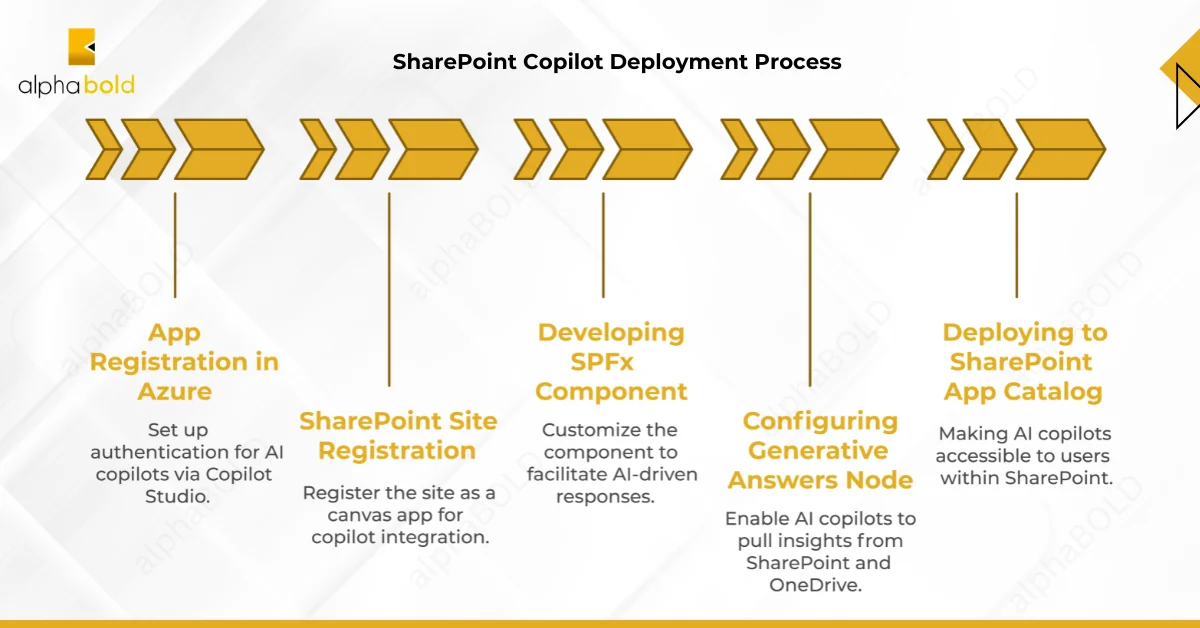
The following are the steps to add copilots in SPO
- App Registration in Azure: Set up authentication for AI copilots via Copilot Studio.
- SharePoint Site Registration: Register the site as a canvas app for copilot integration.
- Developing SPFx Component: Customize the component to facilitate AI-driven responses.
- Configuring Generative Answers Node: Enable AI copilots to pull insights from SharePoint and OneDrive.
- Deploying to SharePoint App Catalog: Making AI copilots accessible to users within SharePoint.
Need Help Implementing AI in SharePoint?
AlphaBOLD's SharePoint experts help you build and integrate AI copilots tailored to your business needs.
Integrate My SharePoint with CopilotWhat are the Top Use Cases for Custom Copilots in SharePoint?
Custom Copilots in SharePoint support a range of business scenarios. They can guide onboarding, automate project updates, streamline content discovery, and power help desk responses. With AI handling routine tasks, teams save time, reduce errors, and collaborate more efficiently across departments and regions.
Key use cases include:
- Employee onboarding and training: Copilot provides new hires with interactive FAQs, training guides, and policy walkthroughs, ensuring a consistent onboarding experience.
- Project management: Integrated with Microsoft Planner, Copilot automates status reports, tracks tasks, and centralizes project communication.
- Content discovery and organization: AI-powered search helps users retrieve and manage content faster, reducing time spent navigating SharePoint libraries.
- Workflow automation: Repetitive processes like approval routing, notifications, and task assignments are automated to improve efficiency.
- Help desk and internal support: Copilot delivers instant answers to employee queries and common troubleshooting questions, reducing support volume.
- Multilingual collaboration: With built-in translation features, Copilot supports seamless communication across global teams and content repositories.
- Data analysis and visualization: Copilot helps users interpret SharePoint data, build quick summaries, and make faster decisions using integrated insights.
Each use case can be tailored to your environment with the help of tools like Copilot Studio and SPFx. For complex needs, working with a partner ensures your Copilots align with enterprise goals and data governance policies.
Not Sure Where to Begin with SharePoint and Copilot?
Our consultants will evaluate your SharePoint setup to pinpoint areas where AI copilots can enhance workflows and minimize manual effort.
Ask an Expert About SharePoint CopilotConclusion
Copilot in SharePoint is more than a productivity upgrade. It changes the way teams find information, automate work, and collaborate across Microsoft 365. With the latest updates and custom development options, organizations can tailor Copilot to real business needs. When planned and implemented thoughtfully, it becomes a key part of a smarter digital workplace.
Copilot in SharePoint: Frequently Asked Questions
Yes. Copilot Studio and Microsoft Graph connectors allow secure integration with ERP systems, CRMs (like Dynamics 365), HR platforms, and internal data sources, ensuring context-aware AI recommendations.
It depends. Some Copilot features are included in Microsoft 365 E5 or Business Premium licenses, while advanced capabilities like custom copilots and Graph connectors often require add-ons or premium Power Platform licensing.
Explore Recent Blog Posts