
Table of Contents
Introduction
Poor data quality leads to flawed insights and compromised decisions, ultimately undermining business intelligence operations. Power BI provides comprehensive tools for tracking and resolving data quality issues, including Power Query, DAX measures, and automated monitoring of dashboards.
This guide examines methods for identifying common data quality challenges, implementing Power Query transformations to clean data before report generation, constructing monitoring dashboards that automatically track quality metrics, and configuring alerts that trigger when issues occur.
The techniques discussed leverage Power BI’s native features to maintain clean, reliable data for accurate analytics.
What Data Quality Challenges Do Businesses Face?
Organizations encounter five primary data quality issues that undermine analytics accuracy. According to Gartner research, poor data quality costs organizations an average of $12.9 million annually, thereby increasing the complexity of data ecosystems and compromising decision-making.
- Incomplete data: Missing fields and partially populated records create data gaps
- Duplicate records: Result in inflated metrics and skewed analytical outputs
- Inconsistent formatting: Complicates comparison and aggregation operations
- Outdated information: Produces decisions based on obsolete data points
- Accuracy problems: Stem from human error or system integration failures
These challenges directly impact business operations from sales forecasting to customer relationship management. Power BI provides systematic solutions to address each issue through its data preparation and monitoring capabilities.
Bonus reading: Power BI Integration Challenges | Key Updates & Trends
How Does Power Query Enable Data Quality Control?
Power Query Editor serves as the primary data transformation component in Power BI, executing cleaning, transformation, and structuring operations before the data reaches the reporting layers. This prevents quality issues from propagating into analytics.
When connecting data sources, Power Query provides immediate visibility into data quality. The column quality feature displays the percentage of valid, error, and empty records in each column, allowing for the rapid identification of data issues.
Key transformation capabilities include:
- Standardize data formats across disparate sources
- Remove duplicate entries through automated rules
- Split and merge columns based on business logic
- Handle null values systematically
- Create repeatable, automated transformation workflows
Each data refresh maintains consistent quality through these automated transformation sequences.
What Insights Does Data Profiling Reveal?
Data profiling in Power Query performs statistical analysis to identify quality issues before report construction. This proactive approach prevents flawed data from entering the analytics layer.
Column profiling provides access to:
- Value distribution – Identifies data anomalies through distribution analysis.
- Distinct value counts – Reveals unexpected entries and cardinality issues.
- Outlier detection – Highlights statistical anomalies and data entry errors.
- Frequency analysis – Displays occurrence patterns for each unique value.
This statistical analysis proves particularly valuable for categorical data where specific value domains are expected. Understanding data characteristics before report development prevents quality issues from compromising analytical outputs.
Bonus reading: Top Power BI Rollout Mistakes and How to Avoid Them
How Do You Build Effective Data Quality Dashboards?
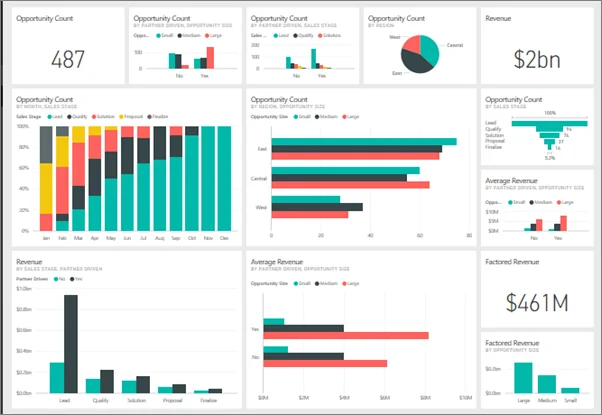
Power BI makes it easy to visualize data quality issues by creating monitoring dashboards that track key indicators over time.
Comprehensive data quality dashboards include:
- Completeness rates for business-critical fields.
- Trending visualizations displaying quality metrics over time periods.
- Conditional formatting with color-coded alerts for threshold violations.
- Dataset health indicators identifying tables with data integrity issues.
Providing stakeholders with access to these dashboards increases organizational visibility into data health and establishes accountability for maintaining data quality. Business users gain insight into data integrity without requiring technical expertise.
What DAX Measures Track Data Quality?
Data Analysis Expressions (DAX) enables complex quality calculations through custom measures that quantify data integrity.
Common DAX measures for quality monitoring include:
- Calculate missing value percentages across columns
- Detect duplicate records within tables
- Validate data consistency across related tables
- Enforce business rule compliance automatically
Calculated columns flag quality issues directly within the data model, simplifying identification of problematic records and root cause analysis.
Bonus reading: Optimizing DAX Queries for Power BI Performance
How Do Dataflows Centralize Data Quality?
Power BI dataflows create a single preparation layer that all reports can use, which helps control data quality issues at the source. Enforcing rules at the data flow level ensures that every connected report remains consistent.
Dataflow benefits include:
- Incremental refresh – Reduces processing overhead while maintaining quality standards
- Data lineage tracking – Documents transformation history and quality issue origins
- Team collaboration – Enables shared data quality practices across development teams
- Reusable transformations – Applies quality rules once for consumption across multiple reports
This centralized approach eliminates redundant data cleaning operations across individual reports, ensuring uniform data quality standards.
Struggling with Inconsistent Data Across Your Organization?
Our Power BI consultants build data quality frameworks that address your data quality issues. We set up automated monitoring dashboards, define governance policies, and train your teams on sustainable quality practices.
Request My Custom DemoCan You Automate Data Quality Monitoring?
Power BI alerts provide automated notifications when quality issues occur, eliminating the need for continuous manual monitoring. Data-driven alerts trigger when metrics fall below defined thresholds.
Configure alerts to monitor:
- Duplicate record counts exceeding acceptable limits
- Completeness rates falling below target thresholds
- Refresh delays indicating source system problems
- Unexpected value distributions signaling data anomalies
Email and mobile notifications deliver alerts to relevant personnel immediately, enabling rapid response to emerging quality issues.
How Does Row-Level Security Support Data Governance?
Row-level security (RLS) restricts data access based on user roles, ensuring individuals access only data relevant to their responsibilities. This security layer protects sensitive information while supporting data quality by preventing unauthorized modifications.
RLS implementation provides:
- Data access pattern tracking for audit purposes
- Identification of potential data misuse
- Visibility into areas requiring enhanced quality controls
- Reduced exposure to sensitive data quality issues
This governance mechanism adds an accountability layer to the data quality framework, supporting regulatory compliance requirements.
Build Custom Data Quality Solutions with AlphaBOLD
Need advanced data quality monitoring beyond standard Power BI features? Our experts create custom DAX measures, automated alert systems, and integrated quality dashboards tailored to your specific compliance and operational requirements.
Schedule My Personalized DemoConclusion
Power BI offers a comprehensive set of tools for monitoring and addressing data quality issues, from Power Query’s transformation capabilities to advanced DAX measures and automated alerts. These features allow organizations to establish trust in their data, make more confident decisions, and achieve improved business outcomes.
Data quality practices implementation in Power BI goes beyond technology. It depends on the organizational obligation to data governance, assigned accountability for data, and constant refinement of data quality processes. These components, along with Power BI’s capabilities, establishe a data framework that delivers reliable and actionable insights.
Begin by identifying the most critical data quality challenges, implement targeted solutions using Power BI’s features, and gradually expand the quality of data. With consistent effort and the right tools, data quality can be transformed from a persistent challenge into a competitive advantage.
FAQs
Yes, Power BI’s data-driven alerts notify stakeholders when quality metrics fall below defined thresholds via email or mobile applications.
Enable column quality and column profiling in Power Query, then implement automated transformations for standardization, duplicate removal, and null value handling.
Explore Recent Blog Posts