Key Ways Construction Firms Can Use Dynamics 365 Business Central and Copilot

Table of Contents
Introduction
Construction firms rarely struggle because they lack project data. The bigger problem is that job costs, purchasing, labor, materials, invoices, and project updates often sit across different systems. By the time finance consolidates that information, committed costs may have changed, WIP may need reconciliation, and a project’s expected margin may already look different from the original budget.
For growing contractors, this makes it harder to answer basic but critical questions: What has been spent? What has already been committed? Which projects are drifting from budget? And what is the likely margin at completion?
Dynamics 365 Business Central for construction helps bring these financial and operational processes into a connected ERP environment. With native capabilities for project accounting, purchasing, inventory, resources, WIP, and financial management, Business Central can support many of the core requirements of project-based construction firms. Where more specialized workflows are needed, such as advanced retainage, progress billing, or subcontractor processes, the platform can be configured or extended with construction-specific solutions.
This guide examines where Business Central delivers the most value in construction, which capabilities it provides natively, where extensions may be required, and which types of contractors are likely to be the strongest fit.
What ERP Challenges Are Construction Firms Trying to Solve?
Before diving into how Dynamics 365 Business Central for construction stands out as a leading ERP solution for AEC professionals, it’s essential to first understand the core challenges facing the construction industry.
Construction firms operate across multiple projects, locations, vendors, subcontractors, and cost categories at once. When financial and operational information is spread across disconnected systems, even routine project decisions can become difficult. Common ERP-related challenges include:
- Delayed Job Cost Visibility: Labor, materials, vendor invoices, equipment, and other project costs are often recorded at different times. This can make it difficult for project managers and finance teams to see the true financial position of a job before margin erosion has already occurred.
- Disconnected Budget, Actual, and Committed Costs: A project may appear to be within budget if teams only look at posted costs. Outstanding purchase orders, subcontractor commitments, and approved changes also need to be considered to understand the likely cost and margin at completion.
- Manual WIP Reporting: Work-in-progress calculations often depend on spreadsheets, manual reconciliation, and data collected from multiple systems, increasing the effort required to produce accurate project and financial reporting.
- Disconnected Purchasing and Project Accounting: Materials, services, and subcontractor costs need to be assigned accurately to the correct project or project task. When procurement and accounting systems are disconnected, project cost tracking becomes slower and more error-prone.
- Limited Access to Project Financials: Project managers may have detailed operational knowledge but still depend on finance teams to provide current cost, budget, and profitability information. This can delay decisions when projects begin to move away from plan.
- Difficulty Scaling Back-Office Processes: As project volume grows, manual invoice processing, approvals, purchasing, reporting, and reconciliation can create significant administrative overhead.
These challenges make connected project and financial data increasingly important. Construction firms need more than a system that records transactions after they occur; they need an ERP environment that helps finance, procurement, and project teams work from the same underlying information and identify cost or margin issues earlier. These challenges are not isolated. 2026 research from Dodge Construction Network found that many construction organizations still struggle to connect data across functions and generate timely insights, reinforcing the importance of integrated project controls and connected workflows.
Is Dynamics 365 Business Central a Good ERP for Construction?
Yes, Dynamics 365 Business Central can be a strong ERP choice for construction firms, particularly growing project-based and specialty contractors that need tighter control over project financials, purchasing, inventory, resources, and reporting.
Business Central already includes native capabilities that align closely with core construction requirements. Firms can manage project budgets and tasks, track resource and material usage, connect purchasing activity to projects, calculate work in progress (WIP), manage financials, and compare actual project performance against planned costs. This gives finance and project teams a more consistent view of project performance without relying as heavily on disconnected spreadsheets and manual reporting.
Its fit becomes especially strong for contractors that combine project work with material purchasing, inventory, service operations, or multiple business entities, and for organizations already invested in the Microsoft ecosystem.
However, not every construction requirement is handled natively. Specialized processes such as advanced retainage, AIA-style progress billing, deeper subcontractor management, lien waivers, or complex field operations may require additional configuration, integrations, or construction-specific Business Central extensions.
For the right contractor, this flexibility is a strength: firms can build around Business Central’s ERP foundation without replacing every existing construction system.
Where Does Business Central Fit in a Construction Technology Stack?
Construction firms rarely operate from a single system. Project teams may use dedicated tools for field operations, scheduling, estimating, document management, payroll, or subcontractor coordination, while finance relies on separate accounting software and spreadsheets. The challenge is not always replacing those systems, but ensuring that project and financial data can move between them reliably.
Dynamics 365 Business Central for construction can serve as the ERP and financial backbone of this technology stack. It brings together core processes such as project accounting, purchasing, inventory, resource management, accounts payable and receivable, WIP, and financial reporting, giving teams a consistent system of record for project-related transactions.
Around this core, firms can connect other tools based on their operational needs:
- Project and Field Systems: Existing construction platforms can continue to manage field activity, scheduling, documentation, or site coordination while relevant cost and project data flows into Business Central.
- Microsoft 365: Teams, Outlook, and Excel can support collaboration, communication, and day-to-day analysis using connected business data.
- Power BI: Project, financial, procurement, and operational data can be turned into dashboards for job-cost analysis, margin tracking, WIP reporting, and executive oversight.
- Power Platform: Power Automate and Power Apps can support approval workflows, data capture, notifications, and construction-specific processes that sit around the ERP.
- Construction Extensions: Industry applications can add specialized capabilities such as retainage, progress billing, subcontractor management, lien-related workflows, or other requirements not covered by standard Business Central.
This approach allows construction firms to use Business Central as the financial and operational center of their environment without forcing every project, field, or industry-specific process into a single application.
Bring More Control to Construction Operations
Connect project financials, purchasing, inventory, approvals, and reporting with Dynamics 365 Business Central.
Book My Personalized DemoWhat Can Business Central Actually Manage for Construction Firms?
Business Central supports many of the financial and operational processes that sit at the center of construction project control. Its Projects functionality connects budgets, resources, materials, purchasing, invoicing, and WIP with the wider finance system, helping firms move from fragmented project reporting toward a more consistent view of cost and performance.
The following areas are particularly relevant for construction firms evaluating Business Central.
1. Job Costing, Project Budgets, and Margin Visibility
Accurate job costing depends on more than knowing what has already been invoiced. Construction firms need to understand how labor, materials, purchasing, resource usage, and other project costs compare with the original budget as work progresses.
Business Central allows teams to structure projects into tasks, assign budgets, record resource and material usage, capture project-related purchases, and compare planned costs with actual activity. Because project transactions are connected to the financial system, finance and project teams can work from the same underlying cost data rather than maintaining separate spreadsheets for project reporting.
This can help firms answer questions such as:
- How much has been spent against the project budget?
- Which cost categories are running above plan?
- What materials, resources, or purchases are driving the variance?
- How is current project performance affecting expected margin?
- Which projects require attention before cost pressure becomes a larger financial issue?
For contractors managing multiple active jobs, this level of visibility can make project reviews more useful. Instead of waiting until month-end to identify a cost problem, teams can review project performance as transactions are recorded and investigate variances earlier.

2. WIP and Project Financial Reporting
Knowing how much a project has cost so far is only part of the financial picture. Construction firms also need to understand how work completed, costs incurred, billing, and recognized revenue affect the financial position of each active project.
Business Central supports work-in-progress (WIP) calculations within Projects, helping firms account for project costs and revenue as work progresses rather than relying solely on invoices or final project completion. Depending on the accounting approach, teams can use WIP methods such as percentage of completion, completed contract, cost value, or sales value and post the resulting amounts to the general ledger.
This gives finance teams a more structured way to reconcile project activity with financial reporting and helps leadership review:
- WIP by active project
- costs and revenue recognized to date
- budget-to-actual performance
- project profitability and margin trends
- projects where financial performance is beginning to move away from plan
For construction firms still assembling WIP reports manually from spreadsheets, accounting data, and project updates, bringing these calculations closer to the underlying project transactions can reduce reconciliation effort and provide a more consistent basis for month-end reporting.
When combined with Power BI, this data can also support portfolio-level reporting across multiple projects, giving finance and operations leaders a clearer view of where margins are holding, where costs are increasing, and which projects require closer review.
3. Purchasing and Committed Costs
Project costs do not begin when an invoice is posted. Construction firms often commit to materials, subcontracted work, equipment, or services weeks before those costs reach accounts payable. If teams only review posted actuals, a project can appear healthier than it really is.
Business Central helps connect purchasing activity to projects so teams can track project-related purchase orders, receipts, and invoices against the correct project or task. This gives finance and project managers better visibility into both actual costs and outstanding commitments.
For construction teams, this matters because project margin should be reviewed against the full cost picture:
Budget + approved changes – actual costs – committed costs = a more realistic view of remaining margin
With purchasing and project accounting connected, teams can more easily identify:
- open purchase orders tied to active projects
- materials or services that have been received but not yet invoiced
- cost commitments that could push a project beyond budget
- projects where procurement activity is increasing faster than planned
- areas where purchasing decisions may need to be adjusted before margins are affected
This is especially useful for contractors managing multiple concurrent projects, where delayed invoices or disconnected purchasing records can make project profitability difficult to assess accurately.
By bringing purchasing commitments closer to project financial reporting, Business Central helps construction firms move from simply recording costs after they occur to understanding the financial impact of decisions earlier in the project lifecycle.
4. Materials, Inventory, and Project Procurement
For many specialty contractors, material control has a direct impact on project margin. HVAC, mechanical, electrical, interiors, pool construction, and fabrication-heavy firms often need to coordinate purchasing, inventory, project demand, supplier lead times, and job-site requirements at the same time.
Business Central helps connect these processes by linking project demand with purchasing and inventory activity. Teams can review material availability, create or manage project-related purchase orders, monitor supplier activity, and assign relevant material costs to the correct project or task.
This can help construction firms answer practical questions such as:
- Are the materials required for an upcoming phase already available?
- Which items still need to be purchased for a project?
- Are supplier delays likely to affect planned work?
- Can existing inventory be reallocated between projects?
- How are material cost increases affecting project budgets and margins?
- Which suppliers are contributing to repeated delays or cost pressure?
For contractors operating warehouses, service vehicles, or multiple project locations, a connected inventory and procurement system can also reduce the need to maintain separate spreadsheets for stock, purchasing, and project material usage.
The value is particularly strong for firms where project delivery depends heavily on physical materials. By connecting procurement and inventory with project accounting, Business Central gives finance, purchasing, and project teams a clearer view of what has been ordered, what is available, and how material decisions are affecting project costs.
5. Resources and Time
Labor and resource costs can quickly affect project profitability, particularly when teams are working across multiple jobs at once. Construction firms need a clear view of who is assigned where, how much time is being spent, and how those hours translate into project cost.
Business Central allows firms to assign resources to projects, record employee or machine time, and connect that usage directly to project tasks and budgets. This helps project and finance teams compare planned resource requirements with actual usage and identify where labor or equipment costs are beginning to move away from plan.
For construction firms, this can improve visibility into:
- labor hours recorded against each project or task
- planned versus actual resource usage
- employee and machine costs by project
- projects consuming more labor than expected
- resource availability across concurrent jobs
- the effect of additional hours or resource changes on project margins
This is particularly valuable for specialty contractors and project-based firms where labor is one of the largest and most variable cost components.
By linking time and resource usage with project accounting, Business Central gives teams a more complete view of project performance and helps reduce the gap between what is happening operationally and what appears in financial reporting.
6. AP, Approvals, and Financial Management
Construction finance teams often manage a high volume of vendor invoices, purchase approvals, project expenses, and cost allocations across multiple active jobs. When these processes rely on email, spreadsheets, or manual handoffs, delays can affect both project reporting and month-end close.
Business Central helps centralize accounts payable, approvals, project coding, and financial transactions so costs can move through a more controlled process before they reach the general ledger. Purchase invoices can be matched to project-related activity, approval workflows can be standardized, and finance teams can maintain clearer traceability from source transaction to project cost.
For construction firms, this can help improve:
- invoice processing and approval times
- consistency in project and cost coding
- visibility into outstanding payables
- control over purchasing and spending approvals
- reconciliation between project activity and financial records
- month-end reporting across multiple projects or entities
Workflow automation through Power Automate can also support approval routing, notifications, and exception handling, reducing the need for manual follow-up across finance, procurement, and project teams.
For growing contractors, the benefit is not only faster AP. It is stronger financial control across the project lifecycle, with fewer disconnected handoffs between purchasing, project management, and accounting.
Further Reading: Microsoft Copilot Integration in Dynamics 365 Business Central
Business Central for Construction: Key Capabilities at a Glance
1. Project Financials and Cost Control
Business Central connects project tasks, budgets, resources, purchasing, invoicing, and WIP with financial reporting. This gives construction teams a clearer view of planned versus actual costs, project variances, and the factors affecting margins as work progresses.

2. Earlier Visibility Into Cost and Project Risk
When project, purchasing, inventory, and financial data are connected, teams can identify budget variance, rising material costs, procurement delays, and resource pressure earlier. Power BI can extend this visibility through project and portfolio-level reporting.

3. Automated Finance and Approval Workflows
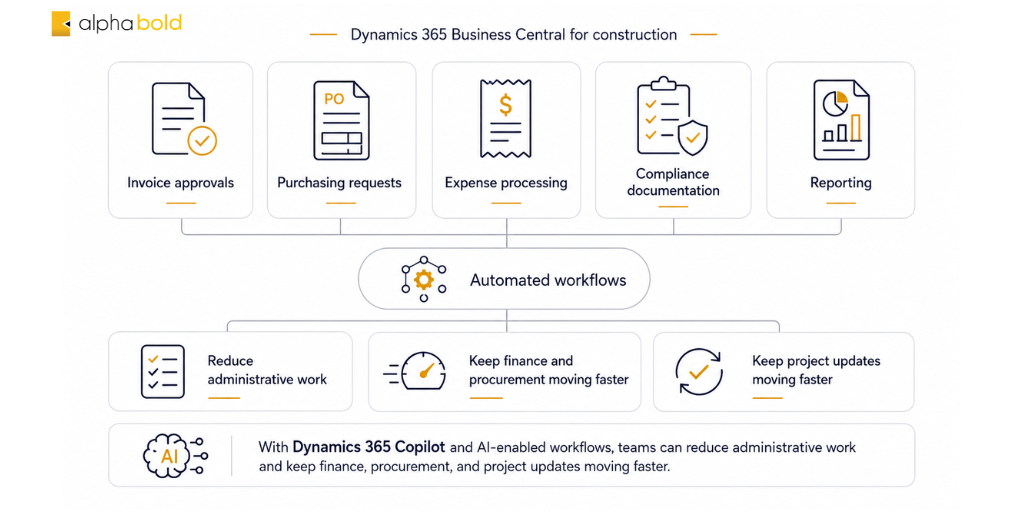
Business Central and Power Automate can help standardize processes such as purchase approvals, invoice routing, expense approvals, notifications, and project-related financial workflows. This reduces manual handoffs while giving finance and project teams clearer control over how transactions move through the business.
4. Connected Workflows Across Microsoft 365
Business Central works alongside Teams, Outlook, Excel, and Power BI, helping construction teams collaborate, analyze ERP data, review reports, and manage business information through familiar Microsoft tools. This can reduce the need to continually move project and financial data between disconnected applications.

5. Inventory, Materials, and Project Procurement
For materials-intensive contractors, Business Central connects inventory availability, purchasing, suppliers, and project demand. Teams can better understand what is available, what still needs to be purchased, and how procurement and material costs are affecting active projects.
This capability can be particularly valuable for specialty contractors such as mechanical, electrical, HVAC, interiors, fabrication, and other firms where materials have a direct impact on project margins.

6. AI-Assisted Work With Copilot
Copilot and other AI capabilities in Business Central can help users reduce time spent on routine ERP work, review business information more efficiently, and receive assistance within supported workflows. For construction teams, the value is in making day-to-day financial and operational work easier rather than replacing project controls or management judgment.

Further Reading: Guide to Microsoft Copilot Pricing & Licensing
7. Configurable and Extensible for Construction Workflows
Construction firms do not all manage purchasing, approvals, reporting, job costing, and project operations in the same way. Business Central can be configured and extended through Power Platform, workflow automation, custom reporting, integrations, and construction-specific applications to support requirements beyond the standard ERP environment.
This flexibility allows firms to retain Business Central as their core business platform while adding specialized functionality where their construction processes require it.

Which Construction Capabilities Are Native to Business Central?
Dynamics 365 Business Central for construction already supports many of the core ERP processes contractors need, including:
- project budgets and tasks
- job cost tracking
- WIP accounting
- project purchasing
- inventory and materials
- resource and time tracking
- approvals and financial management
More specialized construction requirements may need configuration, integration, or an industry extension. These can include advanced retainage, AIA-style progress billing, detailed subcontractor management, lien waivers, complex equipment workflows, and deeper field operations.
The advantage is flexibility: firms can use Business Central as the core ERP and add construction-specific functionality only where their operating model requires it.
How Can Copilot Enhance Business Central for Construction Teams?
Copilot adds an AI-assisted layer to Business Central, helping construction teams spend less time searching for information, reviewing records, and completing repetitive ERP tasks. Its value is not in replacing project controls or construction expertise, but in making the financial and operational data already held in Business Central easier to work with.
Current capabilities can support teams in several practical ways:
- Find business information faster: Copilot Chat can help users locate company records and navigate Business Central using natural-language questions, including information from supported add-on applications.
- Analyze operational and financial data: Analysis Assist can turn Business Central lists into filtered, grouped, pivoted, and summarized analysis views without requiring users to build them manually. This can make it easier to explore project-related costs, purchasing, invoices, or other operational data.
- Summarize records: A newer Copilot capability can generate concise summaries of records and related information, helping users identify relevant details without reviewing every field individually. This feature is currently in production-ready preview.
- Reduce finance administration with agents: Business Central’s agent capabilities are expanding beyond assistance into process automation. For example, the Payables Agent can read invoices, identify vendors and accounts, and prepare invoices for approval while keeping human oversight in the process.
For construction firms managing high volumes of project transactions, supplier invoices, approvals, and financial records, these capabilities can reduce administrative effort around the ERP while allowing project and finance teams to focus more attention on cost control and project performance.
Copilot and agents should therefore be viewed as an extension of Business Central’s construction ERP capabilities: Business Central provides the underlying project and financial data, while AI helps users find, analyze, summarize, and process that information more efficiently.
Reduce Manual Work Across Project Operations
See how Business Central, Copilot, and workflow automation can help your team manage costs, approvals, and project updates more efficiently.
Book My 1:1 SessionConclusion
Dynamics 365 Business Central for construction can be a strong ERP choice for firms that need tighter control over project financials, job costs, purchasing, inventory, resources, WIP, and reporting. Its value is especially clear when these processes are currently spread across accounting software, spreadsheets, and disconnected project systems.
For many project-based and specialty contractors, Business Central provides a solid core without forcing every construction process into one application. Firms can use its native ERP capabilities for day-to-day financial and operational control, then add construction-specific extensions where requirements such as advanced retainage, progress billing, subcontractor workflows, or field operations demand more depth.
Copilot, Power BI, and Power Platform can extend that foundation further by helping teams work with data more efficiently, automate repetitive processes, and improve visibility across finance and project operations.
The key is how well the platform aligns with the contractor’s operating model. AlphaBOLD can help assess those requirements, identify where standard Business Central is sufficient, and design the right mix of configuration, integrations, and extensions for the business.
FAQs
Yes. Business Central can serve as the ERP and financial core while integrating with project management, field, payroll, reporting, and other construction systems. Microsoft 365, Power BI, Power Automate, Power Apps, and industry extensions can also expand the surrounding technology stack.
Business Central can be especially well suited to growing project-based and specialty contractors, including mechanical, electrical, HVAC, interiors, fabrication, and other materials-intensive firms. Companies with highly specialized field, payroll, equipment, or subcontractor requirements may need additional construction functionality.
Copilot can assist users in exploring and analyzing supported Business Central data, while tools such as Analysis Assist and Power BI provide more structured ways to review costs, trends, and performance. Copilot should be viewed as an aid to analysis rather than a replacement for project controls or financial review.
Yes, to an extent. Copilot and Business Central agents can support or automate parts of routine ERP work, such as invoice processing, information retrieval, and other supported administrative tasks. More complex construction workflows may still require Power Automate, configuration, or industry-specific extensions.
Yes. It is scalable for both growing and established firms and supports multi-site operations, complex workflows, and diverse project portfolios.
Explore Recent Blog Posts