Mastering SharePoint Security: Best Practices to Protect Your Data

Table of Contents
Introduction
Over the years, I have seen SharePoint projects evolve from basic document repositories into central collaboration environments that support contracts, HR records, financial files, client documentation, project delivery, and operational knowledge. That shift has made Microsoft SharePoint security a much bigger business concern. The risk is no longer limited to outsiders trying to break in. In many environments, the greater exposure comes from inside the system through broad permissions, unmanaged external sharing, inactive sites, outdated access, and sensitive content stored without clear governance.
This has become even more important as the platform now connects deeply with Teams, OneDrive, Power Platform, and Microsoft 365 Copilot. In earlier projects, the main focus was often document access and collaboration. Today, the focus has expanded to visibility, governance, compliance, and AI readiness. Copilot does not create new permissions, but it can surface information users already have access to. If permissions are not properly reviewed, sensitive files may be easier to discover than the organization intended.
That is why security now requires more than a one-time configuration. It requires a structured approach to permission management, external sharing controls, Microsoft Purview, SharePoint Advanced Management, Copilot readiness, auditing, monitoring, and long-term governance. This article outlines the practices organizations should prioritize to protect their content while keeping collaboration efficient and controlled.
What Is Microsoft SharePoint Security?
SharePoint security refers to the policies, permissions, tools, and governance practices used to protect sites, files, users, and business data. It helps organizations control who can access information, how content is shared, and how sensitive documents are monitored across the Microsoft 365 environment.
In practical terms, it covers access control, external sharing, multi-factor authentication, audit logs, encryption, data loss prevention, sensitivity labels, and compliance monitoring. These controls help ensure that employees, external users, and business teams can collaborate without exposing confidential information.
For many organizations, the challenge is not setting up SharePoint once. The real challenge is maintaining secure access as teams grow, projects change, users leave, and more business content moves into the platform.
Why Is Microsoft SharePoint Security Important for Businesses?
Microsoft SharePoint security is important because SharePoint often stores sensitive business information, including contracts, HR records, financial files, client documents, policies, and project data. Without proper controls, this information can be exposed through broad permissions, unmanaged sharing links, external users, or inactive sites.
For businesses, strong security helps:
- control who can access sensitive documents
- reduce accidental data exposure
- manage external sharing with clients, vendors, and partners
- support compliance and audit readiness
- protect HR, finance, legal, and client-related files
- improve visibility into user activity and file access
- prepare the content for Microsoft 365 Copilot
- reduce risks caused by outdated permissions or overshared content
The goal is not to limit collaboration. The goal is to make sure employees can work efficiently while the organization maintains control over sensitive data, access permissions, and compliance requirements. As Microsoft 365 environments become more connected, security becomes a core part of protecting business information across the digital workplace.
Enhance Your SharePoint Security Management
Protect your data with strong access control, encryption, and monitoring strategies with AlphaBOLD as your partner.
Request a ConsultationCore Microsoft SharePoint Security Controls Every Organization Should Review
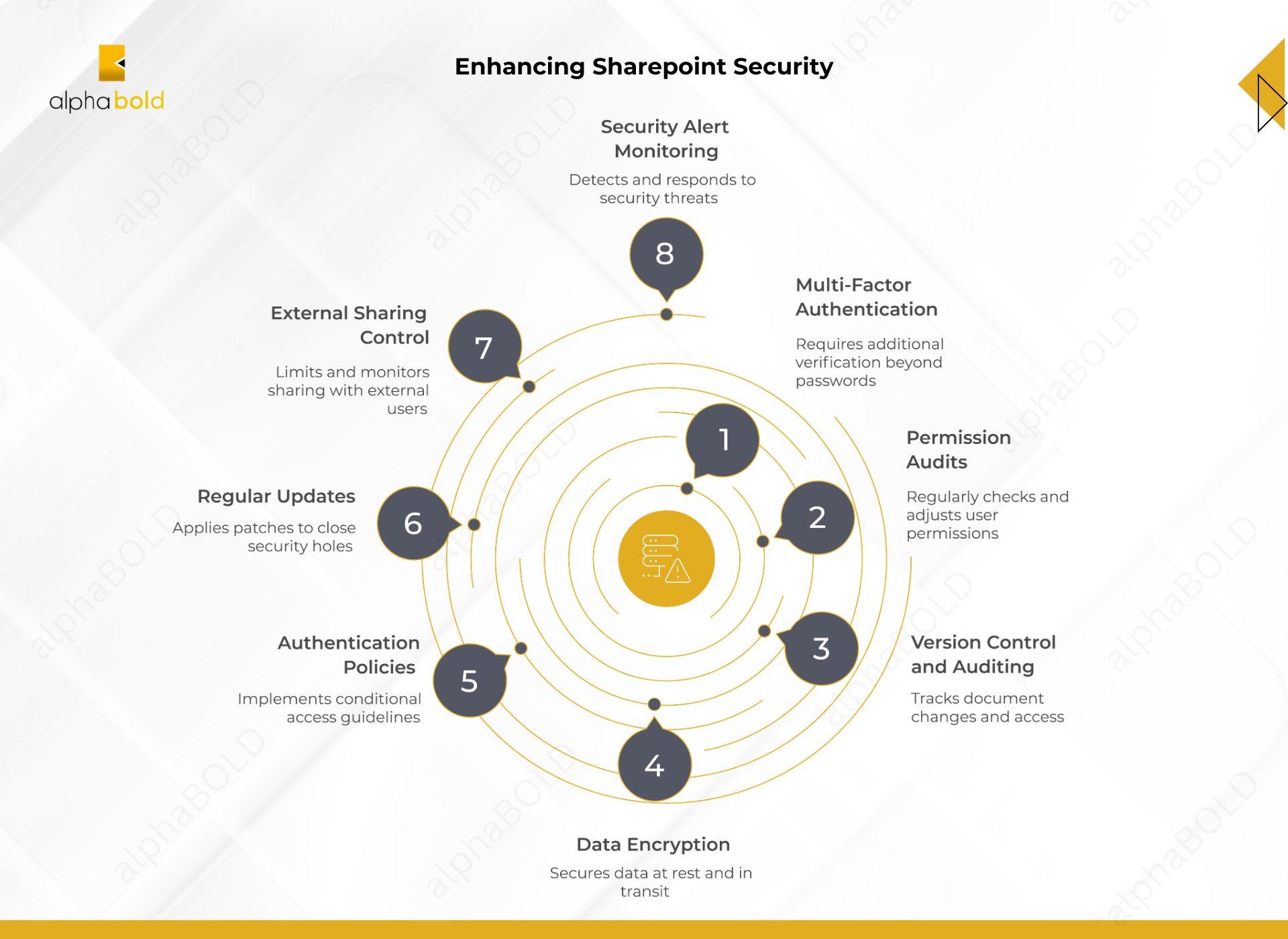
A strong security strategy depends on foundational controls that reduce unauthorized access, prevent accidental exposure, monitor activity, and maintain control over sensitive business content. Newer priorities like Copilot readiness, Microsoft Purview, and SharePoint Advanced Management are important, but these controls still form the baseline for a secure SharePoint environment.
1. Multi-Factor Authentication (MFA):
Multi-factor authentication adds another layer of protection beyond passwords. It is especially important for administrators, high-risk users, external users, and employees who access sensitive content.
Best practices:
- Enable MFA for all users.
- Prioritize admins and high-risk accounts.
- Use stronger methods such as Microsoft Authenticator, passkeys, FIDO2 keys, or hardware tokens.
- Train users to recognize suspicious MFA prompts.
2. Check Permissions Periodically:
Users often collect access they no longer need as projects, roles, and teams change. Regular permission reviews help ensure only the right people can access sensitive content.
Best practices:
- Review site, library, folder, and file-level permissions.
- Remove unnecessary access.
- Use Microsoft 365 groups or Microsoft Entra security groups.
- Limit edit, owner, and full control permissions.
- Update access when users change roles or leave.
3. Enable Version Control and Document Auditing:
Version control and auditing help teams track document changes, recover previous versions, and investigate unusual activity.
Best practices:
- Enable versioning in document libraries.
- Monitor access, edits, deletions, downloads, and sharing.
- Review audit logs regularly.
- Use audit insights for compliance and security reviews.
Further Reading: Benefits of Professional SharePoint Migration Services
4. Data Encryption:
Encryption helps protect data at rest and in transit. Microsoft 365 uses encryption to protect SharePoint and OneDrive data, including AES 256-bit encryption for stored customer data.
Best practices:
- Confirm encryption settings align with security requirements.
- Use TLS for data in transit.
- Review encryption policies regularly.
- Use sensitivity labels for highly confidential content.
5. Use Microsoft Entra ID and Conditional Access:
Authentication policies help control how and when users can access SharePoint. This is where Microsoft Entra ID and Conditional Access become important for managing risk-based access.
Best practices:
- Use Microsoft Entra ID for identity and access management.
- Apply Conditional Access based on user, device, location, and risk.
- Require stronger authentication for sensitive sites.
- Review access policies regularly.
6. Keep SharePoint Updated:
For SharePoint Online, Microsoft manages service updates, but organizations still need to review admin settings and security policies. For SharePoint Server, updates and patches must be applied regularly.
Best practices:
- Apply server patches promptly.
- Monitor Microsoft security advisories.
- Review SharePoint Online admin settings.
- Test major changes before rollout.
7. Control External Sharing:
External sharing supports collaboration with clients, vendors, and partners, but it can create risk if links are too broad or access remains active after a project ends.
Best practices:
- Limit anonymous or “anyone with the link” sharing.
- Set expiration dates for external links.
- Restrict sharing by domain where needed.
- Review and remove outdated external users.
- Use view-only access when editing is not required.
8. Monitor and Respond to Security Alert:
Monitoring helps teams detect suspicious activity early and respond before a small issue becomes a larger security incident.
Best practices:
- Set up alerts for unusual activity.
- Review dashboards and audit logs.
- Define an incident response process.
- Assign ownership for investigation and remediation.
Customize SharePoint for Your Business Needs
Work with AlphaBOLD to tailor SharePoint features, workflows, and permissions to your specific business processes, improving efficiency and user adoption.
Request a ConsultationPrepare SharePoint Security for Microsoft 365 Copilot
Microsoft 365 Copilot works within existing permissions, but it can surface content users already have access to. If SharePoint sites, files, or links are overshared, sensitive information may become easier to find.
Before expanding Copilot use, organizations should review content that is broadly accessible, ownerless, inactive, or sensitive.
Best practices include:
- Review overshared sites and files.
- Remove outdated or unnecessary permissions.
- Confirm that major sites have active owners.
- Clean up inactive sites with business data.
- Apply sensitivity labels to confidential content.
- Review external sharing links and anonymous access.
Copilot readiness is not just a licensing step. It depends on whether the content is properly secured and governed before AI tools make information easier to discover.
Use Microsoft Purview to Classify and Protect Sensitive Data
Microsoft Purview helps organizations classify and protect sensitive SharePoint content without blocking collaboration. Sensitivity labels can be used to mark documents as public, internal, confidential, or highly confidential, while data loss prevention policies help identify, monitor, and protect sensitive information across Microsoft 365.
For SharePoint, this is especially useful when teams store contracts, financial records, HR files, client data, or regulated information in document libraries. Purview can help apply consistent protection rules, reduce accidental sharing, and support compliance reviews.
Best practices include:
- Apply sensitivity labels to confidential documents.
- Use DLP policies to detect and protect sensitive information.
- Enable sensitivity label support for files.
- Review labeled content and policy matches regularly.
- Align labels and DLP rules with compliance requirements.
This gives organizations more control over sensitive content, especially as the platform becomes more connected with Teams, OneDrive, and Microsoft 365 Copilot.
Use SharePoint Advanced Management for Stronger Governance
SharePoint Advanced Management helps organizations manage risk across large environments. It gives admins better visibility into overshared sites, sensitive content, sharing activity, and access patterns, making it easier to strengthen Microsoft SharePoint security without manually reviewing every site.
It is especially useful for organizations with many departments, external users, inactive sites, or upcoming Copilot adoption.
Best practices include:
- Use data access governance reports to find overshared or sensitive sites.
- Review sharing links and broad access permissions.
- Start site access reviews with site owners where needed.
- Apply restricted access control for high-risk sites.
- Use restricted content discovery to reduce accidental discovery in Copilot.
- Monitor governance reports regularly instead of waiting for an audit.
This helps organizations move from reactive cleanup to ongoing SharePoint governance, where access, sharing, and site ownership are reviewed before they become larger security risks.
When Should You Get a SharePoint Security Assessment?
An assessment is useful when your organization is unsure who has access to sensitive content, how external sharing is managed, or whether current permissions still match business needs. It gives IT and business leaders a clearer view of risk across sites, libraries, users, and shared links.
You may need a Microsoft SharePoint security assessment if:
- Permissions have not been reviewed recently.
- External users still have access after projects end.
- Sensitive files are stored across multiple departments.
- Teams use broad sharing links too often.
- Site ownership is unclear or outdated.
- Audit logs are not reviewed regularly.
- Your organization is preparing for Microsoft 365 Copilot.
- Compliance or data protection requirements are increasing.
A structured assessment can help identify overshared content, outdated permissions, inactive sites, external access risks, and governance gaps before they lead to larger security or compliance issues.
Manage Your SharePoint Environment for Compliance and Data Protection
Partner with AlphaBOLD to secure your SharePoint environment, enforce access controls, monitor activity, and implement best practices that protect sensitive data and maintain regulatory compliance.
Request a ConsultationConclusion
SharePoint has become a central part of how organizations store, share, and manage business information. As that role grows, security can no longer be treated as a one-time setup. It requires regular permission reviews, controlled external sharing, strong authentication, auditing, data classification, and clear governance.
The rise of Microsoft 365 Copilot also makes this more important. If SharePoint content is overshared, outdated, or poorly governed, sensitive information may become easier to discover. That is why organizations need to review their security controls before expanding AI-driven collaboration.
A strong Microsoft SharePoint security strategy helps protect sensitive data, support compliance, and keep collaboration efficient. With the right controls in place, businesses can reduce risk while giving teams secure access to the information they need.
FAQs
Mobile access increases flexibility but also risk. Use mobile device management (MDM) policies, enforce strong authentication, and restrict access to approved apps and devices.
Yes. Only approve trusted apps and integrations, monitor their permissions, and regularly review third-party access to prevent data leaks.
Implement regular backups for critical libraries and configure disaster recovery procedures. Test restores periodically to ensure data can be recovered quickly after an incident.
Enable versioning, maintain offline backups, restrict admin privileges, and monitor suspicious file activity. Educate users on phishing and suspicious links.
SharePoint Online relies on Microsoft 365 security tools like Conditional Access and Compliance Center, while on-premises requires patching servers, configuring firewalls, and managing local permissions.
Microsoft SharePoint security often goes wrong when permissions, external sharing, site ownership, and sensitive content are not reviewed regularly. Over time, users may collect unnecessary access, external users may remain connected after projects end, and inactive sites may continue storing business-critical data.
Explore Recent Blog Posts