Table of Contents
Introduction
The conversation around Copilot vs ChatGPT has become increasingly relevant as both platforms have evolved far beyond simple AI assistants. Today, they represent two distinct approaches to artificial intelligence, each powered by next-generation models and designed for very different usage contexts, especially at the enterprise level.
ChatGPT, now powered by GPT-5.2 with Instant, Thinking, and Pro tiers, is a versatile conversational AI built for creative writing, coding assistance, research, and complex problem-solving across domains. With over 800 million weekly active users and enterprise adoption growing eightfold year over year, it has established itself as a widely adopted AI productivity platform.
Microsoft Copilot takes a different path in the Copilot vs ChatGPT comparison. Rather than operating as a standalone assistant, it is embedded directly within the Microsoft ecosystem, working inside Word, Excel, Outlook, Teams, and Dynamics 365.
Powered by GPT-5 and GPT-5.2 through Azure OpenAI and enhanced by the Work IQ intelligence layer, Copilot functions like a contextual coworker, understanding organizational data, documents, and workflows to automate tasks and support day-to-day business operations.
How Does ChatGPT vs. Copilot Compare in Core Capabilities?
ChatGPT vs. Copilot is less about which tool is better and more about where each one delivers value. ChatGPT is built for broad, open-ended problem-solving across platforms.
Copilot is designed to work inside Microsoft’s ecosystem, using your organization’s data and workflows to drive productivity.
The right choice depends on whether you need flexibility across use cases or structured support within Microsoft 365 and business applications.
ChatGPT:
ChatGPT is a conversational AI developed by OpenAI, designed for versatility and creativity. It excels at generating text, answering questions, writing code, and brainstorming ideas.
Think of ChatGPT as a digital assistant that thrives in open-ended tasks whether you’re drafting blog posts, solving technical problems, or exploring new concepts. It’s platform agnostic, accessible via web, mobile apps, and APIs, making it ideal for individuals and businesses seeking flexibility.
Key Capabilities:
- GPT-5.2 models with improved reasoning, coding, and multimodal capabilities
- ChatGPT Agent for autonomous task completion across websites and connected services
- In-app Apps ecosystem with 800+ million user reach
- Deep Research for comprehensive, agentic web research
- Company Knowledge connectors (Slack, Google Drive, GitHub)
Microsoft Copilot:
Microsoft Copilot, by contrast, is embedded directly into Microsoft apps like Word, Excel, Outlook, Teams, and Dynamics 365. It acts like a smart colleague who understands your documents, emails, and workflows.
Its strength lies in context aware productivity summarizing meetings, drafting emails, analyzing spreadsheets, and automating business processes.
Unlike ChatGPT, Copilot is built for enterprise grade security and compliance, making it a natural fit for organizations that prioritize governance and data protection.
Key Capabilities:
- GPT-5 and GPT-5.2 as default models with real-time router for optimal performance
- Work IQ memory layer for personalized, context-aware responses
- Agent Builder with document generation capabilities (Word, Excel, PowerPoint)
- Agent 365 unified control plane for enterprise governance
- Security Copilot included for M365 E5 customers
Further Reading: The Right AI for Dynamics 365: Copilot vs. ChatGPT
Not Sure Which AI Fits Your Organization?
Copilot and ChatGPT solve very different problems. We help organizations map AI tools to real workflows, security requirements, and user roles so adoption drives measurable value, not confusion.
Request a ConsultationHow Do ChatGPT and Copilot Differ in Their Intelligence Models?
The intelligence models behind ChatGPT and Copilot are designed for different purposes. ChatGPT focuses on general-purpose reasoning, creativity, and multimodal problem solving across platforms, while Copilot is optimized for context-aware productivity within Microsoft 365, combining LLM reasoning with enterprise data and compliance constraints.
Understanding these distinctions helps organizations choose the right AI for either flexible innovation or structured workflow automation.
ChatGPT Architecture:
ChatGPT runs on OpenAI’s latest models with multimodal reasoning, live voice, projects, and agent-style tooling available in tiered plans. Pricing tiers include Free, Plus, Pro, Business, and Enterprise, offering access to flagship models and collaboration features. Business tiers add workspace controls and connectors.
Recent Model Updates:
- GPT-5.2 models introduce stronger reasoning, coding accuracy, and improved reliability for complex tasks
- OpenAI has focused recent model updates on reducing hallucinations and improving long-form reasoning quality
- Knowledge coverage reflects recent model updates, with expanded access to late-2025 information depending on plan and feature availability
- Enterprise users report saving 40 to 60 minutes per day; heavy users save 10+ hours weekly
Microsoft Copilot Architecture:
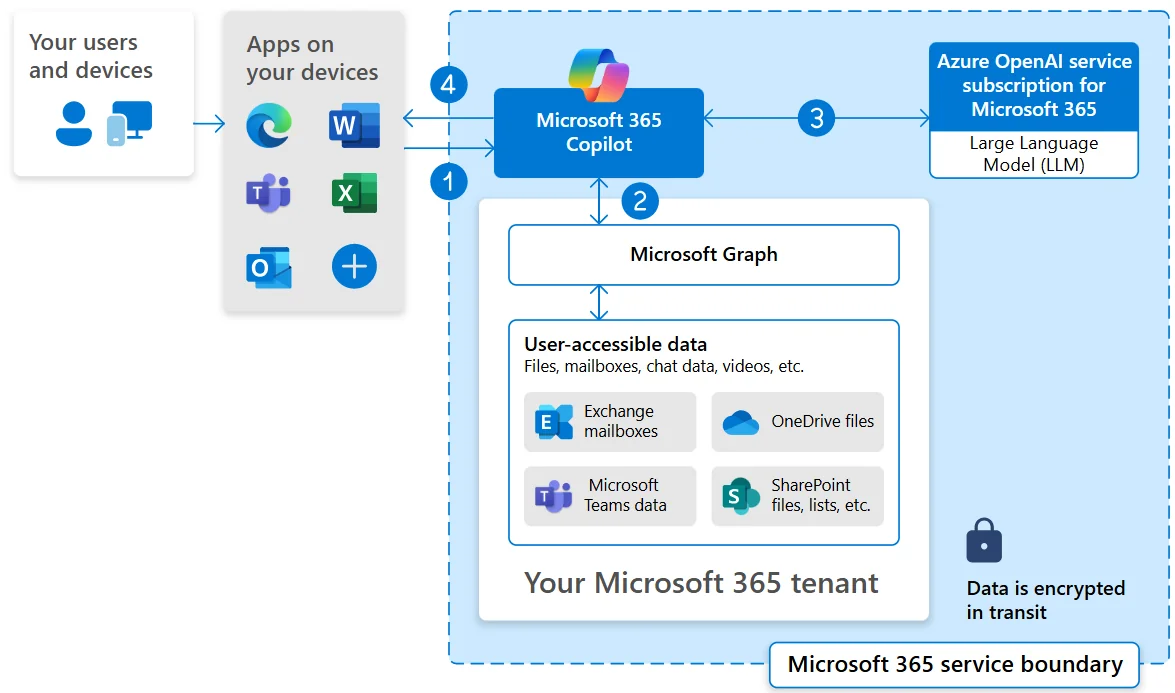
Combines Azure OpenAI models with an orchestration layer, grounding via Microsoft Graph (emails, chats, files), and Microsoft 365 apps. Copilot first “grounds” your prompt by retrieving relevant items you can access, then calls an LLM to return results with citations while respecting tenant policies. This architecture operates inside Microsoft’s service boundary, inheriting your existing compliance posture.
For extensibility, Copilot Studio allows organizations to build custom agents, orchestrate multiagent workflows, and expose actions via Graph/API plugins enabling Copilot to securely perform tasks like sending emails or creating tasks under identity and policy controls.
Recent Architecture Enhancements:
- GPT-5 default model with real-time router selecting optimal model per prompt
- Work IQ intelligence layer enables memory across conversations
- MCP servers for scheduling, document generation, email, and CRM integration
- Copilot Studio agents can now generate Word, Excel, and PowerPoint content
How Does ChatGPT vs. Copilot Compare in Enterprise Integration?
Enterprise integration determines how well an AI platform fits within an organization’s existing IT environment and workflows. For businesses, this means evaluating whether the tool can connect with internal systems, productivity apps, and third-party services while maintaining performance, governance, and security.
Strong integration reduces friction, improves adoption, and ensures that AI-driven insights and automation can operate seamlessly across teams and tools.
ChatGPT:
ChatGPT is platform-agnostic and designed to work across web, mobile, and API environments. It integrates with enterprise knowledge sources such as Slack, Google Drive, and GitHub, enabling enterprises to securely pull and analyze internal data.
While not tied to a specific productivity suite, its flexibility makes it suitable for organizations using a mix of tools.
Recent Updates:
- Expanded connectors for enterprise data sources and knowledge bases
- Enhanced API capabilities for automation and workflow integration
- Improved support for hybrid environments and cross-platform collaboration
Microsoft Copilot:
Copilot is embedded directly into Microsoft 365 apps, including Word, Excel, Outlook, Teams, and Dynamics 365. Its strength lies in native integration with Microsoft Graph, enabling context-aware actions across documents, emails, and chats.
In hybrid or third-party environments, Copilot Studio enables the creation of custom agents and multi-agent workflows to interact securely with external tools, though setup may require IT oversight.
Recent Updates:
- Copilot Studio enables custom workflows and third-party API integrations
- Enhanced orchestration for hybrid environments and multi-agent tasks
- Expanded support for enterprise applications beyond core Microsoft 365 apps
How Do ChatGPT and Copilot Differ in Enterprise Security Features
Enterprise security is a critical factor for organizations evaluating AI platforms. It encompasses data protection, compliance with industry standards, access controls, and auditability.
Strong security ensures sensitive information remains safe while enabling AI tools to operate effectively across workflows, giving businesses confidence in both day-to-day operations and regulatory reporting.
ChatGPT:
ChatGPT Enterprise provides SOC 2 Type II and ISO 27001 certified security, with data encrypted in transit and at rest. Admin controls, role-based access, and audit logs give organizations visibility into usage and data handling.
Connections to company knowledge sources are secured, ensuring sensitive data remains protected while AI-powered workflows operate.
Recent Updates:
- Strengthened encryption and access controls for enterprise deployments
- Enhanced audit logging for compliance and internal monitoring
- Improved data governance when connecting external knowledge sources
Microsoft Copilot:
Copilot inherits Microsoft 365’s enterprise-grade security and compliance standards. It operates within tenant policies, ensuring real-time protection, identity management, and regulatory compliance across SOC, ISO, and FedRAMP frameworks. Security Copilot further provides threat detection and monitoring across enterprise workloads, while all agent actions are logged for auditability.
Recent Updates:
- Expanded real-time protection and policy enforcement for Copilot agents
- Improved audit logging and compliance tracking for document generation and workflows
- Security Copilot integration for proactive monitoring across Microsoft 365 workloads
Key 2026 Updates: What Organizations Need to Know
Microsoft 365 Pricing and Packaging in 2026:
Microsoft 365 now includes several updated plans and capabilities in 2026:
- Global pricing updates for M365 suite subscriptions effective July 1, 2026
- Microsoft Defender for Office 365 Plan 1 added to E3 plans
- Intune Remote Help, Advanced Analytics, and Intune Plan 2 added to E3 and E5
- Security Copilot is available to all M365 E5 customers
- URL safety and threat checks are active on Business Basic, Standard, and E1 plans
- Enterprises are advised to review renewal cycles to optimize cost and entitlements under these 2026 updates.
Note: Final pricing, packaging, and entitlement details are subject to Microsoft’s official licensing announcements and may vary by region and agreement type.
ChatGPT Enterprise in 2026:
ChatGPT Enterprise has expanded its capabilities for business use this year:
- GPT-5.x models deliver stronger reasoning, coding accuracy, and multimodal performance
- Agentic workflows allow autonomous execution across internal systems and SaaS tools
- Integration with enterprise applications via Apps SDK and MCP protocol is now deeper
- Governance, compliance, and workspace controls have been enhanced for regulated industries
- Data residency programs are now available across Europe, Asia, and the Americas
Where Do ChatGPT and Microsoft Copilot Deliver the Most Value?
The real difference between ChatGPT and Microsoft Copilot lies in the workflow context. It’s not about which tool is smarter, but where each delivers the most value.
ChatGPT:
Microsoft Copilot:
How Do ChatGPT and Microsoft Copilot Compare in Enterprise Security & Compliance?
Security and compliance often determine whether an AI platform can be adopted at scale. Enterprises must assess how each solution handles data boundaries, identity controls, regulatory requirements, auditability, and governance before deployment.
Both platforms provide enterprise safeguards, but they operate within different security architectures.
Microsoft Copilot :
Microsoft Copilot ensures prompts, responses, and Graph-accessed data remain within the Microsoft 365 service boundary. It respects existing permissions, Conditional Access, MFA, sensitivity labels, DLP, retention, and auditing. Importantly, your data is not used to train foundation models.
Recent Security Enhancements:
- Security Copilot with 12 Microsoft-built agents across Defender, Entra, Intune, and Purview
- Real-time protection powered by Microsoft Defender
- Microsoft Entra Agent ID for IT oversight of AI agents
- Baseline security mode and richer audit logs in the M365 admin center
ChatGPT:
ChatGPT Enterprise/Business workspaces also provide strong safeguards: no training on your business data by default, encryption in transit and at rest, SAML SSO/SCIM, role-based access controls, admin analytics, and data retention controls. SOC 2 and ISO attestations back to these commitments, though organizations may still evaluate data residency and connector scopes per policy.
Recent Enterprise Features:
- Enterprise Compliance API with time-stamped conversation logs
- Granular workspace GPT controls for domain and API access management
- Data residency programs are now available in Europe and Asia
- 24/7 support with SLAs and dedicated AI advisors for organization-wide rollouts
Pricing Comparison: 2025 to 2026
| Tier | ChatGPT | Microsoft Copilot |
|---|---|---|
|
Free |
Limited GPT-4o access |
Copilot Chat (with M365) |
|
Individual/Plus |
$20/month (Plus) |
Included in M365 Personal/Family |
|
Pro/Premium |
$200/month (Pro) |
N/A |
|
Business |
$25/user/month |
$21/user/month (Copilot Business) |
|
Enterprise |
Contact sales |
$30/user/month (M365 Copilot) |
Note: Microsoft 365 suite pricing increases take effect July 1, 2026. Organizations can lock in current pricing through early renewals.
Plan AI Adoption Without Creating Governance Risk
Choosing between Copilot and ChatGPT is as much an architecture decision as a productivity one. Get guidance on permissions, data boundaries, compliance, and rollout strategy before you scale.
Request a ConsultationConclusion
The choice between ChatGPT and Microsoft Copilot isn’t about which AI is better overall; it’s about alignment with your goals.
- ChatGPT shines as a flexible, creative assistant for content generation, coding help, and open-ended problem solving.
- Microsoft Copilot is built for productivity and enterprise workflows, offering deep integration with Word, Excel, Outlook, Teams, and Dynamics 365.
If you need an AI that works across multiple platforms and creative tasks, ChatGPT is a strong choice. If your priority is secure, context aware automation within Microsoft tools, Copilot is the clear winner. Both tools will continue to evolve, so the right choice depends on your workflow, compliance needs, and budget.
FAQs: Copilot vs ChatGPT
Yes. Many enterprises use Copilot for Microsoft 365 productivity and ChatGPT for strategy, ideation, development support, and cross-platform research.
Copilot operates entirely within the Microsoft 365 tenant boundary and follows existing security controls. ChatGPT Business and Enterprise provide encryption, SSO, role-based access, and default protection of customer data. The difference is architectural, not intent.
ChatGPT requires minimal setup for team adoption, whereas Copilot needs structured planning around data governance, permissions, and content organization before scaling.