Establishing Scalable Cloud-Ready IT Infrastructure with Best Practices

Table of Contents

Introduction

A scalable,  robust IT infrastructure has become a priority as companies embrace cloud-first strategies on scale. Microsoft 365 enables businesses to make the cloud a part of their infrastructure without sacrificing performance or control through its comprehensive suite of productivity, collaboration, and security tools. However, adopting cloud infrastructure is not straightforward and needs careful planning and the best-known methods to harness the full power of the cloud.

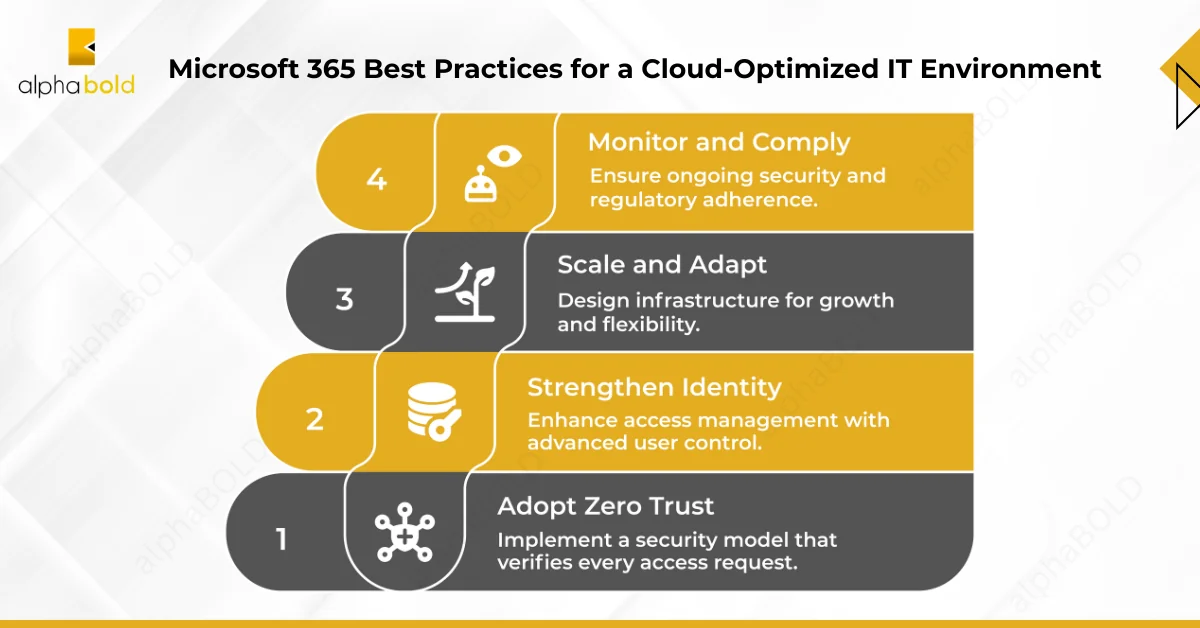
Microsoft 365 Best Practices for a Cloud-Optimized IT Environment

Microsoft 365 Best Practices for a Cloud-Optimized IT Environment

Organizations must align with modern cloud principles to support a resilient, secure, scalable IT infrastructure. Microsoft 365 offers a strategic foundation for implementing IT infrastructure best practices that support secure access, centralized management, and endpoint protection. Below are key methods to help enterprises build a cloud-ready environment:

1. Adopt the Zero Trust Security Model:

A secure cloud that is sustainable, elastic, and scalable is in demand. The traditional perimeter-based security model is ineffective with employees everywhere and on multiple devices. Gartner predicts that over 60% of organizations will embrace Zero Trust as a starting point for security by 2025.

Best Practices:

  • Leverage centralized identity management with Microsoft Entra ID (formerly known as Azure AD) MFA.
  • Set up Conditional Access policies to allow access only from compliant devices or trusted networks.
  • Use Microsoft Defender for Office 365 to defend against phishing, malware, and business email compromise.

2. Strengthen Identity and Access Management:

Identity is central to modern IT infrastructure. Microsoft 365, in conjunction with Entra, enables streamlined access management with advanced control over user permissions and role assignments.

Best Practices:

  • Leverage role-based access control (RBAC) to give users only the necessary access.
  • Enable PIM to govern and audit access to important roles.
  • Continuously review access, with access reviews, and automate stale account removal.

3. Adopt Device Management and Endpoint Security:

To be cloud-ready, endpoint security must extend beyond the office network. Microsoft 365 has strong integration with Microsoft Intune and Defender for Endpoint.

Best Practices:

  • Enroll devices in Intune for centralized management and control over policy, including compliance.
  • Use Microsoft Defender for Endpoint to detect and remediate threats.
  • Use Windows Autopilot to reduce the time it takes to set up and deploy new devices,  which translates into more IT resources focused on other areas of IT. Use it alongside your existing deployment practice to support the scenarios that make the most sense for your organization.

Ready to Modernize Your Infrastructure with Microsoft 365?

Let AlphaBOLD tailor a futuristic cloud-ready IT Infrastructure that aligns with your business goals.

Request a Consultation

4. Use Microsoft 365 Collaboration Tools:

Collaboration is one of the primary reasons organizations move to the cloud. Services such as Microsoft Teams, SharePoint Online, and OneDrive for Business ensure effective communication and seamless collaboration.

Best Practices:

  • Establish team governance policies to manage how and why teams are created, named, and who has guest access.
  • M365 apps rely on sensitivity labels and data loss prevention (DLP) to classify and protect shared data.
  • Educate users on best practices for collaborating, such as safely sharing files, and using chat, meet, and channels efficiently.

5. Scaling and Flexibility in Design:

A cloud-enabled infrastructure should grow and adapt with you. With Microsoft 365, organizations can adjust their service packages up or down based on business needs.

Best Practices:

  • Use dynamic membership in Microsoft Entra ID (via security or M365 groups) to automate user access provisioning.
  • Use Azure Logic Apps or Power Automate to simplify workflows and alleviate the administrative burden.
  • Track service usage in the Microsoft 365 admin center reports to look for underutilized resources or room for optimization.

6. Conduct Ongoing Monitoring, Reporting, and Compliance:

Putting irresponsible configuration and sprawl in check is critical to your long-term success.

Best Practices:

  • Turn on Microsoft Purview for auditing, data classification, and retention.
  • Leverage Microsoft 365 Defender and Microsoft Sentinel for security visibility and threat hunting.
  • Set up your routine access reviews and configuration reviews twice a year so that your infrastructure keeps pace with regulations and changes in business needs.

Need a Strategic IT Partner? Let's Talk.

Whether you're starting your Microsoft 365 journey or optimizing an existing setup, AlphaBOLD's consultants are ready to help.

Request a Consultation

Conclusion

Microsoft 365 is more than just a productivity suite; it’s the foundation for a modern, cloud-ready IT infrastructure. Your organization can build scalable, nimble, and resilient environments by following best practices, including identity, security, device management, collaboration, and compliance. Ultimately, it’s about taking a long-term approach, automating as much as you can, and regularly revisiting your setup to ensure that it can serve the needs of your business and the ever-evolving threat landscape.

Explore Recent Blog Posts

Infographics show the 2021 MSUS Partner Award winner

Related Posts