Key Ways Construction Firms Can Use Dynamics 365 Business Central and Copilot

Table of Contents
Introduction
Construction projects move fast, but the information required to manage them often moves slowly. Teams track job costs in spreadsheets, manage schedules in separate systems, and wait for outdated reports before making key decisions. This results in slow responses, budget surprises, and projects that deviate from their planned course.
To address these challenges, construction firms require integrated tools that unify people, data, and daily tasks. Dynamics 365 Business Central for construction provides this foundation by centralizing project financials, workflows, and resource planning.
When combined with Copilot, the platform provides practical AI support that enhances forecasting, automates administrative tasks, and improves visibility into costs and performance. These capabilities provide construction teams with timely insights and enhanced control over project outcomes.
This blog explains how construction companies can utilize Dynamics 365 Business Central and Copilot to streamline operations, enhance decision-making, and minimize operational inefficiencies across projects.
What are the Key Challenges Faced by Construction Firms?
Before diving into how Dynamics 365 Business Central for construction stands out as a leading ERP solution for AEC professionals aiming for growth in 2025 and beyond, it’s essential to first understand the core challenges facing the construction industry. The dynamic nature of construction projects introduces unique hurdles that can disrupt workflows and impede progress. These challenges often include:
- Fragmented Workflows: Many construction firms rely on outdated systems or disconnected software, leading to inefficient communication between project managers, site supervisors, and office staff. This disconnect hinders real-time collaboration and decision-making.
- Inefficient Data Management: Relying on spreadsheets and manual processes for tracking job costs, materials, and labor creates data silos and increases the risk of errors.
- Budget Overruns: Lack of real-time visibility into job costs and resources often results in projects exceeding their budgets. According to industry insights, 98% of significant construction projects experience cost overruns, with many exceeding cost by 30%.
- Compliance and Safety Challenges: Relying on disparate systems makes managing compliance with safety standards and legal regulations burdensome. This not only risks regulatory penalties but also compromises worker safety.
- Supply Chain Disruptions: Fluctuating material costs, delayed deliveries, and poorly managed inventory add further strain, causing delays and increased costs.
These challenges drive operational costs, impact client confidence, and jeopardize project outcomes. Overcoming these obstacles is crucial for construction firms aiming to deliver consistent results and maintain their position in a demanding and complex industry.
Build a Practical AI Roadmap for Your Projects
AI adoption doesn’t need to be complex. Our team helps construction firms integrate AI and automation into daily workflows.
Book My Personalized DemoHow Can Dynamics 365 Business Central and Copilot Modernize Construction Operations?
For years, many industries have reaped the benefits of ERP systems, yet their application in the construction sector has often been met with skepticism. The complexities of managing multiple projects, tight deadlines, and fluctuating costs have left many firms hesitant to invest in digital transformation. However, as 79% of business leaders recognize AI as essential for staying competitive, the construction industry cannot afford to fall behind.
Dynamics 365 Business Central for construction addresses this hesitation head-on. Designed with AEC professionals in mind, it eliminates the guesswork from modernizing workflows and adopting AI. This solution enables construction firms to modernize their technology stack, improve operational efficiency, and seamlessly integrate the advanced capabilities of Dynamics 365 Copilot into their everyday processes.
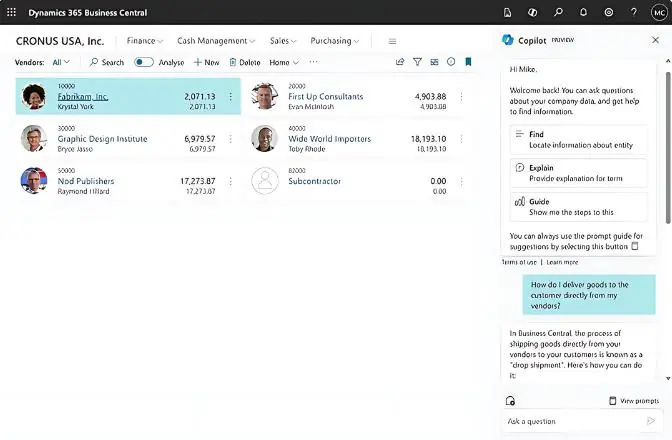
With Business Central and Copilot, AI adoption becomes straightforward and practical. By embedding AI directly into an intuitive ERP platform, construction firms can:
- Achieve Real-Time Insights: Access up-to-the-minute data on job costs, inventory levels, and project performance, enabling proactive decision-making.
- Streamline Workflows: Automate time-consuming tasks such as invoicing, compliance reporting, and material procurement, reducing administrative burdens and human errors.
- Mitigate Risks with Predictive Analytics: Use AI-driven insights to forecast potential delays, resource shortages, or budget overruns before they occur.
Its integration with Teams, Power BI, and Power Automate improves collaboration and supports scalable, multi-site operations.
Further Reading: Microsoft Copilot Integration in Dynamics 365 Business Central
What are Some Key Features of Dynamics 365 Business Central and Copilot for Construction Firms?
Dynamics 365 Business Central for construction is purpose-built to address AEC professionals’ challenges. Integrating seamlessly with Copilot, it combines advanced AI capabilities and a unified ERP platform to simplify complex tasks, support data-driven decisions, and foster collaboration.
Firms implementing Business Central for construction report measurable improvements such as faster resource planning, reduced project delays, and increased cost efficiency.
Below are the key features and practical applications of these tools for the construction industry:
1. Real-Time Project Management and Cost Control:
Tracking and managing multiple projects simultaneously can be overwhelming, especially when relying on outdated systems. Dynamics 365 Business Central for construction provides a unified real-time platform for monitoring job costs, labor, and materials. Paired with Copilot, it enables project managers to analyze financial data, forecast expenses, and streamline workflows effortlessly.
Use Case: A general contractor monitors expenses across multiple sites. When material prices increase, Copilot analyzes impacts and suggests reallocations.
2. Predictive Analytics for Risk Mitigation:
Cost overruns and project delays are common in construction but don’t have to be inevitable. With AI-driven insights from Dynamics 365 Copilot, firms can predict potential delays, budget issues, and supply chain risks before they arise. Copilot leverages historical project data and real-time trends to forecast challenges and recommend proactive solutions.
Use Case: A specialty contractor forecasts resource needs and gets AI-driven recommendations to avoid shortages and delays.
3. Automated Workflows for Increased Efficiency:
Manual processes slow down operations and introduce errors. Business automation for construction simplifies routine tasks like invoice approvals, compliance tracking, and payroll management.
Use Case: A construction firm sets automated compliance workflows, reducing administrative time while maintaining safety documentation.
4. Seamless Collaboration with Microsoft 365 Integration:
Construction projects often involve multiple stakeholders, from subcontractors to architects. Integrating Dynamics 365 construction solutions with Microsoft Teams, Outlook, and Power BI ensures everyone stays on the same page.
Use Case: A site supervisor updates project progress via Teams, auto-syncing data to dashboards used by office leadership.
5. Comprehensive Inventory and Supply Chain Management:
Timely access to materials and equipment is crucial for construction firms. With Dynamics 365 Business Central for construction, companies can track inventory levels, manage supplier relationships, and plan logistics.
Use Case: A construction manager overseeing a remote site uses the platform to monitor inventory in transit. If delays are anticipated, the system automatically suggests alternate vendors or reroutes existing stock to avoid downtime.
6. AI-powered copilot for Smarter Decision-Making:
Dynamics 365 Copilot for construction is a virtual assistant that helps users streamline complex processes. Copilot enables firms to work smarter without requiring advanced technical skills, from drafting project updates to analyzing cost trends.
Use Case: A project manager requests a cash flow summary using natural language. Copilot generates insights instantly.
Further Reading: Guide to Microsoft Copilot Pricing & Licensing
7. Customizable Business Automation for Construction:
Every construction firm has unique needs, and Dynamics 365 construction solutions’ flexibility allows for customization to suit specific workflows.
Use Case: A contractor automates procurement for high-demand materials during peak seasons.
By addressing these key areas, Copilot and Dynamics 365 Business Central for construction and enable firms to streamline operations, reduce inefficiencies, and stay ahead in the industry.
Make Your Construction Operations More Predictable and Efficient
Our consultants help you evaluate needs, configure your ERP, and deploy AI-powered capabilities.
Book My 1:1 SessionConclusion
Dynamics 365 Business Central for Construction helps AEC professionals make informed decisions, manage costs effectively, and enhance collaboration. Paired with Copilot, it streamlines workflows, eliminates inefficiencies, and delivers real-time insights.
As your firm plans for future growth, consider how Dynamics 365 construction solutions can support on-time delivery, cost control, and operational excellence. AlphaBOLD can guide your transition and ensure successful adoption.
FAQs
It is a construction-ready ERP system that unifies project financials, job costing, inventory, scheduling, and resource planning in one platform to support accurate and connected project management.
Explore Recent Blog Posts