Table of Contents
Introduction
Microsoft 365 is no longer just a productivity suite. In 2026, it functions as an agentic platform, one where AI agents do not just assist users but autonomously oversee multi-step tasks across Outlook, Teams, SharePoint, and Intune. The 2026 Work Trend Index analyzed trillions of anonymized Microsoft 365 signals and found that 49% of Copilot conversations now support cognitive work: analyzing, solving, and reasoning that previously required deep human expertise.
This shift matters for IT leaders and business decision-makers. The question is no longer whether to adopt Copilot, but how to govern it, connect it to your data, and structure your licensing to get measurable ROI. This guide covers the most consequential Microsoft 365 Copilot 2026 updates and what each one requires from your organization.
Microsoft 365 Copilot Is Moving from Assistance to Workflow Execution
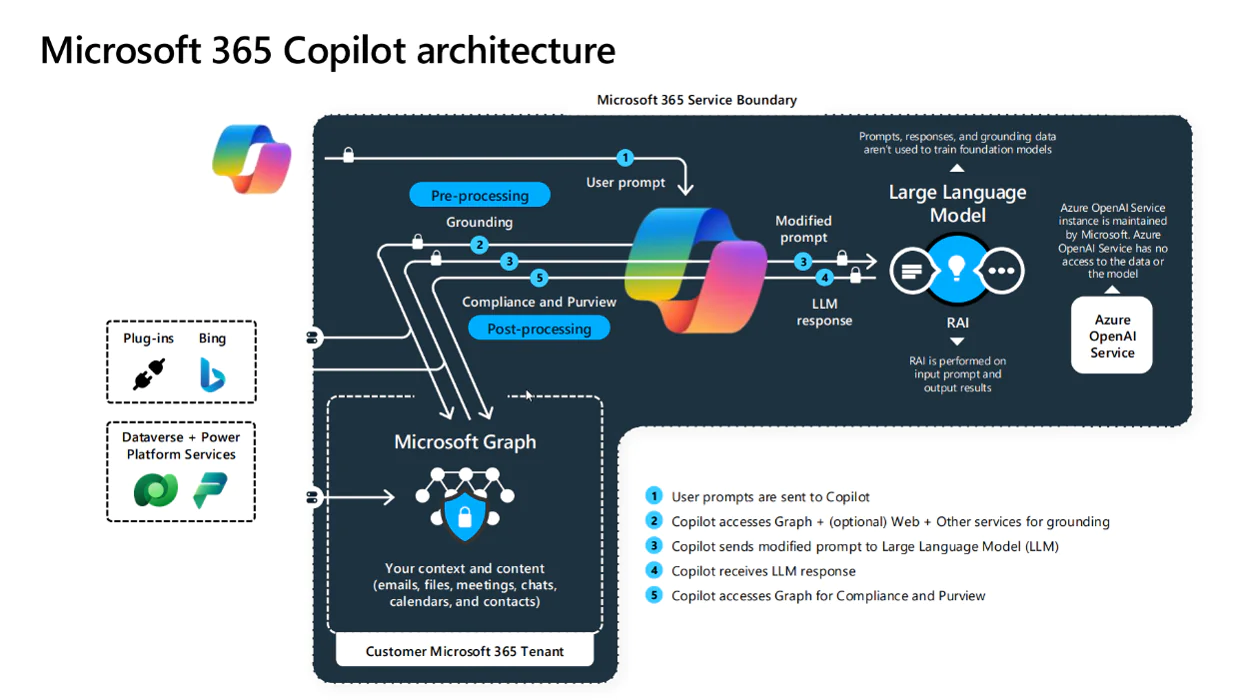
The most significant Microsoft 365 Copilot 2026 update is the move from prompt-response Copilot to agentic Copilot. Where the 2024 version of Copilot answered questions, the 2026 version initiates actions. Agents built in Copilot Studio or via Agent Builder can now autonomously complete multi-step workflows: qualifying a lead, drafting a follow-up, updating a CRM record, and notifying the manager, all without a human prompting each step.
The key capabilities in the 2026 Release Wave 1 (April through September 2026) include:
- Agent Builder in natural language: Admins can describe an agent in plain English and Copilot automatically configures it, including knowledge sources, triggers, and actions. No code required.
- GPT-5.5 Instant (GA May 2026): Rolling out across Copilot Chat, Word, Excel, and PowerPoint. Delivers faster, more accurate responses with improved reasoning for complex analytical tasks.
- Federated Copilot Connectors (GA May 2026): Real-time enterprise data from external systems (SAP, Salesforce, ServiceNow) surfaces inside Copilot Chat without requiring data to be moved into Microsoft’s data lake.
- Agent 365: A centralized control plane for managing all agents across your environment, providing visibility into agent inventory, permissions, behavior, and activity in one place.
- Copilot for Microsoft 365 Sales: A dedicated command center for sellers. Configurable record summaries, contextual deal support inside Outlook and Teams, and improved mobile access to pipeline data. Part of Release Wave 1 April 2026.
For IT administrators, this expansion means governance is no longer optional. Agent 365 exists precisely because organizations deploying dozens of agents need a single pane of glass to monitor what each agent can access, what it has done, and who authorized it.
Copilot is moving from individual productivity support to workflow execution, which means organizations need clearer ownership, access controls, and success metrics before scaling agents across departments.
You may also like: What Is Agentic AI? AlphaBOLD's Overview of Autonomous AI Systems
How Security Copilot Helps Reduce Manual Risk Monitoring
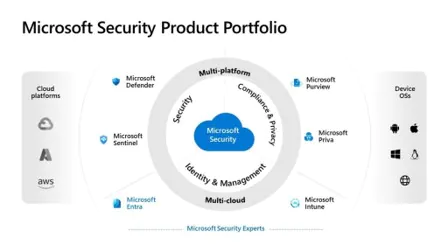
The biggest security development in 2026 is not a policy change. It is the introduction of Security Copilot agents, purpose-built AI that operates inside Defender, Entra, Intune, and Purview to perform security tasks autonomously. As of November 2025, Security Copilot is now included in Microsoft 365 E5 and E7 subscriptions, removing the standalone cost barrier that previously limited enterprise adoption.
- Conditional Access Enhancements: Granular, AI-driven access controls based on real-time risk assessment.
- Zero Trust Architecture: Advanced identity verification, endpoint compliance checks, and adaptive threat detection.
- Data Loss Prevention (DLP) Updates: Better integration with Microsoft Information Protection to prevent accidental or malicious leaks.
- Security Copilot: AI-driven threat intelligence that proactively detects and mitigates risks across the Microsoft 365 ecosystem.
- These Microsoft 365 Copilot 2026 updates not only protect sensitive data but also reduce the operational burden on IT teams by automating security monitoring and compliance reporting.
The practical implication: security teams that have not yet evaluated Security Copilot agents should prioritize this before their next contract renewal. If your organization holds Microsoft 365 E5, the capacity is already included. The cost of not using it is an opportunity cost, not a licensing barrier.
If your organization already uses Microsoft 365 E5, Security Copilot may help reduce manual monitoring, speed up threat response, and improve compliance readiness without requiring a separate security tool evaluation.
You may also like: Microsoft Copilot Consulting Services
How Intune Updates Reduce Repetitive Device Management Work
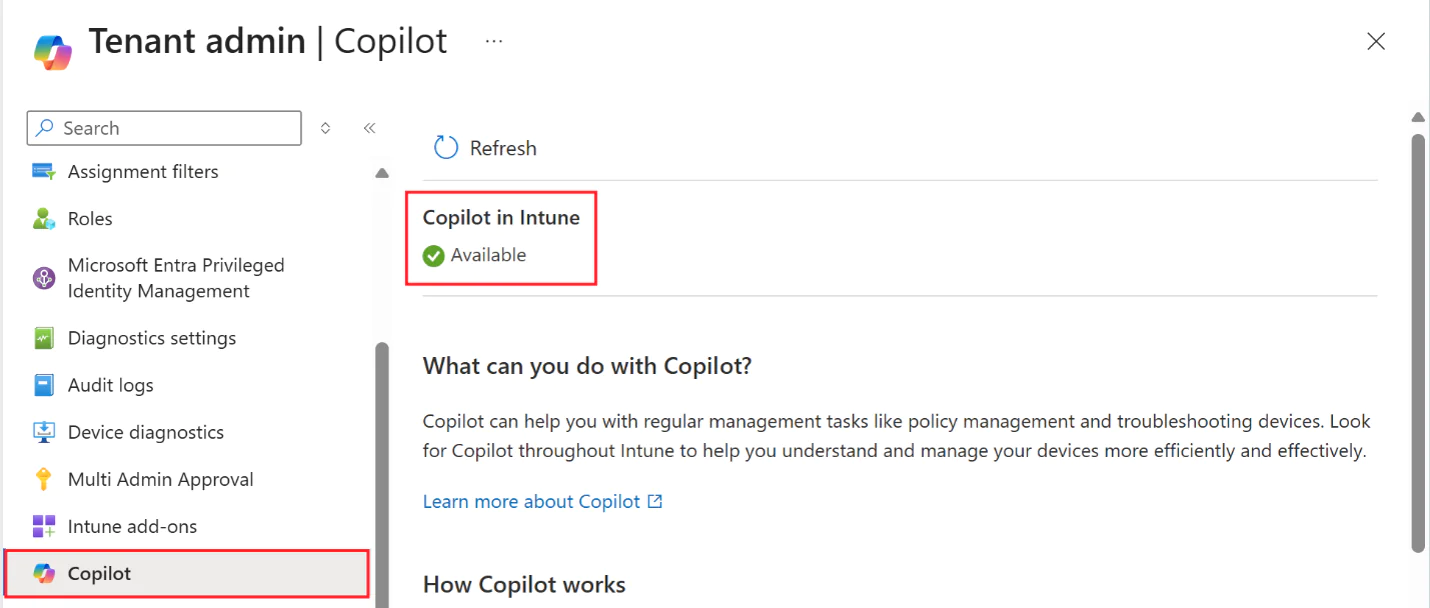
Intune in 2026 is best understood through four new Security Copilot agents that are now embedded directly in the admin console. These agents do not replace IT administrators. They manage time-consuming, high-volume tasks that slow response times and drain analyst capacity.
- Policy Configuration Agent: Translates your organization’s compliance requirements into Intune configuration profiles. An admin describes the requirement in plain language (‘all contractor devices must encrypt at rest and block USB storage’) and the agent generates the correct policy and flags conflicts with existing settings before deployment.
- Change Review Agent: Assesses proposed policy changes before they achieve production. Simulates the impact across your device inventory, identifies affected device groups, and flags any changes that could break compliance baselines or reduce user productivity.
- Device Offboarding Agent: Identifies devices that are stale, unmanaged, or ready for retirement based on activity, compliance status, and enrollment age. Generates a removal report and automates the offboarding workflow with admin sign-off.
- Vulnerability Remediation Agent: Continuously scans enrolled endpoints against current CVE feeds and Microsoft Defender vulnerability data. Prioritizes remediation by device risk score and generates ticket-ready remediation steps for the IT team.
Licensing note: Security Copilot agents in Intune require either a Microsoft 365 E3/E5/Business Premium base license with Intune included, or a standalone Intune license. E5 tenants receive Security Copilot SCU capacity at no additional cost starting April 20, 2026 (rolling out tenant by tenant through June 30, 2026). Non-E5 organizations can purchase Security Compute Units at $4 per SCU-hour.
For companies managing large device fleets, these Intune updates can reduce repetitive endpoint management work, improve policy consistency, and help IT teams respond faster to device risk without adding more manual review cycles.
How Teams AI Turns Meetings and Conversations into Action Items
The Teams updates in 2026 center on making AI a participant in the meeting itself, not just a note-taker afterward. The Facilitator agent (now generally available) is the most practical of these, but it operates within a broader set of collaborative AI capabilities worth understanding separately.
- Facilitator (GA): Joins Teams meetings automatically to generate agendas, capture decisions, assign follow-ups, and flag unresolved issues. Unlike automatic transcription, Facilitator structures the output into a usable meeting record rather than a raw transcript dump.
- Channel AI agents: Teams channel agents draft weekly status reports, compile insights from channel conversations and linked meetings, and answer questions from channel members in natural language. Useful for large cross-functional projects where context is spread across weeks of conversation.
- Knowledge Agent: Tags and organizes project files across SharePoint and Teams channels. Produces stakeholder-ready project summaries on demand without requiring a human to manually compile them.
- Copilot Chat for Teams (Wave 1 2026 update): Copilot Chat now draws on Microsoft Graph signals, CRM data via Federated Connectors, and Teams conversation history simultaneously. A sales rep asking, ‘What do I need to know before my call with Contoso?’ gets a brief that pulls from Dynamics 365, recent email threads, and the last Teams meeting with that contact, all in one response.
For organizations still treating Teams Copilot as an optional add-on, the Wave 1 2026 release changes the cost-benefit calculation. The Facilitator alone reduces post-meeting administrative work significantly. Organizations with high meeting volume and distributed teams see the clearest ROI.
Teams AI becomes most valuable when it turns conversations into action, helping sales, project, and leadership teams reduce follow-up gaps and recover time lost in meeting administration.
Why Copilot ROI Depends on Clean, Governed Data
Before addressing best practices, it is worth naming the prerequisite that determines whether all the above deliver’s value: data quality and governance.
Microsoft 365 Copilot draws on Microsoft Graph, which means it surfaces whatever data exists in your SharePoint, OneDrive, Teams, and Exchange environment. Organizations that deploy Copilot on top of unstructured, ungoverned data do not get better outputs. They get faster access to noise. The three governance steps that consistently separate high-ROI Copilot deployments from low-ROI ones are:
- Microsoft Purview sensitivity labels before Copilot enablement: Labels tell Copilot what it can and cannot reference. Without them, the system may surface confidential HR or legal data in response to a broadly scoped query from an unauthorized user.
- SharePoint and OneDrive cleanup: Copilot retrieves content based on relevance signals. Stale, duplicate, and unlabeled files generate lower-quality responses and increase the risk of surfacing outdated information in AI-generated outputs.
- Agent 365 enrollment before scaling agents: Every agent you deploy should be registered in Agent 365 before going to production. This gives administrators real-time visibility into what the agent can access, what actions it has taken, and whether its behavior has drifted from the intended configuration.
With these foundations in place, the standard best practices apply adopt Copilot progressively across departments (starting with highest administrative burden roles), enforce Zero Trust, manage all endpoints through Intune, and run structured onboarding rather than self-service rollouts.
Copilot ROI depends less on enabling the tool quickly and more on whether employees can trust the answers it produces, whether sensitive data stays protected, and whether adoption can be measured over time.
You may also like: How to Integrate Multiple Data Sources in Power BI
What These Microsoft 365 Updates Mean for Enterprise AI Readiness
The 2026 Microsoft 365 suite reflects a clear trend: AI and security are central to enterprise productivity. Organizations that adopt these Microsoft 365 Copilot 2026 updates can reduce operational overhead, enhance decision-making, and improve collaboration at scale. As Copilot becomes more capable, and security frameworks more intelligent, the potential for digital transformation within Microsoft 365 continues to expand.
Microsoft 365 in 2026 is not just a collection of tools, it is a platform for innovation, security, and productivity that empowers businesses to thrive in an increasingly complex digital landscape.
The organizations that benefit most from Microsoft 365 Copilot in 2026 will not be the ones that enable every new feature first. They will be the ones that prepare governance, licensing, data quality, and adoption plans before expanding AI across the workplace.
Ready to Configure Microsoft 365 Copilot for Your Organization?
AlphaBOLD helps enterprises plan, license, and govern Microsoft 365 Copilot deployments , from Purview sensitivity labeling to agent governance with Agent 365. We work with organizations on E3 and E5 to build a Copilot foundation that delivers measurable ROI from day one.
Request a ConsultationConclusion
The biggest Microsoft 365 shift in 2026 is not just that Copilot is becoming more capable. It is that Copilot is becoming more connected, more autonomous, and more deeply embedded in everyday business workflows.
That creates a clear opportunity for organizations, but also a clear risk. If Copilot agents can access business data, trigger workflows, summarize sensitive information, and support decisions across Teams, Outlook, SharePoint, Intune, and connected systems, then governance cannot be treated as a post-launch activity.
The organizations that see the strongest ROI from Microsoft 365 Copilot will not be the ones that enable every new feature first. They will be the ones that prepare the foundation first: clean data, sensitivity labels, agent governance, licensing clarity, endpoint controls, and adoption measurement.
For business leaders, the takeaway is simple: Microsoft 365 Copilot is no longer only a productivity tool. It is becoming an operating layer for enterprise work. The question is whether your Microsoft 365 environment is ready to support that shift safely, measurably, and at scale.
FAQs
Microsoft Copilot responds to prompts from individual users. It summarizes, drafts, and retrieves on demand. A Copilot Agent is configured to operate autonomously on predefined triggers and rules, completing multi-step workflows without a user initiating each action. Agents are built using Agent Builder or Copilot Studio and managed through Agent 365. The distinction matters for governance: agents have persistent permissions and take actions on your behalf, which require formal registration and audit logging before production deployment.
From April 20, 2026, Security Copilot is included in Microsoft 365 E5 and E7 subscriptions. E5 tenants receive 400 Security Compute Units (SCUs) per month per 1,000 paid E5 licenses, capped at 10,000 SCU, rolling out tenants by tenant through June 30, 2026. Organizations on E3 or Business Premium can purchase Security Copilot capacity standalone at $4 per SCU-hour. The four Intune agents (Policy Configuration, Change Review, Device Offboarding, Vulnerability Remediation) consume SCUs and require either E3/E5 with Intune or a standalone Intune license.
Agent 365 is Microsoft’s centralized management layer for all Copilot agents deployed across your Microsoft 365 environment. It provides a unified inventory of agents, showing what each one can access, what actions it has taken, and whether it has been authorized by the appropriate admin. As of the April 2026 update, it is the recommended starting point before deploying any agents at scale. Organizations that skip Agent 365 setup and deploy agents broadly risk creating unmanaged access paths into sensitive data. Think of it as the equivalent of a firewall policy review before opening ports.
Three steps consistently separate high-ROI Copilot deployments from low-ROI ones: First, apply Microsoft Purview sensitivity labels across SharePoint, OneDrive, and Exchange before enabling Copilot. Without labels, Copilot may surface confidential data in response to broad queries from users who lack appropriate authorization. Second, remove stale and duplicate files from SharePoint and OneDrive. Copilot retrieves content based on relevance signals, and unstructured environments generate lower-quality, higher-risk outputs. Third, register all agents in Agent 365 before production deployment. This applies even to simple agents built in Agent Builder.
Business leaders should prepare by treating Copilot as an enterprise AI program, not just a productivity tool rollout. That means aligning IT, security, operations, and department leaders around four areas: data readiness, access governance, licensing value, and adoption measurement. Before scaling Copilot agents across Teams, Outlook, SharePoint, Intune, and connected business systems, organizations should confirm that sensitive data is labeled, stale content is cleaned up, agent permissions are controlled, and success metrics are defined.
A focused Copilot deployment covering governance setup, sensitivity labeling, user onboarding, and baseline measurement typically takes 6 to 10 weeks with a structured partner engagement. Organizations that skip governance preparation and run self-service rollouts see lower adoption rates and higher burden of support. AlphaBOLD’s Copilot implementation engagements follow Microsoft’s recommended three-phase approach: baseline measurement before deployment, 90-day activation tracking, and 6-month outcome surveys to build a defensible ROI case.