Microsoft Fabric’s Advanced Data Security Features for Enterprise-Level Protection

Table of Contents
Introduction
Enterprise data environments are becoming more complex, with information spread across multiple systems, users, and analytics layers. In this context, Microsoft Fabric data security is not just about protecting data; it is about maintaining control, visibility, and trust across the entire data lifecycle.
Many organizations assume built-in security features are enough. In reality, gaps emerge at the configuration level, as in access control, data classification, or monitoring. These gaps lead to overexposed datasets, inconsistent governance, and compliance risk.
Microsoft Fabric addresses this by combining analytics workloads with integrated security and governance in a single platform. Built on Microsoft Azure, it brings together identity management, encryption, policy enforcement, and compliance support in one environment. As of May 2026, Fabric closed one of its largest remaining gaps with the general availability of OneLake Security, native, fine-grained, cross-engine access control built directly into the data lake.
This blog covers every core Microsoft Fabric security capability, what changed with the 2026 OneLake Security and Purview updates, where implementations typically go wrong, and what to do about it.
What's New: OneLake Security Reaches General Availability (May 2026)
OneLake Security is now generally available, and it’s the most significant Fabric security update since launch. It’s a fine-grained access control model built natively into OneLake storage, enforced at the item, folder, table, or row/column level. Unlike workspace-level permissions, this security travels with the data. Whether a user queries data through a Spark notebook, views it in a Power BI report, explores it through a Fabric data agent, or opens it in Microsoft Excel, they see only what they’re permitted to see.
What rolled out with GA:
- Enabled by default: every newly created item has OneLake Security on from creation. Existing items are being auto-upgraded on a rolling basis and will be completed by the end of May 2026, without changing current user permissions.
- RLS and CLS at role creation: a new wizard-style role creation flow lets admins author row-level and column-level security policies at the same time they create the role, with inline validation that catches rule errors before they ship.
- ReadWrite permissions: users can now be granted safe write access to OneLake, not just read.
- Broader reach: cross-region shortcuts, workspace private link support for all workloads except Power BI, and OneLake Security support for Mirrored Databases.
- Granular admin APIs: new REST APIs support single-role management for programmatic governance at scale.
Alongside OneLake Security, Microsoft Purview Insider Risk Management extended its risk-detection coverage from Power BI to Fabric Lakehouses. It adds ready-to-use risk indicators for risky behavior such as sharing lakehouse data outside the organization, plus a new quick-start policy for the Data Theft rule. Purview’s security insights are also consolidating into the OneLake Catalog’s Govern tab, giving admins a single place to view governance and security posture instead of switching between the Purview hub and Fabric.
If your organization has existing Fabric workspaces, OneLake Security is being turned on for you, on Microsoft’s timeline, whether or not you’ve reviewed what the default roles will allow. That’s worth a proactive audit, not a wait-and-see approach.
What are The Core Security Features of Microsoft Fabric?
Microsoft Fabric data security includes built-in security and governance controls that help organizations manage access, protect sensitive data, and enforce policy across analytics workloads. These capabilities are tightly integrated with identity, access, and data-level security mechanisms.
Identity and Access Management:
Microsoft Fabric integrates with Microsoft Entra ID (formerly Azure Active Directory) to provide centralized identity and access control across the platform. This allows organizations to enforce consistent authentication and authorization policies for all users and services.
It supports enterprise-grade access controls through:
- Single Sign-On (SSO): Users can access Fabric resources using existing organizational credentials without repeated logins
- Multi-Factor Authentication (MFA): Adds an additional verification layer to reduce unauthorized access risk
- Conditional Access: Policies can restrict or allow access based on user identity, location, device state, and risk signals
Role-Based Access Control (RBAC) ensures that users can access only what they need. Permissions can be assigned at different levels, including workspace roles such as Admin, Member, Contributor, and Viewer. This aligns with the principle of least privilege, though enforcement depends on how roles are configured.
Row Level Security (RLS) allows control over data visibility within datasets. It restricts access to specific rows based on user attributes, so a single report can serve multiple users while showing only relevant data. This is widely used for scenarios like regional reporting or department-level data access.
It is now configurable at the time of role creation, thanks to the OneLake Security GA update above.
Comprehensive Data Encryption:
Microsoft Fabric applies encryption at both rest and in transit to protect data across its workloads. These controls are inherited from and aligned with Microsoft Azure’s security model.
Data at rest is encrypted using AES-256, which is the standard across Azure storage services. This applies to data stored in OneLake, warehouses, and other Fabric-managed storage layers.
Key management is handled through Azure-managed encryption by default, with support for customer-managed keys (CMK) via Azure Key Vault. However, CMK support in Fabric depends on specific workloads and configurations, so it is not universally available across all components.
For data in transit, Fabric enforces TLS 1.2 or higher encryption. This ensures that data moving between services, users, and endpoints is protected against interception.
- Encryption at rest (AES-256): Secures stored data across Fabric storage layers
- Encryption in transit (TLS 1.2+): Protects data during communication between services
- Key management options: Azure-managed keys by default, with selective support for customer-managed keys
- Additional protection layers: Azure infrastructure encryption may provide an extra encryption layer in certain scenarios, depending on the service configuration
One correction to note: “double encryption” is not a Fabric-specific feature exposed as a standard setting. It exists at the Azure infrastructure level and may apply depending on how the underlying services are configured, rather than as a direct Microsoft Fabric data security control.
You may also like: Warehouse vs Lakehouse in Microsoft Fabric: Key Differences
Data Loss Prevention and Governance:
Microsoft Fabric integrates with Microsoft Purview to provide data classification, protection, and governance across analytics workloads. These capabilities help organizations identify sensitive data, apply controls, and maintain visibility across the data lifecycle.
- Sensitivity labels: classify datasets, reports, and files by confidentiality; labels persist with the data and can enforce access restrictions or encryption.
- Data discovery and classification: identify sensitive information types (financial, health, PII) across connected sources. Automated detection is built in, but enforcement (e.g., blocking sharing or requiring extra authentication) depends on how DLP policies are configured in Purview and Microsoft 365.
- Insider risk detection, extended to Lakehouses: Purview Insider Risk Management now covers Fabric Lakehouses in addition to Power BI, with ready-made indicators for risky sharing behavior and a quick-start Data Theft policy.
- Data catalog and lineage: a searchable inventory of data assets plus lineage tracking from source through transformation to reporting. It is now surfaced alongside security insights in the OneLake Catalog’s Govern tab, supporting impact analysis, auditing, and compliance work in one place.
You may also like: Everyone’s Losing Their Minds Over Dataverse + Fabric.
Network Security and Isolation:
Microsoft Fabric uses network-level controls from Microsoft Azure to limit exposure and manage secure access to data and services. These controls help organizations restrict connectivity and align with internal security policies.
- Private endpoints: access underlying data services via private IP rather than the public internet; availability varies by workload. It now includes workspace private link support for all workloads except Power BI as of the May 2026 update.
- Firewall and IP restrictions: limit access to approved IP ranges or corporate networks.
- Tenant isolation: logical separation of data, identities, and access policies between organizations within Entra ID.
- Regional data residency: data stored in selected geographic regions to support data sovereignty requirements.
Fabric doesn’t manage every aspect of network isolation independently. These capabilities are largely inherited from Azure and depend on how the environment is configured and governed.
Wisely choose which Fabric security controls to turn on
AlphaBOLD's certified Fabric specialists run a structured security assessment of your actual workspace configuration and provide you with a prioritized list of what to fix first.
Request a DemoAuditing and Monitoring:
Fabric provides built-in activity tracking across workspaces to support compliance, security investigations, and operational oversight.
- Audit logging: tracks data access, sharing, permission changes, and admin operations, integrated with Purview audit capabilities through Microsoft 365.
- Security monitoring via integration: Fabric doesn’t run standalone real-time security monitoring. Organizations typically pair it with Microsoft Sentinel or Azure Monitor for anomaly detection and event correlation.
- Admin portal reporting: workspace usage, dataset activity, and sharing behavior reports help admins spot unusual patterns, though these are operational reports rather than a full security monitoring system.
You may also like: Microsoft Fabric’s ROI: Cost-Saving Features and Benefits
Advanced Threat Protection:
Fabric relies on Azure security capabilities to detect and respond to risky activity such as unusual login patterns, abnormal data access, repeated authentication failures, or access from unexpected locations. Fabric itself isn’t a standalone threat detection engine; deeper analytics and enforcement are handled by Azure security services and Microsoft Defender for Cloud Apps, which extend CASB-style visibility into SaaS usage, shadow IT, and policy enforcement across connected cloud applications.
Secure Collaboration:
Sharing in Fabric is permission-based, not open by default. Users share reports, datasets, or workspaces with specific people or groups, governed by role assignments and tenant policy. With OneLake Security now GA, that governance follows the data itself across every engine that touches it, including Excel.
For external collaboration, Fabric uses Entra ID B2B guest access: external users authenticate with their own organizational credentials. They are subject to domain restrictions and sharing policies set by the hosting tenant.
Where Microsoft Fabric Data Security Implementations Go Wrong
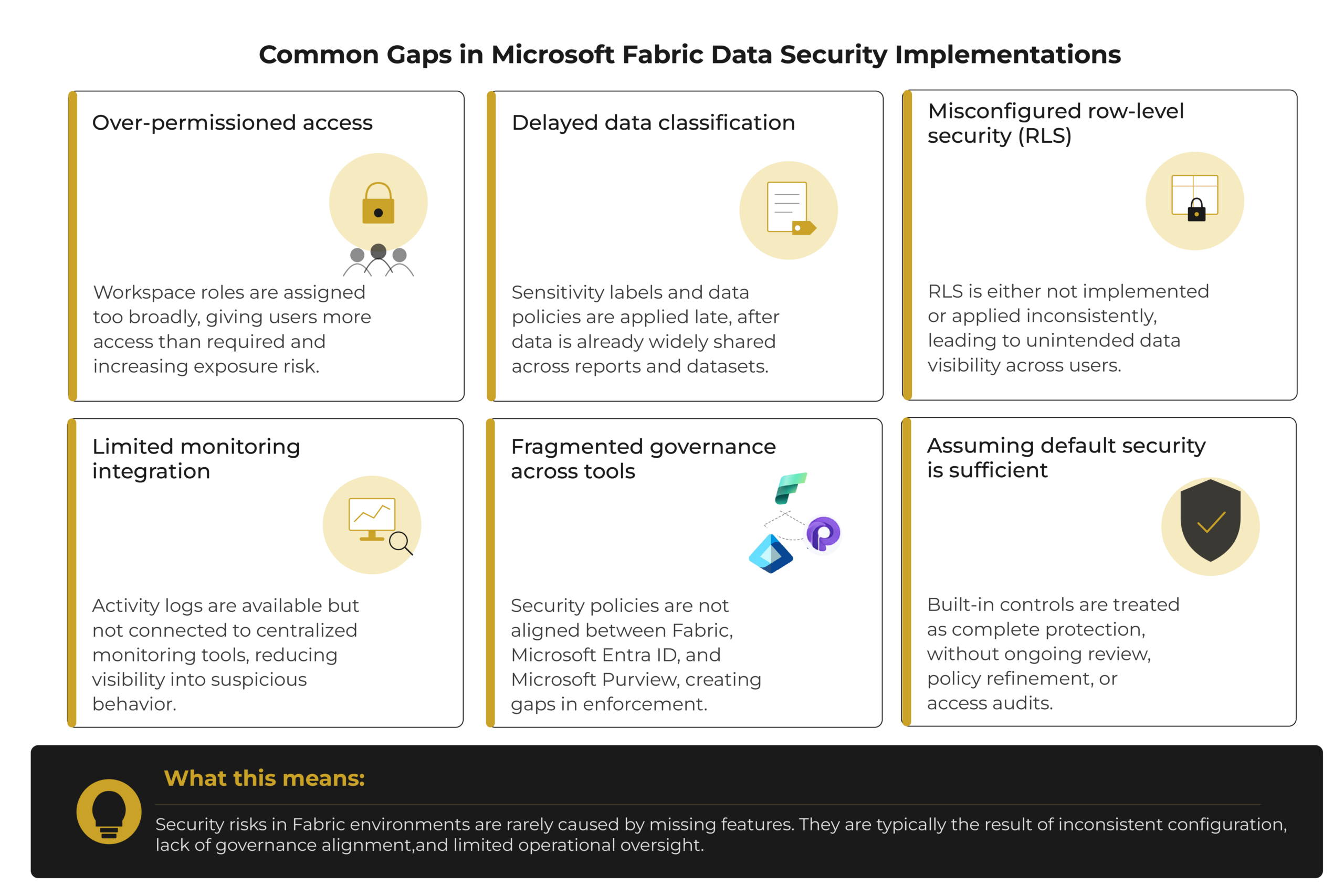
Even with strong built-in capabilities, Microsoft Fabric data security often falls short due to its implementation. The most common failure points AlphaBOLD sees in the field:
- Default roles left unreviewed after the OneLake Security auto-upgrade
- Sensitivity labels applied inconsistently across teams
- Audit logs collected but never connected to a SIEM
What are the Best Practices for Implementing Security in Microsoft Fabric?
Security best practices in Fabric combine platform capability with organizational discipline — no single control should carry the weight alone.
- Layered security model: combine identity, data protection, and network controls so no single point of failure exposes the whole environment.
- Governance and policy management: define security policies and access rules, and review them on a set schedule, not reactively.
- Least privilege access: assign only the roles and permissions a user actually needs, and revalidate regularly to prevent permission drift.
- Audit the OneLake Security auto-upgrade: don’t assume the default roles applied during rollout match your actual access requirements. Review them before trusting them.
- SIEM integration: forward Fabric audit logs to Microsoft Sentinel or an equivalent platform so anomalies are actually monitored, not just logged.
- Security awareness and incident response: train users on safe data handling and define clear escalation paths before an incident, not during one.
Get On-Demand Microsoft Fabric Security Expertise
AlphaBOLD's certified Microsoft Fabric specialists handle the audits, security reviews, and complex implementation work, including OneLake Security role design and Purview policy configuration.
Request a DemoConclusion
Microsoft Fabric provides enterprise-grade security through layered controls spanning identity, access, encryption, and monitoring, leveraging deep integration with Microsoft’s broader security ecosystem. With OneLake Security now generally available and Purview’s insider risk coverage extended to Fabric Lakehouses, the platform’s native security posture is stronger in 2026 than it was even a few months ago.
But the platform closing gaps doesn’t close yours. Security effectiveness still depends on governance, defined policy, user awareness, and continuous management of access and configuration. Fabric’s security architecture continues to evolve alongside Azure and Microsoft’s security stack, and management must keep pace.
FAQs
It ships with baseline security from Azure, but most real protection depends on how identity, access, and policy are configured. As of May 2026, on how you configure OneLake Security roles.
OneLake Security reached general availability in May 2026. It’s enabled by default on all new items, and existing items are being auto-upgraded on a rolling basis through the end of May 2026. It doesn’t automatically change existing user permissions, but admins should review the default roles it creates rather than assume nothing has changed.
Yes. As of the 2026 update, Purview Insider Risk Management extends beyond Power BI to Fabric Lakehouses, with ready-to-use risk indicators and a quick-start Data Theft policy for detecting risky sharing behavior.
No, data is distributed across regions based on workspace settings and Azure data residency options.
Yes, most security and compliance controls are managed at the tenant level through Microsoft Entra ID and Microsoft Purview.
It provides audit and activity data, but formal compliance reporting usually depends on Microsoft Purview and Microsoft 365 compliance tools.