Power BI in 2026: What Enterprise Teams Need to Prepare For

Table of Contents
Introduction
2026 has been a pivotal year for Power BI. Microsoft has accelerated its release cadence significantly, shipping consequential updates every month as part of the broader Microsoft Fabric platform evolution. For enterprise data teams and business leaders who rely on their output, the pace of change demands a structured review of what has shipped, what it changes architecturally, and what it means for how your organization operates.
This blog covers the most significant updates from the January through May 2026 release cycle, drawn directly from Microsoft’s official feature summaries. As a Microsoft Solutions Partner specializing in Data and AI, AlphaBOLD works with organizations to operationalize these capabilities and not just track them. The updates covered here are ones we are actively implementing with clients.
1. Copilot and AI
Copilot capabilities in Power BI have progressed materially across every release this year, moving from limited preview features to capabilities that are now embedded in day-to-day reporting and analysis of workflows.
Copilot Summary Shortcuts (May 2026):
The May 2026 release introduced Copilot summary shortcuts, giving report consumers faster access to AIgenerated narrative summaries without needing to interact with the full Copilot pane. This is a significant usability improvement for organizations that have embedded Power BI reports in business workflows; executives and functional leads can surface a structured summary of key insights without navigating away from the visual context.
Copilot Narrative Visual, Embedding in Customer Applications (Preview, May 2026):
The Copilot Narrative visual can now be embedded in external applications in preview. For organizations building internal portals, customer facing dashboards, or ISV products on top of Power BI Embedded, this enables AIgenerated natural language summaries to travel with the report rather than remaining confined to the Power BI service.
Expanded Copilot in Power BI Mobile (April 2026):
Prior to the April release, Copilot on mobile was limited to summaries and preset prompts. The April 2026 update enabled full conversational interaction with reports on mobile devices meaning analysts and decisionmakers can ask follow-up questions, explore data contextually, and receive natural language responses from their phones or tablets.
Copilot Pane UX Refresh (March 2026):
The March 2026 release unified the Copilot pane experience across Reports and Apps to match the standalone Copilot interface, including a revised prompt guide, persistent chat controls, and an updated feedback mechanism that lets users attach diagnostic context to submissions. This is a governance and support improvement, shared diagnostics allow partner and Microsoft support teams to investigate Copilot output issues with appropriate conversational context.
AlphaBOLD’s perspective: Copilot’s progression in 2026 is moving from a demoworthy feature to a workflow dependency. Organizations that have not yet configured AIready semantic models with defined business terminology and governance rules are accumulating technical debt that will limit Copilot’s reliability at scale.
You may also like: AIDriven Predictive Analytics via Power BI Insights
2. Reporting High Impact Features Now Generally Available
Several capabilities that enterprise teams have been piloting in preview are now Generally Available (GA) in 2026, meaning they are fully supported, production ready, and relevant for governance planning.
Visual Calculations and Custom Totals, GA (May 2026):
Visual calculations allow report authors to write running sums, moving averages, percent-of-parent, and other visuals coped expressions directly inside a chart, without creating additional DAX measures in the semantic model. This has been one of the most requested Power BI features in the community for years.
The practical benefit for enterprise data teams is significant: reportlayer calculations can now be handled by authors without requiring changes to the semantic model, which reduces the load on data engineering resources and accelerates iteration cycles. Custom totals (None and Average) reaching GA in the same release rounds, out the financial reporting use case, where average and suppressed subtotals are standard requirements.
Translytical Task Flows GA (March 2026):
Translytical task flows reached General Availability in March 2026. This feature enables report consumers to take action from within a Power BI report, submitting data, triggering workflows, or updating records without leaving the analytical context. For organizations running Power BI alongside Dynamics 365 or other Microsoft business applications, this closes the loop between insight and action in a single interface.
Direct Lake in OneLake GA (March 2026):
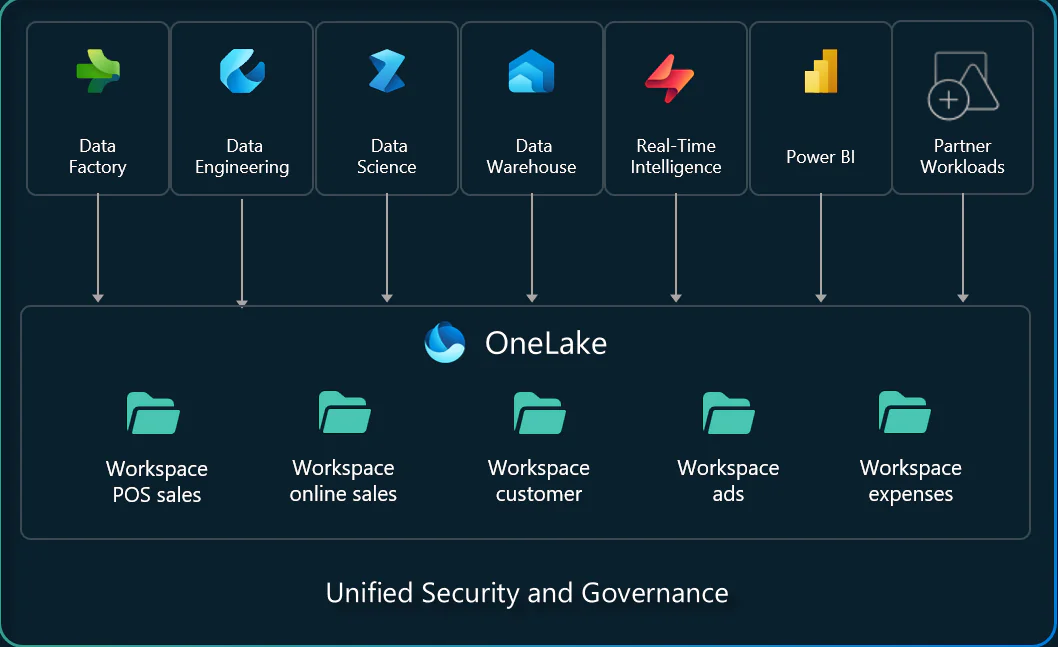
Direct Lake mode for semantic models stored in OneLake reached General Availability in March 2026. This is an architecturally significant release: Direct Lake eliminates the need to import or duplicate data into a separate Power BI model, allowing the semantic layer to query OneLake data directly at query time. For largescale data environments, this reduces storage overhead, simplifies refresh management, and ensures that reports always reflect the current state of the data lake.
Version History in Power BI Desktop (May 2026):
Power BI Desktop now maintains version history for reports. This addresses a longstanding governance gap where report files existed as unmanaged binary artifacts with no audit trail. Version history aligns Power BI with software development best practices and is a prerequisite for organizations that need to demonstrate change management controls over their analytical environment.
AlphaBOLD’s perspective: The combination of Direct Lake GA, version history, and the PBIR format transition (covered below) represents the most consequential shift in Power BI’s enterprise architecture in several years. Organizations should be reviewing their current report development and deployment processes against these changes now.
3. PBIR Format The Default Has Changed
Beginning May 2026, Power BI Desktop defaults to the PBIR (Power BI Report) format for all new reports. This replaces the legacy PBIX format as the standard output.
The architectural difference is meaningful. PBIX stored the entire report definition in a single binary file, making it opaque to source control systems and difficult to audit or merge. PBIR stores report definitions as modular, human readable JSON components in a folder structure, enabling Git to show exactly which element of a report changed and when.
For enterprise data teams operating under change management requirements, this is a significant governance improvement. Reports can now be version controlled with the same discipline applied to application code. Existing PBIX files are not immediately deprecated, but any team still treating Power BI files as unmanaged binary assets is accumulating technical debt that will become increasingly difficult to resolve.
4. Modeling DAX User Defined Functions and Direct Lake Extensions
DAX UserDefined Functions, Preview (MarchApril 2026):
DAX userdefined functions (UDFs) entered preview in March 2026 and continued development through April. UDFs allow data model authors to define reusable DAX logic as named functions that can be called across measures and calculated columns, similar to function definitions in a programming language.
For teams maintaining large, complex semantic models, this reduces duplication, improves readability, and makes models easier to maintain and audit. It is a meaningful step toward treating the semantic model as managed, testable code rather than a collection of adhoc expressions.
Direct Lake Calculated Columns and Tables Preview (April 2026):
April 2026 introduced preview support for calculated columns and tables within Direct Lake semantic models. Previously, calculated columns required Import mode, which meant Direct Lake models were architecturally constrained in how they could be extended. This preview removes that limitation, broadening the range of analytical patterns that can be built on top of OneLake without forcing a mode switch.
5. Data Connectivity, Redesigned Get Data Experience
The May 2026 release introduced a preview of the redesigned Get Data experience in Power BI Desktop. The new experience provides a unified interface for discovering and connecting to data sources across Microsoft Fabric, Power BI Desktop, and Excel, replacing the legacy dialog with a more accessible and consistent flow.
For enterprise environments with multiple data source types Fabric lakehouses, onpremises databases, cloud services this streamlines the onboarding step for new datasets and reduces friction in data model development. The redesign also surfaces Fabricnative sources more prominently, reinforcing the platform’s direction toward Fabric as the primary data infrastructure layer.
6. Deprecations and Discontinuations to Plan For
Several platform changes in 2026 require action from enterprise teams. These are not optional updates they involve the removal of legacy capabilities that may currently be in production use.
- Legacy File Picker in Power BI Desktop Deprecated as of the April 2026 (SU04) release. The updated OneDrive/SharePointintegrated file picker is now the default and cannot be toggled off.
- QuickBooks Online Connector, Retired as of March 2026. Organizations using this connector must migrate to an alternative connectivity approach.
- SCOM Management Packs for SSRS, PBIRS, and SSAS, officially deprecated as of February 2026. Organizations using System Center for monitoring these components should begin planning their transition.
- Scorecard Hierarchies, Removed from Power BI Scorecards as of April 15, 2026. Teams relying on multilevel hierarchical scorecard views should review their current scorecard architecture.
What This Means for Your Organization
The 2026 release cycle reflects a consistent direction from Microsoft: Power BI is being engineered to behave less like a standalone BI tool and more like a governed, AIcapable layer within a broader data platform. The PBIR format, Direct Lake GA, DAX UDFs, and version history collectively push Power BI toward software engineering maturity standards. The Copilot updates push it toward embedded intelligence that business users can rely on without technical mediation.
For organizations that have not yet structured their Power BI environment around governance, semantic model quality, and Fabric integration, the 2026 updates represent both an opportunity and a deadline. These capabilities are most valuable and most reliable when the underlying data foundation is clean, governed, and aligned with the Microsoft Fabric architecture.
AlphaBOLD works with enterprise teams as a Microsoft Solutions Partner to help plan, implement, and operationalize these changes across the full Power BI and Fabric stack. If your organization is navigating any of the updates in this post, we are ready to help you assess readiness and move forward with a clear implementation plan.
FAQS
No. Existing PBIX files continue to function and are not immediately deprecated. However, all new reports created in Power BI Desktop from May 2026 onward default to PBIR. Microsoft recommends beginning a planned migration for teams that intend to use source control, version history, or CI/CD pipelines with their reports.
Copilot in Power BI requires a Microsoft Fabric capacity (F64 or higher, or equivalent Premium capacity), a Fabricenabled workspace, and a tenant administrator having enabled Copilot features. For optimal results, semantic models should be configured as AIready with defined relationships, businessfriendly field naming, and AI instructions set within the model.
Import mode copies data into the Power BI model for fast query performance but introduces refresh latency. DirectQuery queries the source system at query time, which is realtime but can be slow at scale. Direct Lake queries data stored in OneLake’s Delta Parquet format directly without importing while maintaining performance closer to Import mode. It eliminates refresh cycles for data already in OneLake, making it the preferred mode for Fabricnative architectures.
DAX userdefined functions (UDFs) allow semantic model authors to write reusable DAX logic as named, callable functions. Rather than duplicating complex expressions across dozens of measures, authors define the logic once and reference it wherever needed. This benefits data teams maintaining large or complex models it reduces maintenance overhead, improves consistency, and makes models easier to review and audit.
The native QuickBooks Online connector was retired as of March 2026. Organizations can maintain connectivity through ODBC or by extracting QuickBooks data into a staging layer (such as Azure Data Factory or a Fabric Data Pipeline) before connecting to Power BI. AlphaBOLD can assess your current data flow and recommend the most appropriate migration path.
Power BI Pro and Premium peruser licenses remain available and continue to function independently of a full Fabric capacity. However, the most significant 2026 capabilities including Direct Lake mode, full Copilot functionality, and OneLakebased governance require a Microsoft Fabric capacity. Organizations looking to fully leverage the 2026 updates should be evaluating their licensing posture accordingly.