

Table of Contents
Introduction
This article peels back the layers of Power BI’s mobile experience. Whether you’re using Power BI in mobile for business decision-making in the boardroom, strategizing in transit, or analyzing trends over a cup of coffee, the mobile version ensures you’re not tethered to a desk to make sense of your data.
In a world where business never sleeps, the power to harness critical insights on the go has become indispensable. Power BI, Microsoft’s renowned business intelligence platform, has transcended the confines of desktop applications, now placing its rich, data-driven capabilities into the mobile sphere. Imagine the possibilities when robust analytics are as accessible as your smartphone.
We’ll walk through how this tool can fit into your fast-moving professional life, offering insights at your fingertips without getting tangled in technical jargon. Let’s embark on a journey to discover how Power BI on mobile can be more than just a tool and assess its shortcomings.
Overview of Power BI’s Mobile Platform
Power BI’s mobile platform is more than just an extension of its desktop counterpart; it’s a reimagined experience optimized for the demands of on-the-go usage. With an intuitive interface, it offers seamless access to your dashboards and reports, ensuring that critical data is never more than a tap away.
This mobility fosters a new dimension of flexibility and responsiveness, allowing professionals to stay connected to their data anytime and anywhere.
What are Power BI Mobile apps?
Microsoft’s Power BI extends its reach beyond the traditional desktop environment, offering a suite of mobile applications compatible with iOS, Android, and Windows devices. These mobile applications are designed to provide seamless access to your cloud-based and on-premises data, ensuring that critical insights are always at your fingertips, regardless of your location.
With Power BI’s mobile apps, the reports, dashboards, and apps you rely on – whether stored in the cloud through the Power BI service or locally on the Power BI Report Server – are readily accessible.
These mobile solutions boast a wide array of features that mirror many capabilities in the Power BI service. This includes the ability to view, analyze, and interact with your data dynamically, with functionalities such as cross-highlighting, cross-report drill-through, and filtering.
Additionally, advantages of Power BI mobile for managers come equipped with several unique features that enhance their usability:
- The ability to view data offline, ensuring uninterrupted access even in areas with limited connectivity.
- Report filtering based on your current geographic location, offering tailored insights on the go.
- Barcode scanning capabilities that allow you to quickly access filtered data on-site.
- An automatic slideshow feature for reports, which activates whenever the app is launched (specific to the Windows app).
Discover the Power of Data
Don't let your data sit idle. Transform it into actionable insights with Power BI. Request a demo from AlphaBOLD. today and take the first step into a data-driven future!
Request a DemoKey Features and Functionalities of Power BI Mobile
Here are some of the best key features and capabilities of Power BI in mobile.
1. Navigating and Finding Data
Power BI’s mobile application offers a range of intuitive locations to help you swiftly locate your data.
Home Page Navigation:
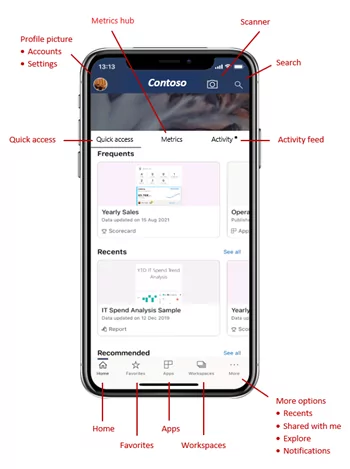
Source: https://learn.microsoft.com/en-us/training/modules/explore-power-bi-mobile-apps/2-find-your-data
Upon opening the Power BI Mobile app and logging into your account, you’re welcomed by the home page, as depicted below. This central hub grants immediate access to your most frequented or recently viewed reports, dashboards, and apps.
An activity feed keeps you informed about the latest developments in your Power BI content. The home page is designed for efficiency, with a header and an action bar that guide you swiftly to essential content or actions.
There are multiple pathways to find your content from the home page:
- Direct access is available if your content appears in the Quick Access tab; simply tap to open.
- The search icon in the header allows you to type in and locate the item you need.
- On the action bar, options like Favorites, Apps, Recents, or Shared with me lead to corresponding lists of dashboards, reports, and apps.
- Tapping Workspaces on the action bar reveals a list of workspaces housing viewable content. Selecting a workspace then provides a list of available reports and dashboards.
Once you locate the desired item, a simple tap opens it.
Utilizing the Navigation Tree:
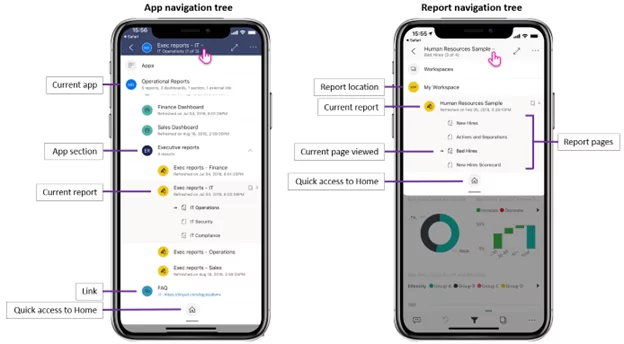
The navigation tree offers an immediate overview of your content’s location hierarchy, enabling you to navigate through content levels, explore related content, or return to the home page.
If the item in question is part of an app, the tree displays the entire app contents, including sections, links, and all relevant reports and dashboards. The tree also presents a list of all visible report pages for individual reports.
This structured approach to navigation ensures that Power BI users can effortlessly find and engage with their data, enhancing productivity and decision-making on the go.
2. Engaging with Your Data
Power BI enables you to interact with your data in various ways once you open a report in the app.
Interacting with Report Data: You can manipulate your report and its data through simple gestures. Tapping,pressing, and holding (long tapping) on report items allows you to dissect and analyze the data. The report footer offers several actionable options for the report.
Optimized Mobile Viewing and Data Interaction: Reports may contain pages optimized for mobile viewing, ensuring readability in portrait mode. For pages not optimized, they appear as in the Power BI service. You can rotate your device for a broader view or zoom in for a detailed examination.
Selecting and Highlighting Data
- Tap on a data visual to select a point. This selection affects other visuals in the report.
- Choose between single or multiple data points to observe their impact on your data. Single-select mode replaces the current selection each time you tap a data point, whereas multi-select mode allows for the aggregation of multiple selections, affecting all visuals on the page.
- Switch between these modes in the app settings.
Using Tooltips and Drilling Data
- Long tapping a data point reveals a tooltip with its values.
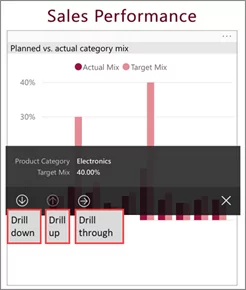
- Reports with defined hierarchies allow you to drill up, down, or through data by holding a data point and selecting the appropriate option from the tooltip.
Anomaly Detection and Focus Mode
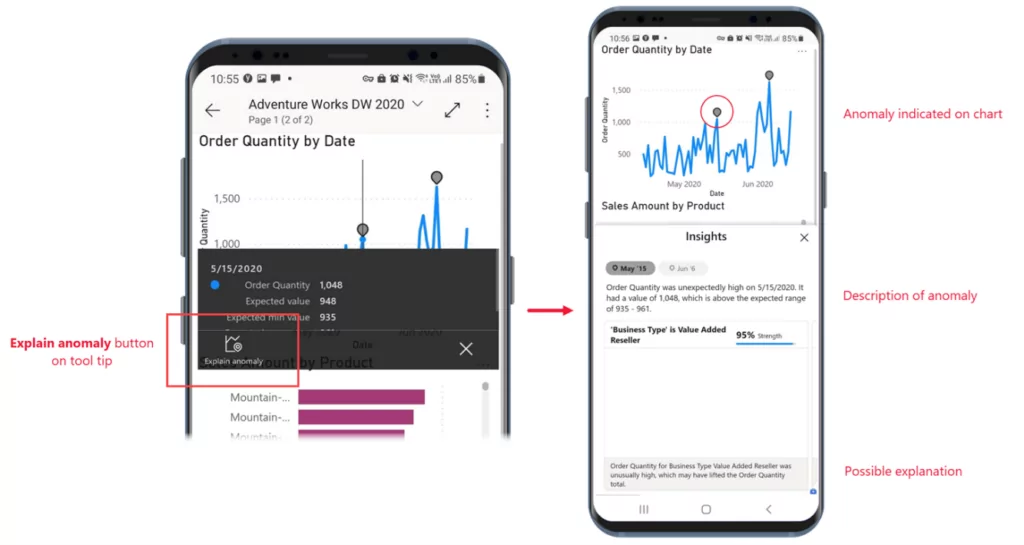
- Anomaly detection identifies unusual values and provides explanations. If enabled, the tooltip on a data point will have an “Explain anomaly” button, leading to the Anomalies pane for insights.
- Focus mode allows for an expanded view of a single visual for more detailed exploration. Actions in focus mode reflect on the overall report and vice versa.
Zooming and Filtering Data
- Use the pinch gesture to zoom in or out for a detailed view.
- Interact with filters via the filters pane, accessible through the filter icon in the report footer.
Navigating Report Pages and Actions
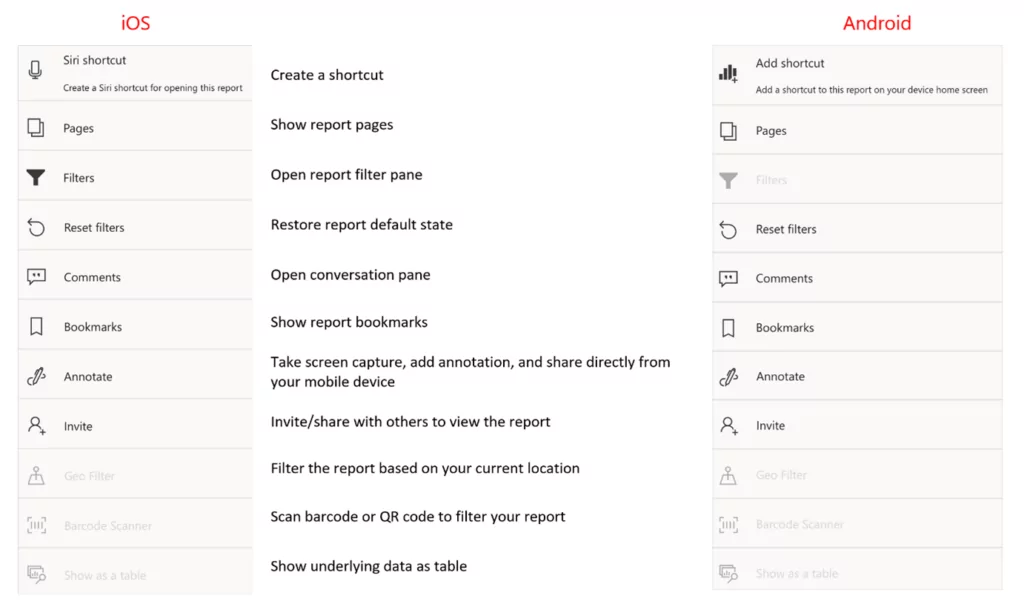
- Navigate through report pages using the down arrow, swiping motions, or the Pages icon in the report footer.
- The report footer and More options menu provide access to common report actions.
Using Bookmarks and Refreshing Data
- Bookmarks capture specific report views. While you can’t create bookmarks in the mobile app, you can use existing ones, including setting a personal bookmark as the default view.
- Refresh report data manually by pulling down on the report page.
Offline Data Viewing
- The mobile app allows offline access to previously viewed dashboards and reports, though some functionalities like filtering or sorting might be limited.
Power BI’s mobile functionalities facilitate a comprehensive and interactive experience with your data, enhancing your ability to analyze and make informed decisions.
3. Enhanced Mobile App Experience
Quick Access and Alerts: Power BI’s mobile app offers a suite of features to enhance your experience. Create shortcuts and alerts, easily share reports and dashboards, and even play reports as slideshows. The split-screen mode also allows multitasking with other apps.
Direct Access Through Shortcuts: Create shortcuts for immediate access to your frequently visited reports or dashboards. This feature is available on both iOS and Android devices.
- For iOS Users:
- Siri Voice-Activated Shortcuts: Set up Siri shortcuts by selecting the option under the More options menu. A simple voice command can open your desired report or dashboard.
- Home Screen Shortcuts: You can also add these shortcuts to your home screen for one-tap access. For details, refer to Apple support’s Shortcuts User Guide.
- For Android Users:
- Home Screen Shortcuts: Easily place shortcuts on your home screen through the More options menu.
- Quick-Access Menu: Android offers a quick-access menu through a long tap on the app launcher icon, displaying frequently viewed items.
Alerts for Crucial Data Changes:
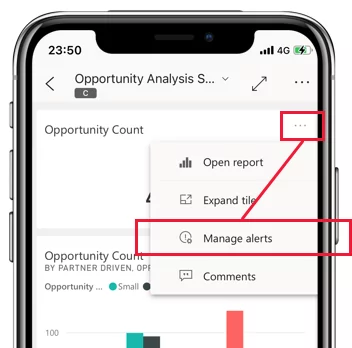
Stay informed on the go by setting up alerts for dashboard changes. These alerts are bidirectional, visible both in the mobile app and the Power BI service.
Note: Alerts can be set for single-number tiles like cards and gauges, excluding streaming data tiles.
Seamless Sharing of Reports and Dashboards: Share insights effortlessly. Apply necessary filters or bookmarks and use the Share option under More options to send a link via your chosen communication app. You can also share annotated reports directly.
Slideshow Feature for Reports: Available on Windows devices, this feature allows you to play reports as slideshows, cycling through pages or bookmarks. It’s particularly useful for kiosk-like displays.
Split-Screen Mode for Enhanced Productivity: Work on Power BI while using another app by leveraging the split-screen mode on iPads and Android tablets. Adjust screen sizes by dragging the border for optimal viewing.
Note: Check your device’s documentation for specific instructions on using the split-screen mode.
By utilizing these functionalities, Power BI ensures an efficient, flexible, and user-friendly mobile experience, empowering users to stay connected and responsive to their data needs.
4. Accessing Data in the Real World
Leveraging Mobile Capabilities for Data Access: The Power BI Mobile apps capitalize on your device’s location and scanning features, enhancing data accessibility when you’re mobile or in the field. Whether location-based data filtering or scanning QR codes and barcodes, these apps streamline data retrieval.
Geolocation-Based Report Filtering: Power BI mobile apps offer the unique ability to filter reports based on your physical location. For instance, if a report contains data specific to a city, state, or region, you can tailor the report to reflect your current geographic location.
- How to Use:
- Open the desired report in the Power BI mobile app. You’ll be prompted to allow location access if the report has geographic data.
- Upon granting permission, a pushpin icon appears.
- By tapping the pushpin, you can filter the data by city, state/province, or country/region, depending on the report’s data and your current location.
Scanning Barcodes for Filtered Data: Imagine managing inventory in a large store and needing specific product information. With the Power BI mobile app, you can simply scan an item’s barcode to access a relevant report, filtered to show the needed data.
- Procedure:
- Ensure you have access to a report with barcode data.
- When you need information about a barcoded item, open the app, select Scanner from the More options menu, and scan the barcode.
- A list of reports containing that barcode will appear. Select the report you need, and it will display data filtered to that specific barcode.
- You can continue scanning other barcodes within the same report using the barcode scanner icon in the More options menu.
- For additional information, see Scan barcodes from the mobile app to get filtered data.
Note: Head to our blog to truly understand the importance of real-time data visualizations in Power BI.
Direct Access via QR Codes: QR codes in Power BI create direct links to related information, bypassing the need to search or navigate through the app. If a colleague creates a QR code for a report or dashboard tile and shares it with you, simply scanning it with your phone’s scanner or the Power BI app provides instant access to the relevant information.
5. Tailoring Your Power BI Mobile App
The Power BI mobile app offers a range of customization options to enhance security and personalize your experience, aligning it with your preferences and requirements.
Enhance Security with Biometric Identification: Both iOS and Android versions of the Power BI apps support enhanced security measures. This involves requiring additional identification each time the app is opened or resumed from the background. For iOS devices, this could be Face ID, Touch ID, or a passcode. On Android, you have the option to use fingerprint ID as your biometric data. These security features can be activated within the app settings.
For more details, you can refer to the guidelines on securing the Power BI app with Face ID, Touch ID, passcode, or biometric data.
Customize Your User Experience: The Power BI mobile app allows you to modify a variety of settings to create a tailored experience:
- Light and Dark Mode: You can select your desired mode depending on your preference for light text on a dark background or vice versa. This can be adjusted through the Appearance option in the app settings.
- Docked Report Footer: Choose whether the report footer always remains visible or hides when not in use. This can be customized via the Docked report footer setting.
- Multi-Select Feature: Decide whether selecting a data point replaces the effects of the previous selection or accumulates the effects of multiple selections. This is adjustable through the multi-select setting.
- Refresh Button for Reports (Android Only): You can enable a refresh button on all report headers or utilize the pull-to-refresh gesture. This preference can be modified in the Report refresh setting.
To access these settings, tap your profile picture in the top left corner of the home page and then select Settings. The process is similar on both iOS and Android devices, though the settings page may appear slightly different between the two platforms.
Potential Limitations of Power BI Mobile
Power BI Mobile offers a convenient way to access and interact with dashboards on the go. However, there are certain limitations that users should be aware of. Using this Power BI mobile app limitations review for executives you can access where the mobile app lacks.
- Lack of Flexibility in Design Layouts
One of the primary limitations is the lack of flexibility in design layouts. There’s a specific design layout for phone users, but this isn’t the case for tablets. Tablets display reports in the same format as the Power BI Service, meaning that reports cannot be tailored for tablet landscape or portrait formats. Additionally, the mobile layout is designed for a generic phone model, so it’s challenging to predict how reports appear on different devices with varying screen sizes.
All formatting adjustments need to be made in the desktop view. Consequently, any changes intended solely for the mobile view, such as selecting a smaller font size for better visibility on smaller screens, are not feasible.
- Limited Map Interactivity
Another significant limitation lies in map interactivity. Although Power BI Mobile does offer features like centering or filtering reports based on the user’s current location, the interactivity with map views is considerably restricted. Users cannot perform basic actions such as selecting a group of marks simultaneously, which can hinder the overall experience when interacting with geographical data.
Power BI Mobile vs. Desktop: A Comparative Analysis
Although Power BI Desktop, Power BI Service, and Power BI Mobile Apps all serve the primary goal of providing robust business intelligence, they each bring distinct strengths to the table. Let’s delve into these differences to understand their unique features and functionalities.
Power BI Desktop
Power BI Desktop stands as the powerhouse for crafting intricate, static reports and engaging in deep data modeling. This version is specially designed for Windows systems and offers a comprehensive data analysis environment. However, it lacks the capability for real-time accessibility and does not provide instant alerts, which are signature features of the Power BI Mobile Apps.
To learn about the recent features introduced in Power BI read our recent blog: 3 New Features of Power Platform
Power BI Mobile Apps
The Power BI Mobile Apps are designed with on-the-move professionals in mind. They offer real-time access to dashboards and interactive reports, enabling data-driven decisions anywhere and anytime. This version stands out for its mobility and features like data alerts, which are crucial for staying abreast of evolving business conditions. The Power BI Mobile Apps are instrumental for those needing immediate insights and alerts, providing a level of convenience and immediacy that the desktop and online versions don’t quite match.
Comparison Table: Power BI Desktop vs. Power BI Mobile App
| Features | Power BI Desktop | Power BI Mobile Apps |
|---|---|---|
|
Real-Time Dashboards |
|
✓ |
|
Interactive Reports |
✓ |
✓ |
|
Data Alerts |
|
✓ |
|
Sharing & collaborating |
✓ |
✓ |
|
Mobile Accessibility |
|
✓ |
Conclusion
Power BI Mobile encapsulates a holistic approach to mobile business intelligence. Implementing Power BI mobile in corporate strategy can give executives and managers real-time access to data and instant alerts for evolving business conditions. Its thoughtful design, coupled with powerful features, not only meets but anticipates the needs of modern professionals. Although there are areas for improvement, especially in layout flexibility and map interactivity, the app significantly bridges the gap between data and decision-makers, ensuring that insights are always within reach, irrespective of location or time. This makes Power BI Mobile an indispensable tool in the arsenal of any data-driven professional navigating today’s fast-paced business landscape.
Lead with Data, Excel with Power BI!
Stay ahead of the curve. Discover the capabilities of Power BI Mobile with a comprehensive demo from AlphaBOLD. Request now and lead your industry with data-driven strategies.
Request a DemoExplore Recent Blog Posts