
Table of Contents
Introduction
AI is everywhere, but many teams still struggle to apply it in practical, day-to-day work. Copilot plugins address this gap by extending Microsoft Copilot inside Dynamics 365 and the Power Platform, allowing teams to connect real data, trigger actions, and automate workflows without heavy custom development. Instead of abstract AI features, copilot plugins focus on making Copilot useful where work actually happens.
I use the Power Platform daily, not just at work but also for personal projects. A coworker once mentioned the saying about the cobbler‘s kids having no shoes, not because the cobbler lacks skill, but because time runs out. I felt that firsthand when I tried to build a Copilot plugin in a single sitting.
To my surprise, it was entirely doable using Copilot’s built-in customization features. Microsoft is not trying to box users into rigid patterns. Copilot plugins are designed to encourage experimentation and make it possible to build practical, production-ready extensions without weeks of effort.
What is a Copilot Plugin?
A Copilot plugin extends what Microsoft Copilot can access or do by connecting it to real business data and actions. In practice, these plugins enable Copilot to work with information across Dynamics 365, Dataverse, the Power Platform, and external systems, helping it move beyond generic responses into operational workflows.
Historically, these extensions were commonly referred to as copilot plugins. While the term is still widely used, Microsoft now implements Copilot extensibility through clearer building blocks such as Copilot Studio, declarative agents, custom connectors, and Power Automate actions. In this article, these plugins are used as a practical shorthand for these extension patterns rather than a single product feature.
In practice, copilot plugins usually take one of two forms:
- API-based integrations: Used when Copilot needs to retrieve data from or trigger actions in external systems through governed APIs.
- Prompt-based extensions: Built using Copilot Studio or the Power Platform, allowing teams to configure Copilot behavior using natural language and low- or no-code tools.
This distinction matters because extending Copilot today is less about adding individual plugins and more about intentionally controlling how Copilot reasons, what data it can access, and which actions it is allowed to perform within enterprise systems. This approach aligns with insights from the Microsoft Work Trend Index 2025, which shows that Copilot delivers the most value when it is connected to real business data and embedded directly into day-to-day workflows.
How Do Declarative Agents Work with an API-First Approach?
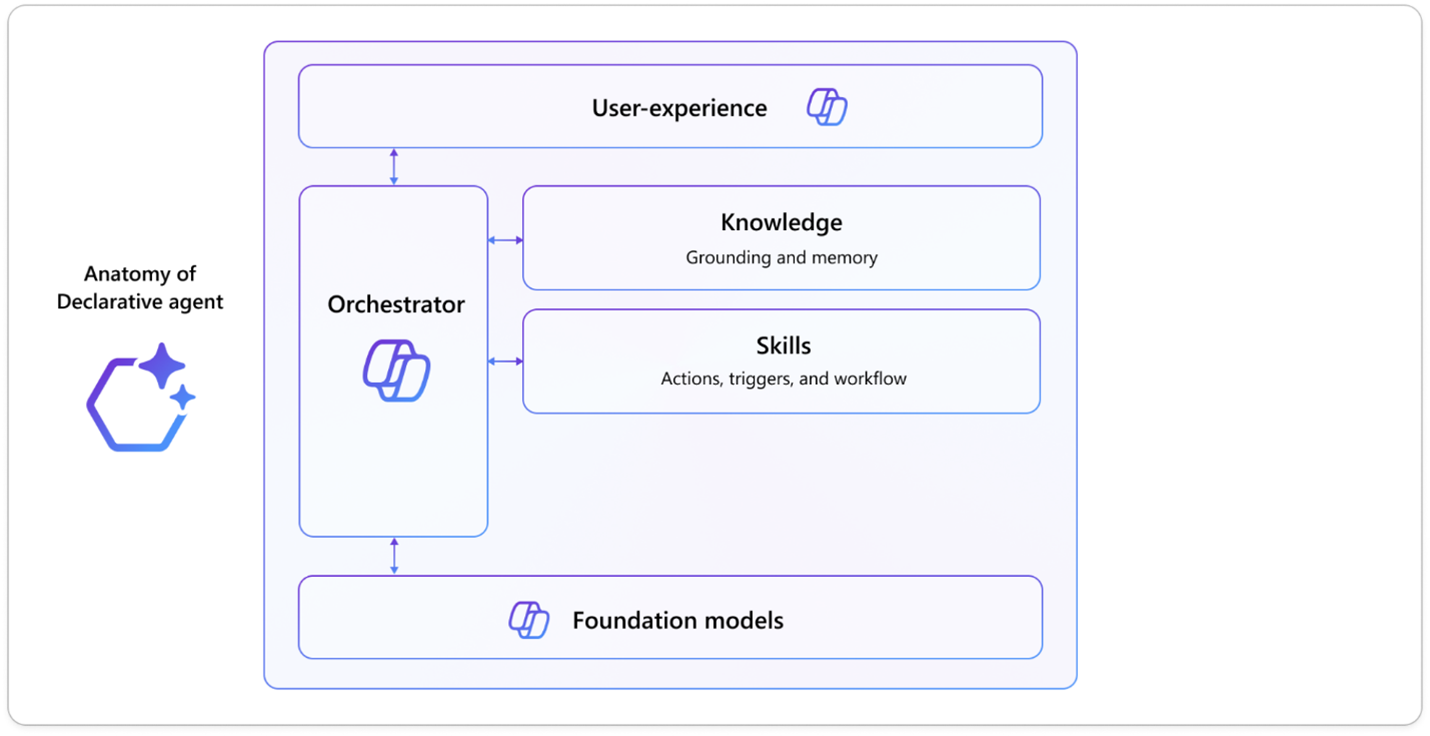
Declarative agents define how Copilot behaves in specific business scenarios. Rather than acting as simple connectors or API bridges, they control how Copilot reasons, what knowledge it can reference, and which actions it is allowed to perform when responding to user requests.
At a high level, a declarative agent acts as a configuration layer. It combines instructions, knowledge sources, and callable actions to guide Copilot through multi-step tasks in a controlled and predictable way. This orchestration applies whether Copilot is working with data inside Dynamics 365 and Dataverse or interacting with external systems.
When Copilot needs to perform actions beyond its native capabilities, those actions are exposed through the Power Platform. Internal actions may involve Dataverse tables, Power Platform connectors, or existing business logic. External actions are typically implemented using custom connectors or REST APIs that the agent can invoke when required.
In this model, the declarative agent does not replace integrations. It coordinates them. By separating orchestration from execution, organizations can extend Copilot in a way that remains governed, auditable, and scalable across teams and systems.
Prompt-based Copilot Extensions
Prompt-based Copilot extensions allow teams to customize how Copilot behaves using natural language rather than code. They can be created directly in Copilot Studio or within the Power Platform under Prompts, making them accessible to power users and functional teams.
These extensions rely on guided configuration and structured instructions, enabling Copilot to extract information, perform tasks, or support workflows through an interactive dialogue with the user.
You may also like: Check out this Guide to Microsoft Copilot Pricing & Licensing
Prompt Library
Connect External Systems to Dynamics 365 with Copilot
Bridge gaps between Dynamics, third-party systems, and APIs using declarative agents designed for real-world data flows.
Talk to a Copilot ConsultantBill Tracking Example
I previously tracked utility and rent bills in Dataverse to aggregate totals and split costs each month. While functional, the process required manual data entry and review.
Using a prompt-based Copilot extension, I provided sample bills to the Prompt Designer, which reliably extracted key fields such as bill total, company name, and due dates. This demonstrated how prompt-based extensions can support both proof-of-concept scenarios and stable, production-ready features.
The takeaway is simple: when data flows in and out of your systems, Copilot plugins can be used to automate extraction and processing with minimal setup, turning repetitive tasks into structured, repeatable workflows.
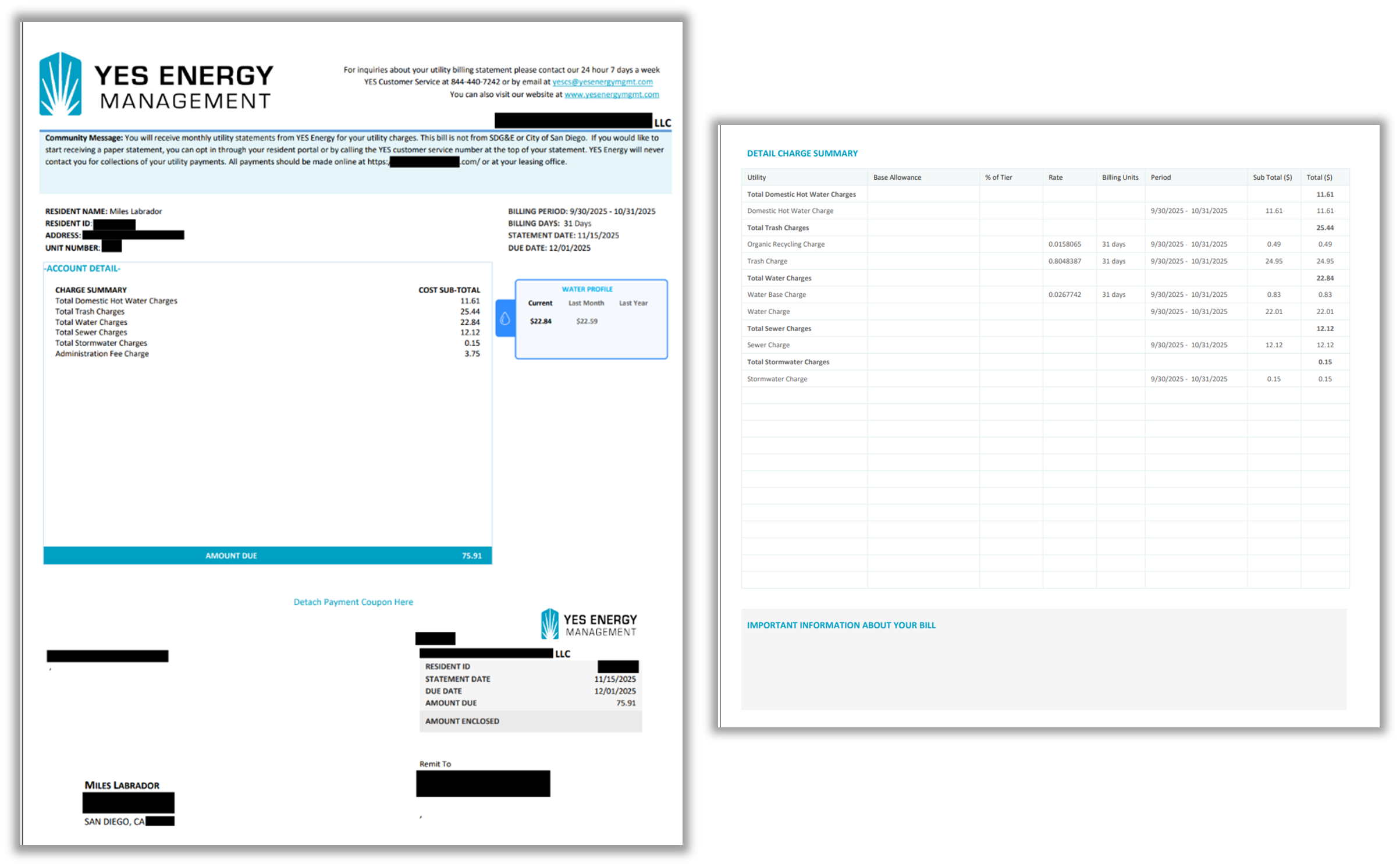
The need requires that I extract multiple pieces of information:
- Bill due date
- Billing Period Start and End
- Total
- Account Name
We’ll start by creating a prompt. Microsoft has curated a repository of templates so you can quickly get started on customizing your Copilot.

Begin with the data type that you’re inputting. For us, we’ll be providing PDF files to be parsed.
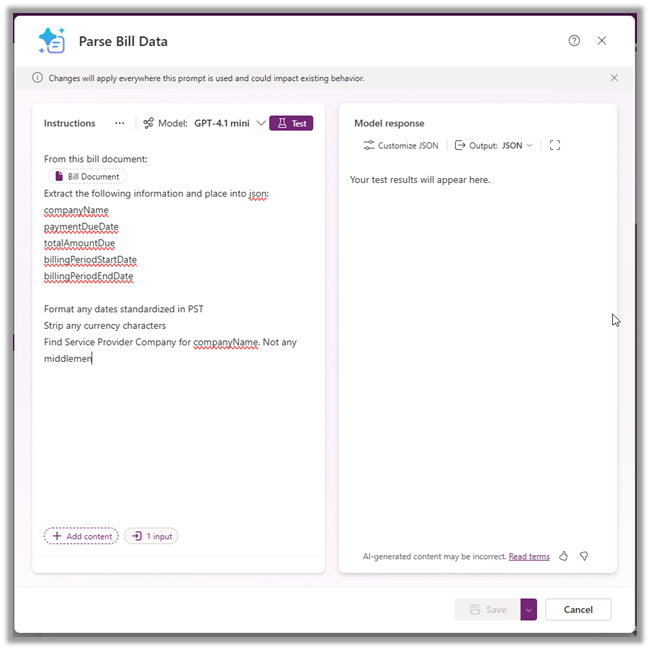
Now, it might be hard for Copilot to accurately parse the information we want when there are multiple lines that have dates, amounts due, and text.
You’ll want to use the testing features to verify your copilot plugin acts as you expect it. Click the “Test” button in the top of the instructions panel. Upload a sample document to test your parsing functionality. Now, we’ll be able to see the results of our prompt plugin when running a test:

We can customize the output JSON to our liking, or if we are happy with our result, we can save and finish building our plugin. In this case, we are receiving the expected information from our document, so we’ll move on to integrating it somewhere.
Lastly, we can introduce our Copilot prompt plugin into Power Automate using the “Run a prompt” action. To easily ingest our documents, I’ve set up a OneDrive folder that runs documents through this parser. I use the “Run a prompt” action to trigger our plugin and feed in data.
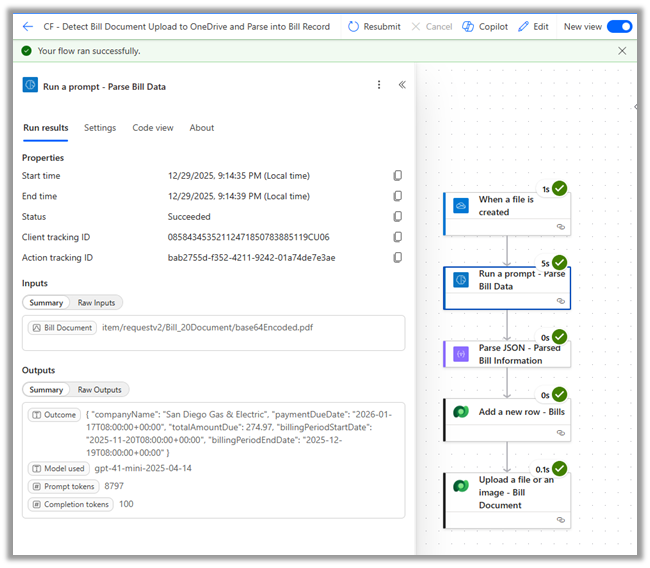
We can see the successful parsing of one of our bills in the output of this Power Automate flow run.
All in, this was a feature that was created from start to finish in one sitting. It was incredibly easy to integrate with my existing Dataverse system and Power Automate. This required no extra code development, role assignment, etc. Everything you need should be packaged into your plugin. This is the beauty of extending Copilot. Everything from hosting to execution can be automated to live on the Power Platform.
You may also like: Copilot in Dynamics 365 Project Operations
Get Expert Help Extending Copilot the Right Way
Avoid trial-and-error by working with Dynamics 365 and Power Platform specialists who build Copilot extensions that scale.
Talk to a Copilot ConsultantWhere Copilot Studio Fits in the Architecture
As Copilot extensibility has matured, Copilot Studio has become the central design surface for building and governing Copilot behavior. In 2026, it serves as the primary environment where organizations define how Copilot agents reason, which knowledge sources they can access, and which actions they are allowed to perform.
Copilot Studio brings together several capabilities that were previously scattered across tools:
- Agent creation and configuration, including declarative agent definitions and behavioral instructions
- Prompt orchestration, where structured prompts guide how Copilot interprets requests and produces outputs
- Actions and workflows, often backed by Power Automate and Dataverse logic
- External integrations, exposed through custom connectors and REST-based actions
Rather than treating Copilot extensions as isolated plugins, Copilot Studio provides a unified way to design, test, and manage Copilot behavior across Dynamics 365 and the broader Power Platform. It acts as the control plane that ties together agents, prompts, actions, and integrations into a cohesive experience.
This shift is important because extending Copilot in 2026 is less about adding individual capabilities and more about governing how AI operates within enterprise systems. Copilot Studio enables that governance by centralizing orchestration, permissions, and behavior design in one place.
Conclusion
Copilot plugins allow us to create functioning agents that assist us day to day. When allowed, it opens the possibilities for processing complex information with natural language. Since Microsoft wants to make tool creation available to both power users and those who casually integrate Copilot.
By providing an approachable tool to begin working on enhancing your workflows, we can have a little more independence and power in creating apps that will be useful to us with very low overhead.
FAQs
A Copilot plugin extends what Copilot can access or do by connecting it to Dataverse, Dynamics 365, or external systems through prompts or APIs.
API plugins integrate with external services via APIs, while Prompt-based Copilot extensions use natural language instructions in Power Platform with little or no code.
Use a Declarative Agent when Copilot needs to interact with data or actions in systems that are not natively connected to Dynamics or Dataverse.
No. Prompt-based Copilot extensions can be created directly in Copilot Studio or Power Platform using guided prompts and testing tools.
Simple plugins can be built and tested in a single session, especially when using prebuilt templates and Power Platform connectors.