Dynamics 365 AI Governance Framework: Implementing Microsoft’s Responsible AI Principles

Table of Contents
Introduction
Nobody wants to talk about governance. When a demo shows Copilot summarizing a customer call in seconds or automatically ranking leads with predictive scoring, the room gets excited. Conversations move fast, and budgets follow.
Then governance comes up, and the momentum drops.
That’s the gap. Organizations facing the biggest AI issues are not the ones moving slowly. They are the ones adopting quickly without clear oversight of how these systems behave in real scenarios.
AI governance is often overlooked during implementation, even though it directly impacts risk, compliance, and long-term adoption.
This blog explores why governance gets sidelined and what that means for teams working with Dynamics 365 AI governance and AI features inside their systems.
What Is Microsoft’s Role vs Yours in Responsible AI?
Microsoft provides principles and tooling. You are responsible for how AI behaves in your environment.
Microsoft is built on six principles: fairness, safety, privacy, inclusiveness, transparency, and accountability. Documentation and safeguards exist. This also forms the foundation of an AI governance framework across its ecosystem.
What they don’t provide is oversight inside your Dynamics 365 tenant.
Your system runs on:
- Your historical data
- Your customer patterns
- Your internal decisions
That means:
- AI outputs reflect your data quality and bias
- Governance must be owned internally
Why Do Most Organizations Miss AI Visibility?
Most IT teams don’t have a complete picture of what AI is actually running inside their Dynamics 365 environment. Ask them, and you’ll usually get an answer that feels confident but is only about 60% complete. This is where AI risk in Dynamics 365 often starts to go unnoticed.
Copilot in Sales is well known. Predictive lead scoring is also on the radar. But beyond that, visibility drops quickly. Sentiment analysis in Customer Service often goes unnoticed. So does anomaly detection in Finance, AI-suggested knowledge articles in service portals, and automated email drafts that agents sometimes send without reviewing them closely.
These features don’t announce themselves. They are bundled into updates, enabled during setup, and left running long after the original implementation work is forgotten. That’s a core challenge in Dynamics 365 Copilot governance, where features expand faster than oversight processes.
That’s where governance actually starts. The first step is a full inventory of every active AI capability, what data it uses, who enabled it, and who is responsible for monitoring it today. This is a key part of AI risk management Dynamics 365 practices, along with ensuring AI compliance Microsoft Dynamics 365 requirements are being met consistently.
It is a time-consuming and uncomfortable exercise for most organizations, but it is necessary because you cannot govern what you do not know exists.
Who Is Accountable for AI Outcomes?
There is a difference between ownership and accountability, and most organizations treat them as the same thing. They are not. Every AI deployment has owners, but very few have real accountability attached to outcomes.
An owner manages the system. They handle configuration, access control, and technical setup. When things run smoothly, they are rarely in focus. When something goes wrong quietly over time, they usually only find out later in a review or leadership meeting.
An accountable person is different. This is a named individual who is responsible for what the AI actually produces in business terms. If a Dynamics 365 AI feature starts generating biased hiring shortlists or flawed recommendations, this person must explain the outcome to leadership, identify the cause, and take corrective action.
They also need the authority to pause or disable the feature when required, along with a clear escalation path. That level of responsibility is what makes Dynamics 365 AI governance operational instead of theoretical.
Most organizations formalize this structure only after an issue has surfaced. Those who define accountability early are better positioned to identify and contain problems before they scale.
What Does AI "Transparency" Mean in Practice?
AI transparency means users and stakeholders clearly understand when AI is being used, how it influences decisions, and whether they can question or override it.
The term is often used but rarely defined in practical terms. To make it useful, look at how AI shows up in day-to-day workflows.
Take a common scenario.
A sales rep receives a Copilot-drafted email
- Do they know it is AI-generated, or does it appear like their own writing?
- Can they edit or discard it freely, or does the workflow push them to send it as is?
- If users feel pressured to accept AI output, transparency is not in place
For internal teams, transparency goes beyond documentation
- Users need a clear understanding of how AI tools work and where they can fail
- Training should reinforce this understanding regularly, not just during onboarding
- Teams should feel comfortable questioning AI outputs without being seen as slowing things down
The external side is more sensitive. AI decisions already affect customers and applicants in ways they often do not see.
- A customer may be moved to a lower service tier based on a segmentation model
- A job applicant may be scored before any human review
- Financial or service decisions may be influenced without a clear explanation
These are no longer rare cases. They are standard behavior in many enterprise systems, and regulatory scrutiny is increasing across industries and regions.
A simple test helps assess transparency: if someone asks why an AI-driven decision affected them, can your organization explain it clearly and specifically? If not, transparency is not yet in place, and that becomes an immediate priority.
You may also like: Why Governance Is Not Optional in Power Platform
How Should You Approach AI Fairness in Dynamics 365?
AI fairness is not a one-time check. It requires continuous monitoring because outcomes change based on data, usage, and context. This is a core part of Dynamics 365 AI governance, not a separate exercise.
Most teams treat bias as something you detect once and fix. They run an audit, get a passing result, and move on. Then issues resurface months later.
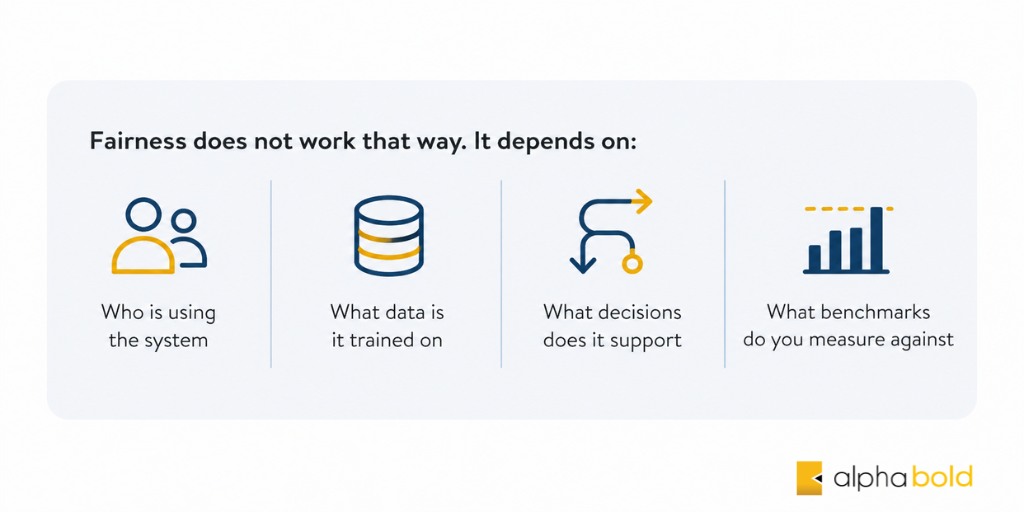
Fairness does not work that way. It depends on:
- Who is using the system
- What data is it trained on
- What decisions does it support
- What benchmarks do you measure against
Your Dynamics 365 environment reflects your own data. Customer profiles, hiring decisions, and historical trends all shape AI outputs. If past decisions included bias, AI will repeat those patterns at scale.
One of the biggest risks is subgroup impact:
- Overall results may look accurate
- Smaller segments may still receive worse outcomes
- These issues remain hidden unless tested directly
Most organizations do not check for this consistently.
High-risk areas in Dynamics 365 include:
- HR tools (candidate scoring, promotions, performance flags)
- Customer segmentation (service levels, targeting decisions)
- Financial anomaly detection (risk identification, transaction reviews)
To manage fairness, governance must be operational:
- Define who reviews AI outputs
- Set clear evaluation criteria
- Establish a review schedule
- Document what actions to take when the results look incorrect
This process should be defined early. Waiting until an issue appears makes it harder to trace and fix.
Ensure Fair and Reliable AI Outcomes in Dynamics 365
Identify bias risks in your AI models and put the right review processes in place to maintain consistent, fair decision-making.
Request a DemoWhat Does Effective Human Oversight Look Like?
Human oversight means people can independently evaluate and challenge AI-driven decisions, not just approve them. This is one of the most overlooked parts of Dynamics 365 AI governance in real environments.
Most frameworks require “human oversight,” but few define how it works in practice. A simple test helps assess it:
- Remove the AI feature for a week.
- Can your team still make the same decisions?
- Do they understand the underlying data?
- Can they interpret outputs without AI assistance?
If the answer is no, oversight is not in place. The process has become dependent on AI, and human involvement is reduced to approval without real evaluation.
Effective oversight requires:
- Context and understanding
- Reviewers know what “normal” looks like
- They can spot unusual or incorrect outputs early
- Authority to act
- Reviewers can question or escalate decisions
- Concerns are taken seriously, not dismissed
- Workflow design that supports judgment
- Processes encourage review, not shortcuts
- Skipping validation is not the easiest option
This is not a training issue alone. Oversight depends on how workflows are designed and enforced at the process level.
You may also like: Establishing AI Governance Frameworks in Your Organization
How Can Microsoft Transparency Notes Help?
Microsoft transparency notes provide detailed guidance on how AI features in Dynamics 365 are designed, where they can fail, and how to configure them responsibly.
Microsoft publishes documentation for each AI capability, covering:
- Intended use cases
- Known limitations and failure scenarios
- Configuration choices that reduce risk
- Situations where extra caution is required
Most organizations never review these documents.
They are publicly available, but often missed because:
- They are not included in implementation plans
- They are rarely covered during the project kickoff
- Go-live timelines shift focus to execution, not review
These notes do not replace governance. They will not reflect how AI behaves on your specific data or within your workflows.
However, they offer a strong starting point:
- They show where issues are likely to occur
- They reflect insights from the teams that built the models
- They help you anticipate risks before they surface
Skipping them means learning from incidents rather than using available guidance.
You may also like: Low-Code Governance for Scaling Microsoft Power Platform
What Organizational Changes Are Required for AI Governance?
AI governance is less about technology and more about how the organization operates, makes decisions, and responds to risk.
The technical side is relatively clear:
- Audit logging
- Access management
- Configuration reviews
- Integration testing after updates
These controls are necessary, but they are not the main challenge. They support Dynamics 365 AI governance, but they don’t define it on their own.
The real shift is organizational:
- Willingness to delay rollout
- AI features are not deployed until governance structures are in place
- Leadership accountability
- AI-related incidents are treated with the same urgency as data risks
- Decisions are reviewed based on impact, not just performance
- Psychological safety for teams
- Managers and employees can raise concerns without pushback
- Questioning AI outputs is accepted as responsible behavior
These changes do not come from documentation alone. They depend on how leadership responds in real situations, especially when issues surface. Organizations that address this early are better prepared to manage AI risks as adoption grows.
See How AI Works Inside Your Dynamics 365 Environment
Explore real AI capabilities and identify where oversight, controls, and accountability matter most.
Request a DemoConclusion
AI governance is often treated as a one-time requirement to get through before deployment. In reality, it shapes how quickly and safely AI can scale across your organization. This is the core reason Dynamics 365 AI governance cannot be treated as a checklist item.
When a clear framework exists, teams do not start from scratch every time a new AI feature is introduced. Decisions move faster because evaluation criteria are already defined. Issues still occur, but they surface earlier, making them easier to investigate and fix. Teams also know where to raise concerns and who is responsible for addressing them, reducing hesitation and improving overall trust in AI outputs.
Without governance, the opposite happens. Decisions slow down due to uncertainty, risks remain hidden for longer periods, and confidence in AI-driven outcomes declines over time.
Dynamics 365 provides the tools, and Microsoft outlines the principles. How those systems operate within your environment, use your data, and influence your decisions is something only your organization can manage.
FAQS
Start by creating a comprehensive inventory of AI features, assigning accountability, and defining monitoring processes.
HR, Customer Service, and Finance due to decision impact and data sensitivity.
Quarterly at minimum, with additional reviews after major updates or data changes.
Lack of accountability. Without a responsible owner, issues go unmanaged.
No. Microsoft provides guidance and controls, but governance must be implemented internally.