Introduction
Organizations today are not short on data. They are short on clarity, control, and speed. As data estates expand across lakes, warehouses, operational systems, and SaaS platforms, many analytics environments become fragmented, costly to manage, and slow to deliver insights. Microsoft Fabric for data analytics addresses this challenge by providing a unified, cloud-based platform designed to simplify how organizations ingest, manage, analyze, and act on data at scale.
Built on OneLake, Microsoft Fabric brings data ingestion, engineering, warehousing, real-time analytics, data science, and business intelligence into a single SaaS experience. This unified architecture helps reduce architectural sprawl, streamline governance, and shorten the path from raw data to decision-ready insights.
Rather than serving a single persona, Fabric supports multiple analytics workloads within one consistent environment, enabling technical and business teams to work from the same data foundation without duplicating pipelines, models, or security controls.
As Microsoft Fabric continues to evolve with regular platform enhancements, many enterprises face a practical question: when does Fabric make sense, and how do you use it effectively at scale?
This article explains how Microsoft Fabric fits into a modern analytics strategy and helps decision-makers evaluate whether it is the right foundation for their organization’s data and analytics needs.
Microsoft Fabric for Data Analytics: A Complete Suite
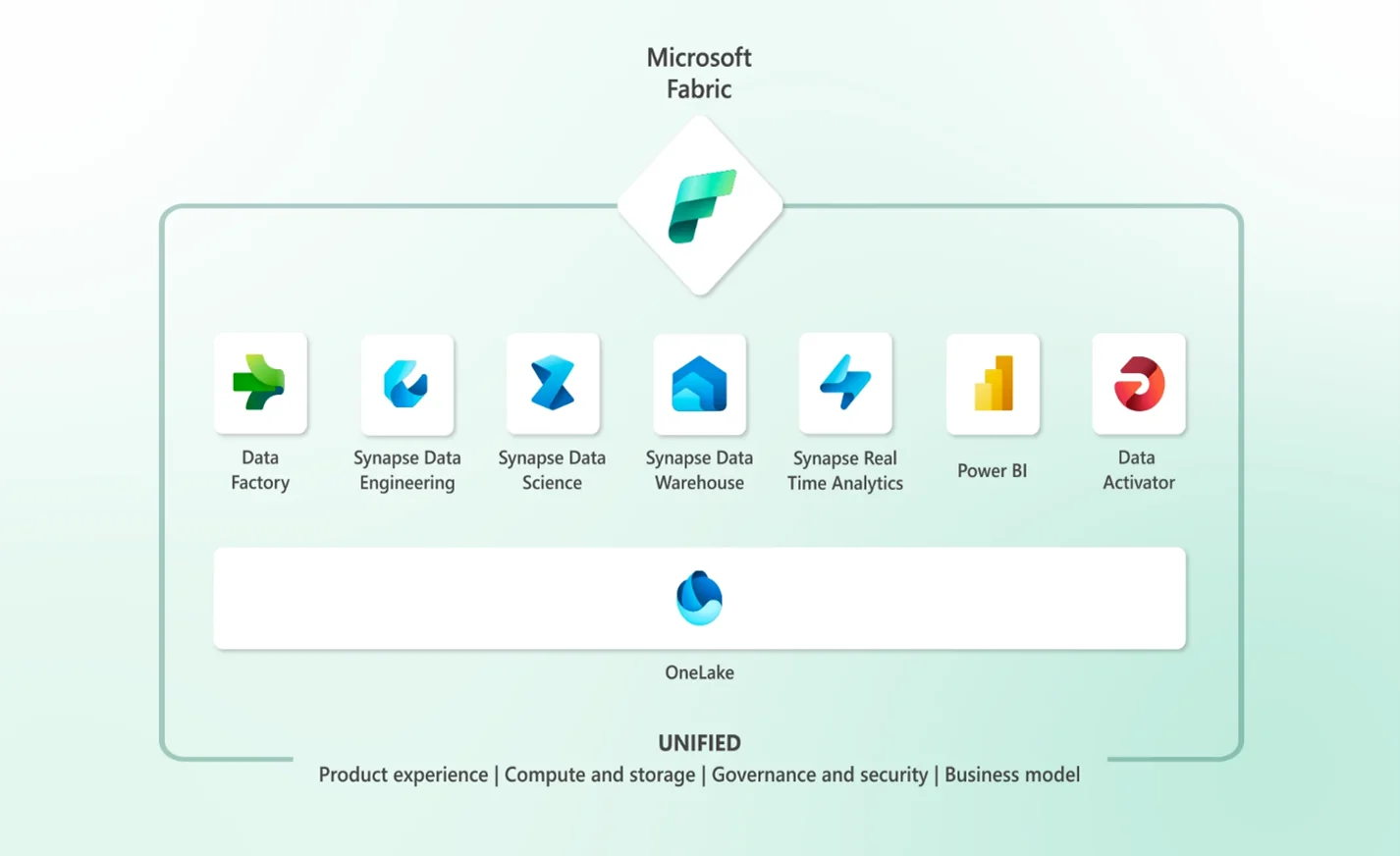
Managing analytics across multiple tools often leads to duplicated data, higher costs, and inconsistent governance. Microsoft Fabric for data analytics simplifies this by unifying the full analytics lifecycle within a single, SaaS-based platform.
At the center of Fabric is OneLake, a unified data lake that acts as a shared data foundation across all workloads. Teams work from the same underlying data without copying or moving it between systems, which reduces data sprawl and simplifies security and governance.
Delivered as a fully managed SaaS platform, Microsoft Fabric removes the need to provision and maintain separate analytics services. This allows organizations to scale analytics more predictably while keeping operational overhead low.
Further Read: Advanced AI Analytics in Power BI for CTOs: Transforming Data Strategy.
What this unified architecture enables
- Single data foundation with OneLake across all analytics workloads
- Integrated data engineering, analytics, and BI in one platform
- Consistent governance and security across teams and use cases
- Lower operational complexity compared to fragmented analytics stacks
By consolidating analytics workloads on top of OneLake, Microsoft Fabric provides a more controlled and scalable foundation for enterprise data and analytics.
Microsoft Fabric Core Workloads and Analytics Experiences
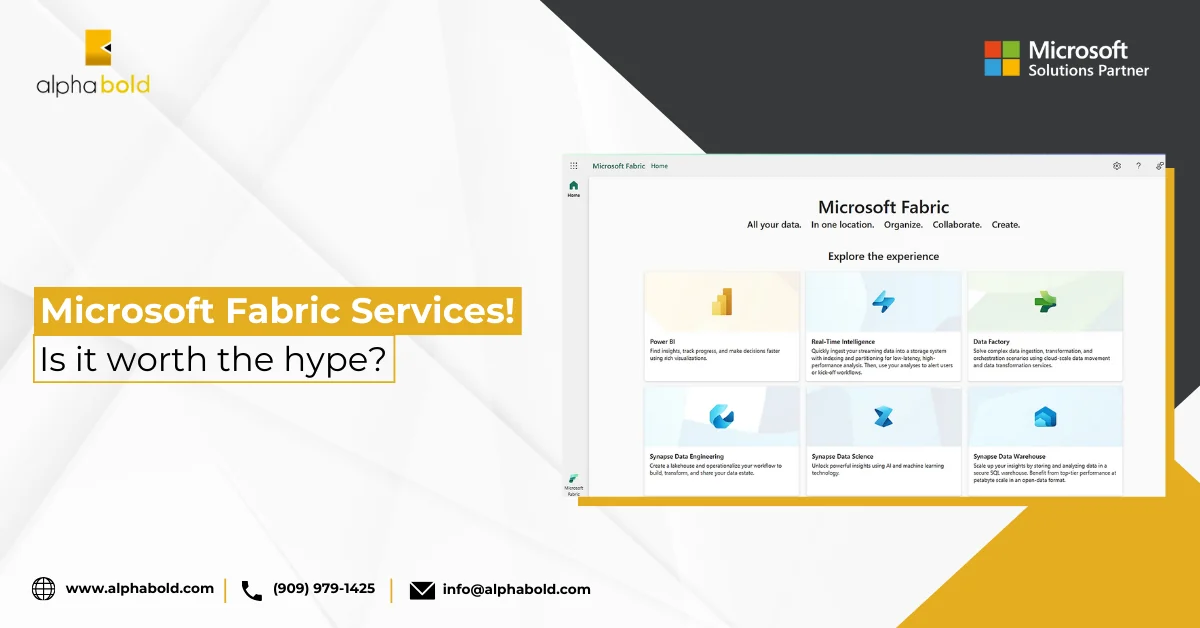
Microsoft Fabric brings data integration, engineering, analytics, and business intelligence together on a shared data foundation powered by OneLake. Instead of operating separate tools for each workload, organizations work within a single platform where data, security, and governance are consistently applied.
- Data integration and orchestration
Ingest and manage data from cloud and on-premises sources using built-in pipelines that support end-to-end analytics workflows. - Data engineering, SQL, and lakehouse analytics
Work with Spark and SQL on open data formats using a shared lakehouse model that supports both technical and analytical teams. - Real-time analytics
Analyze streaming and event data alongside historical data to support operational and time-sensitive decision-making. - Business intelligence and semantic models
Power BI is embedded within the platform, enabling reusable semantic models and consistent metrics across reports and dashboards. Microsoft Fabric for data analytics allows insights to be delivered using the same governed data foundation. - Event-driven actions
Detect patterns or thresholds in data and trigger notifications or downstream actions to support more responsive operations.
Move From Analysis To Insight With Microsoft Fabric For Data Analytics
Get a guided walkthrough to understand how a unified analytics platform can support your data strategy and reporting needs.
Request a DemoMicrosoft Fabric for Data Analytic vs Power BI vs Databricks
For C-suite executives, comparing analytics platforms is less about individual features and more about long-term platform strategy. Choices made at this level influence how data is governed, how teams collaborate, and how reliably insights can support business decisions at scale.
Microsoft Fabric for data analytics is designed as a unified platform that brings data engineering, analytics, and business intelligence together on a shared foundation. Power BI focuses primarily on business intelligence and dashboarding for insight consumption, while Databricks is optimized for large-scale data engineering and advanced machine learning workloads.
Understanding these differences helps executives align technology investments with organizational priorities, whether the goal is enterprise-wide analytics standardization, advanced engineering flexibility, or fast, insight-driven decision-making across the business.
| Criteria | Microsoft Fabric | Power BI | Databricks |
|---|---|---|---|
|
Primary role |
Unified data and analytics platform |
Business intelligence and reporting |
Data engineering and advanced analytics platform |
|
Platform scope |
End-to-end analytics lifecycle in a single SaaS platform |
Visualization and insight consumption layer |
Engineering-first platform for large-scale data processing |
|
Data architecture |
Shared data foundation via OneLake across workloads |
Relies on underlying data sources and models |
Lakehouse architecture using Delta Lake |
|
Data integration |
Built-in data ingestion and orchestration within the platform |
Limited ingestion, depends on external tools |
Strong ingestion and transformation capabilities |
|
Analytics workloads |
Data engineering, SQL analytics, real-time analytics, BI, data science |
Reporting, dashboards, and semantic modeling |
Data engineering, machine learning, advanced analytics |
|
Business intelligence |
Embedded BI using Power BI on a shared data foundation |
Core strength of the platform |
Available but not the primary focus |
|
Semantic models |
Reusable models shared across analytics and BI |
Central to reporting and dashboards |
Not a core concept |
|
Real-time analytics |
Integrated as part of the analytics workflow |
Limited real-time capabilities |
Supported but typically requires additional configuration |
|
Governance and security |
Centralized governance across analytics workloads |
Governance focused on reports and datasets |
Governance depends on configuration and cloud setup |
|
Operational complexity |
Lower, due to SaaS delivery and unified platform |
Low for BI use cases |
Higher, requires engineering expertise and platform management |
|
Scalability |
Scales across analytics workloads within Fabric capacities |
Scales for reporting scenarios |
Highly scalable for large and complex workloads |
|
AI and advanced analytics |
Integrated analytics and data science workflows |
Limited to BI-centric AI features |
Strong support for ML and advanced AI workflows |
|
Best suited for |
Organizations seeking a standardized, enterprise analytics platform |
Teams focused on reporting and insight consumption |
Organizations with heavy data engineering and ML requirements |
|
Typical buyers |
CIOs, CDOs, analytics leaders |
Business and analytics teams |
Data engineering and data science leaders |
Read our blog, Microsoft Fabric vs. Databricks: Which is Best for Your Data Needs?, for a deeper comparison to help you determine the right platform for your business and budget.
Featuring Client Success with Microsoft Fabric for Data Analytics
Migros Industrie, one of Switzerland’s largest food and consumer goods manufacturers, adopted Microsoft Fabric to modernize its analytics environment and support real-time production decisions.
Before Fabric, growing data volumes and fragmented systems led to long query times, with data updates taking up to 30 minutes. By consolidating production telemetry and SAP data into a single analytics platform, Migros Industrie enabled real-time analytics and simplified its data architecture.
Results included:
- Data update times reduced from 30 minutes to seconds
- Real-time analytics embedded into production operations
- Lower operating costs through platform consolidation
- Around 3,000 employees using Fabric for reporting and analysis
This implementation demonstrates how organizations use Fabric as a centralized analytics foundation to improve operational visibility, speed, and scalability.
“Microsoft Fabric gives us the flexibility to continually improve our data management and integrate innovative technologies. It is tremendously motivating to see how much change we can achieve in this way.” – Sinthuyan Nithiyanandan, Data Architect, Migros Industrie.
How Organizations Use Microsoft Fabric in Practice
Organizations typically adopt Fabric to simplify complex analytics environments and improve how data supports operational and strategic decisions. Rather than using it for a single function, Fabric is often applied across multiple scenarios using the same shared data foundation.
Example use cases across the organization
- Enterprise analytics consolidation
Organizations replace fragmented data pipelines, warehouses, and reporting tools with a single analytics platform. This reduces data duplication, simplifies governance, and provides leadership with consistent metrics across departments. - Operational and real-time reporting
Teams analyze streaming and operational data such as system events, telemetry, or transactions alongside historical data to monitor performance, identify issues early, and support faster operational decisions. - Standardized reporting and metrics
Business teams use shared semantic models to ensure reports and dashboards are built on consistent definitions of KPIs, reducing conflicting numbers across finance, operations, and leadership reporting. - Data engineering and analytics collaboration
Data engineers prepare and manage data using lakehouse and SQL experiences, while analysts and business users consume the same data for reporting and analysis without creating separate copies or workflows. - Event-driven actions and alerts
Organizations detect patterns or threshold breaches in data and trigger notifications or downstream actions, enabling teams to respond proactively rather than relying solely on static reports.
Assess Microsoft Fabric For Data Analytics For Your Organization
See how a unified analytics platform can support your organization’s reporting, governance, and decision-making needs.
Request a DemoConclusion
As data estates grow in size and complexity, organizations increasingly need analytics platforms that reduce fragmentation rather than add to it. Microsoft Fabric brings data integration, engineering, analytics, and business intelligence together on a shared foundation, helping organizations simplify governance, improve collaboration, and deliver more consistent insights.
By consolidating analytics workloads on top of OneLake, Fabric supports a range of enterprise use cases, from operational reporting and real-time analysis to standardized metrics and cross-team collaboration. This unified approach allows organizations to scale analytics more predictably while maintaining control over data access, security, and cost.
For decision-makers evaluating their analytics strategy, the value of Fabric lies not in individual features, but in its ability to serve as a cohesive analytics platform that aligns technical execution with business insight. Understanding how Fabric compares to tools like Power BI and Databricks, and where it fits within the broader data estate, is key to making informed, long-term platform decisions.
FAQs
Microsoft Fabric does not replace Power BI reporting, but it consolidates data engineering, analytics, and BI workflows into a single platform. Many organizations use Fabric to reduce reliance on separate data pipelines, warehouses, and analytics services while continuing to use Power BI as the primary consumption layer. The outcome is fewer tools to manage, shared governance, and more consistent metrics across teams.
Microsoft Fabric applies centralized security and governance across analytics workloads through a shared data foundation. Access controls, data permissions, and policies are enforced consistently across engineering, analytics, and reporting workflows, reducing the risk of data duplication and inconsistent access. This makes Fabric suitable for organizations with strict compliance, audit, and data management requirements.
Most organizations adopt Microsoft Fabric incrementally rather than all at once. Teams often start by consolidating analytics for a specific domain or workload, validate performance and governance, and then expand usage across departments. This phased approach allows organizations to modernize analytics while managing risk, cost, and change effectively.
Explore Recent Blog Posts