How Can Microsoft Fabric Simplify Your Data Integration with OneLake?

Table of Contents
Introduction
Microsoft Fabric has evolved from a promising launch in 2023 into the analytics backbone for enterprise AI. As of mid, 2026, more than 28,000 organizations worldwide are running Fabric , including 80% of the Fortune 500. According to Forrester’s 2025 Total Economic Impact study, organizations report a $4.79 ROI for every $1 invested in the platform. And Microsoft was named a Leader in the IDC MarketScape: Worldwide Data Integration Software Platforms 2025.
In this comprehensive guide, what has changed inside Microsoft Fabric for data integration in 2025, 2026 , including GA mirroring for SQL Server, Cosmos DB, and PostgreSQL; new AI capabilities via Copilot and Fabric IQ; and expanded OneLake shortcuts for multi, cloud data access. Whether you’re simplifying ETL, enabling near real, time analytics, or building AI, ready data pipelines, Fabric’s scope has expanded considerably since this post was first published.
What Makes Microsoft OneLake a Powerful Data Platform?
OneLake is at the core of Microsoft Fabric’s approach to data integration, functioning as a centralized storage solution that simplifies data management across your organization. Think of OneLake as the OneDrive for all your data , a unified, accessible repository where you only pay for the storage you use and avoid the complexities common in traditional data storage.
It is designed to serve as a comprehensive location for all your organization’s data, ensuring that it is easy to access, manage, and secure. Regardless of data type or source, OneLake provides a cohesive environment for seamless integration and storage, including data from:
- LakeHouse
- Data Warehouse
- Semantic models
- Eventhouse (for real, time intelligence workloads)
- Mirrored databases from SQL Server, Cosmos DB, PostgreSQL, Snowflake, Oracle, and Google BigQuery
All data in OneLake is stored in Delta Parquet files, a format optimized for storage and retrieval. Delta Parquet combines the strengths of Parquet and Delta Lake, allowing high performance and efficiency while handling large data volumes.
Key benefits include:
- Support for ACID transactions
- Scalable metadata handling
- Efficient querying for large datasets
- Unified security via OneLake Security (now in public preview), enforcing row, and column, level access at the data layer regardless of which Fabric engine queries it
The main strength of OneLake is how it streamlines data management. By centralizing all data, organizations can reduce silos, cut redundancy, and improve governance. The OneLake Catalog , enhanced in early 2026 with full schema visibility for all stored items , makes it easier to discover, govern, and understand data assets across the entire tenant.
OneLake also supports a wide variety of data sources and formats, including:
- Structured data from relational databases
- Unstructured data from IoT devices
- Semi-structured data from Excel and other applications
- Streaming data via Real, Time Intelligence (Eventhouse + KQL databases)
Further read : Microsoft Fabric’s ROI: Cost-Saving Features and Benefits
How Does Microsoft Fabric Simplify Data Integration?
A key feature of Microsoft Fabric is its ability to integrate data seamlessly without relying on complex ETL (Extract, Transform, Load) processes. Traditionally, data engineers have used ETL tools such as:
- SSIS
- Azure Data Factory
- Stitch
- AWS Glue
While these tools are powerful, they often require significant technical expertise and can be costly. Microsoft’s direction is now clear: Fabric Data Factory is where cloud data integration is heading, and features shipping in 2025, 2026 are designed to accelerate the migration from Azure Data Factory, SSIS, and on, premises tools.
Microsoft Fabric simplifies this process by providing a suite of built-in tools that streamline data integration. With Fabric, you can:
- Move data across platforms with minimal setup
- Connect different data sources effortlessly
- Mirror databases and datasets quickly
- Access all capabilities straight out of the box without additional tools
- Use the Dataflow Gen2 Variable Libraries integration for parameterized, reusable pipelines
- Query mirrored data via natural language using Fabric Data Agents
Eliminate the Complexity of ETL Processes:
Traditional ETL processes involve multiple steps to extract data, transform it, and load it into a target system. This approach requires significant time and resources, introduces multiple points of failure, and needs ongoing maintenance.
Fabric’s zero, ETL architecture, anchored by database mirroring, replicates operational data into OneLake continuously and converts it into Delta tables automatically. Organizations using this approach report eliminating expensive ETL operations entirely. For example, ExponentHR noted that Fabric Mirroring “alleviated the need for expensive and complex ETL operations” while enabling near real, time analytics across dozens of datasets.
What Are the Out-of-the-Box Data Movement and Connectivity Options?
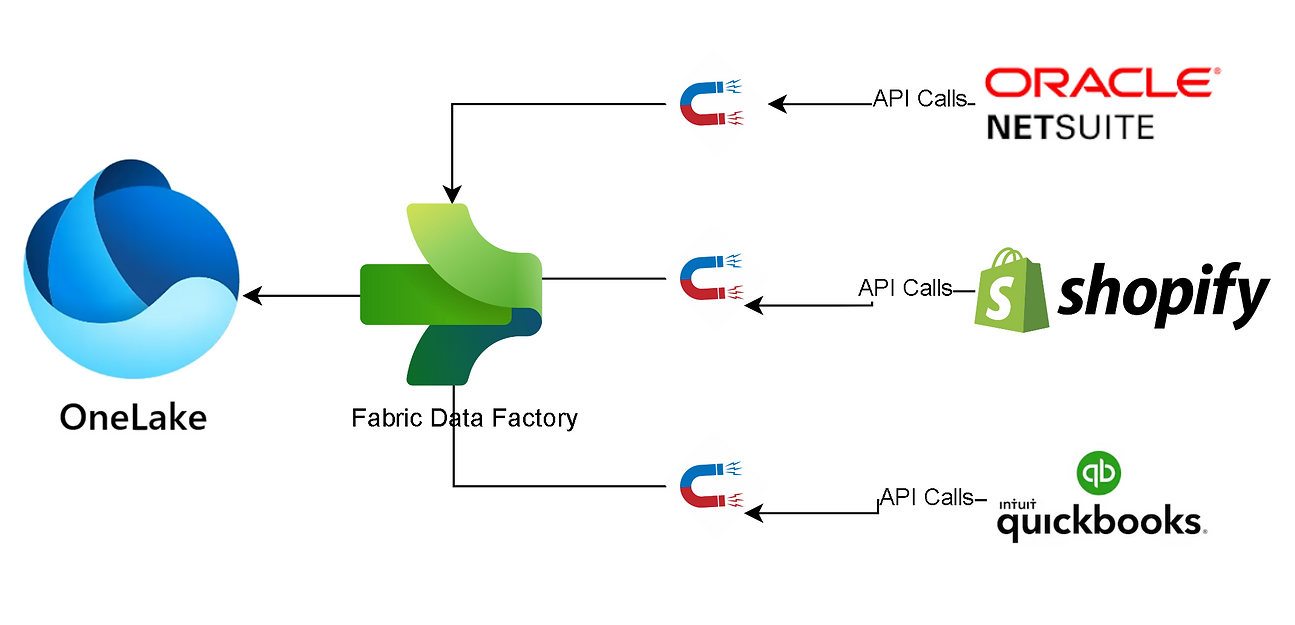
Microsoft Fabric provides a complete set of tools for moving and connecting data seamlessly. The platform supports a wide range of data sources, including:
- Cloud-based databases
- On-premises systems
- Various data storage solutions
Microsoft Fabric provides a complete set of tools for moving and connecting data seamlessly, supporting cloud, based databases, on, premises systems, and various storage solutions. In 2025, 2026, Microsoft significantly expanded its connector ecosystem. The platform now supports bi, directional, zero, copy data sharing with SAP, Salesforce, Azure Databricks, and Snowflake. Additionally, MCP (Model Context Protocol) support has been added to Fabric, extending AI agent capabilities to interact with all connected data sources.
How Can You Mirror Data Effortlessly?
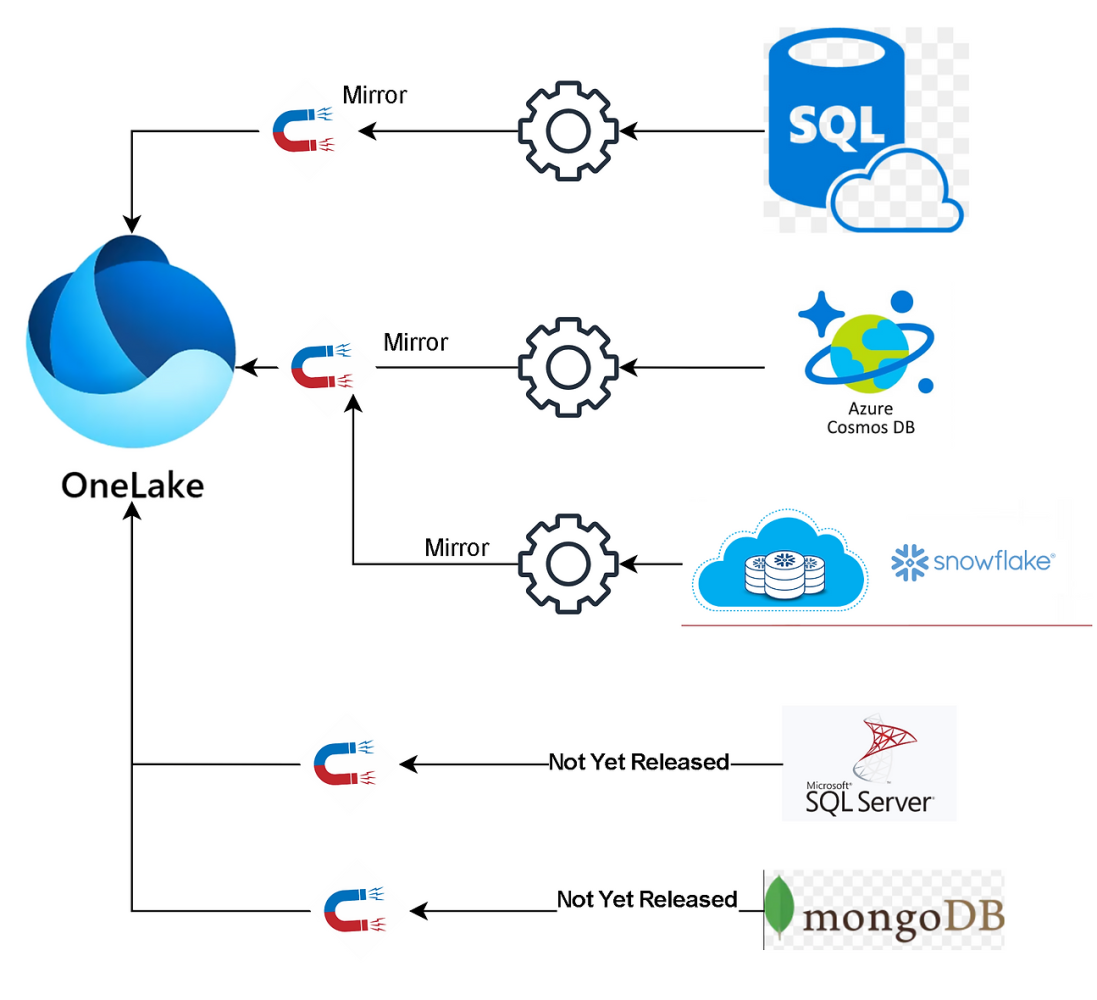
One of the most powerful features of Microsoft Fabric is its ability to mirror databases with minimal configuration. What was “coming soon” at the time of the original post is now generally available. Here is what has shipped:
- SQL Server (GA): Native mirroring for SQL Server 2016, 2022 and SQL Server 2025 is now GA. Supported environments include on, premises, Azure VMs, and non, Azure clouds, with secure connectivity via on, premises data gateway.
- Azure Cosmos DB (GA): Cosmos DB mirroring is now GA with continuous change capture, automatic schema inference, and support for nested JSON. Covers real, time personalization, fraud detection, and IoT telemetry.
- Azure Database for PostgreSQL (GA): Announced at Microsoft Ignite 2025. Data is continuously replicated into OneLake as Delta tables, enabling analytics and ML without impacting production workloads.
- Oracle and Google BigQuery (Preview): Oracle (on, premises, Oracle OCI, and Exadata) and Google BigQuery are now available for zero, ETL mirroring in preview.
- Snowflake (GA): Managed and Apache Iceberg table mirroring with high, performance analytics and open, format interoperability.
- 40+ sources via Qlik Open Mirroring: Covers SAP, DB2, and dozens of additional enterprise sources.
OneLake Security and Governance
One of the most important investments across Fabric in 2025, 2026 is unified data governance. OneLake Security , now in public preview , enforces security rules directly at the data layer in OneLake. Rather than managing access permissions separately for each engine (Spark, SQL, KQL, Power BI), rules are set once and applied consistently regardless of which workload queries the data.
Key governance features added in this cycle:
- OneLake Security for Mirrored Databases (Preview, January 2026): Granular, role, based access control for all mirrored data types.
- Microsoft Purview integration with OneLake Catalog: Sensitivity labels, access policies, and compliance controls remain enforced across data shared across tenants.
- Purview Security Posture Management for AI: Ensures AI workloads consuming Fabric data respect the same governance constraints as traditional analytics.
See Microsoft Fabric in Action
Discover how Microsoft Fabric can revolutionize your data integration and management. Request a Demo Today and experience the seamless, powerful capabilities firsthand.
Request a DemoHow Shortcuts in OneLake Help with Physical Data Movement?
Creating Shortcuts in OneLake:
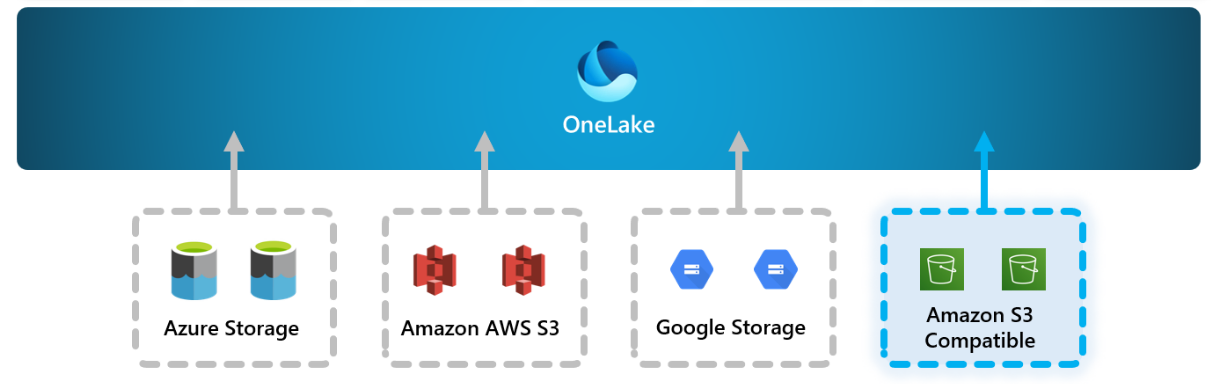
If you have large amounts of data stored in Amazon S3 or Google Storage, you don’t need to move it all into OneLake. Instead, you can create a shortcut folder within OneLake. This folder acts like a native data folder, allowing you to:
- Read, write, and query external data as if it were physically stored in OneLake
- Interact with Amazon S3 or Google Storage seamlessly
- Reference data from Azure Databricks, Snowflake, and other platforms via zero, copy sharing (expanded in Ignite 2025)
This approach makes working with external data as efficient as working with data already in OneLake.
Streamlined Data Operations:
Using shortcut folders helps keep data operations efficient and consistent, even with external sources. Benefits include:
- Reduced overhead from data migration, including bandwidth use and transfer costs
- Minimized potential downtime during integration
- Simplified data governance with a unified view of all data
This method allows organizations to manage and access external data without disrupting workflows or performance.
Read more about How to Integrate Multiple Data Sources in Power BI
Enhanced Flexibility and Accessibility:
This feature provides enhanced flexibility and accessibility, making it possible for organizations to integrate data from multiple cloud platforms without the need for extensive reconfiguration or data duplication.
Whether your data is spread across AWS, Google Cloud, or other cloud services, Microsoft Fabric enables you to consolidate your data management efforts and ensure consistency across your data landscape.
Practical Use Cases:
If your organization utilizes Amazon S3 for storing large datasets generated by IoT devices or analytical tools, you can create a shortcut in OneLake to access and analyze this data using Microsoft Fabric’s robust analytics capabilities.
Similarly, if your marketing team stores campaign data in Google Storage, you can integrate this data into OneLake and perform comprehensive analytics without moving the data, thereby saving time and resources. And with zero, copy access to OneLake data in Azure Databricks now available, multi, engine analytics pipelines no longer require data duplication.
AI and Copilot Capabilities Inside Fabric:
AI has become deeply embedded across the Fabric platform , not just as an add, on but as a first, class capability within each workload. Key developments for 2026:
- Copilot for Fabric: Now generally available across Fabric workloads, powered by Azure OpenAI. Copilot assists with data preparation, writing Spark notebooks, generating Power BI reports from natural language, and analyzing data in real time.
- Fabric Data Agents: You can now chat with any mirrored database using a Data Agent. Select the mirrored sources you want to query, and ask plain, language questions , the agent translates them into precise, read, only queries via Azure OpenAI Assistant APIs.
- Fabric IQ (Preview): A new workload that exposes live business data from OneLake to Microsoft 365 AI experiences. Works alongside Foundry IQ (document/knowledge graph data) and Work IQ (Teams/email context) to power AI agents with full organizational context.
- Real, Time Intelligence: Fabric’s Eventhouse and KQL databases enable real, time dashboards, AI, powered anomaly detection, and automated alerts. Real, time intelligence is positioned as a primary growth area for Fabric in 2026.
- MCP Support: Fabric now supports the Model Context Protocol, extending AI agent interoperability to all data sources connected to OneLake.
Transform Your Data Strategy with Microsoft Fabric
Experience the future of data integration and management. Schedule a Demo Now to see Microsoft Fabric in action and unlock its full potential.
How Can OneLake Desktop App Handle Various File Types?
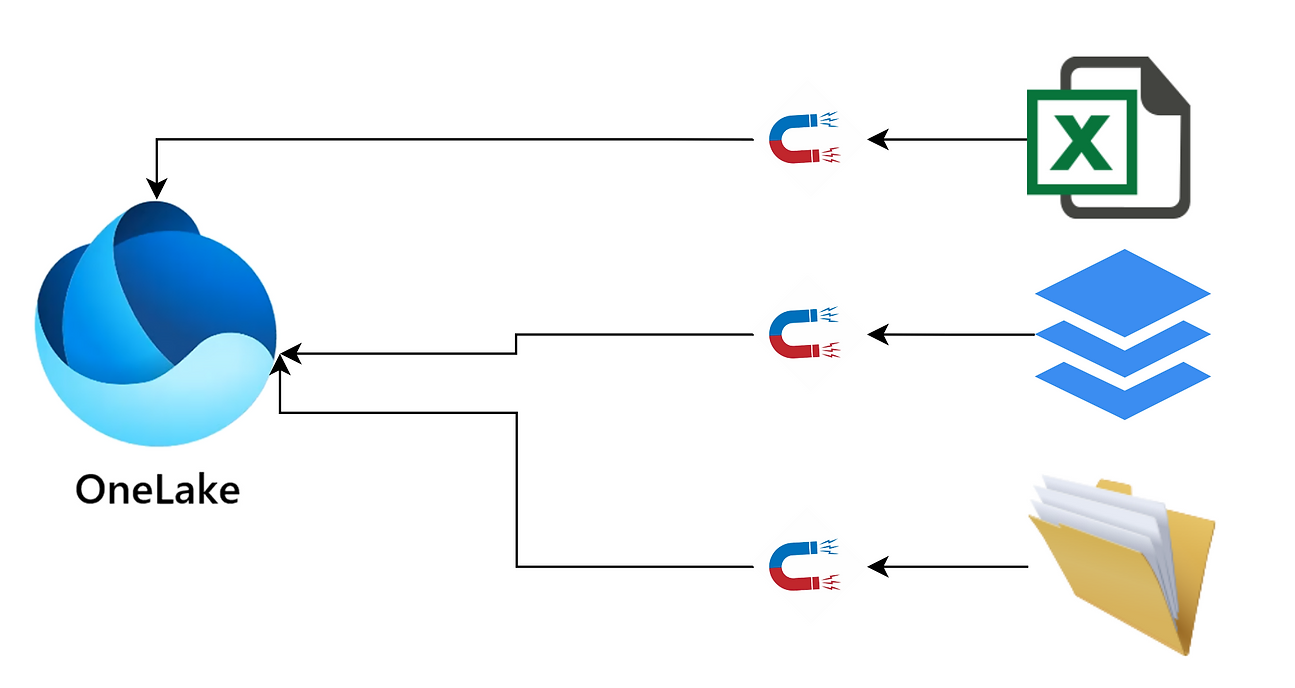
Microsoft Fabric offers unparalleled flexibility when it comes to handling various file types, thanks to the powerful capabilities of the OneLake Desktop App. Whether you’re dealing with Excel files, CSVs, text files, or Parquet files, OneLake Desktop App makes it incredibly easy to bring all these different file types into Microsoft Fabric.
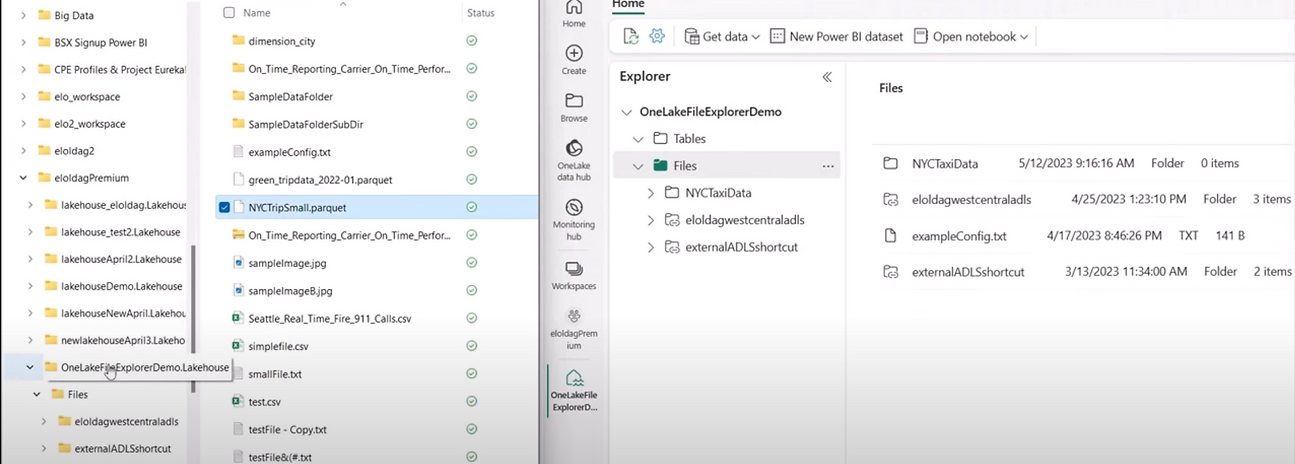
The OneLake Desktop App operates with the same simplicity and efficiency as OneDrive, ensuring a smooth and intuitive user experience. With this app, you can move files and folders into OneLake without the hassle of complex procedures or technical barriers.
The familiar drag-and-drop interface allows you to manage your data effortlessly, enabling you to focus more on your analytical tasks and less on the intricacies of data management.
Universal File Format Conversion:
One of the standout features of OneLake Desktop App is its ability to convert any file type into Delta Parquet files upon ingestion. This conversion is automatic and seamless, ensuring that all your data, regardless of its original format, is standardized into a high-performance, query-ready format.
Excel Files: Excel files, commonly used for data collection and preliminary analysis, can be directly imported into Microsoft Fabric. This allows users to leverage the rich analytical capabilities of Fabric without the need to manually convert Excel data.
CSV Files: CSV files, a staple for data exchange and reporting, are effortlessly handled by OneLake Desktop App. These files can be quickly ingested and converted, making them ready for immediate use in your data workflows.
Text Files: Text files, often used for logs and unstructured data, can be integrated into OneLake with ease. The app ensures that these files are properly formatted and stored as Delta Parquet files, enabling efficient querying and analysis.
Parquet Files: For those already using the Parquet format, the OneLake Desktop App preserves the integrity and performance of your existing Parquet files, seamlessly incorporating them into the OneLake ecosystem.
One of the most impressive features of Microsoft Fabric is its ability to facilitate data integration without necessitating physical data movement. If your data resides on another cloud platform and you prefer not to migrate it to Microsoft’s cloud, Microsoft Fabric offers a seamless solution through the creation of shortcuts in OneLake.
Versatile Data Usage Across Methods:
Once your files are stored in Delta Parquet format within OneLake, they are ready for querying and usage across various methods. Whether you’re working within a Data Warehouse, LakeHouse, notebooks, or semantic models, your data is instantly accessible and usable.
This versatility is a key advantage of Microsoft Fabric, enabling you to apply your data in a wide range of analytical and operational scenarios.
- Data Warehouse: Utilize your integrated data for complex queries and business intelligence reporting.
- LakeHouse: Combine structured and unstructured data for comprehensive analytics and machine learning applications.
- Notebooks: Leverage Jupyter or other notebooks for interactive data analysis and exploration.
- Semantic Models: Build semantic models to enable intuitive data discovery and reporting for end-users.
Enhanced Collaboration and Data Sharing:
The OneLake Desktop App within Microsoft Fabric offers a robust solution for handling various file types, providing seamless integration, efficient data management, and versatile data usage. Whether you’re dealing with Excel, CSV, text files, or Parquet files, the app ensures that your data is easily accessible and ready for advanced analytics.
The OneLake Desktop App also supports enhanced collaboration and data sharing capabilities. By storing all files as Delta Parquet within OneLake, teams across the organization can access and work with the same high-quality data sets, ensuring consistency and accuracy.
This centralized approach to data management fosters better collaboration and enables more effective data-driven decision-making.
Conclusion
Microsoft Fabric has matured from a promising platform into the enterprise standard for unified analytics and AI, ready data. In 2025, 2026 alone, Microsoft shipped GA mirroring for SQL Server, Cosmos DB, and PostgreSQL; introduced OneLake Security and the OneLake Catalog; embedded Copilot and Data Agents across every workload; and expanded multi, cloud connectivity to include Oracle, Google BigQuery, SAP, Salesforce, and Databricks.
For organizations still running fragmented data stacks , separate warehouses, ETL pipelines, and BI tools , the consolidation case for Fabric is now measurably strong. The 379% three, year ROI documented by Forrester, combined with the platform’s growing AI capabilities, makes the question less “should we evaluate Fabric” and more “when do we start.”
AlphaBOLD is a certified Microsoft Solutions Partner with hands, on experience deploying Fabric across ERP, CRM, and analytics workloads. If you’re ready to move from legacy pipelines to a unified data foundation, talk to our team.
FAQS
Microsoft Fabric is a unified, SaaS, based analytics platform that combines data engineering, data warehousing, real, time intelligence, data science, and business intelligence into a single environment built on OneLake. Launched in 2023, it now serves more than 28,000 organizations globally, including 80% of the Fortune 500.
OneLake centralizes data storage, enabling seamless access without complex ETL pipelines.
As of mid, 2026, Fabric Mirroring supports the following sources in General Availability: Azure SQL Database, Azure SQL Managed Instance, SQL Server 2016, 2025 (on, premises and cloud), Cosmos DB, Azure Database for PostgreSQL, and Snowflake. Oracle and Google BigQuery are in public preview. Over 40 additional sources are available via Qlik Open Mirroring.
Yes, OneLake uses shortcuts and virtual connections to access data without copying it.
Fabric now includes Copilot for Fabric (GA), powered by Azure OpenAI, which assists with notebook authoring, data preparation, Power BI report generation, and natural language querying. Fabric Data Agents allow users to chat directly with mirrored databases. Fabric IQ (Preview) connects OneLake data to Microsoft 365 AI experiences. Real, Time Intelligence supports AI, powered anomaly detection and automated streaming alerts. MCP support extends AI agent interoperability across all connected data sources.
Yes, the desktop app allows universal file format conversion for easier analysis.
OneLake Security is a new access control model (currently in public preview) that enforces data permissions directly at the storage layer in OneLake. Instead of managing access separately in each Fabric engine (Spark, SQL, KQL, Power BI), you define rules once and they are applied consistently across all workloads. This is especially important for organizations with strict regulatory requirements or multi, team data governance needs. Learn more in the Microsoft documentation.
Common use cases in 2026 include: zero, ETL analytics on operational databases via mirroring; real, time intelligence and anomaly detection on streaming data; AI application development using Copilot and Fabric Data Agents; unified BI reporting via Power BI over OneLake; data mesh architectures with federated governance via Microsoft Purview; and migration from Azure Data Factory or SSIS to Fabric Data Factory for simplified pipeline management.