How Microsoft Copilot in Azure Can Streamline Your Cloud Workflows

Table of Contents
Introduction
Enterprise Azure environments are becoming harder to manage as scale, security requirements, and cost pressures increase. Cloud teams are expected to deliver faster releases while still maintaining control over infrastructure, governance, and uptime.
Microsoft Copilot in Azure introduces an AI layer inside the Azure platform that helps teams manage cloud operations using natural language. It supports deployment, troubleshooting, optimization, monitoring, and cost analysis within existing workflows.
This guide explains how Microsoft Copilot in Azure changes day-to-day operations, where it delivers measurable ROI, and how organizations can adopt it safely at scale.
What is Microsoft Copilot in Azure and How Does It Work?
Microsoft Copilot in Azure is an AI assistant built into the Azure platform that helps teams manage cloud resources using natural language instead of manual commands or scripts. It sits directly inside Azure and supports everyday tasks like deployment, monitoring, troubleshooting, and cost optimization.
It works by combining three core capabilities:
- Large language models (Azure OpenAI Service): Understands natural language, generates responses, and can create scripts or code
- Azure control plane integration: Works with Azure service structures, relationships, and best practices
- Environment context: Uses your actual resources, permissions, and policies to give relevant and safe outputs
Copilot runs inside tools like the Azure portal, Azure mobile app, and AI Shell, so teams can manage cloud operations without switching between tools or interfaces.
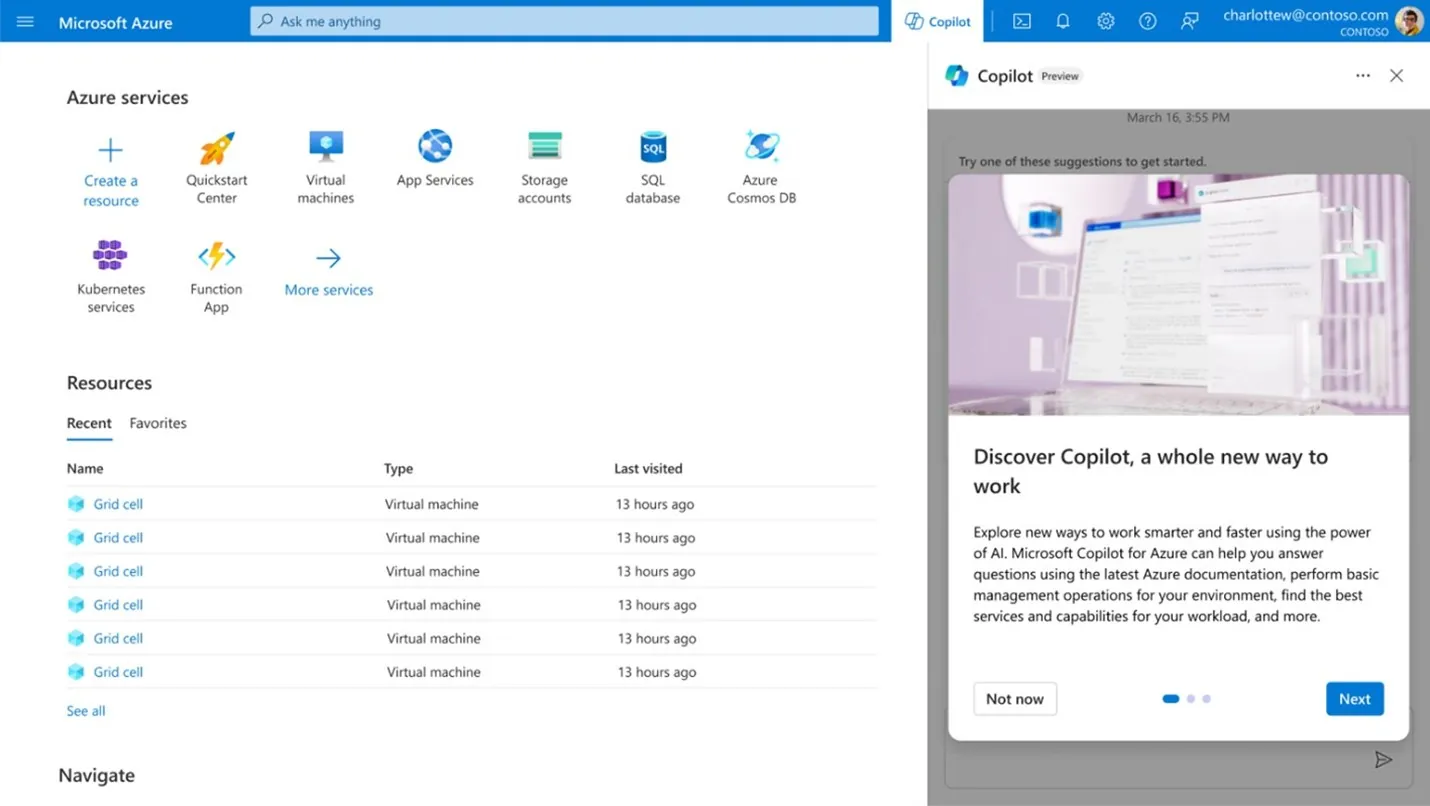
What Can Microsoft Copilot in Azure Do in Real Operations?
Microsoft Copilot in Azure supports the full cloud lifecycle and reduces manual effort across day-to-day cloud operations. It works directly within Azure to help teams plan, run, optimize, and troubleshoot environments using natural language.
Design and Architecture:
Copilot helps teams design cloud solutions by recommending Azure services based on requirements and existing policies. It also aligns configurations with the Azure Well-Architected Framework, helping teams make consistent architectural decisions without having to start from scratch each time.
Operations and Execution:
Copilot handles routine operational work such as:
- Generating Azure CLI commands
- Running status checks
- Deploying infrastructure components
- Executing cloud tasks based on plain-language requests
Instead of switching between documentation and tools, teams describe what they need, and Copilot translates it into execution steps.
Optimization:
Copilot continuously reviews your Azure environment to identify:
- Cost inefficiencies and underused resources
- Performance bottlenecks
- Security gaps
- Reliability improvements
It works with Azure Advisor to turn these insights into clear, actionable recommendations based on your actual workload.
Troubleshooting:
Copilot analyzes logs, metrics, and diagnostic data to:
- Explain errors in simple terms
- Identify root causes faster
- Suggest remediation steps
- Provide direct fixes for certain issues
This reduces time spent on manual investigation and speeds up incident resolution.
Cloud workflows become more consistent and less manual as Copilot connects planning, execution, and optimization into a single operational flow.
How Does Microsoft Copilot in Azure Transform Cloud Workflow Automation?
Microsoft Copilot in Azure reduces manual effort by turning complex, multi-step cloud operations into guided, AI-assisted workflows. It helps teams move faster across deployment, migration, monitoring, optimization, and troubleshooting without switching between tools or writing extensive scripts.

Streamlining Infrastructure Deployment:
Copilot simplifies applications and infrastructure deployment by converting natural language into complete cloud setups.
For example, a request like: “Deploy a scalable SaaS app on AKS with PostgreSQL backend, secure key storage, and monitoring.”
Copilot can:
- Generate an architectural blueprint aligned with the Azure Well-Architected Framework
- Evaluate trade-offs such as performance vs. cost
- Produce Terraform configurations ready for deployment
- Integrate Azure Key Vault for secrets management
- Configure Application Insights for observability
It can also push outputs directly to GitHub for CI/CD workflows or open them in Visual Studio Code for the Web, connecting design and deployment in a single flow.
You may also like: Simplify your Azure Infrastructure with Azure Blueprints
Making Cloud Migration More Manageable:
Cloud migration often involves long timelines and cross-system coordination. Copilot reduces this effort by guiding teams through structured steps.
It helps by:
- Breaking migration into clear stages
- Supporting modernization of legacy .NET and Java applications
- Recommending cost-effective replacement services
- Automating parts of the migration workflow
Tasks that traditionally take months can be completed in shorter cycles because repetitive effort is reduced and guidance is available throughout the process.
Real-Time Observability Without Query Complexity:
Copilot removes the need for deep query knowledge when monitoring Azure environments.
Teams can ask questions such as:
- “Why are my AKS pods restarting?”
- “Show CPU usage trends for production VMs last week”
- “Are there spikes in application errors today?”
Copilot converts these into queries, analyzes results, and explains findings in plain language. It also helps troubleshoot integrations with tools like Datadog and Splunk by identifying data flow or configuration issues.
Continuous Optimization Through Azure Advisor:
Copilot continuously scans environments and highlights improvement opportunities across:
- Cost: Identifying underused or oversized resources.
- Performance: Recommending services like Azure CDN for lower latency.
- Security: Flagging unencrypted storage or risky configurations.
- Reliability: Suggesting availability zones for critical workloads.
Teams can review recommendations, ask follow-up questions, and apply changes without leaving the interface.
Faster Troubleshooting and Incident Resolution:
When production issues occur, Copilot helps teams diagnose problems using simple descriptions such as:
- “Azure SQL Database is not connecting from Power BI”
- “App Service returning frequent 500 errors”
It analyzes logs and diagnostics, identifies likely causes, and provides clear remediation steps. In some cases, it can suggest or apply direct fixes, such as resolving container restart loops or correcting configuration issues in Azure Arc-enabled resources.
This reduces time spent on manual investigation and shortens incident resolution cycles, improving overall system stability and user experience.
What Real-World Use Cases Show the Business Value of Microsoft Copilot in Azure?
Microsoft Copilot in Azure is used across industries to reduce manual effort, speed up decision-making, and improve operational efficiency. The impact is visible across analytics, automation, software delivery, and support operations.

Global Enterprises Improving Operations Speed:
Large enterprises are using Azure-based AI tools to shorten execution cycles and improve responsiveness.
- Zeiss: Large enterprises are using Azure-based AI tools to shorten execution cycles and improve responsiveness.
- Volvo: Automated document processing with a custom Azure AI solution, saving around 10,000 manual hours annually and redirecting effort to higher-value work.

Professional Services Improving Delivery Efficiency:
Service-based organizations are using Copilot and Azure AI to streamline complex workflows and improve client outcomes.
- PwC: Simplified audit processes using Azure OpenAI Service, improving transparency and reducing turnaround time for client deliverables.
- Intertech: Combined GitHub Copilot with Azure OpenAI Service, improving code quality and cutting internal communication load by 50%, allowing teams to focus on core development work.
Operational Savings Across Enterprise Environments:
Organizations are using automation to reduce cost pressure and improve workforce efficiency.
- Epiq: Automated internal employee processes using Copilot and Power Platform, saving over $500,000 annually and recovering 24,000 work hours per year.
- PG&E: Applied generative AI to handle 40% of helpdesk requests, reducing operational load and saving over $1 million annually while improving response times.
Across industries, the pattern is consistent: Copilot reduces manual work, improves response speed, and enables teams to focus on higher-value activities rather than repetitive operational tasks.
How Does Microsoft Copilot in Azure Enhance Security Operations?
Microsoft Copilot improves security operations by helping teams investigate threats, analyze security data, and respond to incidents faster using natural language queries.
Organizations are already applying this in real environments:
WTW:
Common Security and Cloud Scenarios Organizations Can Implement:Uses Microsoft Copilot for Security to investigate threats through natural language prompts, accelerating threat detection and incident response. Faster response reduces exposure time and limits the impact of potential breaches.
Copilot allows security teams to:
- Analyze large volumes of security data quickly
- Investigate attack patterns without manual query building
- Get clear explanations of risks and recommended actions
- Respond faster to active threats
Common Security and Cloud Scenarios Organizations Can Implement:
Copilot is already being used across core cloud and security operations.
- Infrastructure Management: Deploy and manage VMs, Kubernetes clusters, and storage using natural language commands
- Code Generation: Create Azure CLI scripts, PowerShell automation, Terraform templates, and Kubernetes YAML files
- Security Analysis: Review firewall logs, assess attack surfaces, and investigate incidents
- Resource Discovery: Explore Azure environments using natural language queries powered by Azure Resource Graph
- Network Visualization: Generate topology views and troubleshoot connectivity issues
These capabilities are available now and are transforming how organizations manage cloud infrastructure, improve efficiency, and reduce costs.
Operational Impact:
These use cases show how Copilot fits into daily workflows without requiring new tools or processes. Teams can manage infrastructure, analyze risks, and resolve issues faster while reducing manual effort and operational overhead.

What Measurable ROI Does Microsoft Copilot in Azure Deliver?
Microsoft Copilot in Azure improves productivity, reduces cloud costs, and increases operational efficiency. For most organizations, the impact is measurable within months, not years.
Productivity Gains:
Cloud teams spend a large portion of their time on repetitive operational work. Copilot reduces this effort by handling routine tasks through natural language prompts.
Key improvements include:
- Infrastructure-as-code creation: While a standard three-tier Azure setup typically takes several hours, new AI-driven tools can generate and finalize the configuration much faster.
- Log and query analysis: According to Microsoft Learn, Copilot allows users to enter plain-language questions and automatically generates Kusto Query Language (KQL) queries, making data analysis quicker and more accessible for both experts and non-experts.
- Automation scripts: Azure CLI and PowerShell scripts that previously took hours to write and test can now be generated and refined in minutes.
At scale, these gains are significant. Many organizations recover 20–30% of engineering capacity, which for a 10-person team equals the output of 2–3 additional engineers without increasing headcount.
Bonus Reading: Guide to Microsoft Copilot Pricing & Licensing
Direct Cloud Cost Reduction:
Copilot improves visibility into resource usage and helps teams act on cost inefficiencies faster.
- Resource right-sizing: Identifies underutilized or oversized resources. According to Microsoft, Azure Copilot can help you analyze, estimate, and optimize your cloud costs by identifying unused or inefficient resources and streamlining incident resolution to reduce downtime for critical business systems.
- Lower support workload: Automating routine queries and fixes reduces ticket volume, often resulting in measurable annual savings for IT teams.
Business Value Beyond Cost Savings:
Some of the most important gains come from improved execution across teams.
- Faster onboarding: New engineers contribute sooner without deep expertise in CLI or portal workflows
- Reduced dependency on senior staff: Routine work no longer requires constant escalation
- Shorter release cycles: Infrastructure provisioning shifts from days to minutes
- Improved security posture: Earlier detection of configuration issues reduces risk exposure
How to Calculate Your Potential ROI?
A practical ROI model should focus on four inputs:
- Weekly hours spent on routine cloud management tasks
- Expected time reduction of 20–30%
- Estimated cloud cost reduction of 10–15%
- Current downtime cost with a conservative MTTR improvement assumption
For organizations with established Azure environments, these inputs typically result in a return on investment within 3 to 6 months. As adoption expands across more workflows, the value continues to increase over time.
How Does Microsoft Copilot Integrate Across the Azure Ecosystem?
Microsoft Copilot in Azure works within the tools teams already use. It does not require new workflows or separate interfaces. Instead, it connects Azure services and Microsoft platforms through a shared foundation, so context carries across environments.
Azure OpenAI Service:
Azure OpenAI Service powers Copilot across Azure, Microsoft 365, Power Platform, and Dynamics 365. Because these services use the same models and security boundaries, Copilot can understand context across platforms.
This means teams get consistent behavior whether they are working in the Azure portal, Visual Studio Code, or Power Platform.
GitHub Copilot for Azure:
GitHub Copilot for Azure brings cloud management into Visual Studio Code.
Developers can:
- Provision resources
- Troubleshoot deployments
- Review configurations
For example, a developer can request a PostgreSQL server with encryption enabled directly from the IDE. Copilot applies policy-compliant settings and returns connection details. If deployment issues occur, diagnosis happens in the same workspace, reducing delays.
Power Automate:
Power Automate allows
business users to create workflows using plain language.
Copilot:
- Converts descriptions into complete flows
- Configures connectors and parameters
- Automates tasks like document processing, compliance alerts, and system logging
This reduces reliance on engineering teams and helps clear operational backlogs.
Azure Kubernetes Service (AKS):
Kubernetes management can be complex. Copilot simplifies common tasks such as:
- Generating manifests
- Diagnosing upgrade issues
- Recommending scaling adjustments
- Troubleshooting pod failures
Guidance is based on the actual cluster configuration, not generic documentation.
Azure Monitor:
Copilot removes the need to manually write KQL queries.
Teams can:
- Ask questions about logs and metrics
- Investigate performance issues
- Analyze latency or error trends
Copilot generates queries, runs them, and explains results in plain language, making monitoring accessible to more users.
Azure Migrate:
During migration projects, Copilot works with Azure Migrate to:
- Assess environments
- Identify workloads
- Recommend migration paths
- Suggest modernization opportunities
Because it understands the source environment, recommendations are specific and actionable.
The Unified Experience Advantage:
The value of Copilot increases when these services work together.
Teams can:
- Analyze costs in the Azure portal
- Update infrastructure from the IDE
- Automate workflows in Power Automate
- Monitor performance in Azure Monitor
All while maintaining context across tools. This reduces handoffs, speeds up execution, and keeps operations aligned with existing workflows.
Integrate Microsoft Copilot into Your Azure Environment
Connect Copilot with your existing Azure services, workflows, and governance model to ensure secure adoption and measurable outcomes.
Request a ConsultationHow Should You Implement Copilot in Azure for Success?
Strong results depend on how Copilot is introduced and governed. Organizations that see consistent value treat Copilot as a capability to operationalize, not a feature to switch on.
1. Start Realistic Expectations Early:
Copilot supports teams; it does not replace cloud expertise. Teams should understand current limitations before adoption.
Key constraints:
- Conversation history is limited to 24 hours
- Single commands are capped, typically around 50 resources
- Temporary throttling can occur during peak usage
- Copilot operates only within existing user permissions
- Clear expectations reduce frustration and improve adoption.
2. Roll out in Phases, Not All At Once:
A staged rollout allows teams to learn, adjust, and govern usage before scaling.
Phase 1: Pilot Group (Weeks 1-4)
Select 5 to 10 users across development, operations, and architecture.
Focus on:
- Daily usage in real workflows
- Identifying high-impact use cases
- Capturing effective prompts
- Documenting gaps and limitations
Phase 2: Expanded Testing (Weeks 5-8)
Extend access to 30 to 50 users across teams.
Use pilot insights to:
- Train users on proven scenarios
- Share prompt examples
- Validate governance rules
- Capture role-specific feedback
Phase 3: Organization-wide rollout (Week 9 onward)
Expand access with:
- Documented use cases
- Internal champions
- A shared prompt library
- Tested governance controls
3. Train Teams On Effective Prompting:
Copilot output depends on prompt quality. Teams should learn how to provide context and ask precise questions.
Create training sessions that teach your team to:
Be Specific:
- Weak: “Help with my database”
- Strong: “My Azure SQL Database ‘proddb-east’ is experiencing connection timeouts from my App Service ‘webapp-prod’. The issue started around 3 PM and affects about 30% of connection attempts. What could be causing this?”
Add Context:
- Weak: “Reduce costs”
- Strong: “Show cost optimization recommendations for my production subscription, prioritizing opportunities that won’t impact performance for customer-facing services”
Ask Follow-Ups:
- “Why do you recommend that approach?”
- “What are the trade-offs between these options?”
- “Can you show me the step-by-step implementation?”
Create a shared repository of effective prompts for common scenarios to improve team-wide usage.
4. Apply Responsible Usage Principles:
Copilot follows Microsoft’s Responsible AI framework. Implementation should reinforce the same approach.
- Encourage users to flag inaccurate or unexpected responses
- Require human review before applying changes in production
- Train teams to avoid sharing sensitive or regulated data in prompts
5. Measure Impact Continuously:
Tracking usage and outcomes is necessary to evaluate effectiveness and guide expansion.
Usage metrics
- Active users
- Prompts per user
- Common request types
Value metrics
- Time saved on routine tasks
- Reduction in support tickets
- Cloud cost reductions from recommendations
• Deployment frequency and success rates
Quality metrics
- User satisfaction
- Accuracy of responses
- Adoption of Copilot-generated recommendations
Review results regularly and refine training, governance, and rollout strategy based on actual usage patterns.
How Does Microsoft Copilot in Azure Address Security, Governance, And Compliance?
Security and compliance are often the deciding factors in AI adoption. Microsoft Copilot in Azure is designed to operate within enterprise security boundaries from the start, not as an added layer.
Tenant-Boundary Data Isolation:
All Copilot interactions remain within your Microsoft 365 tenant.
- Prompts do not leave your tenant
- Customer data is not used to train models for other organizations
- Responses are generated only from data the user is authorized to access
This approach ensures data remains isolated, owned, and controlled by your organization.
All data is encrypted in transit using TLS 1.2+ and at rest using AES-256. Microsoft also defends against risks such as prompt injection, malicious code generation, and data exfiltration through continuous monitoring.
Governance Through Microsoft Purview:
Copilot works within existing Microsoft Purview policies instead of introducing a separate governance layer.
- Sensitivity labels: Copilot respects classification rules and restricts access where required.
- Data Loss Prevention: Risky prompts are blocked or redacted before processing.
- Audit logging: All interactions are recorded, providing visibility into usage, blocked actions, and trends.
This audit trail supports compliance reviews, investigations, and policy enforcement.
You may also like: Streamlining Microsoft Azure Identity and Security for Growth
Identity and Access Controls Remain Intact:
Copilot follows Azure RBAC and the principle of least privilege.
- Users can only access what they are already authorized to view or manage.
- Read-only users can analyze data but cannot make changes.
- Copilot does not bypass permissions or create new access paths
Conditional Access policies can also be applied, including:
- Multi-factor authentication
- Device compliance checks
- Network-based restrictions
- Session controls for high-risk scenarios
These controls mirror those used for other critical enterprise systems.
Enterprise Compliance Certifications:
Copilot in Azure inherits Microsoft Cloud compliance certifications required by regulated industries, including:
- ISO/IEC 27001, 27017, 27018
- SOC 1, 2, and 3
- HIPAA and HITECH
- FedRAMP High
- GDPR
- PCI DSS
These standards are maintained through regular third-party audits.
Customer Lockbox: Ultimate Control
Customer Lockbox provides an additional layer of control when Microsoft support requires access.
- Access requires explicit customer approval
- All requests are logged for auditing
- No access is granted without authorization
This ensures full visibility and control over any external access to your environment.
Operationalize Copilot Across Your Azure Stack
Move from isolated usage to a structured Copilot integration across Azure, DevOps, and monitoring workflows.
Schedule Your ConsultationConclusion
Microsoft Copilot in Azure is changing how cloud teams manage infrastructure by embedding AI directly into daily operations. It supports faster execution, better cost control, and improved visibility across complex environments without requiring new workflows.
Microsoft’s roadmap points to deeper integration across cloud, security, and endpoints, along with stronger governance and better control over data and usage. As these capabilities expand, Copilot is moving beyond a reactive assistant toward a more proactive, agent-based model that can monitor environments and automate routine actions.
Organizations that adopt Copilot with a clear rollout plan, governance model, and team training will be better prepared to scale its use and capture long-term value as it becomes a core part of cloud operations.
FAQs
Copilot works directly within Azure services, including the Azure portal, GitHub Copilot for Azure, Power Automate, AKS, Azure Monitor, and Azure Migrate, leveraging shared context and existing permissions.
No. Copilot operates within existing tools and workflows, enhancing team productivity without requiring new platforms or process redesigns.
Yes. Copilot follows tenant-boundary data isolation, enforces RBAC and Conditional Access, and integrates with Microsoft Purview for DLP, audit logging, and data classification.
No. Copilot strictly respects Azure RBAC and can only access data and perform actions that the user is already authorized to do.
Initial integration and pilot setup typically take a few weeks, depending on the readiness of governance, access controls, and training requirements.