VertiPaq Engine in Power BI and Fabric: Why It Determines Performance, Cost, and Scalability in 2026

Table of Contents
Introduction
In 2026, the Tabular vs. Multidimensional discussion is no longer about modeling preference. It is about engine behavior under enterprise stress. With Microsoft Fabric consolidating analytics into shared capacity environments, VertiPaq performance directly impacts cost, scalability, and AI readiness.
Tabular models power Power BI semantic models and Fabric analytics. That means compression efficiency, memory usage, and query execution patterns influence capacity consumption and concurrency limits. Poor model design no longer affects just one dashboard. It affects shared workloads across departments.
AI-driven queries add volatility. Copilot prompts, natural language exploration, and data agents generate unpredictable query patterns. Engine efficiency now determines whether workloads scale smoothly or trigger capacity pressure.
Enterprise scalability in 2026 is about concurrent users, mixed BI and AI demand, and cost governance. The engine choice must align with Fabric’s architecture and long-term platform direction.
What Is the VertiPaq Engine in Power BI?
The VertiPaq engine is the in-memory, columnar storage engine that powers Tabular models in Power BI, SQL Server Analysis Services (Tabular), and Microsoft Fabric semantic models.
VertiPaq compresses data column by column and stores it in RAM. This columnar structure allows high compression rates and extremely fast aggregation queries, especially for analytical workloads.
Where VertiPaq Is Used
VertiPaq operates when:
- Power BI uses Import mode
- Fabric semantic models use Direct Lake
- SSAS Tabular models are deployed in-memory
In these modes, data is loaded into memory rather than queried directly from disk for each request.
How It Works (Simplified)
The VertiPaq engine relies on two internal components:
- Storage Engine (SE) – Handles data retrieval, compression, and scanning of columnar data
- Formula Engine (FE) – Executes DAX calculations, applies logic, and orchestrates queries
The Storage Engine performs fast column scans and aggregations. The Formula Engine processes business logic and calculated measures.
In simple terms:
Data is compressed and stored in memory →
Storage Engine scans columns efficiently →
Formula Engine applies DAX logic →
Results are returned quickly.
VertiPaq’s performance depends heavily on model design, cardinality optimization, and memory management, which directly affect scalability in enterprise environments.
How VertiPaq Works (Without Getting Academic)
VertiPaq’s performance advantage comes from how it stores and compresses data in memory. The goal is not just speed. It is compression efficiency, lower memory footprint, and reduced capacity pressure in enterprise environments.
Columnar Storage
VertiPaq stores data by column instead of by row.
Because analytical queries typically scan specific columns rather than entire records, columnar storage allows the engine to read only what is needed. This reduces memory access, improves aggregation speed, and lowers overall resource consumption inside shared Fabric capacity.
In 2026, that translates directly into better concurrency and more efficient capacity utilization.
Dictionary Encoding
VertiPaq replaces repeating values with numeric identifiers stored in a dictionary. This is called dictionary encoding.
Below is a simple example. Instead of storing city names like “New York,” “Tokyo,” “London,” and “Shanghai” repeatedly in every row, the engine assigns each unique city a numeric ID. The data column then stores only those compact IDs, while the actual city names are kept once in a separate dictionary.
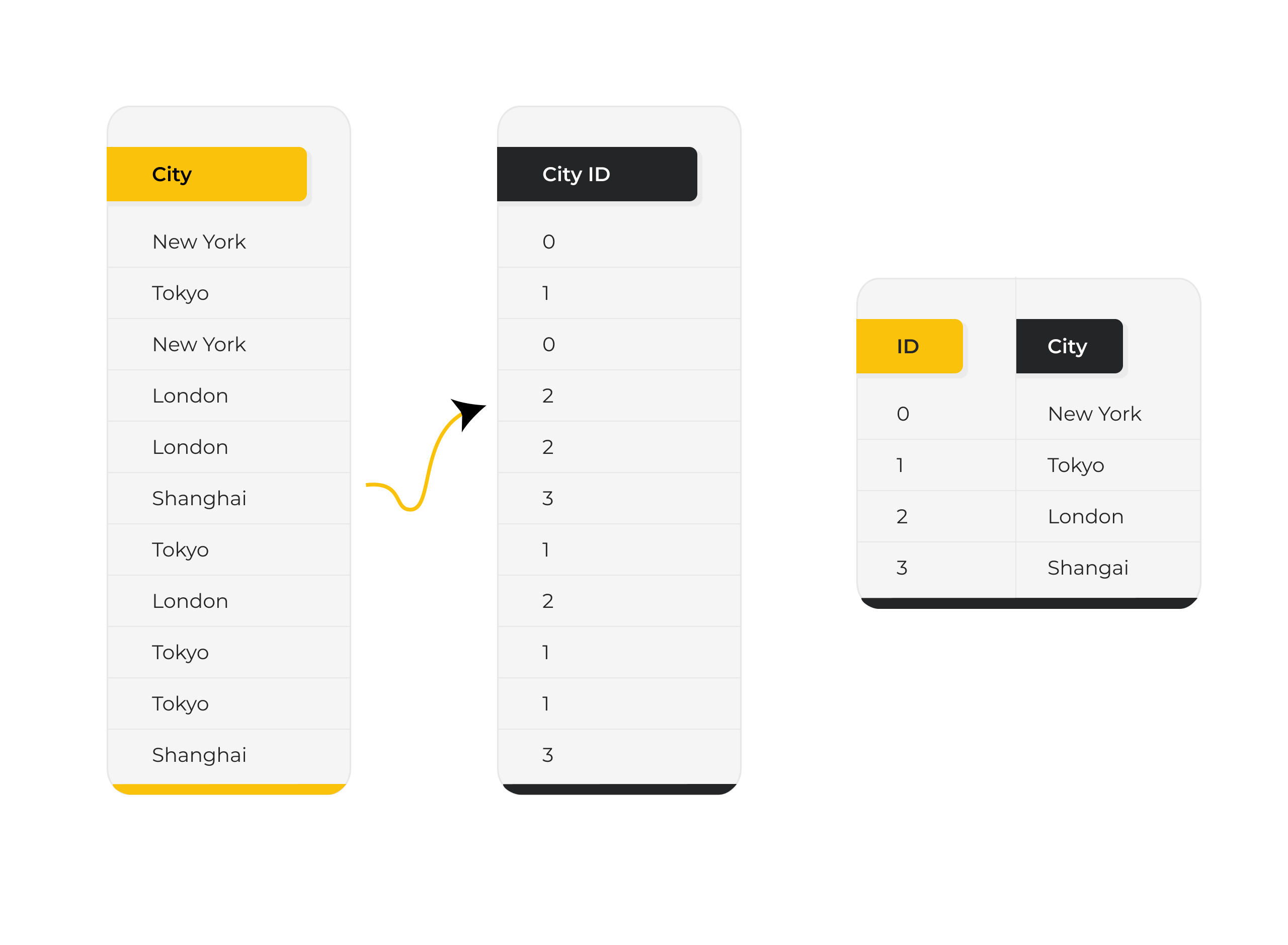
This dramatically reduces memory usage for low-cardinality columns where values repeat frequently. A smaller memory footprint leads to higher compression ratios, which directly improves performance, increases concurrency capacity, and reduces Fabric capacity pressure in enterprise environments.
Further Reading: How to Integrate Multiple Data Sources in Power BI
Value Encoding
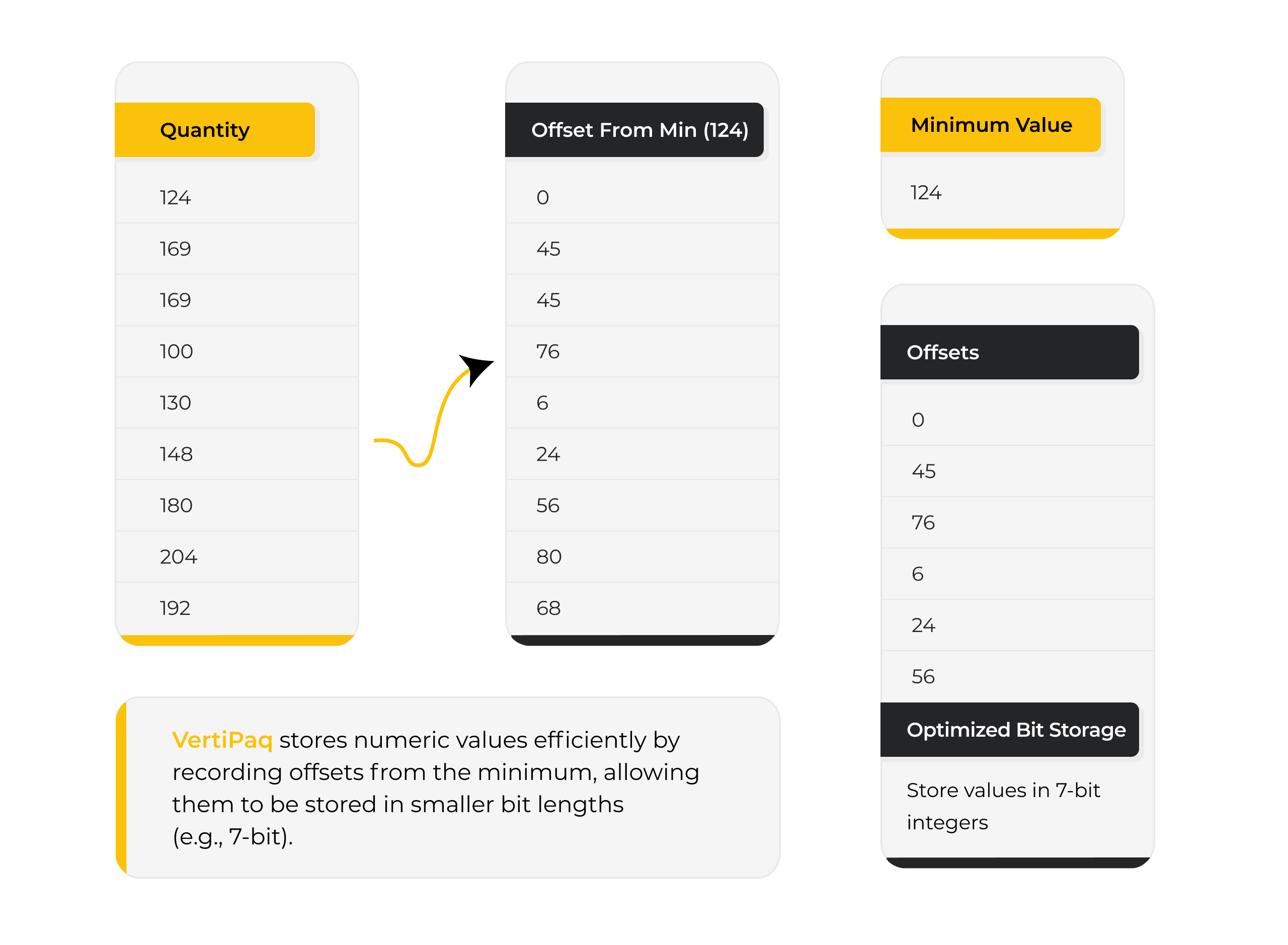
For numeric columns, VertiPaq uses value encoding to store numbers in the smallest possible data type.
If a column only contains small integers, it will not reserve large memory blocks unnecessarily. This fine-grained optimization improves compression and allows more data to fit within capacity limits.
In enterprise models, this determines whether a dataset remains comfortably within memory or triggers expensive capacity scaling.
Run-Length Encoding (RLE)
When consecutive rows contain the same value, VertiPaq stores the value once along with a count of repetitions.
This works particularly well in sorted columns such as dates, status flags, or partitioned data. The result is further compression and faster scans during aggregation.
Efficient RLE reduces both memory consumption and scan cost, improving performance under high concurrency workloads.
VertiPaq’s compression mechanisms are not just engineering details. They determine how efficiently semantic models scale, how many users can query simultaneously, and how much capacity an organization must provision in Fabric.
In modern BI architecture, compression efficiency is directly tied to performance stability and cost control. Here we can see an example for better understanding.

Is Your Semantic Model Cost-Efficient in Fabric?
Model design decisions directly impact memory usage, concurrency, and capacity cost. Our BI architects help enterprises optimize Tabular models for performance and scalability.
Request a ConsultationVertiPaq in the Fabric Era
In Microsoft Fabric, VertiPaq engine moves beyond storage and into import mode. It governs how semantic models consume memory, respond to concurrency, and behave under AI-driven workloads inside shared capacity environments.
Fabric consolidates analytics into capacity-based SKUs where multiple workspaces, refresh cycles, and query patterns compete for the same memory and compute. That makes compression efficiency and engine behavior directly tied to performance stability and cost control.
Direct Lake, Memory Pressure, and Capacity Economics
Direct Lake allows semantic models to read data directly from OneLake without traditional refresh cycles. However, once queries execute, VertiPaq still manages in-memory compression, caching, and aggregation behavior.
If models are inefficient:
- Memory pressure increases
- Datasets are evicted from cache
- Cold-query latency rises
- Capacity SKUs must scale sooner
In Fabric, model design directly influences licensing cost. High-cardinality columns, poor encoding patterns, and oversized semantic models can push organizations into higher SKUs earlier than necessary.
VertiPaq compression is no longer just a performance detail. It is a cost variable.
AI Workloads and Multi-Workspace Governance
Fabric environments now support Copilot prompts, natural language queries, data agents, and exploratory analytics. These introduce unpredictable concurrency spikes and irregular query shapes.
Efficient VertiPaq models absorb workload volatility. Poorly optimized models amplify it.
Because multiple workspaces often share a single capacity, one inefficient semantic model can impact refresh schedules and query performance across teams. Engine optimization becomes part of governance strategy, not just development hygiene.
In the Fabric era, VertiPaq influences scalability, cost predictability, AI readiness, and enterprise stability. The engine conversation is once again architectural.
Further Reading: Microsoft Data Fabric for SMBs
Why Decision Makers Should Care
The VertiPaq engine may sound like a technical detail, but in the Fabric era it directly influences cost, performance stability, and AI responsiveness.
Because Fabric operates on capacity-based licensing, how efficiently the VertiPaq engine compresses and serves data affects:
- Capacity SKU upgrades
- Memory pressure and dataset eviction
- Concurrency limits under peak usage
- Long-term licensing trajectory
When dashboards load unpredictably due to memory churn, adoption drops. When Copilot prompts or AI-driven queries slow down under concurrency spikes, perceived AI maturity declines.
As organizations scale across workspaces and departments, workload overlap increases. The efficiency of the VertiPaq engine determines whether growth feels controlled or unstable.
In 2026, this is not just an architectural conversation. It is about:
- Protecting analytics investments
- Avoiding unnecessary capacity spend
- Maintaining AI responsiveness
- Scaling without performance volatility
Optimizing the VertiPaq engine is now a governance and cost-control decision, not just a modeling preference.
Warning Signs Your VertiPaq Is Not Optimized
An inefficient VertiPaq engine rarely fails loudly. Instead, it creates subtle performance and cost signals that compound over time.
Watch for these indicators:
- High-cardinality columns inflating model size
- Slow dataset refresh despite moderate data volumes
- Sudden memory spikes inside Fabric capacity
- Frequent dataset eviction or capacity throttling
- Copilot prompts or natural language queries lagging under concurrency
- Reports performing well in isolation but degrading under multi-user load
If these patterns appear, the issue is often not data volume, but semantic model design.
In Fabric environments, inefficient VertiPaq engine behavior can quietly increase capacity consumption and reduce performance stability long before teams recognize the architectural root cause.
Not Sure If Your VertiPaq Engine Is Operating Efficiently?
Many organizations only uncover compression inefficiencies and capacity waste after performance declines or Fabric costs rise. A structured semantic model health review can surface high-cardinality risks, memory pressure patterns, governance gaps, and AI query bottlenecks before they escalate.
Before upgrading capacity or accepting performance instability, validate whether your VertiPaq engine design is the real constraint.
Strategic Approach to Semantic Model Engineering
Optimizing the VertiPaq engine is not about tweaking formulas. It is about disciplined semantic model architecture. Organizations that treat modeling as an engineering practice, rather than a reporting exercise, see measurable gains in performance stability, cost control, and AI readiness.
A strategic approach typically includes:
- Star schema enforcement to reduce ambiguity, simplify relationships, and improve storage engine efficiency
- Cardinality reduction through normalization, surrogate keys, and controlled dimension design
- Column pruning to eliminate unused fields that inflate memory footprint and compression overhead
- Governance standards for naming, partitioning, refresh scheduling, and workspace isolation
- AI-ready modeling that supports natural language queries, Copilot prompts, and consistent semantic definitions across domains
In the Fabric era, semantic modeling is no longer just a BI development task. It is an architectural discipline that influences capacity economics, scalability behavior, and long-term analytics resilience.
Further Reading: The Value of Consulting Expertise in Power BI Implementations
Conclusion
The VertiPaq engine has not fundamentally changed. It still compresses data in memory, optimizes columnar storage, and powers Tabular semantic models.
What has changed is the context.
In the Fabric era, semantic models run inside shared capacity environments, support AI-driven workloads, and operate under visibility into memory consumption and scaling behavior. Memory efficiency is no longer a technical optimization. It is a strategic lever that influences cost trajectory, performance stability, and enterprise scalability.
Organizations that treat semantic modeling as infrastructure, not just reporting logic, gain predictable performance and controlled capacity growth. Those that treat it as a BI afterthought often encounter volatility and reactive scaling.
If you are evaluating Fabric readiness, performance stability, or long-term capacity planning, an architectural review of your semantic layer can surface risks before they become operational constraints.
VertiPaq is not just powering dashboards. It is quietly shaping how your analytics environment scales.
Explore Recent Blog Posts