Chaos Engineering with Azure Chaos Studio: Validating Virtual Machine Resilience

Table of Contents
Cloud outages are rarely caused by a single failure. They usually surface from untested dependencies, incomplete recovery paths, or assumptions about how systems behave under stress. As Azure environments become increasingly distributed, performance testing alone is no longer sufficient to validate resilience.
Chaos Engineering addresses this gap by deliberately introducing controlled failures to observe how systems respond and recover. Instead of testing ideal conditions, it validates whether applications and infrastructure can withstand real disruptions such as CPU saturation, memory pressure, service failures, or availability zone loss.
With Azure Chaos Studio, organizations can apply Chaos Engineering practices natively across Azure workloads to validate recovery behavior, scaling logic, and alerting before failures affect users or business operations.
This article explains how Chaos Engineering works in Azure, how Azure Chaos Studio differs from traditional testing approaches, and how controlled fault injection can be used to validate virtual machine resilience.
How is Chaos Engineering Different from Performance Testing?
Performance testing evaluates how systems behave under expected conditions, such as increased user load or sustained throughput. It helps identify capacity limits but assumes that underlying services and dependencies remain available.
Chaos Engineering focuses on how systems behave when those assumptions break. It validates resilience by introducing controlled failures and observing recovery behavior, including:
- CPU or memory exhaustion
- Network interruptions
- Service or dependency failures
- Virtual machine shutdowns or restarts
In Azure environments, outages are more often caused by cascading failures and incomplete recovery paths than by traffic spikes alone. Chaos Engineering complements performance testing by validating whether systems can recover predictably when failures occur.
Why Chaos Engineering Became Necessary in Cloud Architectures?
Modern cloud architectures are distributed by default. Applications rely on multiple services, regions, networks, and dependencies that can fail independently and often unpredictably. In this environment, failure is not an exception. It is an expected condition that systems must be designed to tolerate.
Chaos Engineering emerged as a response to this reality. The practice gained attention after a major outage at Netflix, where traditional testing had not exposed weaknesses in recovery behavior across distributed services. Rather than treating failures as rare events, the focus shifted toward deliberately validating how systems respond when components fail.
In cloud environments, resilience can no longer be assumed based on design alone. Manual recovery processes, static assumptions, and untested dependencies often break down under real-world conditions. Chaos Engineering addresses this gap by validating recovery paths, automation, and operational readiness before failures impact users.
Introducing Azure Chaos Studio
As Chaos Engineering matured, cloud providers began embedding fault-injection capabilities directly into their platforms. In Azure, this capability is delivered through Azure Chaos Studio, which enables controlled failure experiments across cloud resources.
Rather than functioning as a standalone testing tool, Chaos Studio integrates natively with Microsoft Azure, allowing teams to:
- Target virtual machines and supported platform components using managed experiments
- Test failure scenarios in environments that closely mirror production behavior
- Observe how monitoring, alerting, and automation respond during disruption
Chaos Studio is still evolving and is not available in all Azure regions. For globally distributed workloads, this makes regional selection and architectural planning an important part of any resilience testing strategy.
When used with clear scope and safeguards, Chaos Studio helps teams validate real recovery behavior rather than relying on assumed resilience.
Further Reading: A Quick Guide to Infrastructure as Code (IaC) Template Security
What Types of Failures Can You Simulate with Chaos Engineering?
Chaos Engineering validates how systems respond when critical components fail. In Azure environments, experiments typically focus on the following failure categories:
- Compute pressure: vCPU saturation and memory exhaustion
- Network disruptions: latency, packet loss, or connectivity interruptions
- Infrastructure failures: VM redeployment, shutdown, or restart
- Service failures: dependency outages and container terminations
- Availability zone loss: validation of zone-level failover behavior
Each scenario tests a different resilience assumption, helping teams identify recovery gaps, dependency risks, and automation weaknesses before failures impact production workloads.
Example: Validating VM Resilience with vCPU Pressure
To make the concept more concrete, here’s a practical experiment. A VM is selected as the target, and VCPU Pressure is applied to mimic heavy CPU consumption and evaluate how the system responds under stress.
Setting Up the Experiment
Step 1: Create a VM
The first step is to set up a VM in an Azure region where Chaos Studio is available (e.g., North Central US). The VM should have sufficient resources (e.g., CPU, memory) to handle normal workloads before performing stress testing.
Step 2: Enable Chaos Studio Extension
You will need to enable the Chaos Studio extension on your VM. This allows Chaos Studio to inject faults into the VM. Chaos Studio supports agent-based targeting for this type of test, as the fault (VCPU pressure) is within the VM itself.
Step 3: Set Up the Experiment
In Chaos Studio, create a new experiment that targets the VM. Choose the VCPU Pressure scenario, which simulates high CPU load on the virtual machine. This test artificially increases the CPU usage by running heavy processes that put pressure on the VM.
Step 4: Run the Experiment
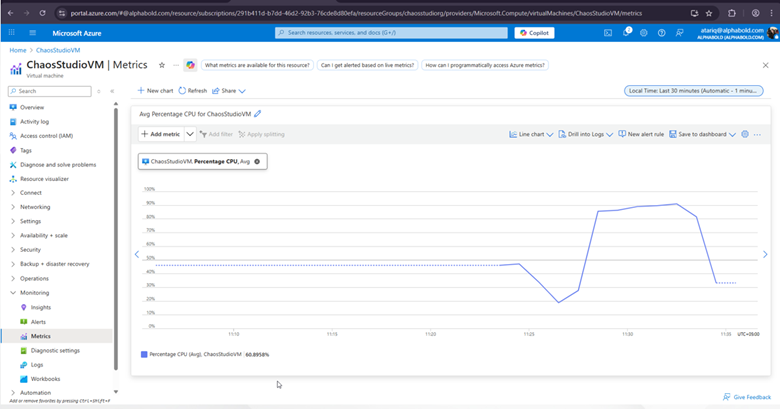
Once the experiment is set up, you can run it. During the experiment, Chaos Studio will simulate high CPU usage, pushing the VM’s CPU to its limits.
Step 5: View Metrics
As the experiment runs, you’ll need to monitor the metrics dashboard to evaluate the VM’s performance under stress. Key metrics to watch include:
- CPU Utilization: See if the VM reaches 100% CPU usage.
- System Response: Observe whether the VM experiences crashes, performance degradation, or if it manages to recover.
- Alerting and Scaling: Check if auto-scaling mechanisms or alerts are triggered when the CPU utilization crosses certain thresholds.
Validate Your Cloud Resilience Strategy
AlphaBOLD reviews system architecture, identifies resilience gaps, and helps organizations strengthen recovery behavior and reliability across Azure workloads.
Request a ConsultationAnalyzing the Results:
The results of the VCPU Pressure test help identify how well the system handles high CPU load. If the VM crashes, becomes unresponsive, or fails to recover, it indicates that the system isn’t optimized for handling such loads. In this case, you may need to:
- Upgrade VM Resources: Increase CPU cores or virtual CPUs to handle higher workloads.
- Implement Auto-Scaling: Automatically scale up resources when CPU usage spikes.
Virtual Memory Pressure Experiment:
Another type of experiment in Chaos Studio is Virtual Memory Pressure, which simulates a situation where the VM is running low on memory. Here’s how it works:
- Create a VM with a set amount of memory (e.g., 8GB).
- Simulate Memory Pressure by allocating more memory than the system can handle, causing it to swap memory or crash processes.
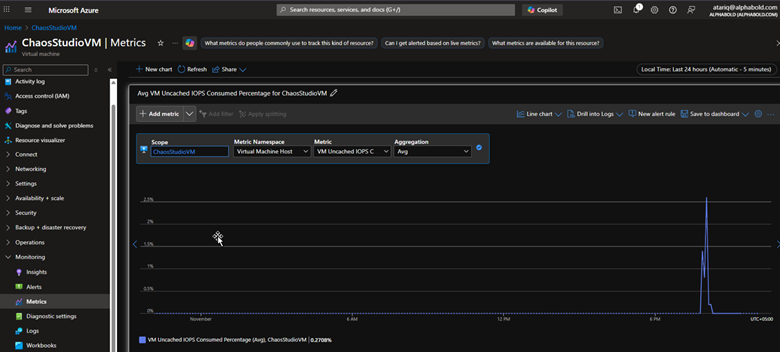
- Monitor System Response: Check the VM’s memory usage, IOPS, and caching behavior. If the system uses more uncached memory, it could indicate memory pressure.
The goal is to ensure that the VM can handle memory spikes, manage memory leaks, and scale or alert appropriately when the system is under stress.
Key Metrics to Monitor During Chaos Experiments
- Memory Usage: Monitor RAM and virtual memory usage during memory pressure tests.
- IOPS (Input/Output Operations Per Second): This measures the number of I/O operations, which is especially useful in scenarios involving memory and disk pressure.
- VM Uncached IOPS Consumed Percentage
- Auto-Scaling and Alerting: Ensure that auto-scaling is triggered when required and that alerts are sent out when a critical threshold is breached.
Enhance Reliability Across Your Azure Workloads
AlphaBOLD helps organizations assess and strengthen workload reliability using Azure Chaos Studio. By identifying resilience gaps and validating recovery behavior, teams can reduce downtime risk and ensure predictable performance during disruption.
Request a ConsultationPractical Insights for Modern Cloud Environments
Chaos Engineering with Azure Chaos Studio enables teams to proactively test how systems respond to real failure conditions before those failures occur in production. Scenarios such as vCPU pressure, memory exhaustion, and network disruption help expose weak points in recovery logic, alerting, and automation.
The insights gained from these experiments support more informed decisions around capacity planning, scaling configuration, and operational readiness. In distributed cloud environments, reliability depends less on theoretical design and more on whether recovery behavior has been deliberately validated.
When applied consistently, such type of engineering helps organizations confirm that their Azure workloads can withstand real-world disruptions without impacting users or business operations.
You may also like: How Copilot in Azure Can Streamline Your Cloud Workflows
Conclusion
Chaos Engineering shifts reliability from assumption to validation. By deliberately testing how Azure workloads behave under real failure conditions, organizations gain clarity on recovery readiness, operational risk, and architectural resilience. Azure Chaos Studio provides a practical way to validate these behaviors before disruptions affect users or business operations.
FAQs
For enterprise environments, outages rarely stem from a single failure. Such type of engineering helps leaders validate whether systems can recover predictably under real disruption. This reduces operational risk, protects customer experience, and supports business continuity planning across complex Azure workloads.
For architects, Chaos Engineering validates design assumptions around dependency management, failover, and automation. It exposes gaps between intended architecture and actual runtime behavior, especially in distributed, multi-service Azure environments.
Operations and reliability teams use Chaos Engineering to test alerting accuracy, escalation paths, and automated recovery under failure conditions. This helps reduce mean time to recovery and prevents alert fatigue caused by untested or misconfigured thresholds.
Chaos Engineering is most effective once workloads are stable, monitored, and automated. It is especially valuable before scaling production systems, expanding to multiple regions, or supporting revenue-critical and customer-facing applications.
AlphaBOLD helps organizations move Chaos Engineering from isolated experiments to an operational resilience practice. Teams assess architecture, define safe failure boundaries, design meaningful experiments, and validate recovery behavior across Azure workloads to reduce downtime risk and improve reliability at scale.