Dynamics 365 Shopify integration connects your eCommerce platform to your CRM, so customer, product, and order data updates automatically in both systems. Instead of using two disconnected platforms, teams work from one accurate, real-time source of information.
Growing eCommerce businesses often run into the same operational gap: Shopify manages customers, products, and orders, while Dynamics 365 manages sales activities and customer relationships. When these systems don’t talk to each other, teams manually enter data, search across platforms, and reconcile mismatched records.
In this blog, we’ll show you how to set up this integration, from syncing customers and products to orders, using a real, working example. By the end, you’ll understand what it takes to connect these two systems for your own business.
What Challenges Do Businesses Face Without This Integration?
Without Dynamics 365 Shopify integration, Shopify and Dynamics 365 operate as separate silos, creating data gaps that slow down sales and service teams. Common issues include:
Customer information that exists only in Shopify is invisible to sales and support teams.
Sales reps with no visibility into a customer’s online purchase history.
Product details that require manual updates in multiple systems.
Limited insight into customer buying patterns.
Inventory discrepancies caused by disconnected records.
A Shopify-Dynamics 365 integration closes these gaps by creating a single source of truth that both eCommerce and CRM teams can rely on.
Integrating Shopify with Dynamics 365 enables customer, order, and product data to flow between eCommerce and CRM, giving sales and service teams a unified customer view instead of relying on manual imports.
How Does the Integration Work?
For this demonstration, we built a working integration using Shopify webhooks, Power Automate, and Dynamics 365.
The setup automatically synchronizes three core data types:
Customers
Products
Orders
from Shopify into Dynamics 365, with no manual re-entry required.
How Does Customer Data Sync Between Shopify and Dynamics 365?
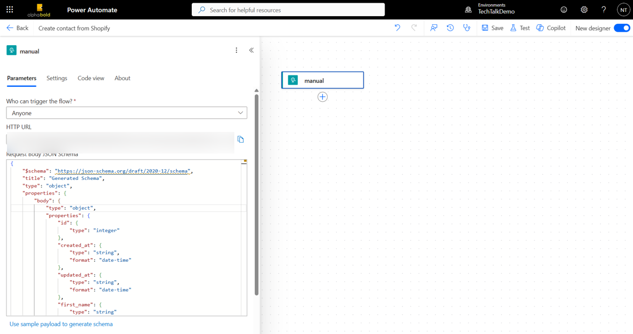
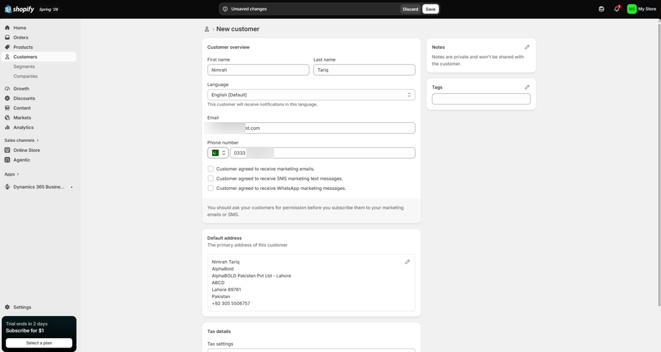
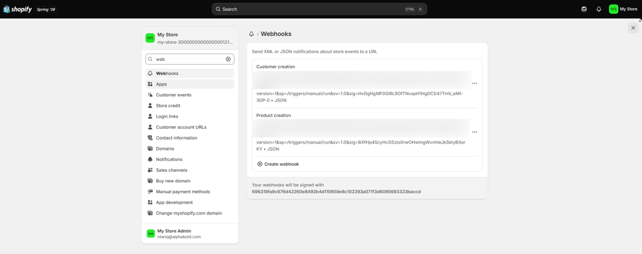
When a customer registers in Shopify, their information is automatically sent to Dynamics 365 via a webhook; no manual contact creation is needed. The flow works as follows:
1. A Power Automate flow is triggered by an HTTP request from Shopify.
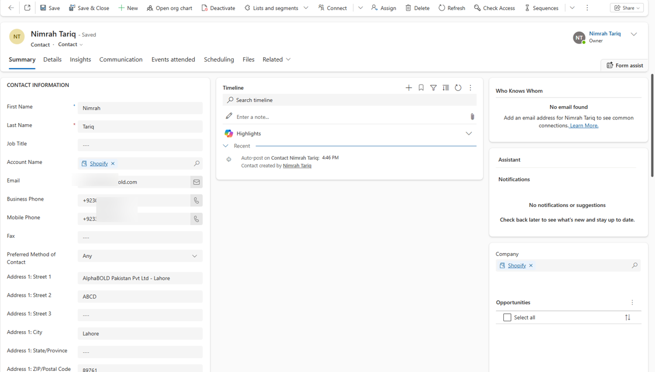
2. The flow then maps the incoming data to a Contact record using the “Add a new row” action.
3. A webhook for the Customer Creation event in Shopify fires whenever a new customer signs up, triggering a Power Automate flow via an HTTP request.
4. Testing confirms the flow: and creating a customer in Shopify triggers a matching contact in dynamics 365 within seconds.
This gives sales reps immediate access to new customer information inside the CRM, so they can:
Maintain accurate, up-to-date customer records without manual entry
Start engaging new customers directly from Dynamics 365
As order volume grows, this automation keeps the CRM up to date without adding administrative work for the sales or operations team.
Connect Shopify with Dynamics 365 and Eliminate Manual Work
AlphaBOLD connects Shopify and Dynamics 365 to automatically sync customers, orders, products, and inventory, giving every team access to accurate, real-time data.
The next step involves synchronizing product information from Shopify into Dynamics 365.
Whenever a product is created in Shopify, the integration automatically creates a matching product record in Dynamics 365, including product images stored as attachments. This keeps product data consistent across both systems without manual maintenance.
The practical benefit: Opportunities, quotes, and orders in Dynamics 365 always reference accurate, current product information, reducing the risk of quoting the wrong SKU, price, or product variant.
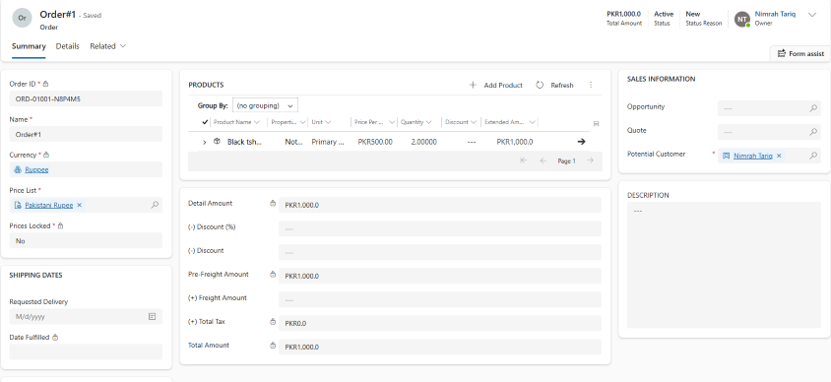
With Dynamics 365 Shopify integration, once a customer completes payment in Shopify, the order is automatically created in Dynamics 365, giving sales and finance teams immediate visibility into the transaction.
This removes the need to manually recreate order records for reporting or account management.
This order sync gives organizations several practical advantages:
Revenue tracking: Online sales are visible inside Dynamics 365 alongside offline and sales-team-driven revenue, supporting more accurate forecasting.
Unified account view: Sales reps can see a customer’s online orders without switching to Shopify, speeding up account reviews and renewal conversations.
Faster service response: Support and account teams can reference recent orders directly in the CRM when handling inquiries, instead of asking customers for order numbers.
Better pipeline accuracy: Existing Dynamics 365 opportunities can be linked to actual completed orders, giving sales leadership a clearer picture of conversion from pipeline to revenue.
What Customer Insights Does This Integration Provide?
With customer and order data unified in Dynamics 365, sales teams get a complete view of each customer: details, related orders, purchase history, and total activity, in one place.
This eliminates the need to cross-reference Shopify separately for buying history. That unified view makes patterns easier to spot. A customer who regularly purchases specific products becomes a clear candidate for upselling, cross-selling, or targeted campaigns, decisions that are difficult to make when order data lives only in the eCommerce platform.
How Can AlphaBOLD Help with Your Integration?
Every organization has different business processes, systems, and reporting needs, so a real-world integration is rarely as simple as the demonstration above.
Common additions include:
Custom business logic specific to your sales process
Support for multiple sales channels beyond Shopify
ERP integrations for finance and inventory management
Automated reporting and dashboards for leadership visibility
AlphaBOLD designs Dynamics 365 Shopify integration solutions that align with your specific business objectives while ensuring the solution scales, stays secure, and remains maintainable as your systems evolve.
See How Shopify and Dynamics 365 Work Together
Talk to our experts to review your current Shopify setup and see how a Dynamics 365 integration can improve order processing, customer visibility, and reporting.
Integrating Shopify with Dynamics 365 helps businesses bridge the gap between eCommerce operations and customer relationship management.
By automatically synchronizing customers, products, and orders, organizations can improve sales efficiency, gain better visibility into inventory, and develop deeper customer insights.
As businesses grow, connected systems become increasingly important. A well-designed integration enables teams to work with accurate information, make quicker decisions, and deliver better customer experiences.
FAQs
Does this integration require custom development?
A basic sync using Power Automate and webhooks can be configured with minimal custom code, but most enterprise implementations need custom logic to handle unique business rules, multiple sales channels, or ERP connections.
How long does implementation typically take?
Timelines vary by scope. A straightforward customer/product/order sync can be configured in a few weeks; integrations involving ERP systems, multiple channels, or custom reporting take longer.
Can this integration handle multiple sales channels, not just Shopify?
Yes. The same integration pattern can extend to other eCommerce platforms or marketplaces, consolidating all channels into a single Dynamics 365 view.
Is the sync real-time, or does it run on a schedule?
The webhook-based approach shown here is near real-time; data is sent as soon as an event (such as a new customer or a completed order) occurs in Shopify.
Does this integration affect inventory management?
Yes. Synchronized product data reduces inventory discrepancies caused by disconnected systems, since both platforms reference the same product records.
What Dynamics 365 modules does this work with?
This integration pattern works with Dynamics 365 Sales and Customer Service, and can be extended to Business Central or Finance and Operations for deeper ERP-level integration.
To provide the best experiences, we use technologies like cookies to store and/or access device information. Consenting to these technologies will allow us to process data such as browsing behavior or unique IDs on this site. Not consenting or withdrawing consent, may adversely affect certain features and functions.
Functional
Always active
The technical storage or access is strictly necessary for the legitimate purpose of enabling the use of a specific service explicitly requested by the subscriber or user, or for the sole purpose of carrying out the transmission of a communication over an electronic communications network.
Preferences
The technical storage or access is necessary for the legitimate purpose of storing preferences that are not requested by the subscriber or user.
Statistics
The technical storage or access that is used exclusively for statistical purposes.The technical storage or access that is used exclusively for anonymous statistical purposes. Without a subpoena, voluntary compliance on the part of your Internet Service Provider, or additional records from a third party, information stored or retrieved for this purpose alone cannot usually be used to identify you.
Marketing
The technical storage or access is required to create user profiles to send advertising, or to track the user on a website or across several websites for similar marketing purposes.
To provide the best experiences, we use technologies like cookies to store and/or access device information. Consenting to these technologies will allow us to process data such as browsing behavior or unique IDs on this site. Not consenting or withdrawing consent, may adversely affect certain features and functions.
Functional
Always active
The technical storage or access is strictly necessary for the legitimate purpose of enabling the use of a specific service explicitly requested by the subscriber or user, or for the sole purpose of carrying out the transmission of a communication over an electronic communications network.
Preferences
The technical storage or access is necessary for the legitimate purpose of storing preferences that are not requested by the subscriber or user.
Statistics
The technical storage or access that is used exclusively for statistical purposes.The technical storage or access that is used exclusively for anonymous statistical purposes. Without a subpoena, voluntary compliance on the part of your Internet Service Provider, or additional records from a third party, information stored or retrieved for this purpose alone cannot usually be used to identify you.
Marketing
The technical storage or access is required to create user profiles to send advertising, or to track the user on a website or across several websites for similar marketing purposes.