Table of Contents
Introduction
Email overload costs professionals nearly 28% of their workweek. Important messages get buried beneath promotional content. Lengthy email threads are time-consuming to review. Constant context-switching drains mental energy. The anxiety of growing unread counts never stops.
The consequences go beyond lost time. Organizations experience decreased output, missed deadlines, delayed responses to critical communications, and workplace stress that leads to burnout. Traditional email management techniques (filters, folders, manual sorting) don’t solve the problem at this scale.
Artificial intelligence offers a solution. Microsoft has built Copilot into Outlook to transform the way email management is handled, making the experience more manageable through AI-powered support.
What is Microsoft Copilot in Outlook?
Microsoft Copilot is an AI assistant built into Outlook and other Microsoft 365 applications. It runs on large language models and functions as a digital coworker that understands context, interprets natural language, and provides support tailored to your email management needs.
Copilot analyzes professional communication, adapts to your writing style, and delivers contextually relevant recommendations. It doesn’t replace human judgment. Instead, it handles tedious and repetitive email tasks, allowing you to focus on strategic work.
What Are the Key Features of Copilot in Outlook and How Do They Save Time?
Email Drafting and Composition:
Copilot generates polished email drafts based on simple prompts. You don’t stare at blank screens or search for the right words. Provide the necessary context, and Copilot produces well-structured, professionally worded emails.
Implementation steps:
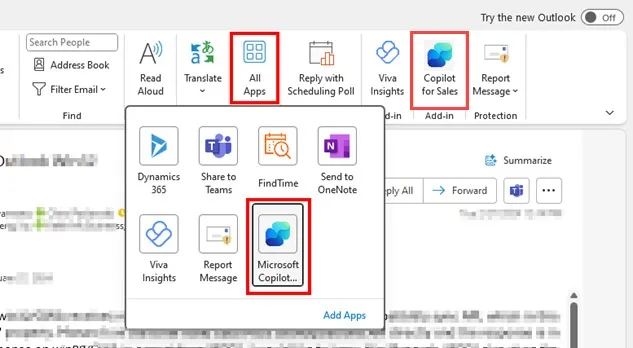
- Open a new email in Outlook and click the Copilot icon in the toolbar.
- Select draft with Copilot.
- Provide precise context regarding the email, including recipient, purpose, required tone, and key points.
- Generate the draft, review it, and make necessary changes if required.
Tasks requiring 10-15 minutes of composition can be reduced to 2-3 minutes of review and refinement. For professionals sending dozens of emails daily, this translates to hours saved each week.
Intelligent Email Summarization:
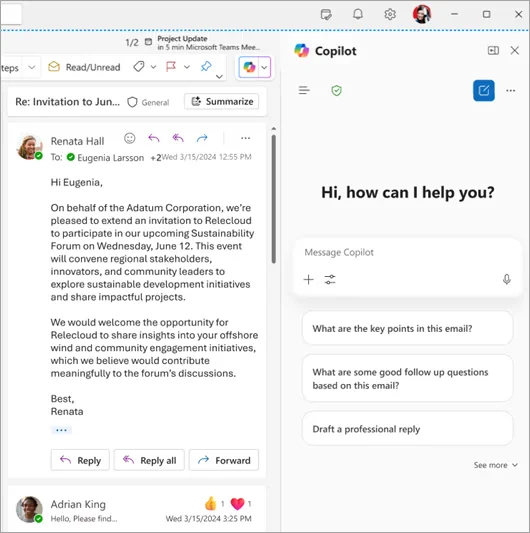
Lengthy email threads with multiple participants create information overload. Copilot’s summarization function analyzes complete email exchanges and extracts critical information: significant decisions made, assigned tasks, crucial dates, and overall context.
This feature can be used by following the simple steps:
- Open any email thread and click on the Copilot icon.
- Select the summarization option.
- Review the summary report highlighting critical information
Instead of scrolling through 20-30 messages, taking 15-20 minutes, you can grasp the essential information in under a minute. This is particularly valuable when returning from vacation or catching up on ongoing projects.
Email Coaching for Tone and Clarity:
Copilot’s coaching feature analyzes your draft emails and provides actionable feedback on tone, clarity, conciseness, and reader engagement. It can identify if your message sounds too harsh, too passive, overly complex, or unclear.
The following steps can help in using email coaching in Outlook:
- Compose the email draft and select coaching by Copilot.
- Copilot’s coaching feature evaluates your draft emails and offers useful comments on reader engagement, tone, clarity, and conciseness. It can determine whether your message is too harsh, too passive, too complicated, or unclear. Before sending, implement suggestions.
This feature prevents miscommunication that could lead to time-consuming back-and-forth clarifications or, worse, damaged professional relationships requiring significant time to repair.
Meeting Scheduling and Coordination:
Finding times that work for both parties usually requires several email exchanges when scheduling meetings. By examining participant calendars, recommending ideal times, creating meeting agendas based on email context, and sending invitations, Copilot expedites this process.
This important feature can be used using the given steps:
- Provide a prompt explaining your purpose (e.g., “Schedule a meeting with the practice manager of the sales team”)
- Review suggested participants, available time slots, and confirm the agenda draft.
- Send meeting invites accordingly.
What normally requires 5-10 emails and 20-30 minutes of calendar checking can be completed in under 5 minutes.
Management of Delegated and Shared Mailboxes:
For executives, assistants, and team leaders managing multiple inboxes, Copilot extends its capabilities to delegated and shared mailboxes. This ensures consistent efficiency across all accounts you manage, whether your personal inbox or a team distribution list.
A few steps are required to enable this feature:
- Ensure you have appropriate permissions for the mailbox.
- Access the delegated or shared mailbox in Outlook.
- Use all Copilot features (summarization, drafting, coaching) as you would in your primary inbox.
Managing multiple inboxes becomes exponentially more efficient, reducing context-switching time and ensuring no important communications are overlooked.
Planning an Enterprise-Wide Copilot Rollout?
AlphaBOLD manages large-scale Microsoft Copilot deployments with change management strategies, IT infrastructure setup, and executive sponsorship programs.
Schedule My ConsultationBonus Reading: Guide to Microsoft Copilot Pricing & Licensing
What Are the Cumulative Benefits of Copilot in Outlook?
The true power of Copilot in Outlook isn’t found in any single feature but in its combined impact on your daily routine tasks:
- Reclaimed Time: Users report saving 2-4 hours per week on email management tasks
- Reduced Cognitive Load: Copilot handles routine decisions, preserving time to focus on other important tasks
- Enhanced Communication Quality: Coaching features improve professionalism and clarity
- Better Work-Life Balance: Efficient email management reduces the need for after-hours inbox monitoring
- Improved Team Collaboration: Quick summaries and clear communication accelerate project progress, resulting in task completion within time
How Do You Get Started with Copilot in Outlook?
Implementing Copilot in your email workflow requires six straightforward steps:
- Verify Subscription: Ensure your Microsoft 365 subscription includes Copilot access (available in Microsoft 365 Copilot licenses)
- Update Outlook: Confirm you’re running the latest version of Outlook for Microsoft 365
- Activate Copilot: Open Outlook and locate the Copilot icon in the toolbar
- Explore Features: Start with simple tasks like summarizing threads or drafting routine emails
- Refine Your Prompts: Learn to provide clear, concise context for better results
- Make It a Habit: Integrate Copilot into your daily email routine for maximum productivity
Bonus Reading: The Right AI for Dynamics 365: Copilot vs. ChatGPT
Improve Your Organization's Email Productivity
AlphaBOLD delivers comprehensive Microsoft Copilot solutions (from planning and deployment to training and change management), ensuring your team gets ROI from day one.
Talk to Copilot ExpertsFrom Copilot Assistance to Agent-Based Email Workflows
Microsoft Copilot in Outlook focuses on helping users understand, draft, and respond to emails more efficiently. With the introduction of Microsoft Agent 365, email productivity begins to shift from individual assistance to workflow execution.
Copilot interprets intent within emails. Agent 365 builds on that understanding by enabling AI-driven agents to act on those intents across connected systems. When an email signals a request, approval, follow-up, or handoff, agents can initiate predefined actions rather than leaving execution entirely manual.
This means emails are no longer just messages to respond to. They become structured inputs into business processes such as task creation, CRM updates, approvals, and notifications. Copilot helps users decide what to do. Agent 365 helps organizations ensure it actually gets done, consistently and at scale.
Extending Meeting Coordination With Agent 365
Copilot already reduces the friction involved in scheduling meetings by analyzing calendars, suggesting time slots, and drafting agendas based on email context. Agent 365 extends this capability by connecting meeting coordination to downstream execution.
Agents can detect meeting intent automatically, validate participants against organizational rules, and associate meetings with related customer, sales, or project records. After meetings conclude, agents can help track outcomes by surfacing follow-ups, logging notes, or triggering next steps without relying solely on manual action.
This reduces the common gap between scheduling a meeting and ensuring the meeting drives progress. Coordination becomes part of an end-to-end workflow rather than a series of disconnected tasks.
Governing Copilot and Agent Behavior in Outlook
As AI becomes more embedded in daily communication, governance becomes critical. Microsoft Agent 365 introduces controls that allow organizations to define how and when agents can act on information originating from Outlook.
Agents operate within defined permission boundaries and can be configured to require approvals before executing sensitive actions. All AI-driven activities follow existing Microsoft 365 security, compliance, and audit policies, ensuring transparency and traceability.
This governance layer allows organizations to scale AI-driven productivity while maintaining oversight, compliance, and accountability. It ensures that automation supports business operations without introducing unmanaged risk.
What Changes as Organizations Move Into 2026
Email is evolving from a productivity burden into a signal-rich input for enterprise operations. Copilot improves how individuals manage communication. Agent 365 changes how organizations act on it.
As these capabilities mature, Outlook increasingly serves as a control surface where intent is captured, interpreted, and routed into structured workflows across CRM, ERP, and collaboration platforms. The value is no longer just time saved per email, but reduced friction across decision-making and execution.
Organizations that prepare for this shift will treat email not as an isolated tool, but as an integrated part of their operational infrastructure.
Prepare Your Organization for Agent-Driven Workflows
AlphaBOLD helps organizations move beyond individual productivity gains by designing and implementing agent-ready Microsoft environments that turn communication into execution, securely and at scale.
Request a ConsultationConclusion
Email overload is a problem that can be successfully resolved with the appropriate resources; it is not an inevitable byproduct of contemporary work. With its intelligent help that saves time, lowers stress, and improves communication quality, Microsoft Copilot in Outlook is a major advancement in email management technology.
Copilot turns email from a productivity drain into a controllable, effective communication channel by automating repetitive tasks, offering intelligent summaries, providing expert coaching, and prioritizing what matters most.
In our increasingly digital workplace, using Copilot in Outlook is becoming essential for businesses and individuals seeking to streamline their operations and recover valuable time. As Copilot and agent-based capabilities continue to mature, organizations that treat Outlook as part of their operational fabric, not just a communication tool, will be better positioned to scale productivity and execution together.
FAQs
No, Copilot requires an active internet connection because it processes requests through Microsoft’s cloud infrastructure.
Copilot only works within Microsoft 365 organizational accounts and cannot access personal email services, such as Gmail or Yahoo.
Yes, your email data remains within your Microsoft 365 tenant, follows your compliance policies, and is not used to train public AI models.
Copilot integrates natively with Outlook and accesses your organizational data within Microsoft 365’s security boundary, while ChatGPT requires manual copy-paste and lacks direct system integration.
Copilot learns from your communication patterns over time, and you can guide its outputs by providing specific instructions in prompts, such as “use a formal tone” or “keep it brief.”
Copilot helps users understand and respond to emails more efficiently. Agent 365 extends this by allowing AI-driven agents to take action based on that understanding, such as creating tasks, routing approvals, updating records, or triggering workflows across connected systems. Together, they reduce manual coordination and improve consistency across enterprise processes.
Explore Recent Blog Posts