From Data to Action: How Microsoft Fabric and Azure AI Foundry Support AI-Driven Business Workflows

Table of Contents
Introduction
In this blog, we look at how Microsoft Fabric and Azure AI Foundry can support a sales-focused AI agent workflow that helps teams identify at-risk opportunities, understand why they need attention, and take approved follow-up action inside Dynamics 365.
AI agents have always promised more than faster answers. Their real business value emerges when they help teams connect trusted insight to the next approved action, reducing the delay between knowing what needs attention and doing something about it.
For organizations already using Dynamics 365, Business Central, Dataverse, Power BI, and Microsoft Fabric, the challenge is often not data availability. It is the time lost between finding the right insight, understanding what it means, and taking the next step inside the right business system.
This is where Microsoft Fabric and Azure AI Foundry can support a more practical approach to enterprise AI. Microsoft Fabric can provide a governed data foundation and business context, while Azure AI Foundry can help orchestrate agent workflows that connect insights to approved actions through secure tools and APIs. Microsoft describes Fabric data agents as a way to create conversational Q&A over governed enterprise data, while Foundry Agent Service can connect agents to tools such as Fabric data agents and OpenAPI-based external APIs.
AlphaBOLD approaches this type of implementation by combining data readiness, semantic modeling, AI agent configuration, workflow governance, and CRM integration, so businesses can move from insight to action without adding another disconnected AI tool.
Why Does Business Data Still Take So Long to Act On?
Most organizations do not struggle because they lack systems or reports. They struggle because action still depends on people moving between those systems, interpreting the information, validating the context, and manually updating records.
A sales leader may already have pipeline dashboards in Power BI and opportunity data in Dynamics 365. But identifying which deals are truly at risk often still requires several manual steps: checking last activity dates, reviewing account history, comparing close dates, asking sales reps for context, and deciding whether the opportunity status needs to change.
That delay creates business risk. By the time a stalled opportunity is reviewed, the customer may already be disengaged, the close date may be unrealistic, or the account team may have missed the right follow-up window.
This is the gap AI agent workflows can help address. Instead of only showing data, they can help users understand what needs attention, why it matters, and what approved action should happen next.
What Does This Look Like in a Sales Workflow?
Consider a sales manager reviewing open opportunities at the end of the month. The question is simple:
Which opportunities are at risk?
The answer is usually not simple. A risk signal may come from different places:
- An opportunity has had no recent activity.
- The close date has moved more than once.
- The deal is still in negotiation with limited customer engagement.
- Project financials or delivery history suggest margin pressure.
- The account owner has not updated the opportunity status.
- The forecast still includes a deal that is unlikely to close.
In a traditional workflow, the manager has to pull these signals together manually. They may check Power BI, open Dynamics 365, review activity history, compare financial or project data, and follow up with the sales team before deciding what needs to change.
The issue is not just reporting. The issue is the time and coordination required to move from a warning sign to a next step.
How Does an AI-Assisted Workflow Change the Process?
With a governed AI agent workflow, the sales manager can ask the question in natural language:
“Are there any opportunities at risk?”
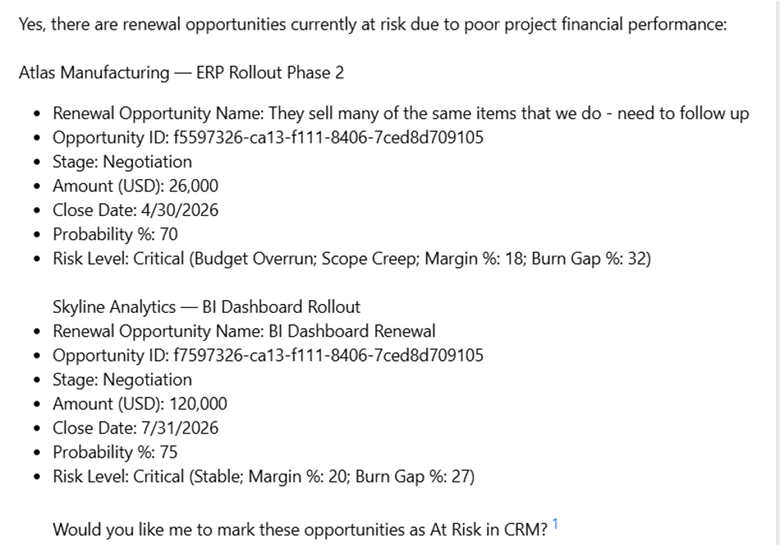
The agent can review approved business data, return the opportunities that need attention, and explain the reason each opportunity was flagged. Instead of giving the user a static report, the workflow provides context that is easier to act on.
For example, the agent may identify an opportunity with a high deal value, a near-term close date, limited recent activity, and a risk reason tied to margin, project performance, or customer engagement. It can then ask whether the user wants to take an approved next step, such as marking the opportunity as at risk or creating a follow-up task.
What Happens After the User Approves the Action?
The action layer is where this workflow becomes more valuable than a dashboard or chatbot. The agent should not update business systems without controls. A safer approach is to keep a human in the loop, so the user reviews the context and approves the next step before the system takes action.
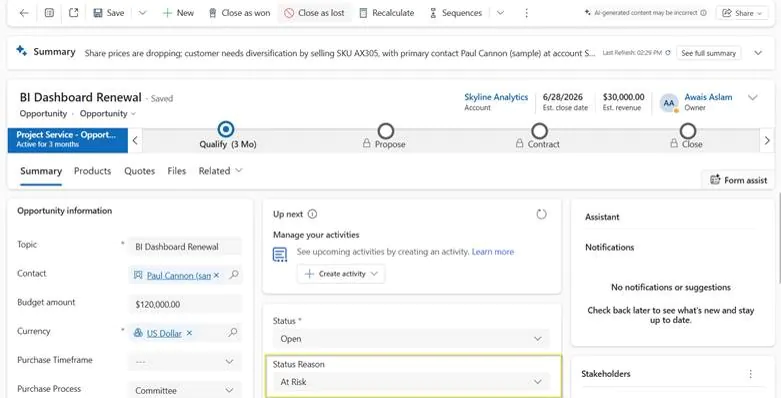
Once approved, a secure workflow can send the update via a defined API or integration. In this case, the approved action updates the opportunity status in Dynamics 365, so the CRM reflects the risk signal in the sales team’s existing workflow.
This matters because CRM hygiene is often a business problem. If opportunity status, follow-up ownership, and risk indicators are not updated consistently, leadership loses trust in the pipeline. AI-assisted workflows can reduce that gap by helping users act while the context is still fresh.
Where Do Microsoft Fabric and Azure AI Foundry Fit?
Microsoft Fabric and Azure AI Foundry play different roles in this type of workflow.
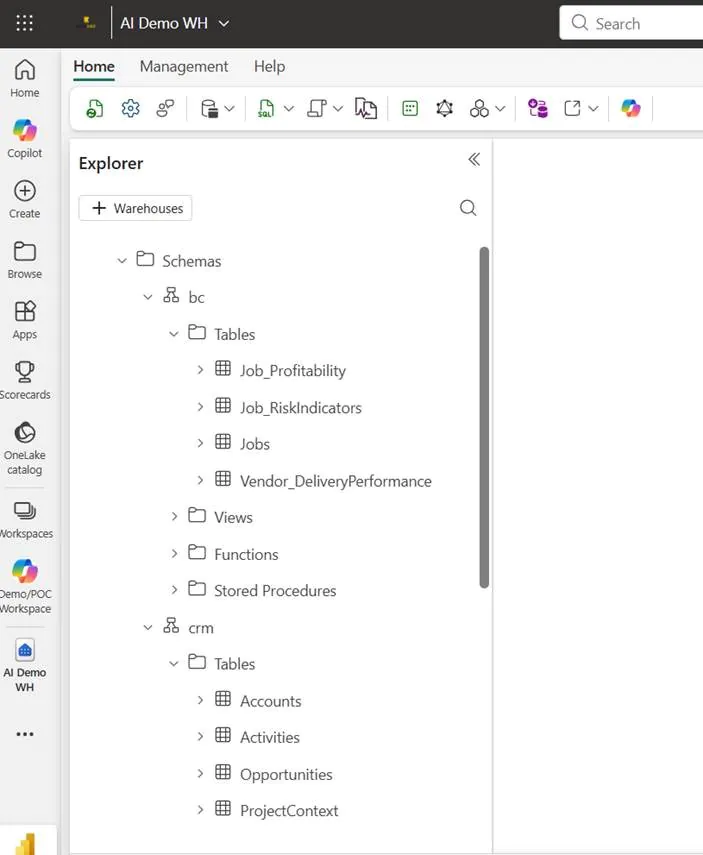
Microsoft Fabric supports the governed data foundation. It can bring together business data from systems such as Dynamics 365, Business Central, Dataverse, and Power BI so users and AI workflows can work from a more consistent view of the business.
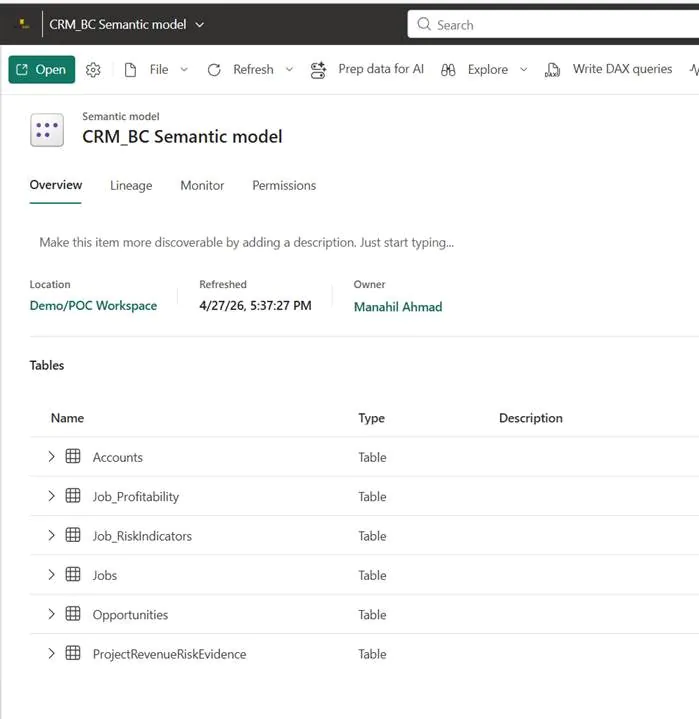
A semantic model adds to the business context. It defines the relationships, metrics, and terminology that matter to the organization, such as opportunity value, risk level, account activity, close date, margin, and project performance. This helps reduce the chance that users and AI interpret the same data differently.
A Microsoft Fabric data agent can then support conversational analytics over approved Fabric data sources. According to Microsoft, Fabric data agents help users ask plain-English questions and receive structured, secure, read-only answers from sources such as lakehouses, warehouses, Power BI semantic models, KQL databases, and ontologies.
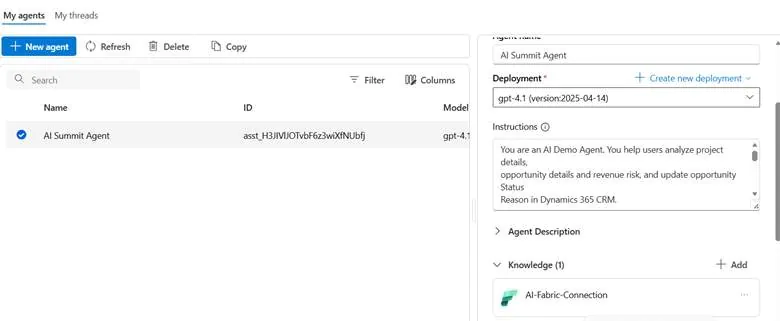
Azure AI Foundry supports the broader agent workflow. It can connect to a Fabric data agent as a knowledge source and connect agents to external APIs via tools such as OpenAPI, depending on how the solution is configured. Microsoft’s documentation also notes that the Fabric data agent integration with Foundry is currently in preview, so production use should be evaluated carefully.
The important point is this: Fabric helps ground the agent in trusted data, while Azure AI Foundry helps orchestrate the broader workflow. The actual business action, such as updating Dynamics 365, should be handled through approved tools, APIs, permissions, and validation logic.
You may also like: Microsoft Fabric for Data Analytics
How Did AlphaBOLD Build the Workflow Behind the Scenes?
In this use case, AlphaBOLD’s role was to connect the data, business context, AI workflow, and CRM action into one governed process.
The implementation included:
- Centralizing relevant CRM and Business Central data in Microsoft Fabric
- Creating a semantic model to define business relationships and risk signals
- Configuring a Fabric data agent for natural language business questions
- Connecting that agent into a Foundry-based workflow
- Designing a secured CRM update process through an approved API
- Keeping the user approval step before records are updated
- Separating insight generation from system execution
This separation is important. Microsoft Fabric supports data and business context. Azure AI Foundry supports the agent workflow. The CRM API handles the approved update inside Dynamics 365. Business users get simpler experience, while technical teams keep control over data access, permissions, and system changes.
Turn Microsoft Business Data Into Approved Action
From data readiness and semantic modeling to workflow governance and CRM integration, we help businesses build AI solutions that support real operational action.
Request a ConsultationWhat Controls Make AI Agent Workflows Safer for Business Use?
AI-assisted action should not mean uncontrolled automation. In business systems like CRM and ERP, governance matters as much as the agent experience.
A practical implementation should define:
- Which data sources the agent can access
- Which users can ask questions and see results
- Which actions require approval
- Which CRM or ERP fields the workflow can update
- What validation happens before an update is made
- How errors are handled
- Where activity is logged for review
- What security and role-based access controls apply
This is especially important when AI workflows touch sales, finance, service, or operational records. The goal is not to let an agent make unchecked business decisions. The goal is to help teams act faster while keeping the right approvals, permissions, and auditability in place.
You may also like: How Microsoft Foundry is Making AI Agents a Business Reality
Where Else Can This Approach Help?
Although this blog focuses on at-risk sales opportunities, the same pattern can apply to other business workflows.
In finance, an AI-assisted workflow could help identify overdue invoices, explain collection risk, and recommend follow-up actions. In customer service, it could flag high-priority accounts, unresolved cases, or customers with repeated issues. In operations, it could surface delayed projects, vendor exceptions, or workflow bottlenecks.
The common thread is the same: the business already has the data, but teams need a faster and more reliable way to move from insight to next step.
For organizations already using Microsoft technologies, this creates a more practical path to enterprise AI. Instead of starting with a disconnected chatbot, businesses can build AI workflows around the systems, data, and approval processes they already rely on.
How Can AlphaBOLD Help Businesses Build Governed AI Workflows?
AlphaBOLD helps organizations move from AI ideas to practical implementation by identifying where agent workflows can create measurable business value.
That process starts with the use case. Not every workflow needs an AI agent. The best opportunities are usually processes where teams repeatedly ask the same business questions, review the same systems, and take the same follow-up actions.
From there, AlphaBOLD helps assess data readiness, connect Microsoft business applications, design semantic models, configure AI agents, define governance controls, and integrate approved actions back into systems like Dynamics 365.
For a sales-focused workflow, that could mean helping leaders identify at-risk opportunities faster. For finance, it could mean improving visibility into collections or margin pressure. For service teams, it could mean helping supervisors prioritize customer issues before they escalate.
The value is not just in building an agent. The value is in building the right governed workflow around the agent.
Build AI Workflows Around the Systems You Already Use
Your business does not need another disconnected AI tool. AlphaBOLD helps organizations design governed AI workflows across Microsoft Fabric, Azure AI Foundry, Dynamics 365, Business Central, Dataverse, and Power BI, so teams can move from trusted insight to approved action faster.
Request a ConsultationConclusion
Microsoft Fabric and Azure AI Foundry can help organizations move beyond static reporting toward AI-assisted business workflows that connect insight to approved action.
In the sales example, the workflow helps a user ask which opportunities are at risk, understand why those opportunities need attention, approve the next step, and reflect that update inside Dynamics 365. That is where AI becomes more practical for business teams: not as a separate tool, but as part of the systems and decisions they already manage.
The real value comes from connecting the right data foundation, semantic model, security controls, agent configuration, and workflow logic. With the right implementation approach, businesses can reduce decision delays, improve CRM consistency, and help teams act on trusted data faster.
AlphaBOLD helps organizations design and implement these governed AI workflows across Microsoft Fabric, Azure AI Foundry, Dynamics 365, Business Central, Dataverse, and Power BI, turning enterprise AI from a concept into a business process that supports real action.
FAQs
For business-critical systems like Dynamics 365, the safer approach is to keep a human approval step in the workflow. The agent can identify the issue, explain the context, and recommend an action, but the update should only happen after the user confirms it. This helps maintain control over CRM records, sales ownership, and auditability.
The data does not need to be perfect, but it does need to be usable, accessible, and clearly defined. Before building an AI agent workflow, businesses should review where their CRM, ERP, Power BI, Dataverse, and Fabric data lives, whether key fields are reliable, and whether business rules such as “at risk,” “stalled,” or “high priority” are clearly defined.
Sales is a strong starting point because opportunity risk and CRM follow-up are easy to connect to business value. However, the same approach can support finance, customer service, operations, and leadership workflows where teams need to review data, understand risk, and take an approved next step inside existing business systems.