Microsoft Fabric’s Advanced Data Security Features for Enterprise-Level Protection

Table of Contents
Introduction
Enterprise data environments are becoming more complex, with information spread across multiple systems, users, and analytics layers. In this context, Microsoft Fabric data security is not just about protecting data, it is about maintaining control, visibility, and trust across the entire data lifecycle.
Many organizations assume that built-in security features are enough. In reality, gaps often emerge at the configuration level, whether in access control, data classification, or monitoring. These gaps can lead to overexposed datasets, inconsistent governance, and increased compliance risk.
Microsoft Fabric addresses this challenge by combining analytics workloads with integrated security and governance capabilities in a unified platform. Built on Microsoft Azure, it brings together identity management, encryption, policy enforcement, and compliance support within a single environment.
However, the effectiveness of Microsoft Fabric data security depends on how these capabilities are implemented and managed. This blog explores the core security features of Microsoft Fabric, how they work together to protect enterprise data, and what organizations should consider when building a secure, scalable analytics environment.
What are The Core Security Features of Microsoft Fabric?
Microsoft Fabric data security includes built-in security and governance controls that help organizations manage access, protect sensitive data, and enforce policies across analytics workloads. These capabilities are tightly integrated with identity, access, and data-level security mechanisms.
Identity and Access Management:
Microsoft Fabric integrates with Microsoft Entra ID (formerly Azure Active Directory) to provide centralized identity and access control across the platform. This allows organizations to enforce consistent authentication and authorization policies for all users and services.
It supports enterprise-grade access controls through:
- Single Sign-On (SSO): Users can access Fabric resources using existing organizational credentials without repeated logins
- Multi-Factor Authentication (MFA): Adds an additional verification layer to reduce unauthorized access risk
- Conditional Access: Policies can restrict or allow access based on user identity, location, device state, and risk signals
Role-Based Access Control (RBAC) ensures that users can access only what they need. Permissions can be assigned at different levels, including workspace roles such as Admin, Member, Contributor, and Viewer. This aligns with the principle of least privilege, though enforcement depends on how roles are configured.
Row Level Security (RLS) allows control over data visibility within datasets. It restricts access to specific rows based on user attributes, so a single report can serve multiple users while showing only relevant data. This is widely used for scenarios like regional reporting or department-level data access.
Comprehensive Data Encryption:
Microsoft Fabric applies encryption at both rest and in transit to protect data across its workloads. These controls are inherited from and aligned with Microsoft Azure’s security model.
Data at rest is encrypted using AES-256, which is the standard across Azure storage services. This applies to data stored in OneLake, warehouses, and other Fabric-managed storage layers.
Key management is handled through Azure-managed encryption by default, with support for customer-managed keys (CMK) via Azure Key Vault. However, CMK support in Fabric depends on specific workloads and configurations, so it is not universally available across all components.
For data in transit, Fabric enforces encryption using TLS 1.2 or higher. This ensures that data moving between services, users, and endpoints is protected against interception.
- Encryption at rest (AES-256): Secures stored data across Fabric storage layers
- Encryption in transit (TLS 1.2+): Protects data during communication between services
- Key management options: Azure-managed keys by default, with selective support for customer-managed keys
- Additional protection layers: Azure infrastructure encryption may provide an extra encryption layer in certain scenarios, depending on the service configuration
One correction to note: “double encryption” is not a Fabric-specific feature exposed as a standard setting. It exists at the Azure infrastructure level and may apply depending on how the underlying services are configured, rather than as a direct Microsoft Fabric data security control.
You may also like: Warehouse vs Lakehouse in Microsoft Fabric: Key Differences
Data Loss Prevention and Governance:
Microsoft Fabric integrates with Microsoft Purview to provide data classification, protection, and governance across analytics workloads. These capabilities help organizations identify sensitive data, apply controls, and maintain visibility across the data lifecycle.
Sensitivity labels can be applied to datasets, reports, and files to classify data based on its level of confidentiality. These labels persist with the data and enforce protection policies such as access restrictions and encryption, depending on configuration.
Data discovery and classification in Microsoft Purview allow organizations to identify sensitive information types, such as financial or health-related data, across connected data sources. However, it’s important to be precise: automated detection and classification are supported, but enforcement actions such as blocking sharing or requiring additional authentication depend on how policies are configured in Purview and related Microsoft 365 services.
- Sensitivity labels: Classify and protect data consistently across Fabric and connected services
- Data discovery and classification: Identify sensitive data types using built-in and custom classifiers
- Policy enforcement: Actions such as restricting access or alerting admins depend on configured DLP and compliance policies
- Data catalog and lineage: Provide visibility into data assets, their origins, transformations, and usage across the environment
The data catalog in Microsoft Purview creates a searchable inventory of data assets, while lineage tracking shows how data moves from source systems through transformation to reporting layers. This supports impact analysis, auditing, and regulatory compliance efforts.
You may also like: Everyone’s Losing Their Minds Over Dataverse + Fabric.
Network Security and Isolation:
Microsoft Fabric uses network-level controls from Microsoft Azure to limit exposure and manage secure access to data and services. These controls help organizations restrict connectivity and align with internal security policies.
Private connectivity is supported through Azure networking capabilities, such as private endpoints, which provide access to underlying data services via private IP addresses rather than the public internet. However, this support depends on the specific Fabric workload and its integration with Azure services, so it is not uniformly available across all components.
- Private endpoints (where supported): Enable access to data services over private networks instead of public endpoints
- Firewall and IP restrictions: Allow administrators to control access based on approved IP ranges or corporate networks
- Service tags: Simplify network rule configuration for Azure-based services
Fabric also operates within a tenant-based model in Microsoft Entra ID, ensuring logical isolation between organizations. Each tenant’s data, identities, and access policies are separated, though this is logical isolation rather than physical infrastructure separation.
- Tenant isolation: Separates data and access boundaries across organizations
- Regional data residency: Data is stored in selected geographic regions to support data sovereignty requirements
One clarification: Fabric does not independently manage all aspects of network isolation. These capabilities are largely inherited from Azure and depend on how the environment is configured and governed.
Strengthen Your Existing Microsoft Fabric Environment
We help you strengthen Microsoft Fabric data security by optimizing security configurations, closing access control gaps, and improving compliance readiness, without disrupting your existing setup.
Request a DemoAuditing and Monitoring:
Microsoft Fabric provides built-in activity tracking to monitor user actions, administrative changes, and data access across workspaces. These logs help organizations support compliance, security investigations, and operational oversight.
Audit logs capture key activities such as data access, sharing actions, permission changes, and admin operations. These logs are integrated with Microsoft Purview audit capabilities through Microsoft 365, allowing centralized visibility across Microsoft services.
- Audit logging: Tracks user and admin activity across datasets, reports, and workspaces
- Centralized audit integration: Works with Microsoft Purview / Microsoft 365 unified audit logs
- Access visibility: Records actions like sharing, exporting, and permission updates
- Coverage dependency: Availability depends on Microsoft 365 licensing and configuration
For monitoring and alerting, Fabric does not provide full standalone real-time security monitoring. Instead, organizations typically rely on integrations with tools such as Microsoft Sentinel and Azure monitoring services to detect anomalies and correlate events.
- Security monitoring via integration: Uses Microsoft Sentinel or Azure Monitor for advanced detection
- Event correlation: Helps connect Fabric activity with broader enterprise security events
- Alerting capability: Configured through external Microsoft security tools, not solely within Fabric
The Fabric admin portal provides operational activity reports, including workspace usage, dataset activity, and sharing behavior. These insights help administrators identify unusual patterns, but they are primarily reporting tools rather than full security monitoring systems.
You may also like: Microsoft Fabric’s ROI: Cost-Saving Features and Benefits
Advanced Threat Protection:
Fabric uses built-in security capabilities from Microsoft Azure to detect and respond to unusual or potentially risky activity across the platform. These controls focus on identifying abnormal access patterns and enforcing policy-based responses.
Behavior-based detection helps identify suspicious activity such as unusual login patterns, abnormal data access, repeated authentication failures, or access attempts from unexpected locations. However, it is important to note that Fabric itself does not function as a full standalone threat detection system; it relies on Azure security services for deeper threat analytics and enforcement.
- Anomaly detection: Identifies unusual access behavior and usage patterns
- Risk signals: Includes failed logins, unusual locations, and abnormal data access activity
- Response actions: Can trigger alerts or require additional authentication through integrated security policies
- Dependency on Azure security services: Advanced detection and response are primarily handled through Azure security tooling
Fabric can also integrate with Microsoft Defender for Cloud Apps, which provides cloud access security broker (CASB) capabilities. This integration extends visibility into SaaS usage and helps enforce organizational security policies.
- SaaS monitoring: Tracks usage patterns across connected cloud applications
- Shadow IT visibility: Identifies unmanaged or unauthorized application usage
- Policy enforcement: Applies security controls based on organizational rules
- Activity monitoring: Observes user actions across cloud services for risk detection
Overall, advanced threat protection in Fabric is not a single native engine but a combination of Azure security services, Microsoft Defender integrations, and policy-driven controls configured at the tenant level.
Secure Collaboration:
Microsoft Fabric supports controlled sharing and collaboration by combining workspace permissions with identity-based access controls from Microsoft Entra ID. This ensures data can be shared without losing governance control.
Sharing in Fabric is based on defined permissions rather than open access. Users can share reports, datasets, or workspaces with specific individuals or groups, but access is always governed by role assignments and tenant policies.
- Granular sharing control: Content can be shared with specific users or security groups
- Permission-based access: Access is tied to workspace roles and assigned privileges
- Reshare control: Sharing permissions can be restricted to prevent further distribution
- Conditional access: Identity verification policies (via Entra ID) can be enforced before access
For external collaboration, Fabric relies on Entra ID B2B (business-to-business) guest access. External users access shared content using their own organizational credentials, subject to the policies defined by the hosting tenant.
- External sharing controls: Admins can allow or block external sharing at the tenant level
- Domain restrictions: Sharing can be limited to approved external domains
- B2B guest access: External users authenticate using their own Entra ID credentials
- Policy enforcement: Access is governed by tenant security and compliance settings
Overall, secure collaboration in Fabric is not based on a separate sharing engine but on Entra ID identity management combined with workspace-level permissions and tenant policies.
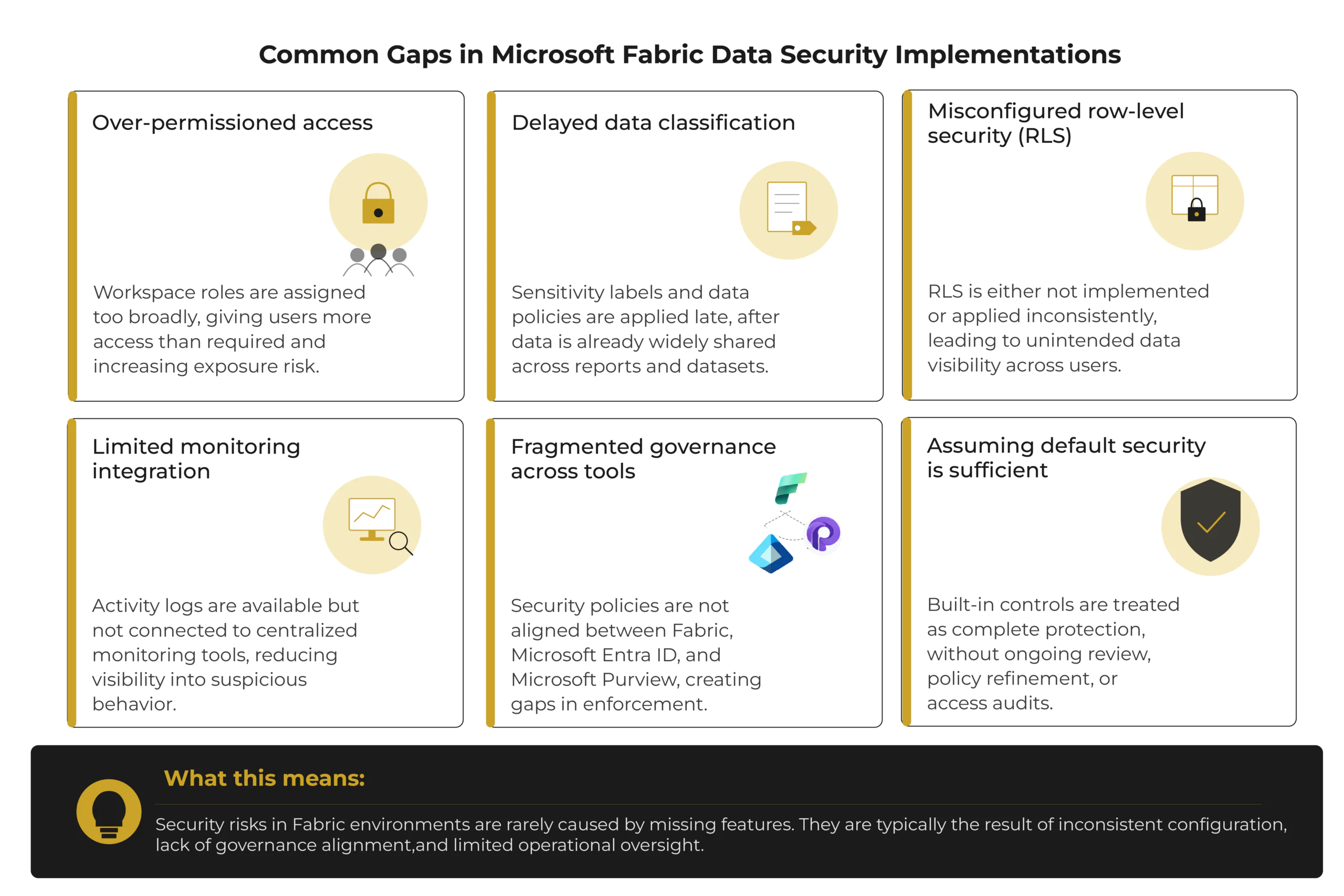
Where Microsoft Fabric Data Security Implementations Go Wrong
Even with strong built-in capabilities, Microsoft Fabric data security often falls short due to how it is implemented, not what the platform provides.
What are the Best Practices for Implementing Security in Microsoft Fabric?
Microsoft Fabric security best practices should be implemented through structured governance, consistent access control, and continuous monitoring. The goal is to combine platform capabilities with organizational policies to reduce risk across data and analytics workloads.
A layered security approach should be used across identity, data, network, and monitoring layers. Security controls should not rely on a single mechanism; instead, they should reinforce each other across the environment.
- Layered security model: Combine identity, data protection, and network controls for multiple levels of defense
- Governance and policy management: Define and regularly review security policies and access rules
- Continuous review: Periodically reassess configurations, roles, and compliance requirements
Access should follow the principle of least privilege, ensuring that users receive only the permissions required for their roles. Regular access reviews help prevent permission drift and reduce unnecessary exposure.
- Least privilege access: Assign only required roles and permissions to users
- Periodic access reviews: Revalidate user permissions and remove unused or excessive access
- Role hygiene: Maintain clear separation between admin, contributor, and viewer roles
Security monitoring and logging should be enabled to support detection and investigation. Fabric activity logs can be integrated with SIEM systems such as Microsoft Sentinel for centralized monitoring.
- Audit logging: Capture user and administrative activity across workspaces
- SIEM integration: Forward logs to centralized security monitoring systems
- Continuous monitoring: Detect suspicious activity through correlated security events
Organizations should also maintain security awareness programs and incident response processes as part of Microsoft Fabric security best practices. This includes training users on safe data handling and defining clear escalation procedures for security incidents.
- Security awareness training: Educate users on data handling and access policies
- Incident response plan: Define escalation paths and response procedures
- Regular testing: Validate controls and response readiness through periodic assessments
Get On-Demand Microsoft Fabric Security Expertise
Access our certified Microsoft Fabric specialists when you need audits, security reviews, troubleshooting, or complex implementation challenges.
Request a DemoConclusion
Microsoft Fabric provides enterprise-grade security through layered controls across identity, access, encryption, and monitoring. It relies on integration with Microsoft’s broader security ecosystem to maintain consistent protection across data and analytics workloads.
Security effectiveness depends on proper governance, defined policies, user awareness, and continuous management of access and configurations.
As security requirements evolve, Microsoft Fabric security architecture continues to align with updates in Microsoft Azure and Microsoft security services. Organizations need to apply these features correctly and follow established best practices to maintain compliance and protect sensitive data.
FAQs
It comes with baseline security from Azure, but most protection levels depend on how identity, access, and policies are configured.
No, data is distributed across regions based on workspace settings and Microsoft Azure data residency options.
Yes, most security and compliance controls are managed at the tenant level through Microsoft Entra ID and Microsoft Purview.