AI Integration Consulting: Why AI-SaaS Integrations Underperform in Production

Table of Contents
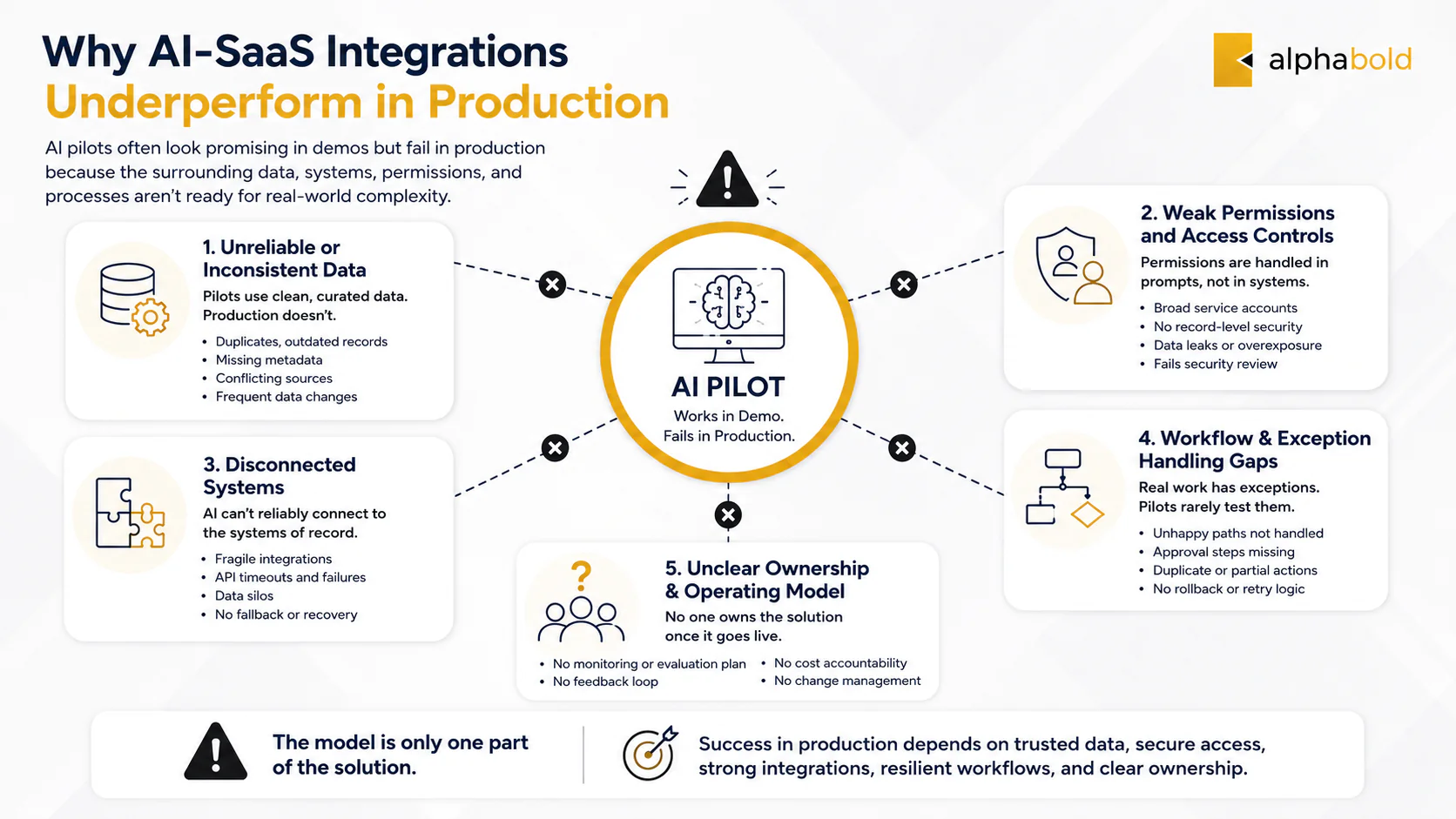
AI integration consulting helps organizations close the gap between an AI pilot that looks promising and a production solution that performs reliably. Most AI-SaaS integrations do not underperform because the model is incapable. They underperform because the surrounding data, permissions, applications, workflows, and operating controls were not designed to support AI at scale.
A demonstration may work with curated documents and a few test users. Production introduces live records, conflicting sources, role-based access, system outages, workflow exceptions, variable usage, and accountability for every action. From a consultant’s perspective, those conditions determine whether the solution creates value or remains another pilot.
Why Do Most AI-SaaS Integrations Underperform?
The first signs are usually clear. The assistant gives plausible but inconsistent answers. Users do not trust its recommendations. Security teams will not approve production access. Costs rise unexpectedly. An agent completes the standard workflow but fails when a record is missing, an API times out, or an approval is required.
These problems usually originate outside the model.
Was the AI Use Case Selected Before the Workflow Was Understood?
A common mistake is starting with a model capability rather than a business problem. Teams decide to build a copilot, summarization feature, or agent before mapping how the work is completed today.
During discovery, we examine where users spend time, which decisions require judgment, where exceptions occur, and which systems hold the authoritative information. This can reveal that the proposed feature addresses one visible step while leaving the actual bottleneck unchanged.
A useful AI use case should improve a measurable outcome, such as resolution time, document-processing time, workflow completion, or manual effort. “Adding AI” is not a measurable objective.
Did the Pilot Use Cleaner Data Than Production?
Pilots are often tested against manually selected documents or a limited dataset. Production systems contain duplicates, outdated files, missing metadata, inconsistent relationships, and different security rules.
In practice, AI rarely creates the underlying data problem. It exposes and amplifies it. Before scaling, the team should identify which sources are authoritative, how frequently they change, who owns them, and how access restrictions will be applied.
Were Permissions Treated as Prompt Instructions?
Telling a model not to reveal restricted information is not an authorization system.
Access should be enforced before information reaches the model. User identity, application roles, record-level permissions, tenant boundaries, retrieval filters, and tool permissions should determine what the AI can retrieve or change.
We often see this issue when a pilot uses a service account with broad access. The responses look complete during testing, but the design cannot safely support users with different roles, customers, or data entitlements.
Was the Architecture Designed for Answers Rather Than Actions?
A chatbot that returns text has a narrower risk profile than an agent that updates a CRM record, starts a workflow, checks financial data, or sends an external communication.
Once AI can act, the architecture must account for authorization, confirmation, transaction state, retries, duplicate actions, unavailable systems, and rollback. The question becomes: Was the action permitted, validated, completed once, and recorded?
Who Owns the Solution After Launch?
Someone must own output evaluation, source changes, prompt and model updates, incident response, user feedback, usage limits, and cost monitoring. Without clear ownership, quality declines as business data and connected applications change.
An AI solution is not finished when it is deployed. It becomes an operational system that requires monitoring, maintenance, and controlled change.
Is Your AI Pilot Stalling Before Production?
AlphaBOLD can assess your use case, data environment, integrations, security controls, and operating model to identify what is preventing the solution from scaling.
Request a ConsultationWhat Should AI Integration Consulting Diagnose First?
AI integration consulting should begin by determining whether the use case is valuable and production-ready, not by choosing a model.
At AlphaBOLD, we start with four questions:
- What business process must improve? Define the user, task, baseline, outcome, and acceptable risk.
- Can the required data be trusted and accessed? Assess quality, ownership, freshness, sensitivity, and permissions.
- Which systems must participate? Map where AI retrieves information and where approved actions are written back.
- How much autonomy is appropriate? Decide whether AI should advise, prepare an action, request approval, or complete a narrow task.
We begin by asking what decision or workflow the solution must support, which information makes that possible, and what should happen when the AI is uncertain or wrong.
You may also like: Generative AI Consulting Services That Ship to Production
What Architecture Does a Production AI Integration Require?
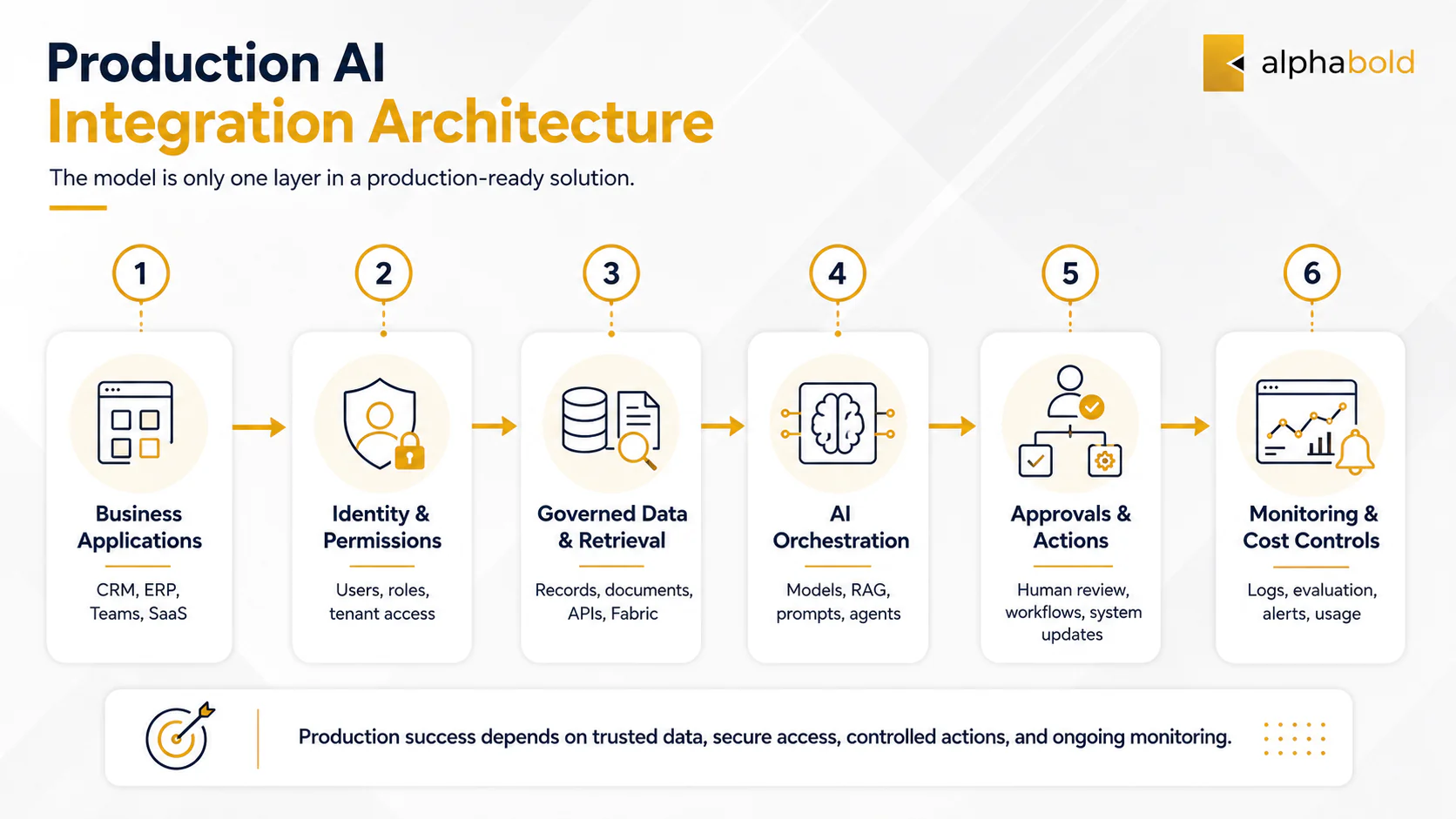
A production AI solution should be designed as connected layers. The model is one controlled component, not the entire system.
Application and Workflow Layer:
This is where the user interacts with AI and where the business process occurs, such as Dynamics 365, an ERP system, Microsoft Teams, an employee portal, or a custom SaaS platform. The AI experience should fit the workflow rather than force users into a disconnected tool.
Identity and Permission Layer:
This layer verifies the user or process and applies role, record, tenant, and tool-level permissions.
The solution should not expose data or actions beyond what the user or authorized process is permitted to access. These rules should be enforced through identity, application security, retrieval filters, and business logic rather than prompts alone.
Data and Grounding Layer:
The grounding layer may use CRM and ERP records, SharePoint content, databases, APIs, Microsoft Fabric, semantic models, or vector indexes.
For retrieval-augmented generation, the consultant must decide which sources are approved, how content is indexed, how permissions are preserved, and how answers remain traceable. Better prompting cannot compensate for irrelevant or unauthorized context.
AI and Orchestration Layer:
This layer coordinates models, prompts, retrieval, tool calls, workflows, approvals, retries, and fallbacks.
The safest design is usually the least autonomous pattern that can deliver the outcome. A structured workflow with one AI-assisted decision is often easier to validate than an agent with broad access to several systems.
Monitoring and Operations Layer:
Production monitoring should cover output quality, retrieval relevance, failed actions, latency, security events, model changes, usage, and cost per outcome. These signals help locate failures across the data, retrieval, model, application, or workflow layers.
You may also like: How to Choose a Data Integration Services Provider: A CIO’s Checklist
Which AI Integration Pattern Fits the Use Case?
Not every problem requires generative AI, and not every generative AI use case requires an agent.
- Search and summarization support document review, service teams, and knowledge access.
- Retrieval-augmented generation grounds responses in approved enterprise content.
- AI-assisted workflow automation applies AI to a controlled step while conventional rules manage the wider process.
- AI agents coordinate multi-step activities but require narrow permissions, approvals, state management, and recovery logic.
- Predictive AI may be better for classification, scoring, forecasting, and anomaly detection.
We recommend the least complex pattern that can produce the required business result. An agent may be technically possible, but that does not make it the most reliable or economical choice.
How Should AI Connect With Enterprise Applications?
AI becomes operationally useful when it works with the systems where business data and actions already exist.
A solution may retrieve case information from Dynamics 365, ground responses in SharePoint, use Microsoft Fabric as a governed data foundation, check ERP inventory, trigger a Power Automate approval, or call a custom SaaS API.
The architecture should separate read access from action access. An assistant may summarize a service case but remain unable to change its status. Another solution may prepare an update and require approval before it is saved.
During architecture design, we ask:
What can the AI retrieve, what can it change, under whose authority, and what happens if the connected application is unavailable?
Production workflows need timeout handling, retries, duplicate prevention, fallback routes, and a clear path for human intervention.
You may also like: Microsoft Fabric for Data Analytics
How Do You Control Security, Governance, and AI Cost?
Governance becomes useful when policies are translated into system behavior.
- “AI must not reveal restricted information” becomes permission-aware retrieval and record-level filtering.
- “AI must not complete a high-risk action independently” becomes an approval checkpoint.
- “AI outputs must be traceable” becomes source attribution, versioning, and audit logging.
- “AI must operate within budget” becomes model routing, quotas, usage allocation, and cost alerts.
A common mistake is adding these controls after the pilot. Retrofitting security can require major changes to identity, retrieval, logging, and workflow design. It is usually more efficient to define access boundaries and approval rules before development.
Cost also needs to be linked to value, such as cost per processed document, resolved case, completed workflow, department, or customer. The State of FinOps 2026 reports that 98% of respondents manage AI spend, up from 31% two years earlier, and identifies FinOps for AI as the leading forward-looking priority.
Practical controls include routing simple tasks to smaller models, limiting unnecessary context, caching repeated results, setting usage thresholds, and preventing uncontrolled agent loops.
How Do You Move an Underperforming AI Pilot Into Production?
When a pilot underperforms, more prompt tuning is not always the answer. The cause may be the data, retrieval logic, application integration, permissions, workflow design, or operating model.
A practical recovery plan includes five steps:
- Revalidate the use case. Confirm that the problem is valuable enough to justify further investment.
- Identify the production gap. Assess missing data controls, permissions, integrations, exception handling, monitoring, and ownership.
- Redesign the architecture. Fix structural issues instead of continuing to patch the demonstration.
- Release to a controlled group. Test real users, permissions, data, and exceptions with approval gates and usage limits.
- Measure performance. Track task time, correction rate, failed actions, workflow completion, adoption, and cost per outcome.
The objective is not to preserve every part of the pilot. It is to retain what proved valuable and redesign what cannot support production.
When Should You Bring in an AI Integration Consulting Partner?
Outside support becomes useful when the pilot cannot pass security review, several systems must be connected, permissions are complex, AI will perform actions, sensitive data is involved, or production ownership is unclear.
A qualified partner should be able to answer:
- Which use cases should proceed, and which do not require AI?
- How will user, record, and tenant permissions be enforced?
- Should the design use RAG, workflow automation, predictive AI, or an agent?
- Which actions require human approval?
- How will outputs, tool calls, failures, and business actions be evaluated and logged?
- How will unavailable models, APIs, and applications be handled?
- How will cost and business value be measured after launch?
A model demonstration is not evidence that a provider can deliver production AI integration. Strong answers should connect the use case to data, architecture, security, workflow design, operations, and measurable outcomes.
Move Your AI Initiative Beyond the Pilot Stage
AlphaBOLD can help you diagnose why an AI initiative is stalling, redesign the integration architecture, connect it with enterprise applications, and establish the controls required for production.
Request a ConsultationWhy Work With AlphaBOLD for AI Integration Consulting?
AlphaBOLD combines AI implementation with enterprise application, Microsoft cloud, data engineering, integration, and workflow expertise. This allows our consultants to evaluate the full environment surrounding the model, including the data it retrieves, the applications it connects to, the actions it performs, and the controls required after launch.
Our services include AI readiness assessments, architecture and platform selection, RAG and agent implementation, enterprise integration, Microsoft Foundry and Copilot Studio solutions, and production governance and support.
Fix the Architecture, Not Only the Prompt
AI-SaaS integrations rarely underperform because the organization selected the wrong model. More often, the solution was not designed for live data, existing permissions, operational exceptions, variable cost, and long-term ownership.
AI integration consulting should help leaders diagnose those gaps before they invest further. The objective is not to add more AI. It is to build a reliable capability that improves a defined business process and can be governed, measured, and supported in production.
FAQs
The cost depends on the use case, connected systems, data readiness, security requirements, selected AI pattern, expected usage, and whether the engagement covers assessment, pilot recovery, or production delivery. A readiness assessment should define the scope and major cost drivers before implementation begins.
A focused assessment may take several weeks. Production delivery usually requires a phased timeline covering architecture, integrations, permissions, testing, monitoring, deployment, and user validation. The timeline depends largely on the number of systems, data quality, workflow risk, and required controls.
Yes. AI can often connect to legacy applications through APIs, databases, middleware, integration platforms, or an intermediary data layer. Where reliable interfaces are unavailable, robotic process automation may provide a limited fallback, although it typically requires additional monitoring and maintenance.
Explore Recent Blog Posts