
Table of Contents
Introduction
Copilot in Dynamics 365 Project Operations is an AI assistant that automates time tracking, project planning, and reporting through natural language commands. It reduces administrative work by generating time entries, task plans, and status reports in seconds, giving project teams more time for delivery and client work.
Built into Microsoft’s unified project management platform, Copilot connects sales, planning, delivery, and finance workflows. The Time Entry Copilot analyzes project context, tasks, roles, and deadlines to create accurate time logs and comments automatically, eliminating the need for manual form completion. Teams see faster submissions, consistent reporting, and better data for forecasting and billing.
How Does Copilot Time Entry Work in Project Operations?
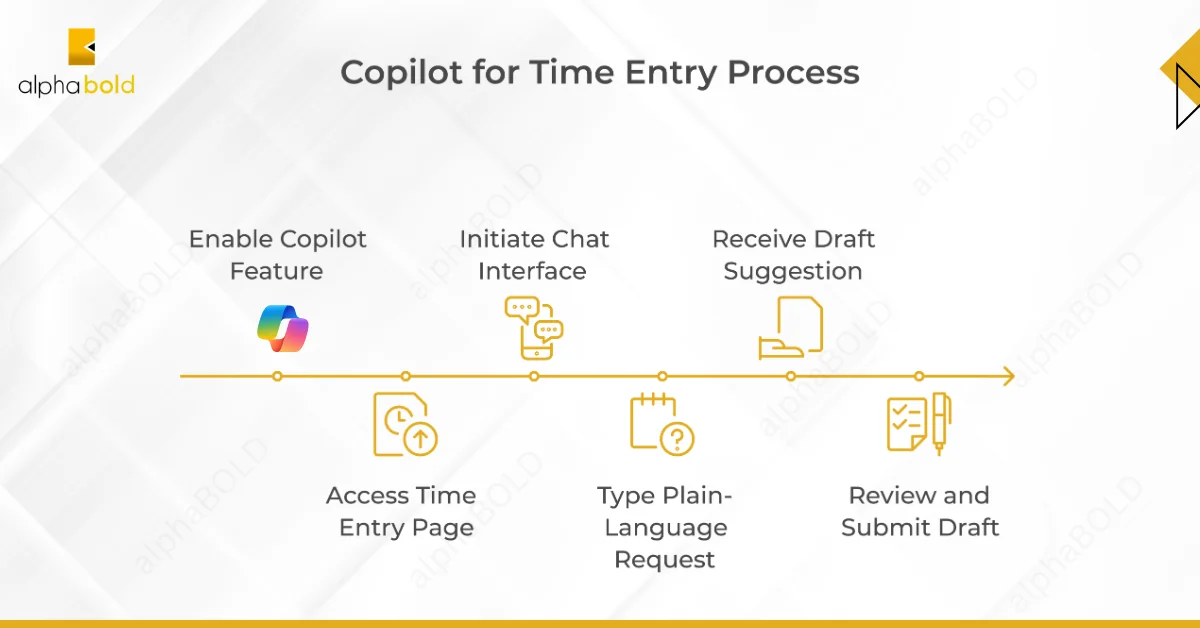
Time tracking becomes conversational with Copilot. Team members type requests, such as “Log my time for this week” or “Add task comments,” directly into the time entry interface. Copilot pulls relevant project data, assigned activities, recorded hours, and deadlines, and generates review-ready drafts.
The system automatically matches entries to active tasks and roles. Project managers receive standardized comments that improve clarity across reports. Finance teams receive accurate data for billing and forecasting without having to chase incomplete timesheets.
Benefits project managers see immediately:
- Faster weekly submissions: Teams spend 40-60% less time on timesheet entry.
- Error reduction: Context-driven suggestions match the correct tasks and durations.
- Consistent documentation: Standardized comments across all project entries.
- Real-time visibility: Accurate entries improve resource allocation and project forecasts.
Organizations managing distributed teams across regions spend less time on administrative follow-up. The result: better deadline adherence, stronger client satisfaction, and improved project profitability.
What Are the Current Limitations of Copilot in Project Operations?
Copilot currently supports time entry for the current week only. Entries require a page refresh to appear in the grid. Organizations with heavily customized time entry forms need additional configuration to align Copilot with existing workflows.
Draft comments are generated from standard fields: project name, task, role, and duration. This ensures consistency, but it means that specialized technical notes still require manual input. Teams should review all generated entries before submission to maintain accuracy.
Plan for user training and process adjustments during rollout. Understanding these boundaries helps organizations set realistic expectations and capture full value from the feature.
Need Help Implementing Copilot in Project Operations?
Talk to AlphaBOLD’s Microsoft-certified consultants about deploying Copilot in your Dynamics 365 Project Operations environment. We’ll assess your current setup, identify AI opportunities, and design an adoption plan that drives measurable ROI.
Request a ConsultationWhat Other Project Management Tasks Does Copilot Handle?
Although time entry is one of the most visible features, Copilot in Dynamics 365 Project Operations supports a wider range of project management tasks that help leaders improve delivery outcomes. These include:
Task plan creation: Generate detailed task lists from a simple project description, complete with start dates and durations, so teams can begin work faster.
Risk assessment: Review project scope, budget, and timelines to identify potential risks and suggest mitigation actions.
Status reporting: Create concise, data-driven project updates that combine scheduling and financial insights, reducing the time spent preparing reports.
Cross-application collaboration: Integrate seamlessly with Microsoft Teams, Outlook, and Excel to share updates, coordinate work, and capture information without switching tools.
By embedding these capabilities into existing workflows, Copilot helps project teams spend less time on repetitive administration and more time on strategic, high-value activities that drive project success.
Why Does Accurate Time Data Matter Beyond Compliance?
Accurate time entries create a ripple effect across the project lifecycle. Project managers use reliable data for forecasting. Sales teams build better proposals from actual delivery patterns. Operations leads identify inefficiencies that reduce waste.
The impact shows up in client relationships, delivery predictability, and financial performance. First National Bank in South Africa deployed Microsoft Copilot for Sales to 3,500 bankers; 94% adoption within months led to time savings and stronger client engagement. Similar results occur when Copilot integrates into Project Operations workflows.
Clean data from Copilot-assisted entries feeds directly into resource planning, budget adjustments, and capacity forecasting. Decision-makers gain visibility into project health without waiting for end-of-week reconciliation.
Further Reading: Boost Productivity: Dynamics 365 Project Operations
How Does AI Collaboration Work Without Replacing Project Teams?
Copilot augments human judgment, not replaces it. The system learns from user patterns and applies intelligent automation where it adds value. Project managers still make final decisions on task priorities, resource allocation, and client communication.
The conversational interface requires minimal training. Team members start using it effectively within days, not weeks. This low-friction adoption means organizations can capture value quickly, as AI complements existing processes rather than disrupting them.
Copilot handles repetitive data entry and draft generation. Humans handle strategy, client relationships, and complex problem-solving. This division of labor keeps teams focused on high-value activities that require experience and judgment.
Ready to Deploy AI in Your Project Workflows
Take the first step toward AI-Powered Project Management. Book an AlphaBOLD copilot readiness session. We'll review your current Project Operations setup, map AI opportunities to business outcomes, and design a phased rollout plan that minimizes disruption while maximizing team adoption.
Request a ConsultationConclusion
Implement Copilot when time tracking creates bottlenecks, project data lacks consistency, or teams spend excessive hours on administrative reporting. Organizations managing multiple concurrent projects, distributed teams, or complex billing structures see immediate value.
Consider the following readiness factors: the current Dynamics 365 version, customization level, team size, and change management capacity. AlphaBOLD guides organizations through configuration, training, and adoption to ensure smooth rollouts that deliver returns within the first quarter.
Start with a pilot team. Measure time savings, data accuracy improvements, and user adoption rates. Expand based on proven results and feedback from early users.
FAQs
No. Copilot needs an internet connection. Offline time entries sync later, but Copilot features only work online.
No. It supports the current week only. Past entries must be added manually.
It uses your tasks, roles, logged hours, deadlines, and activity details within Dynamics 365 only.
Most users are productive in 15 to 30 minutes. A brief introductory session is usually sufficient.
No. It handles routine entry work. Project managers still own planning, decisions, and delivery.
Entries are drafts. Users review, edit if needed, and submit only after verification.
Explore Recent Blog Posts




Related Posts