Copilot for Microsoft Dynamics 365 Sales– How AI Helps Reps Close Faster

Table of Contents

Introduction

Sales professionals often find their productivity limited by manual CRM updates, meeting preparation, and follow-up tasks. Copilot for Microsoft Dynamics 365 Sales addresses these challenges by seamlessly integrating AI into familiar tools, such as Outlook, Teams, and Dynamics 365.

It automates administrative work, drafts personalized emails, summarizes meetings, and provides real-time insights into customer opportunities, all directly within daily workflows.

With Microsoft’s 2026 Release Wave 1 updates, Copilot has evolved well beyond a productivity assistant. It now operates as an agentic AI layer across Dynamics 365 Sales, drawing on CRM data, Microsoft 365 signals (email, meeting recaps, Teams conversations), and Microsoft Fabric analytics to deliver predictive recommendations, autonomous lead qualification, and proactive deal coaching. For sales leaders, this represents a shift from AI-assisted selling to AI-augmented pipeline management.

What is Copilot for Microsoft Dynamics 365 Sales?

Copilot for Microsoft Dynamics 365 Sales is an AI-powered assistant that brings automation, intelligence, and efficiency into the sales workflow. It integrates directly into Dynamics 365, Outlook, and Teams, allowing sellers to manage customer data, prepare for meetings, and communicate, all within the tools they already use.

Unlike standard CRM automation, Copilot understands sales context. It analyzes conversations, extracts insights, and offers next-step recommendations based on real-time data. This enables sales teams to focus on building relationships instead of handling administrative tasks.

Key capabilities include:

  • AI-driven automation: Streamlines CRM data entry, meeting summaries, and email drafting.
  • Contextual insights: Provides personalized recommendations based on customer activity, deal stage, and past interactions.
  • Cross-app integration: Works natively within Outlook, Teams, and Dynamics 365 Sales for a unified experience.
  • Predictive assistance: Suggests next best actions and talking points to accelerate deal closure.
  • Autonomous Sales Agents (Wave 2 2025 / Wave 1 2026): Multi-step agents that qualify leads, draft follow-ups, and update records without human intervention based on predefined rules.
  • Fabric-powered pipeline analytics: Copilot insights now connect to Microsoft Fabric, enabling sales managers to surface deal health scores and revenue forecasts from unified Dataverse and external data in Power BI dashboards.

According to Forrester’s Total Economic Impact™ study, organizations that implemented Copilot for Microsoft Dynamics 365 Sales reported $56.7 million in projected savings over three years and an 8.45% increase in net margin. These results demonstrate how intelligent automation in CRM workflows drives measurable revenue growth and operational efficiency.

Why Sales Reps Need Copilot?

Sales professionals often lose valuable selling time to administrative tasks, such as updating CRM records, drafting follow-up emails, and preparing for meetings. Copilot for Microsoft Dynamics 365 Sales automates these repetitive tasks, allowing teams to spend more time engaging with prospects and closing deals.

Handling manual data entry and routine communication enables sales reps to operate strategically rather than reactively.

Reduce Administrative Overload:

Copilot minimizes time spent on manual CRM updates and post-call summaries.

  • Automatically logs interactions and notes from Outlook and Teams.
  • Draft personalized responses and proposals based on CRM data.
  • Updates opportunity records in real-time, eliminating the need for after-hours data entry.
  • Autonomous Sales Agents (released Wave 2 2025) can qualify inbound leads, send first-touch follow-ups, and push record updates without rep intervention, reducing administrative time by 20 to 30% according to Microsoft customer data.

Improve Meeting and Call Preparation:

Preparation is critical to sales success. Copilot ensures every rep walks into meetings fully informed.

  • Summarizes account histories and open opportunities before each meeting.
  • Surfaces recent email threads, competitor mentions, and action items.
  • Provides quick, AI-generated talking points directly inside Teams or Dynamics 365.
  • In 2026 Release Wave 1, Copilot draws on both CRM data and Microsoft 365 signals (calendar, emails, Teams transcripts) to produce pre-meeting briefs that include deal risk indicators and recommended conversation angles.

Keep CRM Data Accurate and Up to Date:

Accurate data is essential for pipeline forecasting and customer trust. Copilot keeps your CRM up to date without manual effort.

  • Syncs call notes, meeting recaps, and emails automatically.
  • Flags incomplete or outdated records for quick correction.
  • Maintains a live and reliable view of the sales pipeline for both managers and representatives.
  • When connected to Microsoft Fabric via Dataverse, Copilot can now reconcile CRM pipeline data against external market signals, flagging accounts where deal probability diverges from historical benchmarks for that segment or industry.

By reducing administrative effort and improving data reliability, Copilot enables sales teams to focus on what drives performance, building relationships, personalizing outreach, and closing deals more efficiently.

Key Features of Copilot for Dynamics 365 Sales

Copilot for Dynamics 365 Sales integrates AI directly into Outlook, Teams, and Dynamics 365 to automate routine admin tasks and provide actionable insights. It learns from CRM data, communications, and sales activities to deliver context-aware recommendations, drafts, and insights.

Sales teams can prepare for meetings, send follow-ups, and analyze pipelines more efficiently, spending less time on data entry and more time closing deals.

The outcomes include shorter sales cycles, stronger collaboration, and higher win rates, all powered by data-driven decisions.
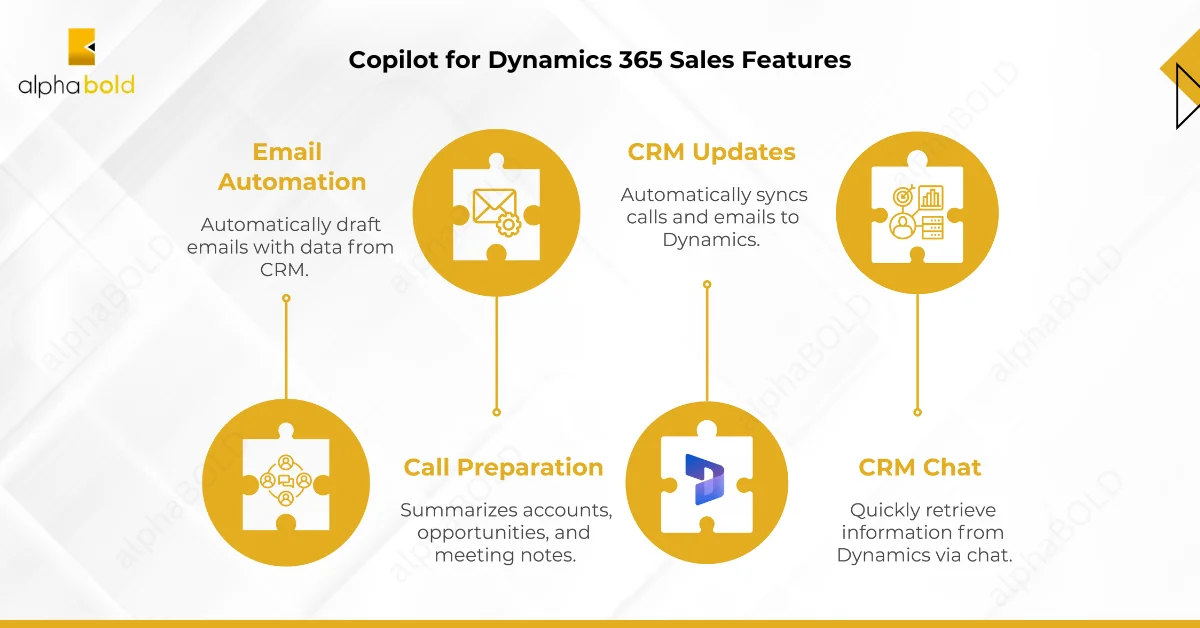
Copilot for Dynamics 365 Sales features

Smart Email Drafting in Outlook:

Copilot suggests personalized, context-aware email responses directly within Outlook, drawing details from recent customer interactions, CRM data, and meeting notes, so your sales reps spend more time engaging, not typing.

In 2026, email drafting now incorporates Sales Insights signals, including deal stage, relationship health score, and competitor mentions from previous calls, producing drafts that adapt tone and urgency based on where the opportunity sits in the pipeline.

Automated Call and Meeting Prep:

Before every meeting or call, Copilot compiles a quick snapshot of account history, deal progress, and relevant notes from Dynamics 365. It’s like having a sales assistant who’s already done the homework for you.

With Release Wave 1 2026, meeting prep briefs now pull from Teams meeting transcripts, Outlook calendar history, and Fabric analytics simultaneously, surfacing deal-specific risks such as stalled decisions, budget cycle proximity, or competitor activity logged in previous calls.

Real-Time CRM Updates Across Platforms:

Copilot syncs updates automatically across Dynamics 365 and connected apps. Whether someone logs a note in Teams or updates a contact in Outlook, the CRM remains aligned, eliminating the need to chase duplicate data.

Power Automate flows can now be triggered by Copilot-detected events. For example, if Copilot identifies a competitor mention during a Teams meeting transcript, it can automatically create a follow-up task, tag the opportunity with a competitor flag, and notify the sales manager via Teams, all without manual intervention.

Conversational Queries via Teams:

Sales teams can ask natural-language questions in Teams, such as “What’s the status of the Contoso deal?” and Copilot instantly pulls data from Dynamics 365. It’s an intuitive way to access CRM insights without needing to switch screens.

As of 2026, these queries now support cross-source reasoning. Copilot can answer ‘Which of my Q2 deals are most at risk based on engagement data?’ by joining CRM opportunity records with email open rates and meeting participation data from Microsoft 365, without any manual report building.

Sales Insights AI and Predictive Scoring (New 2026)

Conversation Intelligence (part of Sales Insights) now analyzes recorded calls and meetings in real time, extracting action items, sentiment shifts, competitor mentions, and buying signals. In 2026, this is augmented by AI-enhanced lead scoring that learns from each rep’s past conversion behavior to predict likelihood scores specific to their book of business, not just global averages.

Sales Insights Feature What It Delivers in 2026

Conversation Intelligence

Real-time extraction of action items, sentiment, competitor mentions, and buying signals from calls and Teams transcripts

AI Lead Scoring

Predictive probability scores based on rep-specific conversion history, account signals, and deal stage velocity
Deal Room Analytics
Engagement heatmaps showing which stakeholders are active, which are disengaged, and recommended next actions per contact

Forecasting with Fabric

Pipeline forecasts reconciled against Fabric-hosted external data (market conditions, segment benchmarks, historical close rates)
Sales Copilot Agents
Autonomous agents that qualify new leads, send first-touch outreach, and update CRM records based on configurable rules

Let AI Handle the Admin So You Can Focus on Selling

Copilot for Microsoft Dynamics 365 Sales eliminates manual data entry and email drafting, helping you spend more time closing deals.

Request a Consultation

Step-by-Step: How Copilot Simplifies Daily Sales Workflows

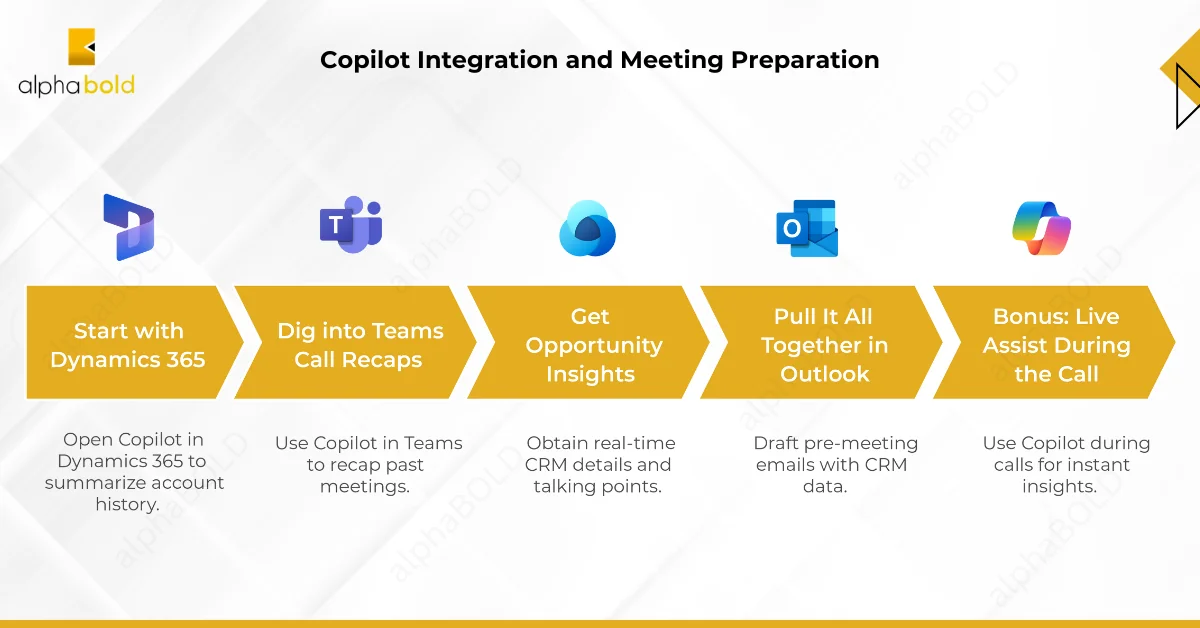
Copilot transforms everyday sales operations from manual, time-consuming tasks into intelligent, guided workflows. By integrating Dynamics 365, Teams, and Outlook, sales professionals can move seamlessly between data, communication, and action, without losing context or momentum.

Here’s how it enhances every stage of a typical sales day.

Summarizing Account Histories in Dynamics 365:

Open the Copilot pane in Dynamics 365 Sales Hub (top-right corner) and type: “Summarize [Account Name]’s history.” Copilot scans your CRM and delivers a comprehensive rundown of past deals, open opportunities, recent interactions, and notes from your last call.

Example:

“Acme Corp: Closed $50K deal in Q4, has a $75K opportunity in negotiation, last contact 3/10/25.”

This ensures you are instantly up to speed before any client interaction.

Pulling Teams Meeting Recaps Automatically:

In Teams, click the Copilot icon and ask: “Recap my last meeting with [Contact Name].” Copilot pulls the transcript, highlights key points (e.g., “They mentioned budget cuts, push value”), and flags action items. No more scrambling through recordings or Post-its.

As of 2026, Copilot also automatically scores the meeting for engagement depth, noting which topics generated the most discussion and which objections were raised but not fully resolved, giving reps a prioritized follow-up agenda.

Accessing Opportunity Insights Quickly:

Back in Dynamics 365 or Teams, you can ask: “What’s the status of [Opportunity Name]?” Copilot provides real-time CRM details, including stage, value, close date, and competitor mentions.

In 2026, Copilot pairs this with a predictive health score: ‘This deal is at 72% probability, down from 85% last week. Engagement from the economic buyer dropped after the last demo. Recommended action: schedule a direct call with the CFO and share the ROI case study.’

Example:

“$100K deal, 80% probability, closes 3/31/25, watch out for Competitor X.”

You can pair this with “Suggest talking points” to receive tailored advice, such as “Highlight ROI from last project” or “Address their scalability concerns.”

Drafting and Sending Follow-Up Emails:

In Outlook, ask Copilot: “Draft a pre-meeting email for [Contact Name] based on Dynamics 365.” It creates a polished, personalized note using CRM data. Adjust the tone, casual or formal, and send it directly.

Example:

“Looking forward to discussing your $75K opportunity; here’s how we beat Competitor X last time.”

Live Assist During Calls:

During meetings, keep Copilot open in Teams and ask: “What’s [Contact Name]’s pain point?” It pulls insights from Dynamics 365 notes instantly, e.g., “They need faster onboarding,” so you can adjust your conversation in real-time.

With Conversation Intelligence active, Copilot also surfaces real-time coaching cards during calls, prompting reps when a competitor is mentioned or when the conversation sentiment shifts negative, allowing mid-call pivots without interrupting flow.

Streamlining Meeting Prep with Copilot

Microsoft Fabric and Power Platform Integration

Starting with 2025 Release Wave 2, Copilot for Sales benefits from deeper integration with Microsoft Fabric and the broader Power Platform stack. This connection turns Copilot from a single-app assistant into a cross-platform intelligence layer for the entire revenue operation.

What the Integration Enables:

  • Fabric OneLake as a CRM signal source: Sales managers can configure Copilot to pull external data (market benchmarks, web engagement, intent signals) stored in Fabric’s OneLake alongside Dataverse CRM records, producing deal health scores that account for both internal activity and external market context.
  • Power BI dashboards surfaced inside Copilot: Pipeline reports built in Power BI can be queried in natural language via Copilot in Teams or Dynamics 365 Sales Hub. A rep can ask ‘Show me my Q2 pipeline by close probability’ and receive an embedded Power BI visual with drill-through capability, without leaving the CRM.
  • Power Automate triggered by Copilot events: Copilot-detected events (competitor mentions, deal stage stalls, engagement drops) can trigger automated Power Automate workflows: create tasks, notify managers, update records, or send templated follow-up emails based on rules set in Power Automate.
  • Real-time forecasting with Fabric: Finance and sales ops teams can build Fabric-powered forecast models that Copilot surfaces directly in the Sales Hub, comparing rep-submitted pipeline against AI-adjusted forecasts based on historical close rates and current engagement data.

ROI and Business Impact: 2025 to 2026 Data

The $56.7M and 8.45% net margin figures are from a 2024 SMB-focused Forrester TEI study. Updated enterprise benchmarks from Forrester’s March 2025 TEI study (16 decision-makers, 12 organizations, 367 survey respondents) are cited below.

Metric Verified Figure Source

Forrester TEI NPV (enterprise)

$19.7M over 3 years

Forrester TEI of Microsoft 365 Copilot, March 2025

ROI on Copilot deployment (enterprise)
116% over 3 years
Forrester TEI of Microsoft 365 Copilot, March 2025
ROI range for SMBs
132% to 353%
Forrester TEI for Microsoft 365 Copilot for SMB, 2024

Users reporting higher daily productivity

70% of Copilot users
Microsoft customer data, 2025
Task completion speed improvement
29% faster for drafting and preparation tasks
Microsoft customer studies, 2025
Admin time reduction (Sales Agents)
20 to 30% reduction in routine sales admin tasks
Microsoft Wave 2 2025 release data
Copilot included in D365 Sales license
No extra cost as of October 2025
Microsoft licensing update, Oct 2025

Note: Copilot capabilities for Dynamics 365 Sales, Customer Service, and Business Central were included at no additional licensing cost as of October 2025, a significant change that strengthens the ROI case for organizations already licensed on Dynamics 365 Sales Enterprise or Premium.

Best Practices to Maximize Copilot’s Value

To get the most out of Copilot for Microsoft Dynamics 365 Sales, it’s important to use it strategically. While AI handles many routine tasks, following these best practices ensures accuracy, relevance, and actionable insights every time.

Prompt Engineering for Sales Workflows:

The quality of Copilot’s output depends significantly on the specificity of the prompt. Vague prompts return generic summaries. Structured prompts return decision-grade insights.

Weak Prompt Stronger Alternative

What happened last week?

Summarize all interactions with Contoso in the last 7 days, including emails, calls, and open action items.

Draft a follow-up email

Draft a follow-up email to Jane at Contoso after our 5/15 demo, referencing her concern about implementation timeline and highlighting our 30-day onboarding guarantee.
What’s the pipeline status?
Show me all opportunities closing in Q2 with probability below 60%, sorted by deal value, and flag any where the last activity was more than 14 days ago.

Tell me about this account

Summarize TechCorp’s buying history, any competitor mentions from the last 3 calls, and recommended next steps based on their current deal stage.

Data Quality: The Foundation of AI Accuracy

Copilot’s recommendations are only as good as the CRM data it draws from. Before expanding Copilot use across a sales team, ensure the following data hygiene standards are in place:

  • All opportunities must have a close date, deal value, and current stage populated. Missing fields reduce prediction confidence and produce generic rather than deal-specific recommendations.
  • Contact records should include role, decision-making authority level, and last interaction date. Copilot uses this to personalize outreach tone and surface the right stakeholder for next actions.
  • Call and meeting notes should be logged within 24 hours. Conversation Intelligence requires transcript data to produce accurate sentiment and action item extraction.
  • Accounts should have industry, segment, and company size tagged. This enables Copilot’s AI lead scoring to apply segment-specific conversion benchmarks rather than global averages.

Verify AI Recommendations Before Acting:

Copilot is highly accurate, but it is essential to review AI-generated summaries and outputs carefully. Double-check names, numbers, and key details to maintain data integrity and avoid errors in client communication.

This is especially important for deal probability scores and forecasting outputs. AI-adjusted forecasts should be treated as an input to manager judgment, not a replacement for it. Reps should flag when Copilot’s sentiment or risk assessment conflicts with their direct knowledge of the relationship.

Ask Specific Questions:

Be precise in your prompts. For example, “Recap my 3/15 call with Jane” produces far more useful results than a vague query like “What happened last week?” Clear prompts help Copilot surface the most relevant information quickly.

Leverage Mid-Call Insights:

Use Copilot during live meetings to access CRM data in real time. Quick queries about accounts, opportunities, or pain points help reps pivot conversations, address objections, and strengthen customer engagement on the spot.

Security, Compliance, and Governance Considerations

As Copilot becomes embedded in daily CRM workflows, AI-generated actions (drafted emails, opportunity updates, lead follow-ups) carry compliance and data security implications that sales leaders and IT administrators must address proactively.

What Copilot Can Access:

Copilot for Dynamics 365 Sales draws on data from Dataverse (CRM records), Microsoft 365 (emails, calendar, Teams), and optionally Fabric (external data and analytics). This breadth of access is what makes it powerful, and it is also what makes governance non-negotiable.

Governance Best Practices for Copilot in Sales:

  • Microsoft Purview integration: Apply sensitivity labels to CRM records, email attachments, and SharePoint files before enabling Copilot. Purview prevents Copilot from surfacing or including confidential data in AI-generated outputs without appropriate clearance.
  • Role-based Copilot access: Use Dynamics 365 Security Roles and Entra ID to limit which reps, managers, and admins can access Copilot features. Not all users need access to AI forecasting or Fabric-powered pipeline analytics.
  • Audit logging for AI actions: Enable Copilot audit logs in the Microsoft 365 Compliance Center to track which prompts were submitted, what data was accessed, and what actions Copilot recommended or auto-executed via Agents.
  • Human-in-the-loop for autonomous agents: Sales Agents (the autonomous lead qualification and follow-up features) should be configured with approval gates for initial deployment. Start with agents that recommend actions for human approval before graduating to fully autonomous execution for low-risk workflows.
  • Regulatory considerations: EU and UK regulators are actively scrutinizing Copilot for transparency, retention, and accuracy gaps (the Dutch DPA commissioned a review in 2025). U.S. organizations should note that Copilot prompts and responses are increasingly treated as discoverable content in litigation. Work with legal and compliance teams before enabling Copilot for regulated data such as financial forecasts or healthcare-adjacent CRM records.

AI Accuracy Improvements and Known Limitations

Microsoft has made significant accuracy improvements to Copilot for Sales through 2025 and into 2026, particularly in conversation intelligence and lead scoring. However, understanding the current limitations is essential for setting realistic expectations with sales teams.

Capability 2026 Accuracy Status Known Limitation

Meeting summaries

High accuracy for structured meetings with clear speakers

Accuracy drops with heavy accents, poor audio, or overlapping speakers. Always review before sharing externally.

AI lead scoring

Strong for accounts with 6+ months of CRM history and logged activity
New accounts or those with sparse CRM notes receive low-confidence scores. Data hygiene directly impacts output quality.
Email drafting
High quality for standard follow-ups and proposals when CRM data is complete
Copilot may hallucinate contact names or deal details if CRM records are incomplete. Always verify before sending.

Deal health / risk flags

Reliable for identifying engagement drops and stage velocity issues
Cannot account for off-platform relationship context (phone calls not logged, in-person meetings not recorded).
Autonomous agent actions
Effective for templated, rule-based workflows
Agents require clear, well-scoped rules. Open-ended agent goals produce inconsistent results. Start narrow and expand scope gradually.

Close Deals Faster with AI-Powered CRM Automation

AlphaBOLD can help you use Copilot for Microsoft Dynamics 365 Sales to transform your workflows with real-time insights, automation, and smarter sales interactions.

Request a Consultation

Conclusion

Copilot for Microsoft Dynamics 365 Sales is transforming the way sales teams work. By automating routine tasks, streamlining email communication, and simplifying meeting preparation, sales professionals can spend more time on activities that directly impact revenue. With AI-powered insights and real-time data at their fingertips, representatives can focus on building meaningful customer relationships, closing deals more quickly, and making more informed decisions.

With 2026 Release Wave 1 capabilities, the platform has moved beyond task automation into genuine pipeline intelligence. Autonomous Sales Agents, Fabric-powered forecasting, cross-platform conversation intelligence, and predictive lead scoring give sales organizations a compounding advantage over teams still relying on manual CRM processes. Organizations that pair these capabilities with clean data, structured prompts, and proper governance will see the strongest results.

FAQs

What is Copilot for Microsoft Dynamics 365 Sales?

Copilot is an AI-powered assistant integrated into Dynamics 365, Outlook, and Teams that automates CRM tasks, delivers contextual insights, and helps sales reps work more efficiently.

How does Copilot improve meeting and call preparation?

It summarizes account histories, highlights key discussion points from past interactions, and provides tailored talking points so sales reps are always fully informed before a meeting. In 2026, meeting prep briefs now combine CRM data with Microsoft 365 signals (calendar, email, Teams history) and flag deal-specific risks such as budget cycle timing or competitor activity from recent calls.

Can Copilot draft emails automatically?

Yes. Copilot generates personalized email drafts using CRM data, recent communications, and account details, saving time while ensuring accurate, professional messaging.

How accurate are Copilot’s AI recommendations?

Accuracy varies by feature and data quality. Meeting summaries and email drafts are high-accuracy when CRM data is complete. Lead scoring and deal health predictions degrade when accounts lack sufficient interaction history. See the AI Accuracy section above for feature-specific guidance.

What are Autonomous Sales Agents and how are they different from Copilot?

Standard Copilot responds to prompts and assists reps with tasks. Autonomous Sales Agents (introduced in Release Wave 2 2025) operate independently based on predefined rules, qualifying leads, sending first-touch follow-ups, updating records, and triggering Power Automate workflows without requiring a rep to initiate each action. They are best used for high-volume, rule-based workflows. Start with human-in-the-loop approval before enabling fully autonomous execution.

What governance steps should we take before enabling Copilot for the sales team?

Configure Microsoft Purview sensitivity labels on CRM records and email data. Set role-based Copilot access via Dynamics 365 Security Roles and Entra ID. Enable audit logging in the Microsoft 365 Compliance Center. Brief legal and compliance teams if any CRM data touches regulated domains such as financial forecasts or healthcare. Start Autonomous Agents in approval-required mode before enabling fully automated execution.

How do I enable Copilot in Dynamics 365 Sales?

Copilot is natively integrated into Dynamics 365 Sales. Users can access it via the Copilot pane in the Sales Hub or through Teams and Outlook, after administrators have set the appropriate permissions.

Explore Recent Blog Posts

Related Posts