Enterprise MCP Integration: How to Build, Test, and Govern Production-Ready AI Connections

Table of Contents
Introduction
AI agents become more useful when they can retrieve records, check transactions, query approved data, review development activity, or start business workflows. Model Context Protocol, or MCP, provides a standardized way for AI applications to discover and use these capabilities.
However, enterprise MCP integration is not simply a matter of exposing tools to a model. Organizations must decide which systems an agent can access, what actions it may perform, ho permissions will be enforced, and how every request will be tested, logged, and monitored.
This guide covers MCP architecture, suitable use cases, governance, validation, and the path from proof of concept to production.
Why Are Enterprises Evaluating MCP Integration?
Enterprises are exploring MCP because AI agents need controlled access to applications, APIs, data, and workflows. Without a consistent approach, each new connection may require separate development, authentication, maintenance, and testing.
MCP creates a reusable interface through which compatible AI applications discover approved tools and required inputs across CRM, ERP, analytics, repositories, and internal applications.
MCP does not replace APIs, identity management, integration platforms, or business rules. The underlying system still determines what data is available and what operations are permitted. MCP standardizes how those capabilities are presented to an AI application.
For a foundational explanation, read how MCP servers connect AI agents with business systems.
Where Does MCP Fit Within an Enterprise Architecture?
An MCP server sits between an MCP-compatible host and the systems the AI application needs. The connection must fit within the organization’s application, identity, security, data, and integration architecture.
A simplified flow looks like this:
Employee or customer → Copilot, AI agent, or application → MCP host and client → approved MCP server → enterprise APIs, applications, data, and workflows
MCP defines how a server exposes tools and how a compatible client calls them. It does not decide who should use a tool, which records a person may access, where credentials are stored, or whether an action requires approval.
For example, an ERP order tool must still verify identity, respect record-level restrictions, validate requests, handle errors, and record activity.
Organizations building proprietary connections may therefore need custom API development and enterprise integration alongside MCP server development.
Which Enterprise Use Cases Are Suitable for MCP?
MCP is most useful when one or more AI applications need repeatable, governed access to clearly defined business capabilities.
In customer service, an agent could retrieve approved account, order, or case information. In finance, it could check invoice or payment status without unrestricted ERP access. An analytics agent could query an approved semantic model instead of raw tables.
MCP can also support controlled business actions. An agent might prepare a service request, create a draft record, or initiate a workflow. Higher-risk actions, such as changing financial data or modifying production code, may require human approval.
Engineering teams may also use GitHub MCP tools to review repositories, issues, pull requests, or workflow information within defined permissions.
A custom server is not always necessary. An existing connector or public MCP server may already meet the requirement. The decision should depend on the business process, authentication model, required permissions, and level of control.
AlphaBOLD’s enterprise AI agent development and integration services help organizations identify use cases where connected agents can create measurable value without unnecessary technical complexity.
Identify the Right MCP Use Case
Not every AI integration requires a custom MCP server. AlphaBOLD can assess your applications, APIs, workflows, data-access requirements, and security constraints to identify where MCP can deliver practical value.
Request a ConsultationWhat Security and Governance Controls Does Enterprise MCP Require?
MCP security depends on the full implementation, not the protocol alone. Every exposed tool should have controls that reflect the sensitivity of the data it can access and the consequences of the action it can perform.
A read-only tool that retrieves approved product information presents a different risk from a write-capable tool that updates a customer record, starts a payment process, or changes source code. Applying identical controls to both may create unnecessary friction in one case and insufficient protection in the other.
Gartner’s 2026 guidance on proportional AI agent governance similarly emphasizes aligning governance with an agent’s autonomy and scope of access.
Enterprise MCP governance should address:
- User authentication and authorization
- Least-privilege credentials and secure secret storage
- Tool allow-lists and defined input schemas
- Record-level and system-level permissions
- Human approval for sensitive actions
- Input and output validation
- Timeouts, retries, and rate limits
- Audit logs and traceable tool activity
- Processes for disabling or rolling back tools
- Ownership of updates and permission reviews
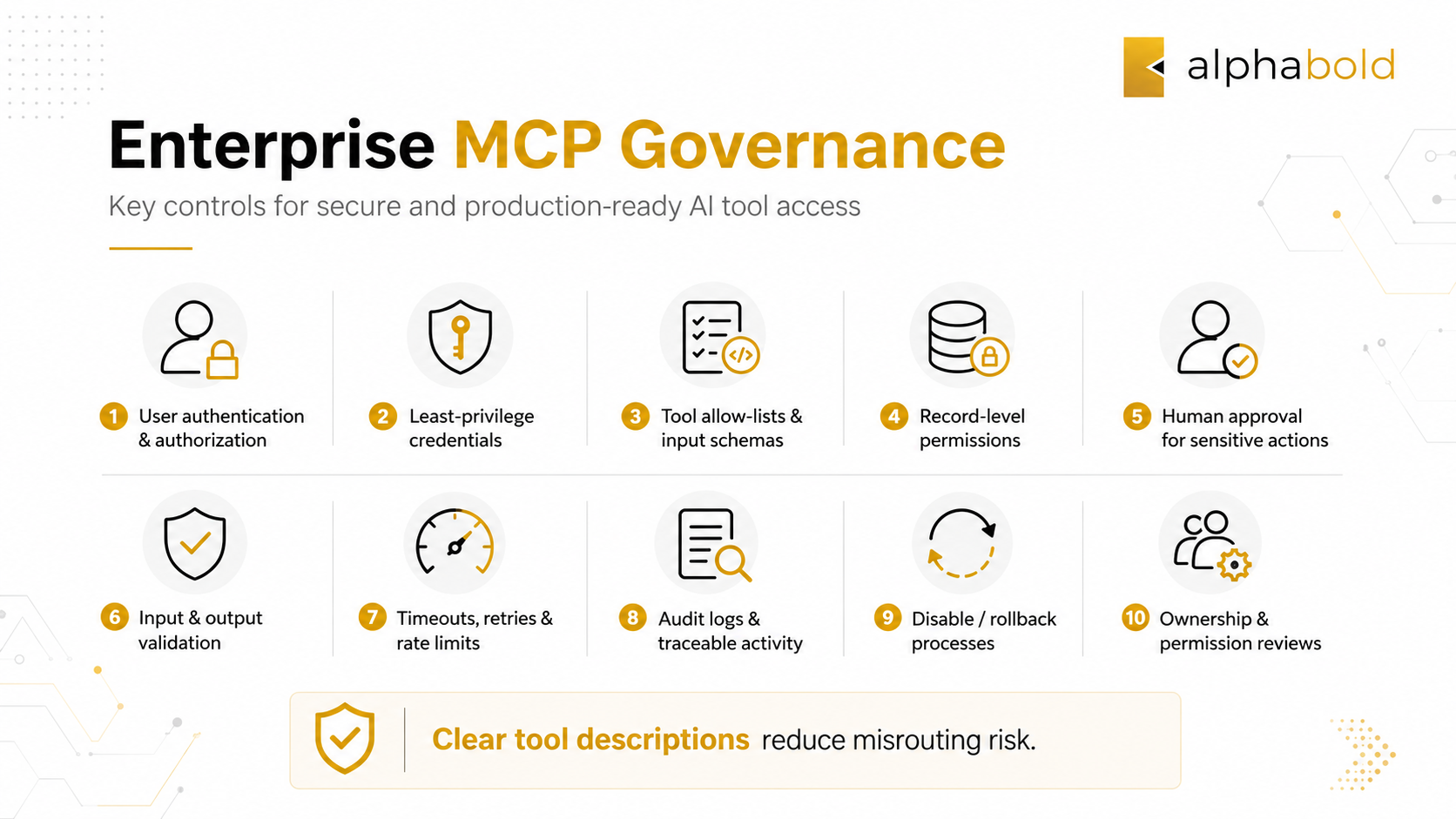
Tool descriptions also matter. Vague or overlapping descriptions can increase the chance that an AI application selects the wrong capability.
How Should MCP Servers Be Tested Before Production?
Enterprise MCP testing must cover the server, connected system, agent behaviour, and complete business workflow.
Functional tests should include valid and invalid inputs, expected outputs, unavailable dependencies, malformed responses, timeouts, and partial failures. Access tests should confirm that unauthorized users, records, and actions remain restricted even when the tool is reachable.
Teams should also test how the AI application behaves when multiple tools appear relevant, a prompt is ambiguous, no tool is required, or an action should be rejected. Business users should then validate whether the result is understandable, useful, and suitable for the intended workflow.
What Role Does MCP Inspector Play in Validation?
MCP Inspector helps teams manually validate that a server connects correctly, exposes the intended capabilities, accepts expected inputs, and returns usable responses.
Teams can review tools, inspect schemas, run calls, examine responses, and confirm that unintended tools are not exposed.
However, MCP Inspector does not validate the complete AI solution. It does not replace automated unit tests, authorization testing, LLM routing tests, security assessments, user acceptance testing, or production monitoring.
A strong QA process should test the full path from user request to model decision, tool execution, connected-system response, approval flow, and final output.
How Do You Move an MCP Proof of Concept into Production?
A proof of concept shows that a connection works. Production requires secure, reliable operation under clear ownership.
Start with a focused business problem. Define the intended users, connected systems, required action, expected outcome, and why MCP is preferable to an existing connector or direct integration.
Next, map the APIs, data sources, identities, permission boundaries, record-level rules, and approval requirements. The organization can then decide whether to adopt a public server, extend an existing option, or develop a custom server around proprietary applications and workflows.
Development should be followed by functional, security, routing, integration, and business validation. Before launch, assign responsibility for monitoring, documentation, permission reviews, tool changes, incident response, and decommissioning.
Organizations that need to move AI integrations from pilot to production should treat MCP as part of the wider enterprise solution, not as an isolated development project.
How Can AlphaBOLD Support Enterprise MCP Integration?
AlphaBOLD can help organizations assess where MCP fits within their AI and application strategy, prioritize commercially relevant use cases, and design the architecture required to connect agents with enterprise systems safely.
An engagement may include API assessment, MCP architecture, custom server development, permission planning, application integration, approval controls, testing, deployment, and monitoring.
This approach connects MCP with the systems and workflows where business decisions already occur, including Microsoft Copilot, Dynamics 365, Power Platform, Microsoft Fabric, GitHub, ERP platforms, Salesforce, internal APIs, and custom applications.
For Microsoft-centered environments, AlphaBOLD also provides Microsoft Copilot consulting and AI agent deployment within defined data, workflow, and permission boundaries.
Build a Governed Path from MCP Pilot to Production
AlphaBOLD can help your organization evaluate MCP use cases, design the architecture, build custom servers, connect enterprise applications, establish permission and approval controls, and validate the complete solution before production deployment.
Request a ConsultationConclusion
MCP can make enterprise AI connections more consistent and reusable, but the protocol is only one part of the solution. Production value depends on choosing a focused use case, enforcing permissions, testing the full workflow, and assigning long-term ownership.
Organizations should begin with controlled access to one meaningful capability, then expand only after the architecture and governance model have been validated.
Frequently Asked Questions
A custom MCP server may be appropriate when available servers do not support the required application, API, authentication model, business rules, record-level permissions, or approval process. Build one when the need for proprietary functionality and control justifies the additional development, testing, security, and maintenance responsibilities.
Apply user authentication, least-privilege access, narrowly defined tools, secure credential storage, input and output validation, audit logging, timeouts, and rate limits. Sensitive actions should require stronger authorization or human approval. Security testing must verify both the MCP interface and the permissions enforced by connected applications.
An MCP implementation partner should help prioritize use cases, assess APIs and systems, design the architecture, develop or configure servers, establish identity and permission controls, test tool and agent behaviour, and plan production monitoring. The engagement should address the complete business workflow rather than stopping at server setup.
Explore Recent Blog Posts
Related Posts