Microsoft Entra Global Secure Access: The Future of Secure Network Access for Enterprises

Table of Contents
Introduction
Hybrid work has transformed how organizations approach network security. With 81% of enterprises operating in distributed environments, the traditional perimeter-based security model no longer works. Microsoft Entra Global Secure Access addresses this challenge by combining Zero Trust architecture with intelligent access controls.
This solution replaces legacy VPNs with identity-driven access policies. Instead of granting broad network access, it verifies every request based on user identity, device health, and context. Organizations using Zero Trust frameworks report up to 50% fewer security breaches, according to Forrester research.
What is Microsoft Entra Global Secure Access?
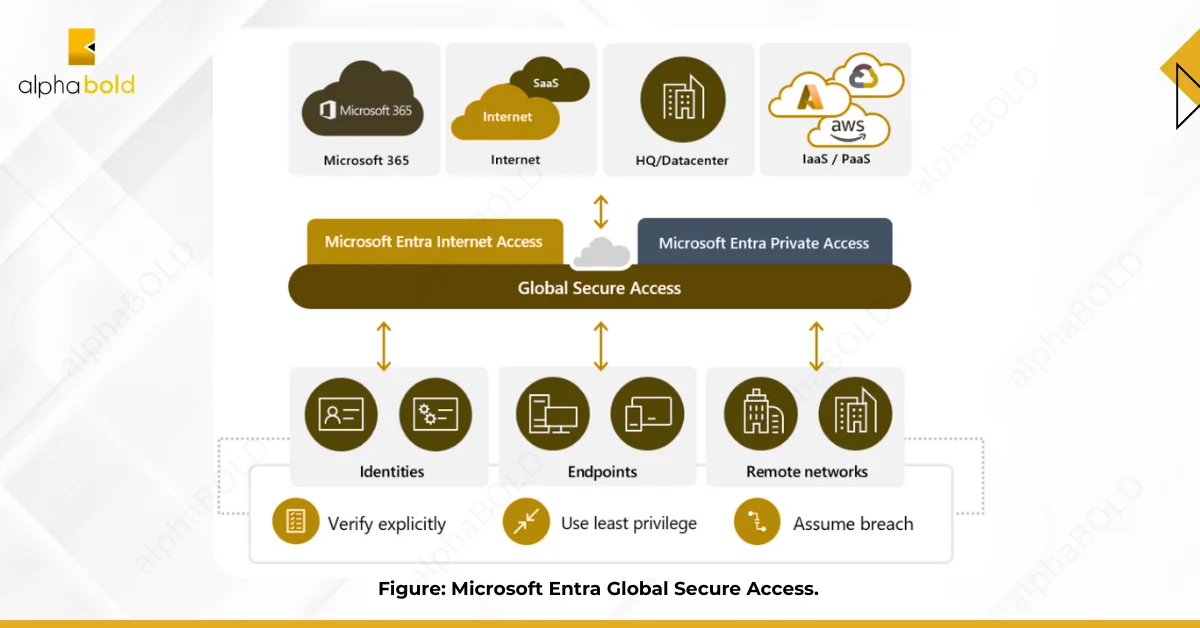
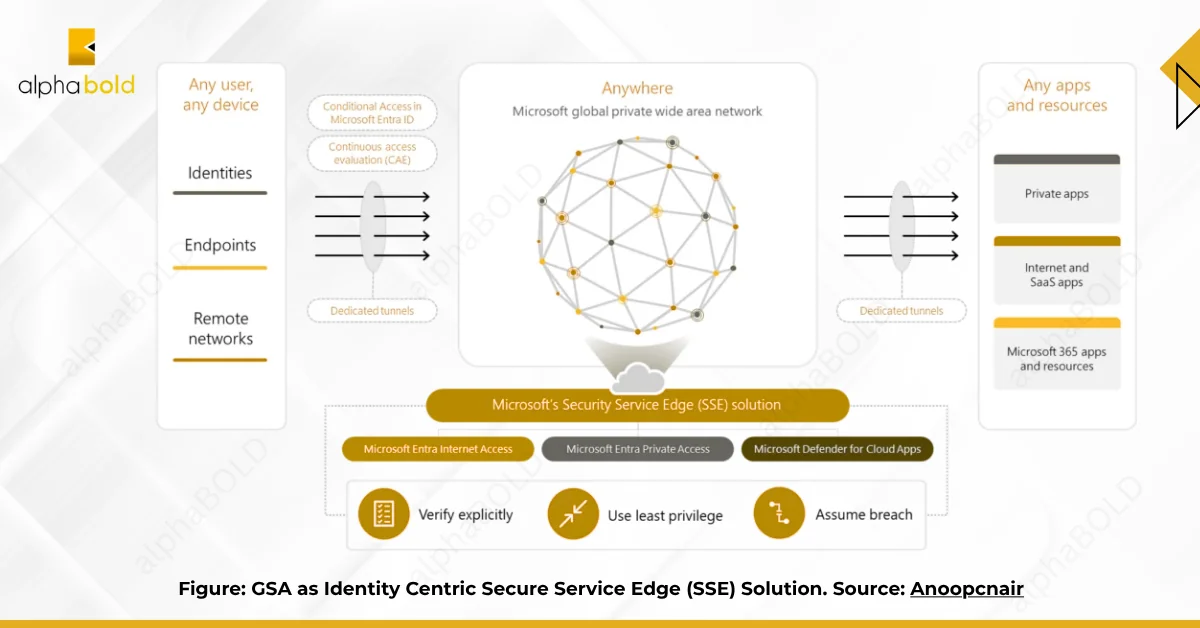
Microsoft Entra Global Secure Access is a Secure Service Edge (SSE) platform that controls user access to applications and resources. It works whether those resources sit in your data center, a private cloud, or the public internet.
The platform has two core components:
It consists of two primary components:
- Microsoft Entra Private Access: Secures connections to private applications in your own infrastructure. It replaces VPNs by using identity-based policies instead of network-level permissions. Users connect to specific applications, not entire networks.
- Microsoft Entra Internet Access: Protects users accessing public websites and SaaS platforms. It filters web content, blocks threats, and integrates with Microsoft Defender for Cloud Apps to monitor cloud application usage.
These components create a unified security layer that follows users across locations and devices.
Enhance Your Network Security with Microsoft Entra
Explore how Microsoft Entra Global Secure Access can transform your organization’s network security. With Zero Trust principles and seamless access control, safeguard your business against evolving threats.
Request a DemoHow Does Entra Private Access Secure Internal Applications?
Entra Private Access shifts security from network perimeters to application-level controls. Traditional VPNs grant access to entire network segments. This solution grants access to individual applications based on verified identity and device compliance.
Application-Specific Access:
You define policies for each application separately. A user might access the finance system but not the HR database, even though both sit on the same network. Access decisions consider user role, device security posture, location, and real-time risk signals.
This granular approach limits lateral movement. If credentials get compromised, attackers can’t pivot across your network because they only have access to specific applications, not network segments.
Identity-Centric Security:
Every access request validates against Azure Active Directory. Users must authenticate before reaching any resource. Multi-factor authentication adds a second verification layer.
Conditional Access policies evaluate each request dynamically. If a user logs in from an unusual location or an unmanaged device, the system can block access or require additional verification.
Simplified Deployment and Management:
The solution employs an agentless architecture in many scenarios, thereby reducing deployment complexity. You manage all policies through the Azure portal, eliminating the need for a separate VPN infrastructure.
Cloud-based management means that policy changes take effect immediately across your entire organization. You can add new applications or modify access rules without needing to reconfigure client devices.
Enhanced Security and Visibility:
The platform monitors all traffic continuously. Security teams see which applications users access, when they access them, and from which devices.
- Microsoft Defender for Cloud Apps: integration detects suspicious patterns in real-time. If a user suddenly downloads large volumes of data or accesses applications outside normal working hours, the system flags the activity.
- Data Loss Prevention: policies prevent unauthorized file transfers. You can block users from uploading sensitive documents to personal cloud storage or copying data to USB drives.
Seamless User Experience:
Users access applications without first connecting to a VPN. Authentication occurs transparently in the background. Traffic routing optimizes for performance, ensuring applications load quickly regardless of the user’s location.
Further Read: Microsoft Sentinel Synergy: Featuring SIEM & SOAR.
What Protection Does Entra Internet Access Provide?
Entra Internet Access acts as a security filter between your users and the internet. It inspects web traffic, blocks threats, and enforces acceptable use policies.
Secure Web Gateway (SWG):
URL filtering blocks access to malicious sites based on threat intelligence and category-based rules. You can prevent users from accessing gambling sites, social media during work hours, or known phishing domains.
Web content filtering controls access to specific types of content. SSL/TLS inspection decrypts HTTPS traffic to scan for hidden threats, such as embedded malware or command-and-control communications.
Cloud Access Security Broker (CASB):
CASB functionality provides visibility into how employees use SaaS applications. You see which cloud services are in use, who accesses them, and what data gets shared.
Access control policies enforce security requirements for cloud applications. You can require MFA for accessing financial systems or block file sharing in certain applications.
Threat protection scans SaaS traffic for indicators of compromise. The system detects anomalies, such as impossible travel (logins from two distant locations within minutes) or unusual data access patterns.
Firewall-as-a-Service (FWaaS):
Intrusion Detection and Prevention systems analyze traffic for attack signatures and behavioral anomalies. They block both known exploits and zero-day attacks based on suspicious patterns.
Web Application Firewall protection defends against attacks targeting web applications, including SQL injection and cross-site scripting. DDoS protection mitigates volumetric attacks that attempt to overwhelm your systems.
Data Loss Prevention (DLP):
DLP policies prevent sensitive data from leaving your organization through unauthorized channels. You can block users from emailing credit card numbers, uploading financial records to personal accounts, or sharing confidential documents.
The system monitors data movement in real-time. If a user attempts to violate a DLP policy, the action gets blocked immediately, and security teams receive an alert.
Remote Browser Isolation:
High-risk web browsing happens in isolated cloud environments, not on user devices. If someone clicks a suspicious link, any malware executes in the remote browser session, never touching the corporate network.
Enhance Your Network Security with Microsoft Entra
Stop relying on outdated VPN technology. Microsoft Entra Global Secure Access delivers Zero Trust security that adapts to how your teams actually work.
Request a DemoWhy Do Large Organizations Choose Global Secure Access?
Large organizations face complex security challenges. They have thousands of users, multiple locations, diverse device types, and countless applications to protect.
- Zero Trust Security stops assuming trust based on network location. Every access request is verified, regardless of its origin. User identity, device compliance, and contextual factors determine access, not IP addresses.
- Improved User Experience eliminates VPN friction. Users access applications directly, without waiting for VPN connections to be established. This speeds up work and reduces help desk tickets about connectivity issues.
- An enhanced security posture results from multiple defense layers working together. Web filtering blocks malicious sites, threat detection identifies suspicious behavior, and DLP prevents data leaks. Security teams get comprehensive visibility into all access patterns.
- Simplified Management centralizes policy control in one location. Instead of managing separate systems for VPN, web filtering, and cloud security, administrators configure all of these through the Azure portal.
- Cost Savings accumulate from reduced infrastructure needs and fewer security incidents. Traditional VPN hardware requires ongoing maintenance and periodic replacement. Cloud-based solutions scale without capital expenditure.
How Do You Set Up Microsoft Entra Global Secure Access?
Deploying Global Secure Access requires planning and configuration across several areas. The setup process follows a logical sequence from prerequisites through production deployment.
Prerequisites:
Licensing forms the foundation. You need Microsoft 365 E5/A5 or equivalent licensing that includes Azure AD Premium and Microsoft Defender for Cloud Apps. Your Microsoft account team can confirm specific licensing requirements for your environment.
Network Infrastructure must support the deployment. Allocate public IP addresses for network connectors. Configure firewall rules to allow outbound traffic to Microsoft endpoints. Microsoft provides a documented list of required endpoints.
Azure AD Configuration should already be in place. If you have on-premises Active Directory, Azure AD Connect must synchronize identities to the cloud. Familiarize yourself with Conditional Access policies since they control resource access.
The Step-by-Step Setup Process:
Step 1. Enable Global Secure Access:
Navigate to Global Secure Access in the Microsoft Entra admin center. Click “Get Started” to begin the activation process. Click “Activate” to enable the service for your tenant.
Step 2: Configure Entra Private Access
Create Private Access applications to represent your on-premises resources. Each application corresponds to an internal system that users need to access.
Set up Network Connectors to establish secure tunnels between your internal network and Microsoft’s cloud service. These connectors route traffic securely without exposing your network perimeter.
Define Conditional Access policies that specify who can access each application. Base policies on user role, group membership, device compliance, location, and risk level.
Step 3: Configure Entra Internet Access
Enable Internet Access and create Security Profiles. These profiles define your web filtering rules, threat protection settings, and CASB policies.
Integrate with Microsoft Defender for Cloud Apps for advanced threat detection and SaaS monitoring. This integration provides deeper visibility into cloud application usage patterns.
Step 4: Deploy the Client
Download and install the Global Secure Access client on user devices. The client automatically registers with the cloud service and begins enforcing your policies.
You can deploy the client through Microsoft Intune, Group Policy, or other endpoint management tools. Users receive seamless access without manual configuration.
Step 5: Monitor and Refine
Review the Global Secure Access dashboard regularly to stay informed. Monitor traffic patterns, security events, and policy violations to identify potential issues. Look for applications that users frequently access and optimize policies accordingly.
Adjust access policies based on real-world usage. If legitimate business activities trigger false positives, refine your rules to strike a balance between security and usability.
Build a security model that scales with your business
Modern security requires modern solutions. Microsoft Entra Global Secure Access replaces legacy VPN architectures with identity-driven access controls.
Request a DemoConclusion
Microsoft Entra Global Secure Access shifts security from network-based controls to identity-based access, built for distributed work. It removes VPN friction and applies Zero Trust checks for every request using identity, device health, and risk context.
Organizations gain centralized policies, improved visibility, and reduced infrastructure overhead through tight integration across Microsoft security tools. For hybrid, Microsoft-heavy environments, it is a practical step toward Zero Trust. The real question is how soon you implement it before the next incident
FAQs
VPNs give broad network access after login, while Global Secure Access allows access only to specific apps based on identity, device health, and context.
Most organizations initially run both in parallel, moving apps in phases. Once migration is complete, legacy VPN hardware can be retired.
Yes. It supports on-premises and cloud apps across vendors, including SAP, Oracle, and custom systems, not just Microsoft workloads.
Performance often improves due to Microsoft’s global network routing and the removal of constant VPN tunneling overhead.
Admins should understand Entra ID, Conditional Access, and basic networking. Initial setup needs planning, but ongoing management is straightforward.
Yes. It secures access to applications hosted in Azure, AWS, Google Cloud, or other environments using the same policy model.
Explore Recent Blog Posts