Migrating from Azure SQL Database to Microsoft Fabric Warehouse: Technical Guide for 2026

Table of Contents
Introduction
Azure SQL Database and Microsoft Fabric Warehouse serve fundamentally different purposes in the modern data stack. Understanding when and why to migrate from Azure SQL Database to Microsoft Fabric Warehouse is critical for organizations scaling their analytical capabilities.
Azure SQL Database is a fully managed relational database (RDBMS) provided by Microsoft Azure as a Platform-as-a-Service (PaaS). It excels at transactional workloads (OLTP) where row-level operations, complex joins, and ACID compliance are paramount. One or more managed SQL Databases can be deployed to a database server with added benefits of cloud such as scalability, reliability, and flexibility. Azure SQL Database offers automatic horizontal and vertical scaling, advanced security features and high availability depending on specific needs.
Microsoft Fabric Warehouse is a fully managed serverless analytical database that is used to store and process structured relational data. The SQL first experience, support for ACID properties, integration with OneLake and security and governance are the few key points that make it a go to choice for large scale businesses. Unlike Azure SQL database which uses single-node architecture, the Fabric DW uses a distributed computing which scales automatically to handle large scale data processing across multiple nodes leveraging massively parallel processing (MPP) architecture. Fabric Warehouse is now adopted by over 28,000 organizations worldwide and represents Microsoft’s strategic direction for enterprise analytics.
Key Technical Reasons to Migrate
- Columnar storage optimized for analytical queries vs. row-based storage optimized for transactions
- MPP architecture that distributes queries across multiple compute nodes automatically
- Native OneLake integration eliminates data movement between storage and compute
- Serverless scaling removes capacity planning overhead
- Direct Lake mode enables Power BI to query Delta tables without data import
Why Migration Planning Matters More Than the Tool
While the Fabric Migration Assistant significantly reduces schema and data movement effort, successful migrations depend on architectural decisions made before the first DACPAC is uploaded. In AlphaBOLD’s experience working with enterprise data platforms, organizations often underestimate the impact of security model changes, shared capacity cost governance, stored procedure refactoring, and downstream Power BI semantic model adjustments. In real-world environments, these factors, not the mechanics of data copy, determine whether a Fabric migration delivers performance and cost benefits or introduces new operational friction. Treating the move from Azure SQL Database to Fabric Warehouse as a tooling exercise rather than a platform transition is the most common reason migrations stall after initial success.
Prerequisites:
- A Fabric workspace with an active Fabric capacity (F2 or higher) or trial capacity
- A DACPAC file from the Azure SQL Database project
- The name of the destination Fabric warehouse
- The AI-assistance while fixing migration issues will require Copilot to be activated
- Microsoft Entra ID configured for user authentication (SQL authentication is not supported in Fabric)
- For Copilot features: F64 or P1 capacity in a supported region, or appropriate tenant settings enabled
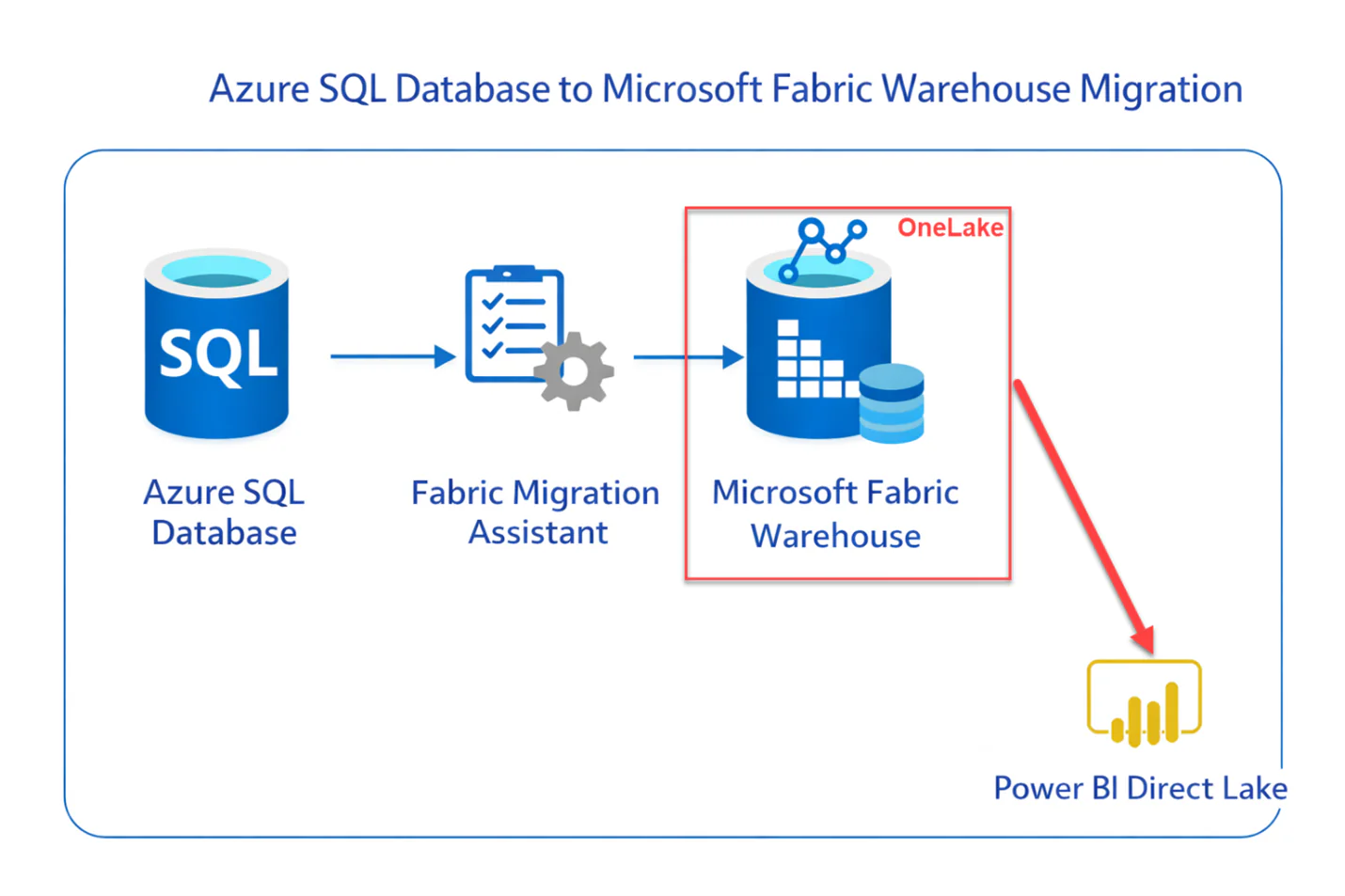
Fabric Migration Assistant (Generally Available)
Migration Assistant Workflow:
- Schema Migration: Upload DACPAC file containing metadata of database objects (tables, views, stored procedures, functions). The assistant automatically converts T-SQL syntax to Fabric-compatible equivalents, streamlining DACPAC migration.
- Problem Resolution: AI-powered fix suggestions identify incompatible T-SQL patterns and provide recommended modifications. Objects are prioritized by dependency chain to ensure primary objects migrate before dependent views and procedures.
- Data Copy: Choose between one-time full data copy (recommended for migration) or continuous incremental copying for ongoing synchronization.
- Connection Rerouting: Redirect downstream reports, dashboards, and API connections to the new Fabric warehouse.
The assistant handles security objects including roles, permissions (GRANT/REVOKE/DENY), and dynamic data masking automatically. SQL authenticated users must be replaced with Microsoft Entra users, which the assistant flags during Azure SQL Database to Microsoft Fabric Warehouse migration.
Assess Your Readiness for a Fabric Warehouse Migration
AlphaBOLD reviews architectural fit, governance implications, and analytics alignment to help organizations migrate with confidence.
Request a Consultation2026 Fabric Warehouse Capabilities
COPY INTO and OPENROWSET from OneLake (Preview):
JSON Lines Support in OPENROWSET:
Read JSONL files natively using OPENROWSET(BULK) without first importing as plain text. Critical for organizations working with logs, streaming data, and machine learning outputs.
OneLake Security (Preview):
Visual SQL Audit Logs Configuration:
Cross-Database Querying:
OneLake Integration Architecture
Fabric Warehouse is built on OneLake, Microsoft’s unified data lake that serves as the foundation for all Fabric workloads. This architecture fundamentally changes how data flows through your analytics stack compared to Azure SQL Database.
Key architectural differences:
- Data stored in open Delta Lake format (Parquet with transaction log), not proprietary SQL Server format
- Single copy of data accessible by all Fabric engines (Spark, SQL, Power BI, Data Science)
- Automatic Delta table virtualization as Iceberg format for cross-platform compatibility
- Shortcuts enable zero-copy access to data in Azure Data Lake, S3, or other OneLake data warehouse locations
- Mirroring supports real-time replication from Cosmos DB, PostgreSQL, SQL Server, Snowflake, and Databricks
Post-migration, your data becomes accessible to the entire Fabric ecosystem without additional ETL. Power BI can use Direct Lake mode to query Delta tables at storage speed. Data science workloads can access the same data through Spark notebooks. This unified access pattern is not possible with standalone Azure SQL Database.
You may also like: Automating ETL Processes with Microsoft Fabric
Data Migrate
Before starting the data migration make sure to analyze all schema and dependencies. List down all the tables that need to be migrated, avoid migrating data for tables which have no use in the downstream processes. The exact tables can be chosen from the list of tables while using copy job in the migration assistant. After the data has been migrated make sure to validate the data, check for column datatypes as some of column datatypes that are available in Azure SQL Database are not compatible with fabric warehouse and the migration assistant uses alternate datatypes. Test the migrated data by connecting the data in fabric warehouse to further downstream workflows and check for any issues.
Data Validation Checklist:
- Row counts match between source and destination
- Data type conversions are acceptable (datetime2 to datetime, decimal precision changes)
- NULL handling is consistent
- Unicode characters transferred correctly
- Query results match for representative analytical queries
Migration Challenges
Collation Settings
Unavailability of Database Features:
Even though fabric warehouse provides most of the relational database functions but lacks some of the key things as of December 2025. Following is the list of database object not available in Faric warehouse:
- Triggers
- Clustered Indexes on Tables (Fabric relies on columnar storage)
- Constraints
- Scalar Functions
- SQL Server Agent jobs (use Fabric Data Factory pipelines instead)
- Column-level encryption (flagged by Migration Assistant)
- SQL authenticated users (must convert to Microsoft Entra ID)
T-SQL Compatibility Gaps:
You may also like: Warehouse vs. Lakehouse: Choosing the Right Microsoft Fabric Solution
Best Practices
- Always take backups of data before starting the migration.
- If possible, consider migrating data in phases to reduce risk.
- Test the migrated data in a staging/test environment before going live.
- If migration is complex, working with Microsoft support or certified consultants could help.
Need Help with Your Fabric Migration?
AlphaBOLD's data engineering team has delivered Microsoft Fabric implementations across manufacturing, financial services, and healthcare. We can assess your Azure SQL Database environment, plan your migration strategy, and execute the transition with minimal disruption.
Request a ConsultationConclusion
Migrating from Azure SQL Database to Microsoft Fabric Warehouse is not a lift-and-shift operation. It is an architectural decision that changes how your organization approaches analytics.
Migrating from Azure SQL Database to Microsoft Fabric Warehouse can offer significant benefits, especially for businesses looking to scale their analytical workloads efficiently. With the right tools, like the Fabric Migration Assistant, and a well-structured approach, the process can be straightforward. However, as with any migration, it’s crucial to thoroughly assess schema compatibility, test migrated data, and keep in mind the limitations of Fabric Warehouse in terms of certain database features.
The general availability of the Migration Assistant in late 2025, combined with continuous improvements to T-SQL compatibility and OneLake integration, has significantly reduced migration friction. Organizations that make this transition gain access to the unified Fabric ecosystem: their warehouse data becomes immediately available to Power BI Direct Lake, Spark notebooks, data science workloads, and real-time intelligence without additional ETL.
The question is no longer whether to migrate, but when. Azure Synapse dedicated SQL pools have reached end-of-life for new feature development. Microsoft’s investment is now concentrated in Fabric. Organizations that delay migration will find themselves on an increasingly outdated platform while competitors leverage the integrated analytics capabilities that Fabric provides.
Frequently Asked Questions
Migration timelines depend on database complexity, data volume, and T-SQL compatibility. Simple databases with standard schemas can migrate in days. Complex environments with hundreds of stored procedures and custom functions may require 8-12 weeks including refactoring and testing. The Migration Assistant significantly accelerates schema conversion but plan for manual work on incompatible T-SQL patterns.
Yes. This is recommended for critical workloads. Use the Migration Assistant’s continuous incremental copy feature to keep data synchronized while you validate query behavior and train users on the new platform. Redirect traffic gradually once confidence is established.
Both store data in Delta Lake format on OneLake. Fabric Warehouse provides a full T-SQL experience optimized for analysts familiar with SQL Server. Lakehouse provides a Spark-first experience optimized for data engineers. You can query across both using cross-database queries. Choose Warehouse for teams with SQL Server expertise; choose Lakehouse for teams with Spark/Python expertise.
Yes. The Migration Assistant was originally designed for Synapse dedicated SQL pool migrations and supports both Azure SQL Database and Synapse as sources. The process is nearly identical, though Synapse-specific features like replicated tables require different handling in Fabric’s MPP architecture.