Table of Contents
Introduction
Microsoft Power BI has become a critical business intelligence (BI) solution for organizations looking to centralize data, improve reporting, and drive better decision-making. Since its launch in 2015, Power BI has grown into a comprehensive analytics platform, used by over 350,000 organizations worldwide. Its seamless integration with Microsoft 365, Azure, and enterprise applications makes it a preferred choice for IT leaders, data analysts, and executives.
As Microsoft continues to enhance Power BI with new features, improved performance, and scalability, the company has announced a Power BI cost increase for Power BI Pro and Premium Per User (PPU) licenses, effective April 1, 2025. This change raises important questions for CIOs, CFOs, and IT decision-makers:
- Which Power BI plan best aligns with your business needs?
- How do these pricing changes impact your BI strategy and budget?
- Is Power BI still the most cost-effective solution compared to Tableau, Looker, or other BI tools?
This guide will provide a detailed breakdown of Power BI pricing for 2025, its key features, and how to determine the right Power BI licensing model for your organization. Whether managing self-service analytics or deploying enterprise-scale BI, understanding these changes is crucial for optimizing your investment in Power BI.
Power BI Overview
Microsoft Power BI is a powerful analytical tool businesses use to visualize and analyze their data. It provides users with a platform to get their data from different sources in one place, analyze it, create interactive insights on it, and then share it with anyone they want. This helps managers and executives to make better business decisions. Let’s discuss about Power BI pricing Model & their features in this blog.
Power BI has 3 Basic Elements:
- Power BI Desktop
- Power BI Service
- Power BI Mobile App
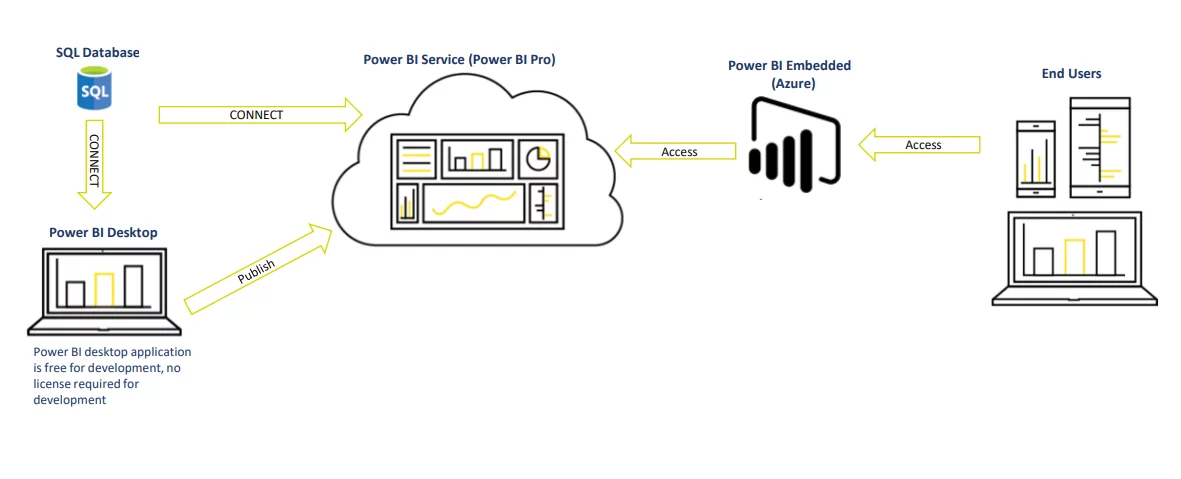
We can see that an increasing number of organizations are adopting Power BI now. While using this powerful tool, they face critical questions related to pricing plans and capacity management. So, in this blog we will discuss Power BI pricing levels, their features, and dedicated capacities that will help you identify which solution fits your enterprise BI needs.
You may also like: Understanding Power BI Licensing
Important 2025 Pricing Updates
Major changes took effect in 2025 that impact Power BI licensing:
Starting April 1, 2025, Microsoft implemented significant price increases: Power BI Pro licenses increased from $9.99 to $14 per user per month (a 40% increase), and Power BI Premium Per User (PPU) licenses rose from $20 to $24 per user per month (a 20% increase). These increases apply globally to all commercial customers, with existing customers seeing the new pricing upon their next renewal after April 1, 2025.
Additionally, Microsoft announced the retirement of Power BI Premium per capacity SKU (P-SKUs) after January 1, 2025, consolidating purchase options with the release of Microsoft Fabric and Fabric capacity SKUs. Existing Power BI Premium customers must transition to Microsoft Fabric SKUs at the end of their current agreements.
Power BI Pricing Levels:
Power BI has the following pricing levels
- Power BI Free
- Power BI Pro
- Power BI Embedded
- Power BI Premium (Per user & dedicated)
Need Help Navigating Power BI Pricing?
We help you choose the right Power BI plan, manage Fabric capacity, and optimize your analytics investment. Get expert guidance tailored to your business.
Request a ConsultationPower BI Free
With the Power BI Free plan, you can download and use Power BI Desktop and Mobile Apps for free. It allows you to use all the analytical features available on the desktop. You can analyze your data, prepare the data model, and create interactive visuals using this free tool. If you are on a desktop and are using the reports and dashboards for personal use, you can get any size of data in it. It also allows you to create or publish your reports on service in your personal workspace, which cannot be shared with anyone else. But licensing charges start as soon as you start sharing from service.
Power BI Free Plan provides a solution to Power BI Consultant by providing a feature to publish on the web. This is the only free method for sharing reports. All other methods need licensing. By publishing your reports or dashboards to the web, you are making them public, and anyone can access them whether you share its link or not. But if your data is sensitive and needs to be protected then this is not the right choice for you because publishing your reports to the web is not secure.
Microsoft 365 subscription is not required for Power BI Desktop. It can be downloaded for free.
So, Power BI Free allows you to analyze and model data, create reports, publish them on service and share them with others through the web, but you will have to compromise on security.
Power BI Pro
Power BI Pro is the next step after the free plan. It provides all the available capacities in the Free Plan, along with some extra features and sharing methods. It is a per-user subscription for Power BI meaning that every user who requires all the Power BI capabilities will need a separate license.
Power BI Pro licenses its users to create and consume the Power BI content shared with them. If the content shared with you is not on the web, then you need to be part of the paid subscription. Only the publisher needs a Pro license if your organization has a premium license. Everyone else can view the PBI content using the Premium plan.
The maximum data size supported by Power BI Pro is 1 GB, which means a limit of 1 GB per dataset can be imported into Power BI. The dataset refresh frequency with Power BI Pro is up to 8 times a day.
It allows users to share reports with those who also have a Power BI Pro License. It also allows users to create app workspaces and embed Power BI visuals in other Office 365 apps. Power BI Pro is designed for both small and large businesses. It can also integrate with Microsoft solutions like Teams, O365, SharePoint, etc.
This plan costs $14 per user per month. Key features of Power BI Pro:
- All capabilities of Power BI Pro
- Access to large model sizes
- More frequent data refreshes
- Advanced AI capabilities
- Paginated reports
Read Further: Power BI AI Capabilities: Transform Data Insights
Power BI Embedded
Power BI Embedded is used to embed your content, such as reports, dashboards, etc., in custom or web applications. It allows the external users to see the embedded content without signing to Power BI. It is mainly used by ISVs (Independent Software Vendors) who develop applications for third parties. But for report development, you will still need Power BI Pro Account.
Power BI Embedded requires A SKU.
SKUs are billed per hour. They can be purchased hourly and can be paused too. So, no long-term commitments are required for this capacity. It can be scaled up and down according to the requirements of the business model and is purchased through Microsoft Azure.
| Capacity Node | Virtual Cores | RAM (GB) | Cost |
|---|---|---|---|
|
A1 |
1 |
3 |
~ $1/hour |
|
A2 |
2 |
5 |
~ $2/hour |
|
A3 |
4 |
10 |
~ $4/hour |
|
A4 |
8 |
25 |
~ $8/hour |
|
A5 |
16 |
50 |
~ $16/hour |
|
A6 |
32 |
100 |
~ $32/hour |
Power BI Premium (Per User)
Premium Per User (PPU) licenses premium features on a per-user basis. It includes all the features of the Power BI Pro license with some other capabilities that were only available in Premium capacity. This includes features like paginated reports, AI (Artificial Intelligence), more frequent refreshments, etc. However, it is not flexible enough to license by capacity as you can in Power BI Premium. When premium capacity is selected in the capacity of your workspace, it is called “Premium Per User.”
It will have the same 100 TB storage limit as a premium plan. The model size limit is 100GB, and the refresh rate for Power BI PPU is 48 times a day, just like the premium plan.
PPU has some reporting/sharing constraints, including that any report created in the PPU workspace can only be accessible to users with the same license. All users must have a PPU license to view the report. A Pro user cannot view or access that report.
The price of Power BI PPU is fixed at $24 per user/month.
This plan addresses all the needs of users who want to access Premium features cheaply.
Note: Microsoft is phasing out the Power BI Premium per capacity (P-SKUs) in favor of Microsoft Fabric capacities. Existing customers can continue using their current capacities until their next renewal. After April 1, 2025, transitions to Fabric capacities are recommended.
Unsure Which Power BI Plan Fits Your Budget and Needs?
Our experts help you navigate Microsoft’s pricing changes and recommend the most cost-effective plan for your data strategy. Request a consultation today.
Request a ConsultationPower BI Premium (Dedicated Capacity)
A new licensing plan, Power BI Dedicated Capacity, was designed to overcome some limitations of Poer BI free and pro account. This plan is designed for companies who want to have a dedicated capacity. Power BI Premium is an additional plan, which means that it might be useful for some companies but not essential for all. It is a suitable choice for a large user base where the size of the data is huge.
It provides you with a storage of 100 TB and the model size limit is up to 400GB. The refresh rate for datasets in Power BI Premium is 48 times per day. It has a built-in license to extend on-prem Power BI with Power BI Report Server. Power BI Premium also provides the capability of incremental refresh which is typically much faster and memory efficient.
Power BI Premium is good for accessing and consuming reports or dashboards but if you want to create content you will still need Power BI Pro Account.
In PBI Premium, you get dedicated resources like nodes, cores, and processing units. The subscription is available in two SKUs.
- P SKUs
- EM SKUs
SKU, known as Stock Keeping Unit is synonymously used for licensing options.
Fabric Capacity
In 2024, Microsoft introduced Microsoft Fabric, a comprehensive platform that unifies data, analytics, and AI into a single, cohesive experience. Fabric builds upon the existing Power BI framework, offering an all-in-one solution for organizations aiming to harness the full potential of their data assets. With the introduction of Fabric, Microsoft is transitioning from the traditional Power BI Premium per capacity (P-SKUs) to Fabric capacities (F-SKUs). This shift provides enhanced capabilities and a more streamlined licensing model.
Key Benefits of Microsoft Fabric Capacity:
- Unified Platform: Integrates data engineering, data warehousing, data science, real-time analytics, and business intelligence into a single platform.
- AI Integration: Offers AI-powered services to enhance data analysis and insights.
- Scalability: Provides scalable compute and storage resources to meet varying organizational needs.
- Simplified Licensing: Consolidating multiple services under a single capacity-based licensing model simplifies procurement and management.
Fabric Capacity SKUs and Pricing:
Fabric capacities are available in various SKUs, allowing organizations to choose the appropriate level of resources based on their requirements. The pricing is structured to offer flexibility through both pay-as-you-go and reservation models.
| SKU | Capacity Units (CU) | Pay-as-you-go Price | Reservation Price (Monthly) | Approximate Savings |
|---|---|---|---|---|
|
F4 |
4 |
$525.60/month |
$312.67/month |
~41% |
|
F8 |
8 |
$1,051.20/month |
$625.33/month |
~41% |
Note: Power BI costs are subject to change. For the most current information, consult with a Microsoft representative or visit the official Microsoft Fabric Pricing page.
Impact on Other Power BI Licensing:
It’s important to note that this transition does not affect Power BI Pro and Power BI Premium Per User (PPU) licenses. Organizations using these licensing models can continue using them without changes.
EM SKU (Embedding SKU)
It includes everything that is available in A SKU but also provides the ability to share reports within an organization through content embedding. It allows you to embed your reports and visuals in apps. They are used for testing premium functionalities before you buy a P SKU as it is quite costly.
EM SKUs cannot be paused and are billed monthly. They are only available through a volume-licensing plan and cannot be purchased directly.
| Capacity Node | Virtual Cores | RAM (GB) | Cost |
|---|---|---|---|
|
EM1 |
1 |
3 |
$625/month |
|
EM2 |
2 |
5 |
$1,245/month |
|
EM3 |
4 |
10 |
$2,495/month |
P SKUs (Premium SKU)
Premium SKU is the ‘ALL IN’ version of Power BI licensed through capacity. It includes everything that is available in A and EM SKU. Only Premium SKU allows users to access and consume Power BI reports, apps, and shared content in the service free of cost. All Premium SKUs are also billed monthly and can be purchased through Office 365 administration.
| Capacity Node | Virtual Cores | RAM (GB) | Cost |
|---|---|---|---|
|
P1 |
8 |
25 |
$4,995/month |
|
P2 |
16 |
50 |
$9,995/month |
|
P3 |
32 |
100 |
$19,995/month |
Power BI Pricing 2025
Microsoft has announced Power BI cost adjustments for its licenses, effective April 1, 2025. The impact of this change varies based on your organization’s current licensing agreements:
New Customers: Commercial purchasing Power BI Pro and Premium Per User (PPU) licenses after April 1, 2025, will be subject to the new pricing structure.
Existing Enterprise Agreement (EA) Customers: Commercial customers with existing EA licenses for Power BI Pro and/or PPU will maintain their current pricing until their next renewal. Any new agreements executed after April 1, 2025, will adhere to the updated pricing.
Microsoft 365 E5 and Office 365 E5 Annual Subscriptions: Customers who access Power BI through these annual subscriptions with annual billing will not experience any pricing changes.
For a comprehensive overview of the new pricing and its implications, please refer to the official announcement on the Microsoft blog, or you can consult with a Microsoft Solution Partner like AlphaBOLD.
Organizations can effectively plan and adjust their budgeting and licensing strategies to continue leveraging Power BI’s robust analytics capabilities by staying informed about these changes.
Want Your Team to Adopt Power BI?
Empower your workforce with advanced analytics skills.AlphaBold provides comprehensive Power BI training and ongoing support to ensure your team can create, maintain, and optimize reports independently.
Request a ConsultationCost Comparison Example (2025 Pricing)
Let us assume your organization has 10,000 users. Out of them, 200 are developers and 4,900 frequent users and 4,900 occasional users.
Option 1: All Power BI Pro Licenses:
- 10,000 users × $14/month = $140,000/month
- Total annual cost: $1,680,000
Option 2: Fabric Capacity + Pro for Developers:
200 developers need Power BI Pro: 200 × $14 = $2,800/month
Fabric capacity for 9,800 readers: ~$40,000-60,000/month (depending on SKU selected)
Total monthly cost: ~$42,800-62,800/month
Total annual cost: ~$513,600-753,600
Savings with Fabric Capacity approach: $926,400 – $1,166,400 annually
This example clearly demonstrates that for large user bases, dedicated capacity (now Fabric capacity) is significantly more cost-effective than individual Pro licenses.
What to Expect in 2026 and Beyond
Continued Microsoft Fabric Evolution:
Microsoft is heavily investing in Fabric as the unified analytics platform of the future. We can expect:
Enhanced Integration: Deeper integration between Power BI and other Fabric workloads, making it easier to move from data ingestion to insights within a single platform.
AI-Powered Analytics: Microsoft continues to integrate AI capabilities across Fabric, including Copilot features that will help users create reports, write DAX formulas, and generate insights using natural language.
Real-Time Analytics: Expanded real-time capabilities as organizations need faster insights from streaming data sources.
Pricing Trends to Watch:
Potential Future Adjustments: Given the April 2025 price increase being the first since 2015 for Pro licenses, organizations should budget for potential periodic adjustments every few years.
Fabric Capacity Optimization: Microsoft is likely to introduce more granular capacity options and better cost management tools to help organizations optimize their Fabric spending.
Consumption-Based Pricing: The industry trend is moving toward consumption-based pricing models, and Microsoft may introduce more flexible options for Fabric capacity.
Migration Considerations:
If you’re currently on Power BI Premium (P-SKUs), you need to plan your migration to Fabric capacity before your agreement renewal. Consider:
- Capacity Right-Sizing: Evaluate your actual usage to select the appropriate Fabric SKU
- Workload Consolidation: Take advantage of Fabric’s unified platform to consolidate other analytics workloads
- Training: Prepare your team for the broader Fabric capabilities beyond Power BI
- Cost Optimization: Review your user licensing to ensure you’re not over-licensing with Pro/PPU where Fabric capacity could be more cost-effective
Strategic Recommendations for 2026:
- Small Organizations (< 50 users): Power BI Pro at $14/user/month remains the most straightforward and cost-effective option.
- Mid-Sized Organizations (50-250 users): Consider Power BI Premium Per User at $24/user/month if you need premium features. Calculate the break-even point against Fabric capacity.
- Large Organizations (250+ users): Microsoft Fabric capacity will provide the best ROI. Focus on optimizing your capacity usage and training users on the broader Fabric platform.
- ISVs and Embedded Scenarios: Continue using Power BI Embedded (A SKUs) for flexible, usage-based billing, or migrate to Fabric capacity for always-on applications.
Conclusion
The Power BI pricing landscape has evolved significantly in 2025 with the introduction of Microsoft Fabric and the retirement of traditional Premium capacity SKUs. The April 2025 price increases for Pro ($14/month) and PPU ($24/month) reflect Microsoft’s continued investment in the platform.
For organizations, the key decision factors remain:
- Number of users: Larger user bases benefit significantly from capacity-based licensing
- Feature requirements: Premium features now available through PPU or Fabric capacity
- Workload scope: Organizations with broader analytics needs beyond Power BI should leverage the full Fabric platform
- Usage patterns: Embedded scenarios benefit from flexible A SKUs or Fabric capacity depending on usage consistency
Power BI Desktop remains free for all users. For content creation, you will always need Power BI Pro or PPU licenses. For consumption at scale, Microsoft Fabric capacity is the recommended approach for 2025 and beyond.
As we move into 2026, the convergence of Power BI with Microsoft Fabric represents the future of Microsoft’s analytics vision – a unified, AI-powered platform that spans the entire analytics lifecycle from data integration to insights delivery. Organizations should begin planning their migration strategies now to take advantage of this next-generation analytics platform.
FAQs
We design all solutions with scalability as a core principle. Our approach includes:
- Premium capacity planning for datasets exceeding 10GB
- Composite models and Direct Query for real-time access to large datasets
- Incrementally refreshing strategies to handle growing historical data
- Azure Synapse integration for data warehouse-scale analytics
- Performance monitoring and optimization as data volume increases
We’ve successfully implemented solutions handling terabytes of data with sub-second query response times. Your architecture will be future-proof for growth.
We follow a zero-downtime migration methodology:
- Parallel system operation: New Power BI dashboards run alongside existing reports
- Phased rollout by department or business unit to minimize risk
- Comprehensive testing environments that mirror your production data
- 24/7 support during critical transition periods
- Rollback procedures in case any issues arise
Critical business reports maintain 99.9% uptime throughout the transition. We never switch off old systems until new ones are proven stable and user adopted.
Our BOLDRoute approach minimizes your IT burden:
- Database admin: 5-10 hours/week for data source connectivity and permissions
- IT security: Initial review of governance framework (2-3 days)
- Network admin: One-time setup for gateway configurations (1 day)
- Business stakeholders: 2-3 hours/week for requirements gathering and testing
We handle 90% of the technical implementation. Your team focuses on business logic and user adoption rather than technical configuration.
Our post-implementation support includes three tiers:
- Immediate (0-90 days): Daily monitoring, user support, and optimization
- Stabilization (3-12 months): Weekly health checks, performance tuning, new user training
- Evolution (ongoing): Monthly reviews, new feature rollouts, business requirement changes
Maintenance costs typically run 15-20% of the initial implementation cost annually. We provide transparent SLAs with guaranteed response times for critical issues (2-hour response for P1 issues).
Power BI works seamlessly across multi-cloud environments:
- AWS: Direct connectors to Redshift, RDS, S3, and other AWS services
- Google Cloud: Native integration with BigQuery, Cloud SQL, and Google Analytics
- Hybrid architecture: On-premises gateways connect any data source securely
- API-based connections: Custom connectors for proprietary or niche systems
You’re not locked into Azure, though leveraging Azure services can provide cost and performance benefits. We design solutions that respect your existing infrastructure investments.
User adoption is critical to ROI. Our change management methodology includes:
- Department champions program: Training power users to support their colleagues
- Role-based training: Customized sessions for executives, analysts, and end users
- Gamification: Usage competitions and recognition programs
- Success stories: Highlighting early wins to encourage broader adoption
- Feedback loops: Regular surveys and usage of analytics to identify adoption barriers
We typically achieve 85%+ user adoption within 6 months through our structured approach. Low adoption is often due to poor change management, not technology issues.
Explore Recent Blog Posts