Table of Contents
Introduction
Canvas apps have become one of the standout platforms of 2026, offering users a virtual blank canvas to bring their creative visions to life. Businesses of all shapes and forms rely on technology solutions, looking for ways to optimize and enhance their business operations, making software solutions like Microsoft Power Apps, especially canvas apps, increasingly popular in the business ecosystem.
These sophisticated, low-code software solutions are now enhanced with Copilot-assisted design, modern controls, and deeper Dataverse integration to refine and streamline business operations. With new AI capabilities and improved cross-platform responsiveness, companies are creating smarter, more intuitive applications that automate repetitive, day-to-day tasks that consume significant time and involve extensive paperwork.
Often, these tasks require multiple levels of approval, rejection, or feedback at various stages, traditionally managed through manual entries into spreadsheets for documentation and future reference. This conventional method significantly drains valuable time and crucial company resources.
Canvas Apps serve as a modern solution within Microsoft Power Apps, designed by Microsoft to empower business leaders by leveraging custom-built applications to simplify complex workflows, reduce manual record-keeping, and enhance overall operational efficiency. This exploration into app ideas for canvas apps is crafted explicitly for decision-makers and strategists eager to discover cutting-edge solutions that can redefine their business processes.
As we look forward to the innovative canvas app design ideas of 2026, the collaboration between technological advancement and strategic creativity is essential for achieving a sustainable competitive edge. Canvas apps offer a versatile platform beyond mere digitization of existing processes, providing an opportunity to completely revamp how businesses engage with their clientele, manage internal operations, and drive innovation.
Is your Business Missing Out on Free Automation Tools?
Did you know that many companies are already paying for access to Canvas Apps without even realizing it? Many Microsoft 365 licenses include Canvas Apps for standard connectors at no additional cost, allowing organizations to leverage their existing investment in Power Apps.
By understanding the capabilities and licensing limits of Canvas Apps, companies can identify areas that benefit from automation, Dataverse integration, and workflow management to build solutions that fit their needs.
The following sections aim to inspire and equip decision-makers with the insights needed to lead the development of top Canvas App ideas, steering their organizations toward a new era of business efficiency and success.
How Are Canvas Apps Revolutionizing Business Innovation for C-Level Executives in 2026?
C-level executives seek agile solutions to enhance efficiency and streamline business processes. Canvas apps have emerged as a pivotal technology in this context, offering a transformative approach to application development tailored to high-level business strategies. This section aims to explore the ascent of canvas apps, highlighting their evolution, current trends, and the role of innovation from a leadership perspective.
From Humble Beginnings to Widespread Adoption:
- Initial Launch: Introduced in 2016 within Microsoft Power Apps, canvas apps began as a straightforward platform, enabling the creation of basic mobile applications through a drag-and-drop interface. This simplicity laid the groundwork for a vital custom, enterprise-grade application development tool.
- Evolution: Thanks to continuous enhancements, canvas apps have grown into a robust platform, allowing the development of sophisticated solutions that meet complex business needs, transforming how organizations operate.
Further Reading: An Introduction to Canvas and Model-Driven Apps
Current Trends Shaping the Canvas App Landscape for Executives:
The landscape of canvas apps in 2026 is defined by several key trends that C-level executives should note:
- Copilot and AI Integration: Incorporating Copilot and AI Builder capabilities into canvas apps automates routine tasks, provides data-driven insights, and enhances user experience, aligning with strategic goals for operational efficiency and innovation.
- Modern Controls and Responsive Design: With modern controls v3 and improved responsive layouts, canvas apps now deliver a consistent, accessible experience across all devices, reflecting a company’s commitment to inclusivity and modern technology standards.
- Empowerment of Citizen Developers: The platform’s low-code and Copilot-assisted design tools enable non-IT staff to participate in app creation, fostering a culture of innovation and collaboration while reducing dependency on IT teams.
- Integration Across the Power Platform: With deeper Dataverse, Power Automate, and Microsoft Fabric connectivity, canvas apps strengthen data management, workflow automation, and analytics, enabling leaders to make more informed and agile business decisions.
Innovation as a Strategic Imperative:
Today’s leaders need to create capacity within their existing resources to get more done faster. This includes:
- Focusing on top business initiatives: Identify the most important goals for your organization and dedicate resources to those areas. This could involve streamlining processes, automating tasks, or investing in new technologies.
- Prioritize business automation and process simplification: Look for ways to eliminate manual work and duplication of effort. This can free up employees to focus on more strategic work.
- Empower the organization to create excellent employee experiences: By providing employees with the tools and resources they need to be successful, you can improve morale and productivity.
- Refocus development work on new functionality rather than maintenance of existing apps: This can help to ensure that your organization is always moving forward and innovating.
- Consolidate suppliers and establish strategic platform suppliers: this can help to reduce costs and improve efficiency.
With that in mind, innovation through canvas apps is a strategic imperative for c-level executives. It allows them to:
- Solving Business Challenges: Canvas apps offer a unique avenue for addressing specific operational challenges, enabling tailored solutions that can significantly impact business efficiency and customer satisfaction.
- Enhancing User Experience: A focus on innovative design improves app usability and engagement, aligning with customer-centric strategies and enhancing overall service delivery.
- Leveraging New Technologies: The integration of emerging technologies through canvas apps opens new opportunities for automation, data security, and efficiency, positioning companies at the forefront of digital transformation.
However, we understand that it’s not practical to teach everyone to code. However, it is possible to use low-code technology platforms to empower everyone to develop applications. Whether you’re a professional developer, an IT Admin, a business analyst, or a non-technical employee, low code empowers all to create solutions in a fast, secure, and compliant fashion.
Planning a Canvas App Project? Let’s Build the Right One Together
AlphaBOLD helps organizations turn app ideas into practical, scalable solutions that solve real business challenges. Whether you're modernizing legacy processes or empowering internal teams with low-code tools, our consultants provide strategic guidance, design expertise, and technical support from start to finish.
Request a DemoTop 10 Apps Ideas for Canvas Apps
As a decision maker, understanding the opportunities canvas apps offer in your field is crucial. Your business encompasses various internal and external processes, all of which canvas apps can streamline. From managing team attendance to monitoring project outcomes, and from measuring client satisfaction to assessing employee motivation, canvas apps unlock vast possibilities. To illustrate the potential within Power Apps, especially through canvas apps, consider exploring the top trending ideas for 2026, showcasing the versatility and innovation accessible to businesses today.
1. Timesheet App:
Problem statement: Traditional timesheet management can be cumbersome and error-prone. Manual data entry is time-consuming, and scattered information across different platforms makes collaboration difficult. This can lead to inaccurate timesheets, delayed approvals, and a lack of real-time project insights.
Summary of App: A Timesheet Canvas App directly integrated with Dynamics 365 F&O and embedded in Microsoft Teams offers a streamlined solution. It automates data entry, simplifies time tracking, and fosters collaboration within the familiar Teams environment. With Power Apps Copilot and AI Builder, users can now generate entries automatically based on task context or prior activity, while Dataverse integration ensures centralized and secure data management.
Benefits: This app offers a multitude of benefits for both employees and managers:
- Increased Efficiency & Accuracy: Automates data entry, reduces errors and saves time. AI-driven suggestions further minimize manual updates and improve consistency.
- Enhanced Collaboration & Visibility: Provides real-time project insights, streamlines approvals, and fosters team discussions with Teams. Modern controls and responsive design deliver a seamless cross-device experience for field and office teams alike.
- Employee Empowerment: Offers convenient access, reduces administrative budget, and improves visibility into timesheets. Offline mode and Power Automate flows ensure continuity and approval tracking even when connectivity is limited.
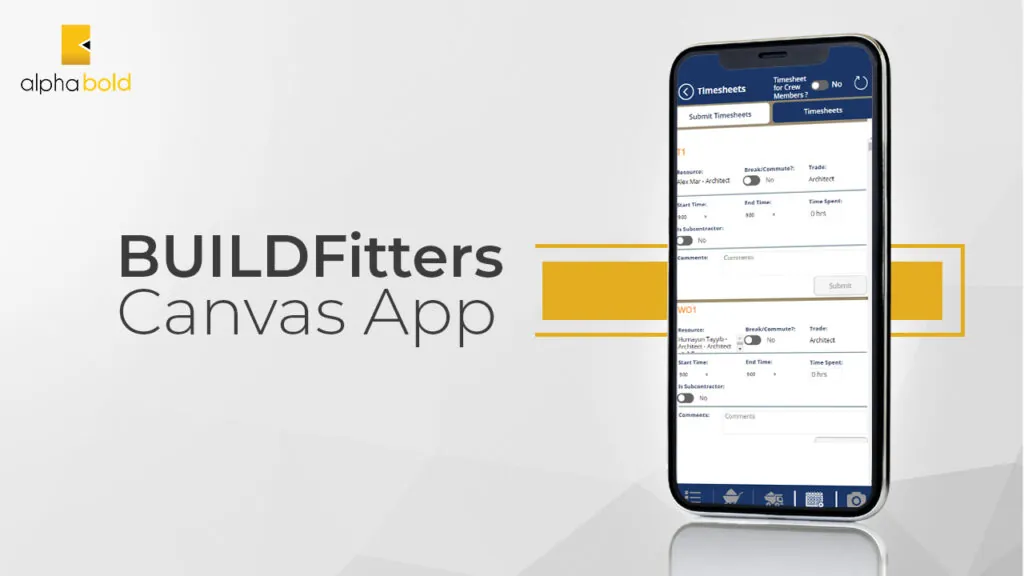
Digital Transformation in the AEC Industry: BUILDFitters Example
The Architecture, Engineering, and Construction (AEC) industry benefits significantly from digital tools that streamline project management and operations. The BUILDFitters canvas app, for example, simplifies time tracking for project stakeholders, enhancing productivity and operational efficiency. Its seamless integration with other AEC tools exemplifies how canvas apps can solve industry-specific challenges by improving time efficiency and reducing manual input errors.
2. Site Inspection Forms App:
Problem Statement: Manual site inspections often involve a lot of paperwork, resulting in data loss, delayed reporting, and inefficient follow-up on identified issues. They can also be challenging to coordinate across different teams and locations.
Summary of App: A Canvas App that transforms site inspections by digitizing forms and checklists. Integrated with SharePoint for document management and featuring real-time data capture capabilities, it can streamline the inspection process. With Power Apps Copilot and AI Builder, inspectors can now capture images, auto-tag findings, and generate reports instantly. Integration with Dataverse ensures secure, centralized record-keeping and offline functionality for field teams.
Benefits:
- Reduced Paperwork and Data Loss: Digital forms eliminate physical paperwork and the risk of losing important data. AI-assisted form generation further simplifies data entry during inspections.
- Improved Efficiency and Reporting: Real-time data capture and reporting tools enable quicker responses to site issues. Modern controls and responsive layouts make input and review seamless across devices.
- Enhanced Coordination: Centralized data storage improves collaboration across teams and locations. Automated Power Automate flows notify stakeholders of new findings, ensuring faster resolution cycles.
3. Expense Management App:
Problem Statement: Handling receipts, processing reimbursement claims, and managing expenses can be tedious. Traditional expense management is often riddled with delays and prone to human error.
Summary of App: This app simplifies the expense reporting process, allowing employees to submit expenses through an intuitive interface connected to the company’s finance system, streamlining the entire expense management cycle. The latest platform enhancements, including Copilot, AI Builder, and Dataverse integration, further support intelligent automation and improved accuracy in financial processes.
Benefits:
- Streamlined Expense Reporting: Quick and easy submission of expense reports, reducing the administrative burden. AI-powered data extraction removes manual entry and improves accuracy.
- Faster Reimbursement: Automation accelerates the review and reimbursement process, improving employee cash flow. Power Automate workflows can now auto-route claims to managers and trigger approval reminders within Teams.
- Increased Transparency: Managers and the finance team get better visibility into expenses and can monitor budgets more effectively. Centralized dashboards built with Power BI or Fabric data connections provide deeper financial insights.
4. Leave Request System:
Problem Statement: Traditional leave management systems can be inefficient and lack transparency for both employees and managers, which may lead to scheduling conflicts and under-resourced periods.
Summary of App: A Leave Request Canvas App, fully integrated with HR systems like Dynamics 365 HR, allows employees to request time off and managers to approve it, all within a unified system that tracks and manages all types of leave. Built with modern controls and assisted Copilot inputs, it delivers a faster, more intuitive experience while simplifying approval workflows and improving accuracy.
Benefits:
- Improved Planning and Scheduling: Helps forecast staffing needs and manage resources efficiently. This setup simplifies real-time tracking and supports multi-level approvals for greater transparency.
- Employee Self-Service: Empowers employees with direct access to their leave balances and requests. Modern controls and Copilot guidance make the submission process quick and user-friendly.
- Regulatory Compliance: Ensures adherence to company policies and labor laws regarding leave entitlements and accruals. Compliance validation and alignment with policy parameters are supported within the Canvas App to reduce administrative effort.

5. Desk Booking and Reservation App:
Problem Statement: As flexible working arrangements become more common, efficiently managing office space and desk reservations is becoming increasingly complex and important.
Summary of App: A Canvas App that facilitates the reservation of desks and workspaces, offering features such as booking calendars, desk availability maps, and integration with office management systems for optimal space utilization. The app’s modern design and Copilot-assisted inputs make reservations faster, more accurate, and accessible across all devices.
Benefits:
- Maximized Space Utilization: Allocates office space effectively, essential for modern, dynamic work environments.
- Enhanced Flexibility: Provides employees the convenience of booking their workspace according to schedule. Real-time availability updates and intuitive layouts simplify the reservation process.
- Safe Work Environment: Incorporates health and safety guidelines, such as social distancing requirements, into the booking process.
6. Shoutout / Kudos App:
Problem Statement: Employee recognition is vital for morale, but it’s often done inconsistently or lost in daily business operations. Celebrating achievements can be overlooked without a dedicated system, leading to decreased employee engagement.
Summary of App: A Shoutout / Kudos Canvas App provides a real-time platform where employees can give and receive recognition. Integrated with the company’s internal social network, it allows everyone to celebrate milestones and acknowledge contributions publicly or privately. Modern controls and Copilot-assisted inputs make it simple to share recognition instantly, personalize messages, and maintain an engaging experience across all devices.
Benefits:
- Boosted Morale and Engagement: Frequent recognition fosters a positive workplace and increases employee engagement.
- Visibility of Achievements: Creates a transparent environment where contributions are acknowledged company wide. Real-time notifications ensure recognition is timely and visible to everyone.
- Culture of Appreciation: Encourages a continuous positive feedback loop, contributing to a healthy company culture. Built-in analytics help HR teams identify recognition trends and strengthen engagement initiatives.
Excited About These Power App Ideas?
AlphaBOLD's experts offer these top 10 Power App ideas and more, catering to various business needs. Enhance productivity and streamline operations with these creative solutions. If these Power App ideas have got you thinking about your business, AlphaBOLD can offer more.
Request a Demo7. Meeting Notes Power App:
Problem Statement: Managing meeting outcomes can be disorganized, with notes and action items scattered across different platforms. This can lead to miscommunication and overlooked responsibilities.
Summary of App: A Meeting Notes Power App that serves as a centralized hub for capturing and organizing all aspects of meetings, from agendas to minutes and tracking action items. Integrated with Microsoft Outlook and Teams, it uses modern controls and Copilot-assisted note-taking to simplify documentation and streamline both pre- and post-meeting workflows.
Benefits:
- Centralized Information: Keeps all meeting details in one place, accessible to all participants. Notes, attachments, and recordings can be viewed or shared instantly within the app.
- Accountability: Assigns and tracks action items, ensuring follow-through on commitments. Automated reminders and linked tasks improve visibility and timely completion.
- Productivity: Saves time by keeping meetings focused and minimizing the need for follow-up meetings. Copilot-driven summaries help teams capture outcomes quickly and move efficiently to next steps.
8. Task Management App:
Problem Statement: Task delegation and tracking can be chaotic without a central system, leading to unaligned priorities, missed deadlines, and a lack of overall visibility into project progress.
Summary of App: An app that serves as a task management solution by organizing tasks by project, priority, and deadline. It integrates with existing project management tools and offers dashboard views for real-time updates on team progress. With Copilot-assisted task creation and modern controls, teams can capture actions more efficiently and view progress across devices through intuitive, responsive dashboards.
Benefits:
- Enhanced Organization: Categorizes tasks and projects to streamline workflow and priorities. Automated sorting and smart grouping features help reduce manual oversight.
- Increased Transparency: A clear view of individual and team workloads facilitates better resource allocation. Shared dashboards ensure everyone stays aligned on project goals and timelines.
- Improved Productivity: Allows teams to focus on tasks with a clear understanding of their roles, responsibilities, and deadlines. AI-driven insights highlight bottlenecks early, helping leaders prioritize effectively.
9. Resource Allocation and Forecasting App:
Problem Statement: Businesses frequently face challenges with efficiently allocating resources and forecasting future demands. Inaccurate resource management may result in operational bottlenecks, overstaffing, or missed opportunities. Take, for instance, an asset sent for maintenance without the team’s knowledge — this could be a crucial copier in an office, a tractor essential for fieldwork, or a key machine on a factory floor. Operations could be significantly disrupted without visibility into the asset’s status and a ready substitute.
Summary of App: This Canvas App enables real-time tracking and management of resources across projects and departments. With Copilot-assisted insights and AI-driven forecasting, it uses historical data to predict future needs, improving utilization, scheduling, and budgeting. Modern controls and dashboards provide a clear, responsive view of resource status across all devices.
Benefits:
- Optimized Resource Use: Ensures the right resources are allocated to the right projects at the right time. Automated alerts and visibility tools help prevent downtime and duplication.
- Strategic Planning: Aids in long-term planning with forecast trends and scenario modeling. AI-enhanced analytics support better planning and proactive decision-making.
- Increased Agility: Allows for quick adjustments to resource allocation in response to changing project scopes or market conditions. Copilot suggestions simplify updates and improve response time during operational shifts.
10. Compliance and Risk Management App:
Problem Statement: Navigating the complexities of compliance and managing risk is particularly challenging for businesses in sectors like finance, healthcare, and manufacturing, where regulations are stringent and frequently updated. Failure to comply can result in hefty fines, legal repercussions, and damage to reputation. Similarly, businesses in technology and international trade must manage risks associated with data security and cross-border transactions.
Summary of App: A specialized Canvas App that is a compliance and risk management hub for businesses operating in heavily regulated industries or dealing with sensitive data and international trade. It centralizes compliance tracking, risk evaluation, and reporting, using AI-assisted insights and Copilot-generated summaries to help teams stay aligned and informed.
Benefits:
- Comprehensive Compliance Tracking: Automatically updates with the latest regulations relevant to specific industries, such as GDPR for data privacy, HIPAA for healthcare, or SOX for corporate accounting. Built-in alerts and dashboards provide real-time visibility into compliance status.
- Integrated Risk Assessment: Utilizes tailored risk assessment frameworks to evaluate and respond to industry-specific risks, from financial audits to cybersecurity threats. AI-assisted analysis highlights potential vulnerabilities before they escalate.
- Proactive Risk Management: Provides decision-makers with dashboards and alerts for real-time risk monitoring, enabling proactive management and rapid response to potential compliance issues. Copilot summaries make reporting faster and ensure stakeholders receive clear, actionable insights.
Interested in Harnessing the Power of Canvas Apps for Innovation?
Discover the potential of canvas apps to open up new avenues for your business. With AlphaBOLD, you can explore innovative solutions that are custom-fit to your unique challenges and aspirations, ensuring you stay ahead in the digital race.
Request a DemoInnovations in Canvas App Design for 2026: A Strategic Overview for Decision Makers
There is no doubt that canvas apps continue to lead digital transformation, offering unmatched opportunities for businesses to enhance operational efficiency and foster innovation. In 2026, design priorities have shifted from experimentation to intelligent automation, accessibility, and scalability, helping organizations extend low-code development across the enterprise. Here’s a strategic overview of the key design innovations shaping how decision-makers plan and deploy app ideas for canvas apps today.
AI Integration: Elevating Efficiency and Insights
The integration of AI within canvas apps has become a foundational capability, transforming business workflows through automation, intelligent recommendations, and contextual insights. Copilot, AI Builder, and generative AI capabilities now allow teams to automate data entry, summarize content, and surface key insights instantly, empowering executives to make faster, data-driven decisions.
Democratization of App Development
Low-code platforms have matured into enterprise-ready ecosystems that empower every employee, not just IT, to contribute to innovation. Modern governance tools and managed environments ensure security and compliance while maintaining the agility of citizen-led development. This approach accelerates time-to-market and builds a stronger culture of collaboration and accountability across departments.
Modern, Immersive User Experiences: Driving Adoption and Satisfaction
Modern controls, responsive layouts, and adaptive UX elements have transformed how users interact with canvas apps. The recent updates emphasize accessibility, design consistency, and device optimization, ensuring every app delivers a seamless, inclusive experience. These design improvements are critical for maintaining user engagement and supporting widespread adoption across the organization.
Integration with Emerging Technologies: Unlocking New Possibilities
Canvas apps now integrate more deeply with Microsoft Fabric, Power Automate, and external systems like IoT, AI services, and industry APIs. This convergence allows businesses to unify data and process automation, unlocking advanced use cases such as predictive maintenance, dynamic scheduling, or real-time compliance monitoring. The result is a connected, intelligent ecosystem that reduces silos and improves visibility across operations.
Industry-Specific Solutions: Tailored Efficiency
Pre-built templates and industry-focused solutions have evolved to address sector-specific needs, from construction and healthcare to finance and retail. Organizations now benefit from ready-to-use frameworks that can quickly adapt to business requirements, reducing deployment time and improving ROI. This targeted approach ensures strategic relevance and measurable impact.
Strategic Implications for Decision Makers:
The innovations in canvas app design for 2026 highlight the continued evolution from low-code experimentation to enterprise-scale transformation. For C-level executives, this means:
- Embedding AI and Copilot capabilities to enhance productivity and insight generation.
- Empowering teams securely with low-code tools that promote agility and compliance.
- Investing in user experience to improve adoption and satisfaction across devices.
- Integrating systems intelligently for unified workflows and actionable analytics.
- Leveraging industry-tailored templates to shorten implementation cycles and reduce costs.
By embracing these advancements and fostering a culture of continual optimization, business leaders can now treat canvas apps not just as tools but as strategic enablers of long-term growth, efficiency, and innovation.
AlphaBOLD's Power Apps Consulting
As a distinguished Microsoft Power Apps consulting firm, AlphaBOLD is dedicated to placing our clients at the heart of our operations. With years of experience in the tech industry, our team of Microsoft-certified experts is committed to excellence. This commitment is matched by our unwavering dedication to our clients, providing unparalleled guidance on Power Apps to automate business processes efficiently and effectively. Here’s what sets AlphaBOLD apart in the realm of Power Apps consulting:
- 24/7 Support: We are here for you at anytime, anywhere, ensuring that help is always just a call away.
- Cross-Industry Expertise: Our experience spans various industries, allowing us to tailor solutions that meet unique business needs, regardless of the sector.
- Time Efficiency: We streamline your processes, freeing up valuable time that can be redirected toward growth and innovation.
- Customized Solutions: From seamless integration to end-to-end customization, our solutions are designed with your business in mind, ensuring they fit your operations perfectly.
- Certified Success: Our years of industry success as certified Microsoft partners speak volumes about our expertise and our clients’ trust in us.
At AlphaBOLD, we believe that technology should not merely support your business; it should be the cornerstone of your growth strategy. AlphaBOLD’s Power Apps consulting services are designed to unlock the full potential of Office 365 and Power Apps, paving the way for innovative app development that drives business success.
Looking to Transform your Business with Power Apps?
Whether you're new to Power Apps or seeking to deepen your existing applications, AlphaBOLD is equipped to guide your journey.
Request a DemoWith our comprehensive Power Apps skill set, we are just a conversation away from starting your next successful project. Discover more about how AlphaBOLD’s Microsoft Power Apps Consulting Services can revolutionize your business operations or reach out to us by completing a simple form. Your next app with AlphaBOLD could be the catalyst for unprecedented growth and efficiency.
FAQs: What C-levels Need to Know
AlphaBOLD is deeply embedded in the technology landscape. We don’t just sell Power Apps; we use them too. This hands-on experience has enabled us to identify the fundamental questions that C-level executives need to consider when taking the first step toward engaging a Power Apps consulting firm.
If you’re contemplating reaching out to us, it’s likely that you’re already pondering some of these questions. Allow us to address them in this complimentary FAQs section, which is the culmination of insights from multiple successful client consultations and AlphaBOLD’s own extensive experience with Power Apps, particularly with canvas apps:
Our process typically involves initial consultation, requirement gathering, prototyping, development, testing, deployment, and ongoing support.
The development timeline depends on the complexity of the app. Simple apps can be built in weeks, while complex applications may take several months.
Yes, we can leverage pre-built templates as a starting point to customize an app that meets your specific needs. This can significantly reduce development time. However, we do have experts who can help you with various app ideas for canvas apps that fit your exact need as well.
The cost varies depending on the app’s complexity, features, and development time. We offer flexible engagement models to fit your budget.
No, Canvas Apps are designed for low maintenance. However, ongoing support plans can be tailored to your needs for updates, bug fixes, and user training.
Canvas Apps can integrate with various data sources like SharePoint, Excel, Dynamics 365, and third-party applications.
Microsoft Power Apps provides robust security features like role-based access control and data encryption to ensure your app data is secure. Any app idea for canvas apps is secure and doable!
Limited offline functionality is available depending on the app’s design. However, most functionalities require an internet connection.
We can help you integrate analytics into your app to track usage metrics, user engagement, and key performance indicators (KPIs) relevant to your business goals.
Bring Your Best Canvas App Ideas to Life With Expert Support
Have an idea but not sure how to scope it, build it, or integrate it with your existing tools? AlphaBOLD’s Power Apps consultants work closely with business and IT leaders to design, build, and deploy apps that drive measurable impact. Let’s discuss what you want to build and how we can get you there.
Request a DemoConclusion
As we’ve explored app ideas for canvas apps, it’s evident that the digital landscape is brimming with potential for innovation and transformation. From personalized learning solutions that revolutionize educational approaches to operational efficiency apps that redefine small business management, canvas apps present a versatile platform for bringing creative visions to life.
With top canvas app design ideas of 2026 leading our discussion, we’ve unveiled numerous avenues for organizations to enhance operations, engage with their audiences, and foster meaningful connections in new ways.
Furthermore, the path to building engaging canvas apps in Power Apps underscores the importance of strategic innovation and deep industry insights. It’s essential for crafting applications that go beyond functionality to become truly transformative. AlphaBOLD is equipped to navigate businesses through this digital evolution, ensuring each canvas app idea is realized to its full potential.
In wrapping up, the future of app development within the canvas apps domain is undeniably promising. For C-level executives and decision-makers, now is the opportunity to leverage these innovative solutions to drive growth, efficiency, and engagement throughout your organization. Whether you’re poised to dive into your first canvas app project or aim to enhance your digital arsenal, AlphaBOLD is your partner in turning vision into reality.
Seize the chance to lead in the digital age. Request a demo today and learn how AlphaBOLD’s consulting services can transform your app ideas for canvas apps into impactful solutions that catapult your business ahead. Let’s shape the future together, one app at a time.
Explore Recent Blog Posts