WordPress AI Plugins Compared: AutomatorWP vs. AI Engine vs. WPBot (ChatBot)

Table of Contents
Introduction
Artificial Intelligence has made its way into WordPress through a growing ecosystem of plugins. From workflow automation to content generation and customer engagement, these tools promise to save time and boost efficiency. Over 43% of websites globally use WordPress, making plugin efficiency and site maintenance critical for site owners.
But do they really deliver?
After personally testing AutomatorWP, AI Engine, and WPBot (ChatBot) across multiple WordPress sites, we discovered that while each plugin has strengths, none fully addressed our core need: automating maintenance tasks like plugin updates, user activity monitoring, and security checks. Still, one plugin stood out enough to recommend despite its limitations.
Let’s break down three popular WordPress AI plugins comparison: AutomatorWP, AI Engine, and WPBot (ChatBot). We’ll compare their core features, strengths, and weaknesses, focusing on how well they handle automation, content generation, and customer engagement. By the end, you’ll know which plugin is worth considering for your WordPress site and which falls short.
How Maintenance-Friendly Is AutomatorWP Despite Its Flexible Workflows?
AutomatorWP is an open-source automation plugin designed to connect WordPress plugins and create workflows. It allows you to link actions across different plugins without coding, enabling tasks such as sending emails when a user completes a form or granting access to content based on user activity.
While it excels at automating business and user-facing processes, it does not extend its automation to technical site maintenance. Tasks such as plugin updates, security monitoring, or system performance checks still require manual attention, which limits their usefulness for site administrators looking to fully offload routine upkeep.
Strengths:
- Flexible automations: AutomatorWP uses “triggers” (when this happens) and “actions” (do this) to automate workflows.
- Wide use cases: Useful for sales, marketing, administrative tasks, and learning processes.
- Open-source foundation: Free to start, with strong community support.
Weaknesses:
- Costly add-ons: Most advanced features require paid extensions, which quickly add up.
- Not maintenance-focused: It doesn’t automate technical upkeep like plugin updates or security checks.
Verdict:
AutomatorWP is powerful for business workflows, especially for automating user interactions, marketing processes, and administrative tasks across WordPress plugins. Its flexible triggers and actions make it ideal for connecting different tools without coding.
However, if your main goal is to reduce manual technical maintenance, such as plugin updates, security checks, or monitoring site health, AutomatorWP falls short. It’s best suited for sites that prioritize workflow automation over backend upkeep, and administrators will still need to handle maintenance tasks manually or use additional tools.
Can AI Engine Handle Automation or Only Content Generation?
The AI Engine integrates WordPress with AI models, such as ChatGPT and Claude, enabling users to generate content directly within their site. It is designed primarily for content creation, including blog posts, product descriptions, chatbot scripts, and even SEO-optimized text. Users can customize prompts to match their brand voice or adjust outputs for different audiences.
While it simplifies the process of producing written material at scale, AI Engine does not extend its functionality to automating site maintenance or backend workflows. Tasks like plugin updates, user monitoring, or security checks remain manual, which limits their usefulness for administrators managing multiple WordPress sites. This highlights a key gap compared with WordPress automation plugins that focus on streamlining operational workflows.
Additionally, its reliance on external AI API keys can add a layer of complexity for those unfamiliar with integrating third-party services.
You may also like: Quickly Migrating WordPress Site to WP Engine
Strengths:
- Content generation: Quickly produces blog posts, product descriptions, and chatbot scripts.
- Customizable prompts: Offers flexibility for different writing styles and SEO needs.
- Open source with pro options: Free to use, with premium add-ons available.
Weaknesses:
- Low-quality output: Generated text often feels generic and requires heavy editing to meet EEAT standards.
- Limited automation: Despite its name, it doesn’t automate WordPress maintenance tasks.
- Dependency on external AI keys: Requires integration with third-party APIs, adding complexity.
Verdict:
AI Engine is highly effective for sites that rely on frequent content creation, particularly for blogs, product pages, or chatbots. Its customizable prompts and compatibility with popular AI models make it a convenient tool for writers and marketing teams looking to scale content production.
However, it offers little support for site administrators who need automation for technical maintenance. If your priority is streamlining backend tasks or reducing manual upkeep, AI Engine will not address those needs. It’s best suited for content-heavy WordPress sites where content generation is the main focus rather than workflow or maintenance automation.
You may also like: Deploy Dockerized WordPress with AWS RDS & AWS EFS
How Effective Is WPBot in Driving Customer Engagement?
WPBot is a feature-rich chatbot plugin designed to handle lead generation, customer support, and interactive user engagement on WordPress sites. It allows businesses to provide automated assistance 24/7 without requiring coding skills. The plugin can manage bookings, answer FAQs, collect visitor data, and integrate with other AI tools, such as OpenAI or DialogFlow, for more advanced conversational experiences.
WPBot can also run natively without extra costs, making it accessible to a wide range of users. While it excels at engaging visitors and supporting marketing efforts, it does not extend to automating backend workflows or technical site maintenance, so administrators still need to handle updates, security checks, and performance monitoring manually.
Strengths:
- 24/7 live chat: Provides automated support without coding.
- Marketing focus: Great for lead generation, bookings, and data collection.
- Flexible integrations: Works with OpenAI, DialogFlow, and other LLMs, or runs natively without extra costs.
Weaknesses:
- Not built for automation: Strong in customer-facing tasks but doesn’t help with backend workflows.
- Risk of robotic feel: Without customization, conversations can feel impersonal.
Verdict:
WPBot is an excellent choice for marketing teams and businesses focused on improving user engagement, capturing leads, and providing round-the-clock support. Its easy integration with AI models and native features makes it effective at enhancing customer experience and driving conversions.
However, it does not support backend automation or site maintenance, meaning administrators must still manually manage updates, security, and other technical tasks. WPBot adds substantial value in visitor interaction and marketing workflows, but should be paired with other tools for complete site management.
Improve Customer Engagement on WordPress
AlphaBOLD helps you configure chatbots and interactive tools to increase lead capture, user satisfaction, and retention.
Request a Consultation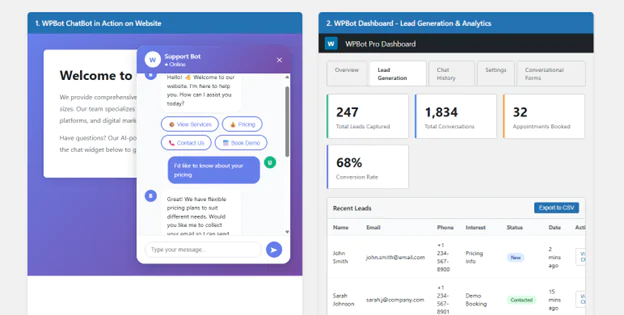
What Did We Observe in Our Hands-On Testing?
Testing these plugins across multiple sites revealed a clear gap: none of them automate core maintenance tasks, such as plugin updates, user activity monitoring, or security checks.
- AutomatorWP came closest with its workflow triggers and actions, but it’s geared toward business processes, not technical upkeep.
- AI Engine focused entirely on content generation, which didn’t align with my automation goals.
- WPBot, while designed for customer engagement, proved the most polished and reliable in its niche.
Recommendation: Despite limitations, we recommend WPBot for teams that prioritize customer interaction. It won’t automate maintenance, but it does deliver tangible benefits in lead generation and support efficiency.
Key Takeaways
- AutomatorWP: Best for connecting plugins and automating workflows, but expensive add-ons limit value.
- AI Engine: Strong for content generation, weak for automation.
- WPBot (ChatBot): Excellent for customer engagement, but not for backend efficiency.
- No plugin meets maintenance needs: Updating plugins, monitoring user activity, and running security checks remain manual tasks.
This hands-on review highlights the strengths and weaknesses across the WordPress AI plugins comparison spectrum, enabling teams to choose based on their specific priorities.
Automate Your Maintenance and Security
Our team provides solutions for plugin updates, monitoring, and security checks so your WordPress sites remain secure and efficient.
Request a ConsultationConclusion
WordPress AI plugins are advancing, but none are yet capable of fully automating technical maintenance tasks. This WordPress AI plugins comparison shows that AutomatorWP, AI Engine, and WPBot each excel in their respective areas: workflow automation, content generation, and customer engagement, but they fall short when it comes to handling site upkeep.
For businesses, the best choice depends on your priorities: choose AutomatorWP for workflow automation, AI Engine if content generation is your main focus, or WPBot to improve customer support and lead generation.
However, the need for maintenance automation remains unaddressed. Until a plugin can reliably manage updates, monitor user activity, and perform security checks, administrators will still need to rely on manual processes or external tools to maintain their sites’ security and ensure smooth operation.
FAQs
No. While AutomatorWP, AI Engine, and WPBot excel in workflows, content, and engagement, none currently automate backend maintenance tasks.
AI Engine is best suited for content-heavy sites, producing blogs, product descriptions, and chatbot scripts with customizable prompts.
Yes. WPBot offers automated live chat and lead generation services around the clock, integrating with AI platforms such as OpenAI or DialogFlow.
AutomatorWP has a free open-source version, but many advanced features require paid add-ons, which can add up quickly.
They are useful for workflows, content, and engagement, but technical site maintenance across multiple sites still requires manual processes or external tools.
Explore Recent Blog Posts



Related Posts