
Table of Contents
Introduction
Microsoft Power BI is a core business intelligence solution for organizations that want centralized data access, consistent reporting, and better decision-making. Since its launch in 2015, Power BI has grown into a comprehensive analytics platform, used by over 350,000 organizations worldwide. Its seamless integration with Microsoft 365, Azure, and enterprise applications makes it a preferred choice for IT leaders, data analysts, and executives.
As Microsoft expands Power BI within the broader Microsoft Fabric platform, pricing and licensing decisions now have a direct impact on BI strategy and long-term cost control. With the Power BI Pro and Premium Per User price changes now fully in effect and Premium per capacity retired, organizations are reassessing how they license analytics in 2026.
Key questions decision-makers are asking include:
- Which Power BI plan aligns best with current and future usage?
- How should budgets account for Fabric capacity and user licensing together?
- Is Power BI still cost-effective compared to Tableau, Looker, or similar tools?
This guide will provide a detailed breakdown of Power BI pricing, features, and licensing models, along with practical guidance for choosing the right approach in 2026 and beyond.
Power BI Overview
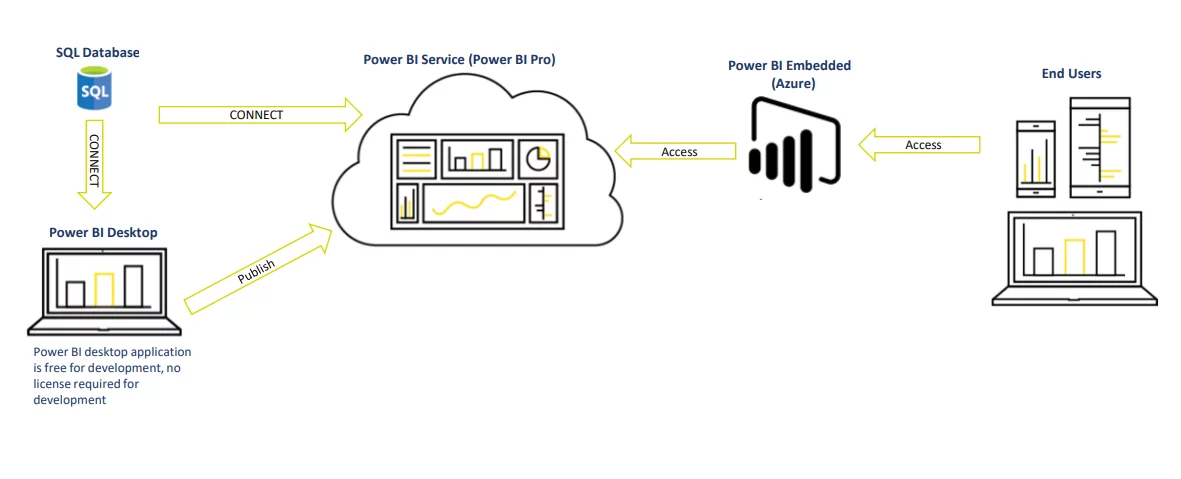
Microsoft Power BI enables organizations to connect to multiple data sources, analyze data in a single environment, build interactive reports, and share insights across teams. It supports both self-service analytics and enterprise reporting scenarios.
Power BI consists of three core components:
- Power BI Desktop
- Power BI Service
- Power BI Mobile App
Adoption continues to increase as organizations expand analytics across departments. With that growth comes more scrutiny around pricing, sharing limits, and capacity planning.
You may also like: Understanding Power BI Licensing
Power BI 2026 Pricing Updates
While the major per-user price changes (Power BI Pro at $14 and Premium Per User at $24 per month) took effect last year, organizations should plan for potential future adjustments tied to annual billing structures and usage patterns in 2026.
Microsoft’s broader shift toward capacity-based licensing through Microsoft Fabric (F-SKUs) emphasizes balancing per-user licenses with capacity commitments to optimize costs and performance as analytics workloads grow.
Power BI Pricing Levels:
In 2026, Power BI pricing remains centered on a mix of per-user licenses and capacity-based models through Microsoft Fabric. Organizations are expected to balance Pro or PPU licenses with Fabric capacity to control costs as usage scales, rather than relying solely on individual user licensing.
Need Help Navigating Power BI Pricing?
We help you choose the right Power BI plan, manage Fabric capacity, and optimize your analytics investment. Get expert guidance tailored to your business.
Request a ConsultationPower BI Free
Power BI Free allows users to download Power BI Desktop and mobile apps at no cost. It supports full report creation, data modeling, and visualization for individual use. Reports can be published to a personal workspace in the Power BI Service, but they cannot be shared privately with other users.
The only sharing option available without licensing is Publish to Web. This makes reports publicly accessible and should not be used for sensitive or internal data.
Power BI Desktop does not require a Microsoft 365 subscription and can be downloaded independently.
Power BI Free is suitable for learning, personal analysis, and proof-of-concept work, but it lacks governance, secure sharing, and collaboration controls required in business environments.
Power BI Pro
Power BI Pro is a per-user subscription that enables secure sharing, collaboration, and consumption of Power BI content. Each user who creates or consumes shared content requires a Pro license unless the content is hosted on dedicated capacity.
Key characteristics:
- Dataset size limit of 1 GB per dataset
- Up to 8 scheduled refreshes per day
- Secure sharing with other Pro users
- App workspaces and embedding in Microsoft 365 apps
- Integration with Teams, SharePoint, and other Microsoft services
Power BI Pro costs $14 per user per month.
Power BI Pro works well for small teams, departmental analytics, and organizations that do not yet need dedicated capacity.
Read Further: Power BI AI Capabilities: Transform Data Insights
Power BI Embedded
Power BI Embedded is designed for embedding reports and dashboards into custom or web applications for external users. Viewers do not need Power BI licenses, but report developers still require Power BI Pro.
Embedded uses A SKUs, billed hourly through Azure, which can be paused when not in use.
| Capacity Node | Virtual Cores | RAM (GB) | Cost |
|---|---|---|---|
|
A1 |
1 |
3 |
~ $1/hour |
|
A2 |
2 |
5 |
~ $2/hour |
|
A3 |
4 |
10 |
~ $4/hour |
|
A4 |
8 |
25 |
~ $8/hour |
|
A5 |
16 |
50 |
~ $16/hour |
|
A6 |
32 |
100 |
~ $32/hour |
Power BI Premium (Per User)
Premium Per User licenses advanced features on a per-user basis. It includes all Pro features plus capabilities previously limited to dedicated capacity.
Key characteristics:
- Model size limit up to 100 GB
- Up to 48 refreshes per day
- Paginated reports and advanced analytics features
- Reports accessible only to other PPU users
PPU costs $24 per user per month. It works well for advanced analytics teams that need premium features but lack the licensing capacity to support a large audience.
Unsure Which Power BI Plan Fits Your Budget and Needs?
Our experts help you navigate Microsoft’s pricing changes and recommend the most cost-effective plan for your data strategy. Request a consultation today.
Request a ConsultationMicrosoft Fabric Capacity
Microsoft Fabric brings data engineering, data warehousing, real-time analytics, and Power BI into a single platform. Fabric capacity replaces Power BI Premium per capacity and is now the recommended approach for enterprise-scale analytics.
Key benefits:
- Unified analytics workloads under one capacity
- Shared compute and storage across services
- Centralized capacity management
- Supports large user bases without per-user viewing licenses
Fabric capacity is available as pay-as-you-go or reserved pricing.
| SKU | Capacity Units (CU) | Pay-as-you-go Price | Reservation Price (Monthly) | Approximate Savings |
|---|---|---|---|---|
|
F4 |
4 |
$525.60/month |
$312.67/month |
~41% |
|
F8 |
8 |
$1,051.20/month |
$625.33/month |
~41% |
Note: Power BI Pro and Premium Per User licenses remain unchanged and can be used alongside Fabric capacity.
EM SKU (Embedding SKU)
EM SKUs allow embedding Power BI content internally and are billed monthly. They cannot be paused and are available only through volume licensing
| Capacity Node | Virtual Cores | RAM (GB) | Cost |
|---|---|---|---|
|
EM1 |
1 |
3 |
$625/month |
|
EM2 |
2 |
5 |
$1,245/month |
|
EM3 |
4 |
10 |
$2,495/month |
Power BI Pro and Premium Per User pricing is now stable following Microsoft’s pricing update. Organizations using Microsoft 365 E5 continue to receive Power BI access without separate pricing changes.
For the latest licensing guidance, consult a Microsoft Solution Partner to align pricing with your usage patterns and growth plans.
Cost Comparison Example
Assume an organization with 10,000 users. Out of them, 200 are developers and 4,900 frequent users and 4,900 occasional users.
Option 1: All Power BI Pro Licenses:
- 10,000 users × $14/month = $140,000/month
- Total annual cost: $1,680,000
Option 2: Fabric Capacity + Pro for Developers:
- 200 Pro licenses: $2,800 per month
- Fabric capacity: ~$40,000 to $60,000 per month
- Annual cost: ~$513,600 to $753,600
Dedicated capacity significantly reduces costs at scale.
Power BI Free vs Power BI Pro vs Premium
Organizations evaluating Power BI often start by comparing the three main licensing options: Power BI Free, Power BI Pro, and Power BI Premium (Per User). Each plan supports different levels of collaboration, data capacity, and advanced analytics features.
- Power BI Free is best suited for individual users exploring data or learning the platform. It supports report creation but does not allow secure sharing within organizations.
- Power BI Pro enables collaboration across teams. Users can publish reports, share dashboards, and integrate analytics into Microsoft tools such as Teams and SharePoint.
- Power BI Premium (Per User) provides advanced capabilities such as larger semantic models, higher refresh limits, and enterprise analytics features that support more demanding data workloads.
For organizations scaling analytics across departments or large audiences, Fabric capacity may become a more cost-effective option than assigning individual Premium licenses to every user.
How Should Enterprises Design a Power BI Licensing Strategy in the Fabric Era?
With Microsoft Fabric, Power BI licensing is no longer only a per-user decision. Organizations must balance user licenses, Fabric capacity, and analytics workloads to control costs and support growth.
A practical strategy usually focuses on three factors.
User scale
- Small teams can operate effectively with Power BI Pro licenses.
- Large organizations often adopt Fabric capacity so reports can be consumed by thousands of users without assigning licenses to every viewer.
Data workloads
- Pro works well for standard reporting.
- Large datasets, frequent refreshes, and advanced analytics often require Fabric capacity or Premium features.
Governance and cost control
Enterprises should manage:
- workspace sprawl
- duplicate datasets
- refresh workloads
- capacity utilization
Strong governance helps organizations avoid unnecessary licensing costs while maintaining report performance.
In the Fabric era, the most effective approach combines Pro licenses for developers and Fabric capacity for enterprise-scale consumption, aligning licensing with the organization’s broader data platform strategy.
Want Your Team to Adopt Power BI?
Empower your workforce with advanced analytics skills.AlphaBold provides comprehensive Power BI training and ongoing support to ensure your team can create, maintain, and optimize reports independently.
Request a ConsultationConclusion
Power BI pricing has shifted from simple per-user licensing toward capacity-based analytics through Microsoft Fabric. For organizations planning analytics growth in 2026, the decision comes down to user volume, feature requirements, and broader data workloads.
Power BI Desktop remains free. Content creation requires Pro or PPU licenses. Large-scale consumption is best served through Fabric capacity.
Organizations that plan now can control costs, reduce licensing complexity, and prepare for continued expansion across the Microsoft analytics ecosystem.
FAQs
We design solutions to scale using capacity planning, composite models, incremental refresh, and enterprise data platforms to support large datasets without performance issues.
We run parallel systems, phased rollouts, and full testing cycles to avoid disruption. Existing reports remain live until new dashboards are stable and adopted.
Most technical work is handled by our team. Internal IT involvement focuses on security review, data access, and validation.
Support includes monitoring, optimization, training, and periodic reviews. Maintenance typically accounts for 15-20% of the initial implementation cost each year.
Yes. Power BI connects natively to AWS and Google Cloud services and supports hybrid and multi-cloud architectures.
We use role-based training, department champions, usage tracking, and continuous feedback to ensure analytics becomes part of daily decision-making.
Power BI Free allows individual users to create reports and analyze data but does not support secure sharing within organizations. Power BI Pro enables report publishing, collaboration, and sharing across teams. Power BI Premium (Per User) includes advanced capabilities such as larger dataset limits, higher refresh frequencies, paginated reports, and AI-driven analytics features designed for more complex data workloads.
Explore Recent Blog Posts