
Table of Contents
Introduction
Field service operations are under increasing pressure as customer expectations continue to rise and service environments become more complex. Teams are expected to respond faster, resolve issues on the first visit, and maintain consistent service quality across locations.
At the same time, many organizations are still managing operations through manual processes, disconnected systems, or tools that were not designed for real-time coordination. This often leads to delays, limited visibility, and increased administrative effort for both technicians and dispatch teams.
To address these challenges, organizations are increasingly adopting AI-enabled solutions that can support scheduling, streamline work order management, and provide real-time insights across service operations.
Dynamics 365 Field Service, with built-in Copilot capabilities, is designed to support these needs by embedding AI directly into service workflows. Copilot with Dynamics 365 Field Service helps teams improve scheduling, simplify work order management, and provide technicians with real-time guidance in the field.
In this blog, we explore how Copilot enhances Dynamics 365 Field Service, the key capabilities it brings to service operations, and how organizations can apply these features effectively to improve efficiency and service outcomes. These capabilities are also evolving beyond assistance toward more action-oriented workflows, where AI not only provides insights but also supports execution within service operations.
How Can You Leverage Copilot for Dynamics 365 Field Service?
Copilot simplifies daily field service operations by embedding AI directly within Dynamics 365 workflows, helping teams reduce manual effort and access relevant information in real time.
For dispatchers, Copilot supports scheduling decisions by identifying resource gaps, recommending technician assignments, and helping generate work orders more efficiently based on available data.
For technicians, Copilot provides guided steps, access to service history, and AI-generated summaries of work orders directly within the Field Service interface. This reduces manual documentation and helps technicians complete tasks more accurately while on-site. These capabilities are also available within the mobile experience, allowing technicians to access and act on information without switching between systems. In many cases, the mobile app becomes the primary interface for technicians to access information, complete tasks, and update work orders in real time.
Managers can use Copilot to review performance metrics, identify trends, and monitor service outcomes. This supports more proactive decision-making and helps improve service efficiency and first-time fix rates.
Recent industry research from Technology & Services Industry Association highlights that technicians spend a significant portion of their time on administrative tasks, and AI is increasingly being used to automate this work and provide real-time guidance in the field. This allows teams to focus more on service delivery and less on manual processes. It also shows that there is now a broader focus on embedding AI directly into operational workflows rather than using it as a separate tool.
Integrating Copilot with Dynamics 365 Field Service improves how organizations manage work orders, resources, and communication by embedding intelligence into day-to-day operations rather than adding it as a separate tool.
You may also like: Transitioning from Legacy Systems to Dynamics 365 Field Service.
1. Smarter Work Order Management:
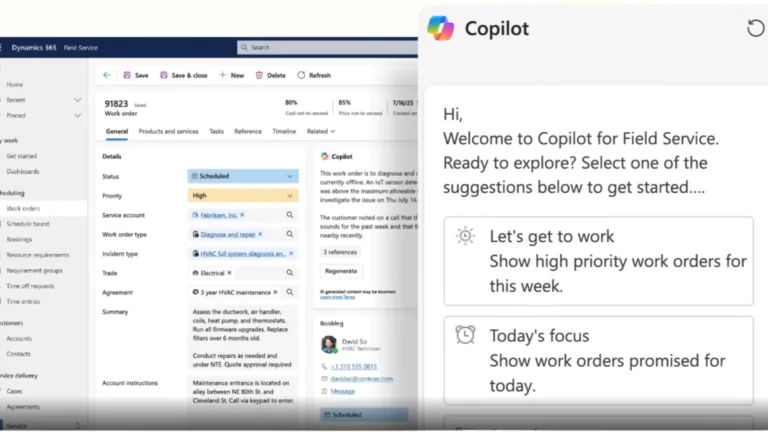
Copilot enhances work order management in Dynamics 365 Field Service by automating data entry, summarizing service details, and surfacing real-time insights. It identifies task priorities, provides next-step recommendations, and ensures technicians have complete visibility into each job before arriving on-site.
Key Benefits:
- Automatically generates and updates work order summaries.
- Highlights critical job information such as parts, history, and customer notes.
- Reduces manual documentation errors and saves administrative time.
2. Automated Work Order Creation From Emails:
Copilot enhances the Outlook integration in Dynamics 365 Field Service by automatically extracting structured data from incoming emails to generate new work orders. This reduces manual entry, ensures data accuracy, and accelerates case creation from customer communications.
Key Highlights:
- Extracts relevant information such as issue type, location, and contact details.
- Auto-fills predefined fields to streamline work order setup.
- Reduces administrative workload and response time.
Apply Copilot to Your Field Service Operations
Explore how Copilot can support your scheduling, work order management, and technician workflows in real-world scenarios.
See My Options3. Intelligent Resource Scheduling and Dispatching:
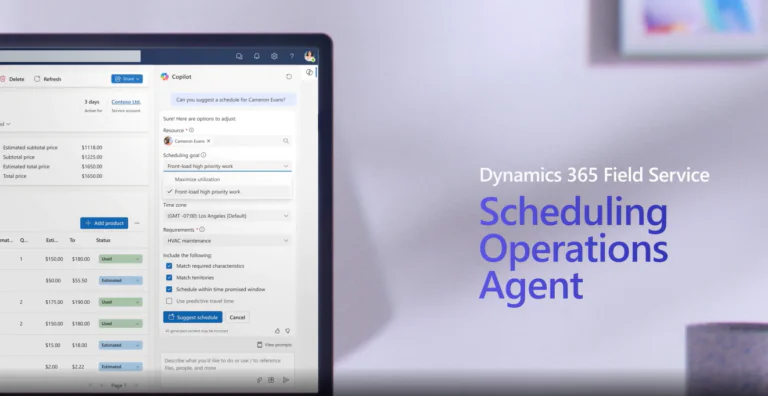
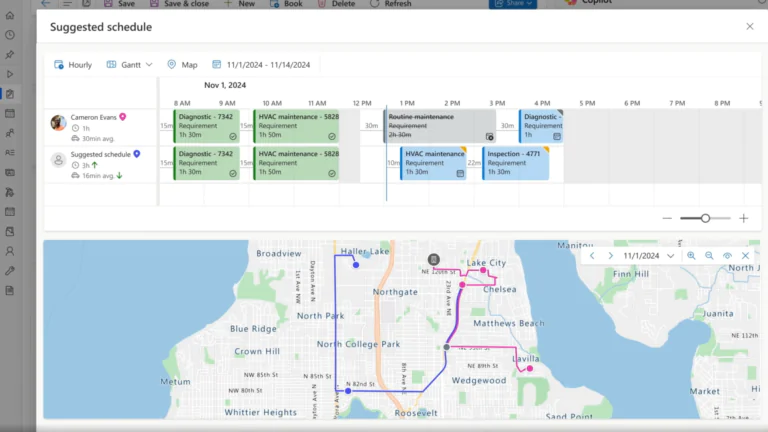
Copilot supports dispatchers by recommending technician assignments and helping adjust schedules in real time based on availability, skills, and changing service priorities. As these capabilities evolve, Dynamics 365 Field Service is introducing more advanced scheduling approaches, such as the Scheduling Operations Agent, which helps continuously evaluate and optimize scheduling decisions.
Key Highlights:
- Recommends best-fit technicians based on skills, availability, location, and service requirements
- Continuously evaluates and optimizes schedules as conditions change
- Adjusts schedules dynamically using real-time data and service priorities
- Reduces manual dispatch effort while improving scheduling consistency
4. Automated Task and Inventory Updates:
Copilot supports post-service documentation by reducing manual steps in updating completed tasks, inventory usage, and service outcomes. These automatic updates ensure consistency across all service data while saving time for technicians and managers.
Key Highlights:
- Updates task status, parts usage, and inventory levels automatically.
- Records service outcomes and attaches relevant documentation.
- Minimizes manual input and ensures accurate reporting
5. Knowledge Assistance and Training Support:
Beyond automation, Copilot is an interactive knowledge assistant within Dynamics 365 Field Service. It provides real-time guidance, answers technician queries, and offers contextual insights that help resolve issues faster.
Key Highlights:
- Delivers on-demand troubleshooting and how-to assistance.
- Supports new technician onboarding with contextual prompts.
- Encourages knowledge sharing and consistent service quality.
How Does Copilot in Dynamics 365 Field Service Provide Business Value?
When deployed strategically, Copilot integration delivers measurable improvements across service operations. It reduces manual effort, enhances operational visibility, and accelerates decision-making, helping field teams focus more on service excellence rather than administrative bottlenecks.
- Reduced Administrative Workload: Less time spent on data entry and scheduling.
- Faster Service Resolution: Real-time insights and recommendations.
- Improved Technician Utilization: AI-driven route and task optimization.
- Enhanced Data Accuracy: Automated updates across work orders and inventory.
- Accelerated Onboarding: Guided prompts and contextual training.
As these capabilities continue to evolve, organizations are increasingly using Copilot to support not just insights, but day-to-day service execution and operational decision-making. AlphaBOLD’s consultants align these capabilities with your business KPIs, ensuring that Copilot implementation drives tangible ROI, not just automation for automation’s sake.
Bonus Reading: Dynamics 365 Field Service: Boost Efficiency & Satisfaction
Integrate AI Where It Delivers Measurable ROI
Let’s integrate Copilot into your Dynamics 365 Field Service environment to eliminate manual processes and enhance operational efficiency.
Review My Field Service SetupConclusion
Copilot in Dynamics 365 Field Service streamlines operations, reduces manual effort, and enhances decision-making through AI-driven automation. It empowers teams to focus on higher-value tasks while improving efficiency and service quality. With AlphaBOLD’s consulting expertise, businesses can integrate Copilot seamlessly, align it with their KPIs, and realize measurable ROI from smarter, data-driven field operations.
FAQs
To enable Copilot in Dynamics 365 Field Service, organizations need:
- An active Dynamics 365 Field Service license
- Copilot-enabled environment and features turned on
- Proper user roles and permissions
- Configured workflows and structured service data
Copilot performs best when work orders, customer data, and service processes are well-defined and consistently maintained.
Copilot can assist in generating work orders and recommending technician schedules, but it does not operate fully autonomously.
- It can extract and summarize information to help create work orders faster
- It recommends technician assignments based on skills, availability, and location
- It supports real-time scheduling adjustments
Final decisions and approvals typically remain with dispatchers or service managers.
Deploying Copilot involves enabling features, configuring workflows, and aligning it with your service processes.
To optimize performance:
- Ensure data is clean and structured
- Start with specific use cases such as scheduling or work order summaries
- Monitor usage and refine workflows over time
Troubleshooting often involves reviewing data quality, permissions, and the integration of Copilot into daily workflows.
Copilot is embedded directly within Dynamics 365 Field Service workflows.
It is available across:
- Work orders (summaries, updates, insights)
- Scheduling and dispatch processes
- Technician workflows, including the mobile app
This allows users to access AI-generated insights and take action without switching between systems.
Copilot helps reduce operational costs by minimizing manual work and improving efficiency across service operations.
It supports cost reduction by:
- Reducing time spent on data entry and scheduling
- Improving technician productivity and utilization
- Increasing first-time fix rates
- Enhancing decision-making with real-time insights
These improvements lead to better resource allocation and lower administrative overhead.
Yes, administrators can control what data Copilot accesses.
- Access is governed by user roles and permissions
- Admins define which entities and fields are available
- Security and compliance settings ensure data protection
This allows organizations to use Copilot while maintaining control over sensitive information.
Explore Recent Blog Posts




Related Posts