Zoho FSM vs. Dynamics 365 Field Service: Features, Pricing, and Scalability

Muhammad Zeshan
Table of Contents
Executive Summary
Choosing between Zoho FSM and Dynamics 365 Field Service goes beyond comparing features. It’s about aligning software capabilities with how your teams actually work in the field. Dynamics 365 Field Service offers robust functionality, deep Microsoft ecosystem integration, and AI-powered scheduling, but often comes with longer deployments, a steeper learning curve, and higher upfront costs.
Zoho FSM, in contrast, delivers faster setup, a simpler interface, and lower total cost of ownership, making it ideal for mid-sized service businesses that value ease of use and quick adoption over advanced configuration options.
This blog compares Zoho FSM vs. Dynamics 365 Field Service across five key areas: core features, user experience, implementation timeline, pricing, and ecosystem fit. You’ll also find real-world considerations for choosing the right solution based on asset value, internal IT support, and compliance needs.
Choosing Between Zoho FSM vs. Dynamics 365 Field Service
Microsoft Dynamics 365 Field Service
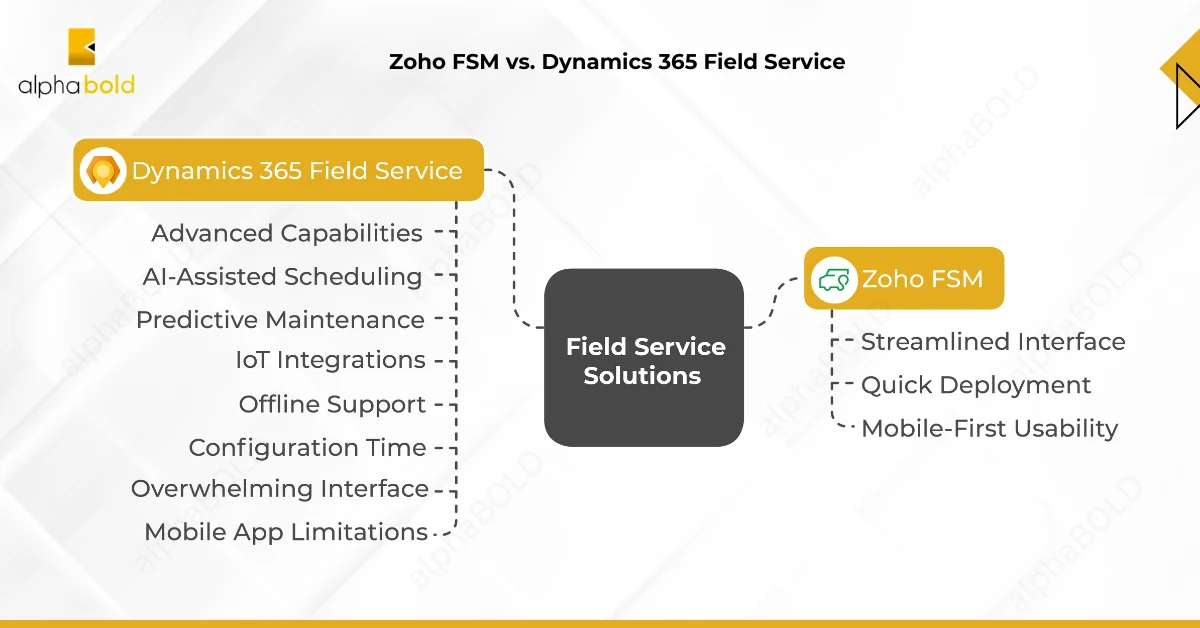
Microsoft Dynamics 365 Field Service offers advanced capabilities, AI-assisted scheduling, predictive maintenance, IoT integrations, offline support, and more. On paper, it’s a comprehensive solution built for enterprise-grade field service operations. Organizations saw up to a 40% improvement in dispatcher efficiency, as reported in a 2023 Forrester Total Economic Impact study commissioned by Microsoft.
However, in practice, many mid-sized service providers face a steep learning curve:
- Configuration Time: Implementing and fine-tuning the system often takes months. Until the AI scheduling engine is fully calibrated, many teams resort to manual workarounds like whiteboards and spreadsheets.
- Overwhelming Interface: The system presents multiple ways to complete the same task, confusing dispatchers and field coordinators.
- Mobile App Limitations: While feature-rich, including barcode scanning, digital signatures, and augmented reality, the mobile app can be prone to crashes in low-connectivity areas. As a result, many technicians revert to using paper-based processes.
Zoho FSM: Simpler Setup, Faster Adoption
Zoho FSM lacks some of the enterprise-grade features of Dynamics 365, but it delivers dependable functionality with a much faster onboarding process:
- Streamlined Interface: The platform emphasizes simplicity, reducing cognitive load for dispatchers and technicians.
- Quick Deployment: Configuration is lightweight. Businesses can often get fully operational in days, not months.
- Mobile-First Usability: Although the app may appear basic, it provides the essentials, work order management, location tracking, and digital signatures, without requiring extensive training.
Pricing and Cost Insights: Zoho FSM vs. Dynamics 365 Field Service
| Platform | Plan / Edition | Price (USD, per user/month) | Notes |
|---|---|---|---|
|
Zoho FSM – Free |
Free |
$0 |
Basic access, up to 30 appointments/month |
|
Zoho FSM – Standard |
Standard |
$25/month |
Mid-tier: 60 appointments/month limit |
|
Zoho FSM – Professional |
Professional |
$35/month |
Includes multi-day scheduling and automation |
|
Dynamics 365 FSM – Full User |
Annual License |
$105/month |
Full access with AI tools, IoT, Copilot |
|
Dynamics 365 FSM – Contractor |
Annual License |
$50/month |
Limited access for external techs |
|
Dynamics RSO Add-on |
Optional Module |
$30/resource/month |
AI-optimized dispatching (add-on only) |
Dynamics 365 Field Service has higher licensing fees, but the bigger consideration is implementation of effort. Most organizations spend 3–6 months configuring workflows, integrations, and roles, often requiring partner support. Zoho FSM, by contrast, enables teams to go live in 4–8 weeks with internal resources and minimal training.
The choice often comes down to operational complexity. Dynamics 365 is ideal for organizations managing high-value assets and deep Microsoft integrations. Zoho FSM appeals to mid-sized service providers that prioritize speed, usability, and cost control.
AlphaBOLD helps organizations assess the total cost of ownership, licensing strategy, and rollout timeline to ensure that the platform you choose fits your team’s long-term needs, without overpaying or underutilizing key features.
Need Help Comparing Total Costs or Building your Rollout Plan?
AlphaBOLD can model the licensing, deployment, and support costs for both platforms, helping you make a smarter investment.
Request a ConsultationWhere Microsoft Actually Delivers the Most Value
Microsoft Dynamics 365 Field Service offers clear advantages in complex asset management and high-value equipment scenarios. Its predictive maintenance capabilities, driven by AI and IoT integrations, are well-suited for organizations looking to reduce unplanned downtime. In asset-intensive industries, early failure detection can prevent costly disruptions and extend the life of multi-million-dollar equipment.
The platform also integrates deeply with the broader Microsoft ecosystem. For companies already using Office 365, Teams, Power BI, or other Dynamics modules, Dynamics 365 Field Service offers seamless interoperability. The Power Platform enables advanced automation and custom integrations, although development expertise is often required to implement them effectively.
However, integration outside the Microsoft environment is more complex. Connecting with third-party applications often involves custom development and extended configuration cycles, which may increase project scope and cost.
Integration and Ecosystem
Zoho FSM, by contrast, integrates natively with Zoho’s suite, including CRM, inventory, and accounting tools, and supports external connections through middleware platforms like Zapier. While it lacks the deep platform-level cohesion of the Microsoft stack, it offers faster and simpler connectivity for small to mid-sized businesses with straightforward integration needs.
Summary: Zoho FSM vs. Dynamics 365 Field Service
Choosing the right Field Service Management solution depends on your business priorities, existing infrastructure, and operational complexity. Below is a comparison to help determine which platform better fits your needs.
| Decision Criteria | Microsoft Dynamics 365 Field Service | Zoho FSM |
|---|---|---|
|
Asset Value & Risk |
Ideal for managing high-value assets with costly downtime |
Suitable for standard service workflows |
|
Downtime Impact |
Recommended when downtime incurs high financial losses |
Acceptable for lower-risk, lower-cost operations |
|
Technology Stack |
Best if already using Office 365, Teams, or other Dynamics apps |
Works well with Zoho Suite or simple third-party tools |
|
Implementation Timeline |
Longer setup with custom configuration |
Fast deployment; minimal setup required |
|
Internal IT Resources |
Requires a capable IT team for ongoing configuration |
Can be managed with limited IT involvement |
|
Regulatory Compliance Needs |
Designed for industries with strict compliance requirements |
More flexible, but fewer enterprise-grade features |
|
Budget Constraints |
Higher licensing and implementation costs |
Cost-effective licensing with simpler setup |
Is Your Dynamics 365 FSM Not Delivering Results?
We fix underperforming implementations by identifying issues and getting them working, including scheduling logic, technician onboarding, or system integrations.
Request a ConsultationBonus Reading: Using Copilot with Dynamics 365 Field Service
Conclusion
Many organizations select field service software based on enterprise-level features they may never use, rather than their teams’ actual needs and capabilities. This often results in underused platforms and poor user adoption.
Microsoft Dynamics 365 Field Service can be transformative if your business has the operational complexity and technical infrastructure to support it. The platform excels in asset-intensive environments with strict compliance needs and established IT teams.
However, if rapid deployment, ease of use, and cost control are higher priorities, Zoho FSM is often the more practical choice.
When comparing Zoho FSM vs. Dynamics 365 Field Service, matching platform strengths with real operational needs is essential.
Before making a decision:
- Evaluate the total cost of ownership, including implementation, training, and long-term support.
- Involve field technicians in the selection process, their adoption will determine the platform’s success.
Ultimately, the best solution is the one your team will actually use, consistently, effectively, and without friction.
FAQs: Additional Considerations for FSM Buyers
Microsoft typically relies on certified implementation partners like AlphaBOLD for onboarding, customization, and ongoing support. Zoho offers direct customer support and also has a network of partners, though it tends to lean toward self-service and documentation-heavy support channels.
Dynamics 365 Field Service supports multi-region deployments with strong localization features, data residency options, and enterprise-grade compliance tools. Zoho FSM supports international use but may require workarounds or third-party integrations for multi-currency, tax handling, or language localization.
Both platforms support integration, but Dynamics 365 is optimized for Microsoft’s ecosystem. External ERP integration often requires custom development or middleware. Zoho FSM connects well with Zoho Books and Zoho Inventory, and can integrate with ERPs like QuickBooks or NetSuite using APIs or tools like Zapier.
Common challenges include data mapping from legacy systems, technician training, change management for dispatchers, and ensuring mobile adoption. Regardless of platform, organizations often underestimate the time required to re-align scheduling workflows and update backend logic for maintenance plans or SLAs.
Explore Recent Blog Posts