
Solve Field Service Challenges with Dynamics 365 Route Optimization

Table of Contents
Introduction
Manual scheduling in field service does not scale. As technician count and service requests grow, dispatchers spend hours every day rebuilding routes by hand and reacting to cancellations and delays. That inefficiency costs you in overtime, missed SLAs, and customers who move to a competitor.
Resource Scheduling Optimization (RSO), the add-in that powers Dynamics 365 Route Optimization, automates that scheduling work. This guide covers what RSO does, why manual scheduling breaks down at scale, and the ROI you can expect from switching.
What Is Resource Scheduling Optimization (RSO)?
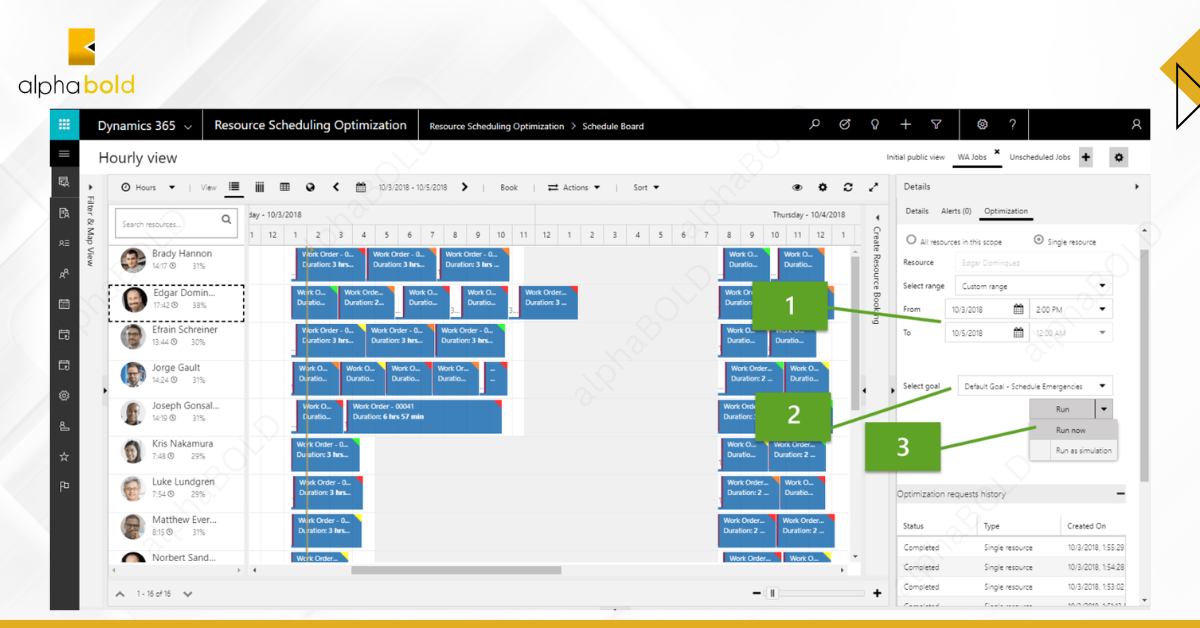
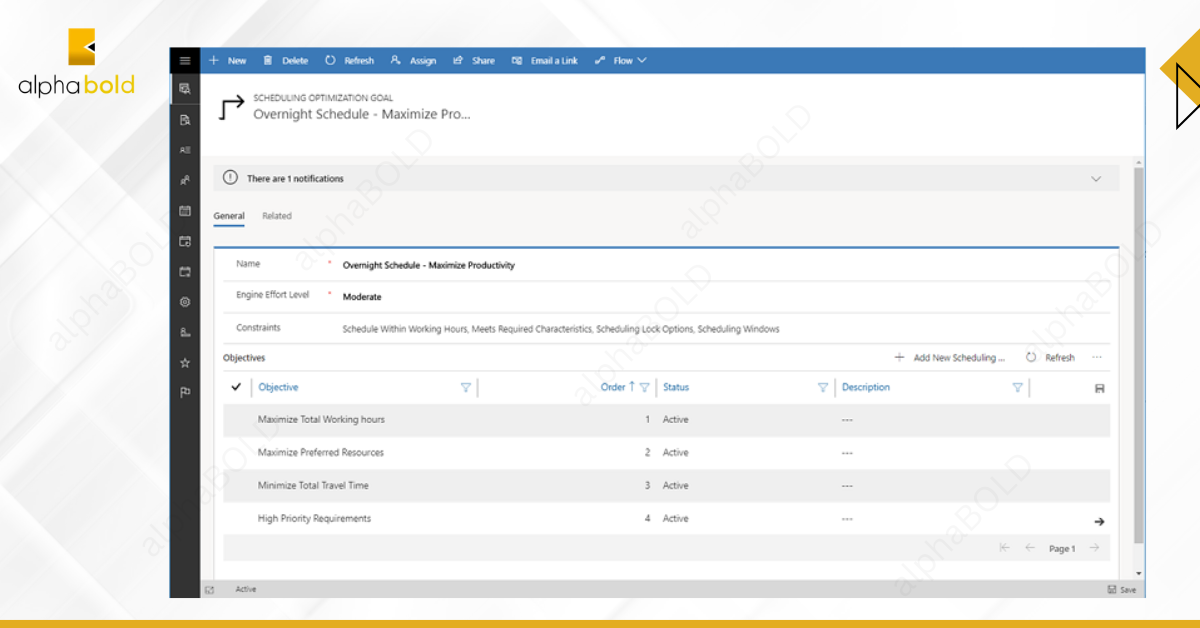
Resource Scheduling Optimization (RSO) is an add-in for Dynamics 365 Field Service that automatically schedules work orders to the technicians best equipped to handle them. It weighs each job against technician availability, skill set, territory, travel time, priority, and promised time windows, then builds the most efficient schedule and route.
RSO runs on configured scheduling scenarios. Most organizations run it overnight to build the next day’s schedule, and again at set intervals during the day or on demand for urgent jobs, so cancellations and new work orders get folded into the plan without a dispatcher rebuilding it from scratch.
Why Does Manual Scheduling Break Down as Your Team Grows?
Manual scheduling breaks down because it relies on a person keeping track of every technician’s location, skill set, and availability in their head at once. That works with five technicians. It falls apart at fifty.
Dynamics 365 Field Service’s default assignment tools let dispatchers match technicians to jobs based on set criteria, and that works fine at a small scale. Here is what typically breaks down first without automated route optimization:
- Dispatchers manually re-sequence routes every time a job is added, canceled, or delayed.
- Technicians drive farther than necessary because assignments are based on who is free, not who is closest.
- Emergency requests get tacked onto the end of the day instead of being slotted into the most efficient spot.
- Skill and territory mismatches send the wrong technician to the wrong job, creating a second visit.
How Does Resource Scheduling Optimization (RSO) Fix This?
RSO fixes this by running optimization passes on a configured schedule: overnight, at set intervals during the day, and on demand for urgent jobs. Each pass accounts for travel time, technician skill, territory, and time windows, and then rebuilds the plan so that a dispatcher does not have to manually resolve every conflict.
Dispatchers can also run scheduling simulations, adjusting parameters such as resource availability within a territory, and compare configurations before committing to one. Pairing this with Connected Field Service and IoT takes it a step further: sensors flag equipment issues and automatically generate a work order, often before the customer notices anything is wrong.
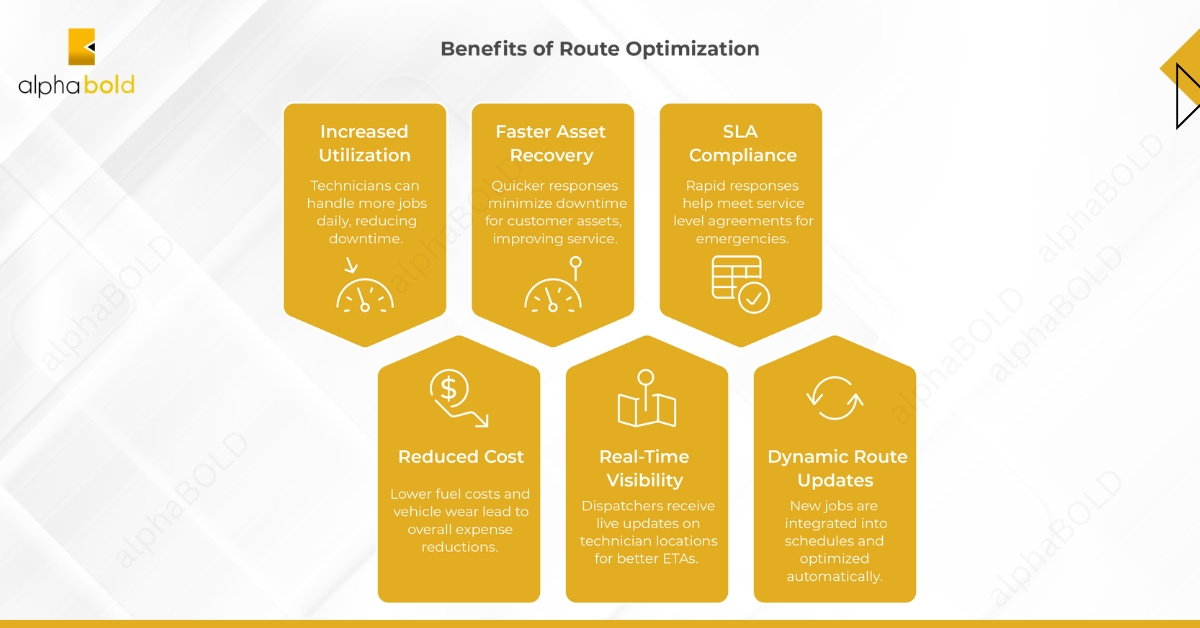
Here is what changes operationally once route optimization is running:
- Increased utilization: Less transit time means technicians complete more jobs in the same shift.
- Reduced cost: Fewer miles driven lowers fuel spend and vehicle wear.
- Faster asset recovery: Quicker technician response shortens the time a customer’s equipment is down.
- Real-time visibility: Dispatchers see technician locations live and can give customers an accurate ETA instead of a guess.
- Stronger SLA compliance: Faster response times make it easier to hit contractual commitments, particularly on emergency requests.
- Dynamic route updates: New jobs get slotted into the existing schedule automatically instead of waiting for a manual rebuild.
Further Reading: Dynamics 365 Field Service features and capabilities
Manual scheduling won't scale with your team
If you want a clear picture of what route optimization would look like for your specific operation, AlphaBOLD Dynamics 365 consultants can help.
Request a ConsultationWhat ROI Can You Expect from Route Optimization?
The return breaks down into practical business impacts you can track from week one.
- Fewer repeat visits, since RSO matches the right skill set to each job on the first attempt instead of after a callback. That directly cuts the truck rolls and technician hours spent fixing jobs that should have closed the first time.
- Faster invoicing and cash flow, because more jobs get completed and closed out same-day instead of carrying open work orders into the next billing cycle.
- You can grow job volume without growing dispatch headcount at the same rate, since RSO absorbs the scheduling complexity that would otherwise mean hiring another dispatcher for every few additional technicians.
These impacts show up in the data, too. A water treatment company that automated its scheduling saw technician capacity rise 40 percent while overtime dropped 6 percent, according to McKinsey.
Investment in this kind of automation is accelerating industry-wide. Seventy-two percent of operations leaders rank automation among their top three AI investment priorities for 2026, per PwC’s Digital Trends in Operations Survey, and Gartner projects more than half of service organizations will double their technology spend by 2028 without cutting staff.
The exact numbers depend on your current technician count, territory density, and the extent to which your scheduling is still manual today. That is worth mapping before you commit to a rollout plan.
Every point of inefficiency compounds month over month
AlphaBOLD can map exactly where your operation is losing capacity and what a route optimization rollout would look like for your team.
Request a ConsultationHow Do You Get Started with Dynamics 365 Route Optimization?
Start by auditing your current scheduling process before you make any configuration changes. Identify how many jobs your dispatchers reschedule manually in a typical week and how much of that is driven by cancellations, emergencies, or skill mismatches. That baseline tells you where Dynamics 365 Route Optimization will have the most immediate impact.
From there, define your assignment criteria (skill set, territory, time windows, and priority rules) and pilot the configuration with a subset of technicians before rolling it out company-wide. Expanding into Connected Field Service and IoT-driven work orders is a natural next phase once the core scheduling engine is running well.
A consulting partner shortens this process considerably. AlphaBOLD’s Dynamics 365 consultants configure Resource Scheduling Optimization around your actual territories and SLAs, rather than a generic default setup, and can guide the rollout in phases so your dispatch team is not managing two systems at once. Learn more about the full scope of Dynamics 365 Field Service implementation support available.
Conclusion
Manual scheduling caps how far a field service operation can grow before margins start to erode. Resource Scheduling Optimization removes that ceiling by automating the routing decisions your dispatchers currently make by hand, cutting wasted hours, reducing fuel spend, and strengthening customer retention. Getting the configuration right for your specific territories and SLAs is where a lot of that value is won or lost, which is where an experienced implementation partner earns its keep.
FAQs
Most rollouts take four to eight weeks, depending on how many technicians and territories you’re configuring for. A pilot with one team or region often lasts for two to three weeks.
It works for both, but the ROI is clearest once you have enough technicians and job volume that manual rescheduling is already consuming significant dispatcher time, typically 15 or more field technicians.
RSO is a paid add-in priced based on the number of technician schedules it optimizes, not a flat fee, so the cost scales with your team size. A consultant can map exact pricing against your current Dynamics 365 licensing tier.
No. It removes the manual, repetitive part of building a schedule so dispatchers can spend their time on exceptions, escalations, and customer communication instead of rebuilding routes by hand.
Explore Recent Blog Posts