The Value of Consulting Expertise in Power BI Implementations

Table of Contents

Introduction

If you are someone leading an organization or involved in the decision-making process, thousands of bytes of data go through you as ‘insights’ every day (and it’s a true skill to juggle that data.) Data helps businesses make better and faster choices by providing intuitive forecasts and insights. Most global organizations are implementing data and advanced analytics to maximize the effectiveness of the data at their disposal. If you are leading the charge at one of these organizations and are looking for consulting expertise in Power BI implementations, this blog is just for you!

Data is the lifeblood of the current global industry, and studies say that users generate 2.5 quintillion bytes of data every day. In 2026, the world is expected to produce roughly 221 zettabytes of data a 22% jump over the previous year. The big data analytics market has surpassed $348 billion and is projected to reach $924 billion by 2032, according to Fortune Business Insights. Over 97% of businesses globally have invested in big data, yet only about 24% use it for actual decision-making. These astonishing numbers are justifiable if we look at this through a decision–maker’s lens.

Businesses need to gather, clean, process, and analyze data to provide meaningful insights. This is where on-premises, cloud, and self-servicing analytical and business intelligence technologies like Power BI come into play. Power BI celebrated its 10-year anniversary in 2025 and has since evolved from a self-service visualization tool into Microsoft’s flagship AI-powered analytics platform within Microsoft Fabric. But how are BI technologies used and integrated in organizations?

There are two methods for accomplishing this. One is to assemble an internal team of Power BI specialists and data scientists. Alternatively and this is the best option you can outsource the process to third-party Power BI consultants. While the initial cost of hiring a Power BI consulting firm might seem higher than bringing someone in-house, the long-term benefits often outweigh the upfront investment. Consider this: attracting and retaining top Power BI talent requires competitive salaries, benefits, and ongoing training. Additionally, internal resources may lack the specific industry expertise and diverse skillset needed to fully unlock the potential of Power BI. Numerous business intelligence consulting firms provide services to assist small, medium, and large-scale organizations in implementing the data-driven approach and utilizing the insights obtained via Power BI.

If you’re looking for consulting expertise in Power BI implementations, continue reading to learn how Power BI can make your job easier and why hiring Power BI consultants is wise.

What’s New in Power BI for 2026

Before we dive into the common challenges and why consulting expertise matters, it’s worth understanding just how much Power BI has changed heading into 2026. The platform is in the middle of its most significant transformation in a decade. Here’s what business leaders need to know:

Copilot Is Now Everywhere:

Microsoft Copilot is generally available across the Power BI experience—desktop, web, and mobile. It can generate DAX queries in DAX Query View, create report pages from natural language prompts, summarize datasets, and now lets users attach a specific report or semantic model to a Copilot chat for grounded, context-aware responses. There’s also a standalone Copilot entry point on the Power BI Home screen, so users can start asking questions the moment they log in. Models can be marked as “Approved for Copilot” to control which data surfaces in AI-generated answers.

PBIR Is the New Default Report Format:

The Power BI Enhanced Report Format (PBIR) became the default for all new reports in Power BI Service as of January 2026, with a full rollout completed by late February. Power BI Desktop follows in the March 2026 release. PBIR enables Git-based version control, CI/CD pipelines, and collaborative development workflows. It’s currently in Preview with an opt-out option, but General Availability is planned for Q3 2026—at which point it will be the only supported report format. Organizations should start preparing for this transition now.

Azure Maps Replaces Bing Maps:

Bing Maps visuals in Power BI are no longer supported. Azure Maps is now the standard for geospatial visualizations, with new Marker capabilities that let users customize icons, scale markers by data values, and represent geographic data like store density and delivery networks without GIS tools.

Semantic Model Editing in the Service:

Users can now modify semantic models directly within the Power BI Service when incremental refresh is configured. This means calculated columns, table renaming, and hierarchy adjustments can happen online—without opening Power BI Desktop. It streamlines maintenance and reduces dependency on desktop environments.

Key Deprecations to Watch:

  • Q&A (legacy natural language tool): Retiring December 2026. Replaced by Copilot.
  • R and Python visuals in PaaS embed scenarios: Support ends May 2026. Affected reports will render blank charts.
  • Old Excel/CSV import experience in Power BI Service: Already deprecated. Use the Create page or Desktop instead.
  • SSRS SharePoint Webpart: Support ends April 13, 2026.
  • Metric Sets: Deprecated. Replaced by Scorecards.

Power BI Security Alert: Phishing via Subscription Feature

In January–February 2026, a widespread phishing campaign was identified exploiting Power BI’s legitimate subscription feature. Scammers create free Power BI accounts, build dashboards with fraudulent content (fake payment alerts, phone numbers), and add target email addresses as subscribers. The resulting emails come from [email protected]—a real, trusted Microsoft address—and bypass SPF, DKIM, and DMARC checks. This makes them extremely hard to catch with traditional email filters. For organizations using Power BI, this underscores the need for proactive BI governance, subscription auditing, and user awareness training—exactly the kind of framework a consulting partner can put in place.

For a deeper dive into the full 2026 roadmap, read AlphaBOLD’s Power BI 2026 Updates: Key Changes from October 2025 Release Wave 2.

Don’t Navigate the 2026 Power BI Changes Alone

From PBIR migration to Copilot governance and deprecation planning, AlphaBOLD’s Power BI consultants help you stay ahead of every platform shift—so your reports never break and your teams never miss a beat.

Request a Consultation

Understanding Issues in Power BI Implementations

Understanding Issues in Power BI Implementations

One-off reports are time-consuming and kill productivity. Even your IT professionals can fall behind if they are compiling large sets of data from multiple resources. This is why Power BI has cemented its place in the field of business intelligence as the go-to solution for organizations from every industry and of every size.

A power BI consultant’s core task is to streamline your data processing capabilities. They automatically connect data sources with your systems, allowing for a significant reduction in time and effort. However, there are potential roadblocks to keep in mind. As your IT professionals dive into Power BI, they often face challenges that can throw them into reporting pitfalls, making the entire process highly cumbersome.

To save your employees from these common stumbling blocks, we have compiled a list of the five most common Power BI challenges you can avoid by investing in consulting expertise in Power BI implementations.

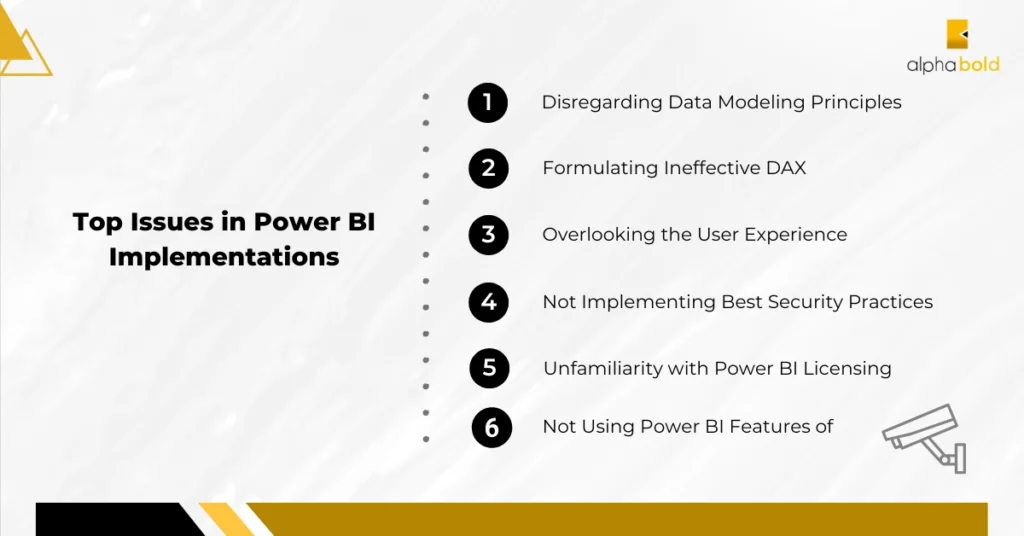
Deprioritizing data modeling principles is the first common mistake a developer might make while starting with Power BI. Every Power BI project is based on a well-structured data model, improving your reports’ precision and efficiency. Failure to abide by these guidelines may result in inaccurate reporting and data interpretations.

Disregarding Data Modeling Principles:

Deprioritizing data modeling principles is the first common mistake a developer might make while starting with Power BI. Every Power BI project is based on a well-structured data model, improving your reports’ precision and efficiency. Failure to abide by these guidelines may result in inaccurate reporting and data interpretations.

Formulating Ineffective DAX:

The foundation of Power BI is Data Analysis Expressions (DAX), which allow for extensive computations and data manipulation. However, creating inefficient DAX formulae can hurt performance and provide inaccurate results.

Overlooking the User Experience:

A design that is easy to use is essential for efficient reporting. One mistake developers tend to make is focusing on the data and neglecting the end users. Users will become frustrated and engage less if a complex layout or reports are hard to understand.

Not Using the Features of Power BI:

Power BI has several strong features, such as a large range of visualization choices and Power Query for data manipulation. The platform now includes Copilot-powered DAX generation, Azure Maps with customizable markers, auto-expanding matrix columns, modern visual tooltips (now GA), and Dataflows Gen2 for enterprise-scale pipelines. Despite this, developers frequently fail to fully utilize these elements, which restricts the capabilities and usefulness of their reports.

Not Implementing Best Security Practices:

One cannot stress how crucial data security is to any business intelligence tool. Neglecting to set up row-level security or disclosing private information irresponsibly might result in data breaches and expensive fines. The January 2026 phishing campaign exploiting Power BI’s subscription feature is a sobering reminder: even trusted Microsoft infrastructure can be weaponized. Organizations need BI governance frameworks that cover subscription auditing, access controls, and user training—not just row-level security.

Unfamiliarity with Power BI Licensing:

Unfamiliarity with Power BI licensing can be a hidden cost drain. Complex licensing structures and evolving regulations can lead to overspending, underutilization, and even compliance risks. Microsoft recently adjusted Power BI Pro pricing and introduced Org Apps in preview for Pro license mode (allowing multiple customized app experiences per workspace), making licensing optimization even more important. Avoid these pitfalls by partnering with Power BI experts who can tailor a cost-effective solution and ensure you get the most out of your investment.

Compare top data visualization tools: Power BI vs. Tableau- Which Data Visualization Tool is Right?

Ignoring Deprecations and Platform Shifts:

This challenge has become critical heading into 2026. With PBIR becoming the only supported report format (GA planned Q3 2026), the Q&A feature retiring in December 2026, embedded R/Python visuals losing PaaS support in May 2026, and Bing Maps already replaced by Azure Maps—organizations that don’t track these changes risk broken reports, compliance gaps, and avoidable downtime. A consulting partner keeps you ahead of the curve.

Why Should You Hire Third-Party Power-BI Consultants?

Let’s look at a surprising reality: many businesses are struggling through major BI illiteracy, and the healthcare industry, specifically, has 97% of data that goes unutilized, i.e wasted. This unutilized data could be a goldmine of insights to help your organization tap into new markets and reach new heights. Answer the following questions:

  1. Are your convoluted data sets difficult for you to understand?
  2. Do you have trouble making data-driven decisions and deriving insightful conclusions?
  3. Finally, can you expand your data analytics processes as your organization grows?

If any of these questions are answered NO, you may have some tough sailing ahead of you.

Why are more than half of businesses hiring external consultants using the data-driven model? Working with a Power BI consultant has several benefits over creating an internal team from the ground up and paying employees.

  1. Address the Talent Gap: To create an internal team, you need workers certified in Power BI and with relevant experience. You need to either teach your current staff or bring in expertise. For every firm, hiring and training new employees is costly and time-consuming. Partnering with Power BI consulting firms with the required expertise and abilities is easier. The consultants have more expertise and comprehension of integrating Power BI into your company and tuning it to your unique needs because they work with various teams and enterprises. With over 63% of organizations reporting talent shortages in big data roles, this gap is only widening.
  2. Better Performance: Your company’s current teams won’t be affected. Power BI specialists will work simultaneously to avoid hampered or delayed projects. This increases both the productivity and operational efficiency of your business. To save work hours, the modifications to your company procedures will be implemented smoothly. Bringing in offshore Power BI consultants provides new ideas, creativity, processes, and frameworks without using more resources. Additionally, the consultant will teach the staff how to generate reports and analyze data using Power BI.
  3. Data-Driven Outcomes: Selecting a Power BI implementation partner is predominantly based on using digital transformation to provide data-driven business results. The professionals are skilled in integrating systems, upgrading and replacing existing ones, and swiftly establishing new integrations.
  4. Advanced Analytics & Artificial Intelligence: Some believe Microsoft Power BI to be an addition to MS Excel. However, it is far more than just a spreadsheet. Although staff are trained to create reports using the dashboard, sophisticated analytics requires subject expertise to perform. Power BI consultants can provide AI and ML-based analytics like sentiment assessment, cluster analysis, big data analysis, predictive analysis, and so forth by utilizing open-source programming languages like Python and R. Note: Microsoft is deprecating embedded R and Python visuals in PaaS scenarios by May 2026. A good consultant will transition affected reports to alternative visuals, DAX-based analytics, or Fabric Notebooks before the cutoff. 

Are you a C-Suite leader wanting to explore Power BI AI capabilities further, and what competitive advantage do they bring to companies? Dive into our blog post: AI-Driven Predictive Analytics Via Power BI Insights.

  1. A competitive advantage: A company that does not leverage analytics will struggle to compete with another that makes decisions based on data and analytical reports. Small and medium-sized businesses can compete with larger corporations if they collaborate with Power BI experts to streamline their decision-making. Making the most of market possibilities and being proactive rather than reactive requires being one step ahead of rivals. By using predictive analytics, you can boost ROI and get your company ready to withstand turbulent market conditions.
  2. Resource optimization and cost-effectiveness: Companies already spend a significant amount of money on operating capital and sales. Putting together internal Power BI teams could increase expenses even further. Collaborating with a consultant is an economical approach that yields amplified benefits. These consultants are skilled at making the maximum use of the resources available to them while still coming up with a workable solution.
  3. Customization, Scalability, and Flexibility: A company’s operations are never static. A company that starts small will eventually become a medium-sized company, and a medium-sized company will become a major corporation. Every time the company grows, you shouldn’t have to start over. Scaling the platform and processes to meet business objectives is simple when you work with a Power BI expert. To make it easier for your company to expand into new areas, the consultants will build a Power BI dashboard that is both scalable and adaptable. One other feature that sets Power BI apart is customization. Any industry, including banking, manufacturing, hospitality, entertainment, etc., can have its software package tailored to match its needs. With Power BI now deeply integrated into Microsoft Fabric, scalability extends beyond dashboards—consultants can architect your entire data foundation using lakehouses, Dataflows Gen2, and Real-Time Intelligence within one unified platform. 
  4. Support Services: Think of your Power BI consultants as a managed service provider for BI and data analytics services. These consultancy firms have verified certifications and affiliations for third-party implementation or integrations.
  5. Copilot & AI Readiness: Copilot is now woven into every corner of the Power BI experience. But rolling it out effectively requires prompt governance standards, AI validation workflows, approved semantic model configurations, and user training. A consulting partner handles this setup so your teams get reliable AI-driven insights from day one. Learn more about AlphaBOLD’s approach to AI-powered insights in Power BI

Go Beyond Power BI Implementation with AlphaBOLD!

Don't just implement; transform with AlphaBOLD. We will guide you through your transformation, meticulously aligning each step with your strategic goals and ensuring sustainable growth.

Request a Demo

The ROI of Consulting Expertise in Power BI Implementations

Diving into the world of business intelligence with third-party consultants, especially when implementing Power BI, isn’t just a smart move – it’s profitable. Imagine getting multifold of what you invested initially!

“Unsurprisingly, businesses that embraced BI solutions have witnessed an exhilarating 127% ROI within 3 years only.” – Tableau.

Here are some research statistics and studies that will clear out any confusion against hiring a power BI consultant:

Forrester found that businesses that used Microsoft Power BI for business intelligence received a 366% return on investment after three years when they established data-driven cultures. According to this Forrester Consulting-commissioned survey, 63 businesses said their analytics had improved after switching to Power BI. By using Power BI, these companies were able to realize observable business benefits like:

  • A 6 percent faster solution quotation rate.
  • A 5 percent boost in operational income.
  • Cutting the 18-month time-to-market for new goods and services down to 10 months.
  • Self-service saved each BI user 125 hours annually.
  • 42% decrease in the centralized analytics team’s work.

These ROI figures continue to hold up across industries. With the addition of Copilot and Fabric capabilities, organizations adopting Power BI in 2025–2026 are seeing even faster time-to-insight and reduced dependency on specialized developers for routine reporting.

How to Choose the Right Power BI Implementation Partner?

Selecting a Power BI implementation partner requires extensive consideration and diligence. Business leaders should leverage a systematic approach while finding the right partner because it’s necessary for them to be aligned with the company’s objectives.

To guide your vendor selection process, we have put together a list that will help you check the most important boxes:

1. Clarifying the Needs and Goals of the Business:

Business leaders must be very clear about their data requirements and business objectives before assessing possible Power BI implementation partners. The relationship will progress smoothly if both parties know the precise insights you hope to obtain from Power BI and the key performance indicators (KPIs) you want to monitor. A clear set of goals guarantees that the partner can provide a solution that fits the company’s particular requirements.

2. Carrying Out Extensive Research:

Company leaders should conduct in-depth research to identify possible partners for the implementation of Power BI. Seek partners with a solid track record of successfully implementing BI projects, a favorable customer review history, and a high reputation. Case studies and endorsements from prior customers provide insightful information about the partner’s talents and the results they can deliver.

3. Asking for Verification:

Request a proof of concept (POC) from the selected suppliers to evaluate their technical proficiency. Through a proof of concept, your company can determine how well the partner’s suggested solutions fit its goals and data needs. It also offers an opportunity to assess how the partner approaches data visualization and problem-solving.

4. Assessing Cooperation and Communication:

Collaboration and effective communication are essential elements of a successful relationship. Evaluate how potential partners answer questions, offer details, and present their suggested solutions. A collaborative partner receptive to inquiries and constructive criticism will likely cultivate a successful working connection.

5. Evaluating AI & Fabric Readiness:

In 2026, it’s no longer enough for a partner to build dashboards. Evaluate whether they can help you adopt Copilot with proper governance, migrate to Microsoft Fabric, handle PBIR format transitions, manage upcoming deprecations, and implement BI security governance against threats like the recent subscription phishing campaign. AlphaBOLD’s Power BI 2026 updates guide breaks down exactly what’s changing and how to prepare.

Chart a New Course with AlphaBOLD!

Start building your personalized Power BI solutions by speaking with one of our experts if you want to use Power BI to improve data visualization and get a competitive edge in your industry.

Request a Demo

Get Started with AlphaBOLD’s Power BI Expertise!

The consulting expertise in Power BI implementations provided by AlphaBOLD’s Power BI experts allows businesses to design and implement cutting-edge visualizations. These well-constructed visuals open the door to well-informed, data-driven decision-making processes by transforming complex data into understandable, practical insights.

We believe that Power BI empowers every department of the organization. Therefore, we have Power BI expertise and specific solutions for pain points of every department:

  • Power BI for CFOs and Finance Departments
  • Data Visualization for CEOs and Executives
  • Power BI for IT Professionals
  • Power BI for Sales Professionals

Visit our website to further explore our Power BI Consultant services.

Conclusion

It’s time to go beyond generic reports and unlock operational efficiency for you and your team by creating customized Power BI solutions. With scalable Power BI solutions, Power BI consultants can help businesses embrace growth without being constrained by data limits. The organization’s strategy becomes centered on data-driven decision-making, which boosts productivity and increases adaptability to market fluctuations.

All you have to do is look for a reliable partner with consulting expertise in Power BI implementations, like AlphaBOLD, which enables firms to make well-informed decisions based on precise and up-to-date data insights. And with the pace at which Microsoft is evolving Power BI in 2026—from Copilot and Fabric integration to PBIR, deprecations, and emerging security threats—having an expert partner isn’t just convenient, it’s essential.

Frequently Asked Questions (FAQs)

What does a Power BI consultant actually do?

A Power BI consultant designs data models, builds interactive dashboards, configures data pipelines, sets up security and governance, and trains your team. They handle everything from connecting your data sources to delivering polished reports—so your internal teams can focus on their core work.

How much does it cost to hire a Power BI consulting firm?

Costs vary based on project scope, complexity, and engagement model. Some firms offer fixed-price projects; others work on a pay-as-you-go or retainer basis. In most cases, consulting is significantly cheaper than building and maintaining a full internal BI team when you factor in recruiting, training, licensing, and ongoing skill development.

What is Microsoft Fabric, and how does it relate to Power BI?

Microsoft Fabric is a unified analytics platform that brings together Power BI, Data Factory, Synapse, and Real-Time Intelligence into a single SaaS environment. Power BI is the reporting and visualization layer within Fabric. AlphaBOLD offers dedicated Microsoft Fabric consulting services to help you make that transition.

What is Copilot in Power BI, and should I be using it?

Copilot is Microsoft’s AI assistant embedded in Power BI. It generates DAX formulas, creates report pages from natural language, summarizes datasets, and answers questions about your data. As of January 2026, it’s available across desktop, web, and mobile with a standalone entry point on the Home screen. To get the most out of it, you’ll need proper governance—approved semantic models, prompt standards, and validation workflows.


What is PBIR and why does it matter?

PBIR (Power BI Enhanced Report Format) is the new default report format as of January 2026. It enables Git-based version control, CI/CD pipelines, and collaborative development. General Availability is planned for Q3 2026, after which it will be the only supported format. Organizations should prepare for this migration now to avoid disruptions.

What Power BI features are being deprecated in 2025–2026?

Key deprecations include: Q&A retiring December 2026 (replaced by Copilot), R/Python embedded visuals in PaaS losing support May 2026, Bing Maps replaced by Azure Maps, old Excel/CSV import deprecated, SSRS SharePoint Webpart ending April 2026, and Metric Sets replaced by Scorecards. Read AlphaBOLD’s Power BI 2026 Updates guide for the full breakdown.

How long does a typical Power BI implementation take?

A focused dashboard project might take 4–6 weeks. A full enterprise rollout with data modeling, governance, Fabric integration, and Copilot configuration can take 3–6 months. Your consulting partner should provide a phased roadmap based on your specific situation.

Can Power BI integrate with non-Microsoft tools?

Absolutely. Power BI connects to hundreds of data sources including Salesforce, Google Analytics, SAP, Oracle, PostgreSQL, REST APIs, and more. With custom connectors and Power Automate, you can integrate virtually any system into your reporting environment.

What industries benefit most from Power BI consulting?

Power BI is industry-agnostic, but consulting expertise is especially valuable in healthcare, manufacturing, finance, retail, and professional services—industries where data volumes are high, compliance requirements are strict, and the cost of bad decisions is significant.

Is there a security risk with Power BI subscriptions?

Yes. In early 2026, scammers exploited Power BI’s subscription feature to send phishing emails from Microsoft’s legitimate [email protected] address. These emails bypass standard email security filters. Organizations should audit subscription settings, implement BI governance frameworks, and train users to recognize suspicious notifications—a consulting partner can set this up for you.

Explore Recent Blog Posts

Infographics show the 2021 MSUS Partner Award winner

Related Posts