AI in CRM: Exploring Microsoft Dynamics 365 Benefits
- Updated: October 27, 2026

Table of Contents
Quick Answer: What Are the Benefits of AI in CRM?
AI in CRM helps businesses analyze customer behavior, prioritize sales opportunities, personalize engagement, and improve service operations. Microsoft Dynamics 365 supports these capabilities through predictive analytics, Microsoft Copilot, and AI agents across Sales, Customer Service, and Customer Insights. By combining AI with connected customer data and defined workflows, organizations can reduce repetitive tasks, improve decision-making, and deliver more relevant customer experiences.
Introduction
CRM systems have evolved from databases for storing customer information into platforms that support intelligent decision-making. Businesses now expect their CRM solutions to identify opportunities, recommend actions, and help employees respond to customer needs more effectively.
This shift is accelerating as artificial intelligence becomes embedded in sales, marketing, and customer service processes. However, implementing AI in CRM involves more than enabling automated features. Organizations must determine which capabilities address their operational challenges, whether their customer data is reliable, and how to measure improvements.
The market opportunity is significant. Gartner’s September 2026 research on agentic AI in CRM identifies a potential $109 billion opportunity by 2030 as AI agents increasingly coordinate customer-facing processes. The research emphasizes the importance of customer context and control over complex workflows. This estimate reflects a potential market opportunity rather than guaranteed returns for individual businesses.
Microsoft Dynamics 365 provides several approaches to applying AI within CRM processes. Understanding these capabilities and their implementation requirements helps organizations develop realistic strategies for improving customer engagement, sales performance, and operational efficiency.
What Is AI in CRM and How Does It Work?
AI in customer relationship management refers to the use of machine learning, predictive models, generative AI, and intelligent automation to analyze CRM data and support customer-facing activities.
Traditional CRM systems organize customer information and track business interactions. AI extends these capabilities by identifying patterns, generating recommendations, and assisting with tasks that would otherwise require manual effort.
Predictive AI, Generative AI, and Agentic AI
Three approaches play distinct roles in modern CRM systems:
- Predictive AI: Analyzes historical information to estimate outcomes, such as lead qualification probability, opportunity conversion likelihood, or future sales performance.
- Generative AI: Creates summaries, drafts customer communications, and helps employees interpret information using natural-language interactions.
- Agentic AI: Performs defined activities within business workflows, including researching leads, preparing outreach, and assisting with case management.

These technologies serve different purposes. Predictive AI helps employees understand what may happen, generative AI supports how they work, and AI agents can execute selected tasks under configured permissions.
Their effectiveness depends on accurate customer records, suitable integrations, and clear business rules.
How Microsoft Dynamics 365 Uses AI to Improve CRM
Microsoft Dynamics 365 incorporates AI into multiple business applications, allowing organizations to use intelligent capabilities within existing customer-facing workflows.
Rather than relying on one universal AI tool, the platform provides functionality suited to different business processes.
- Dynamics 365 Sales supports opportunity management, predictive scoring, seller assistance, and selected AI-driven qualification workflows.
- Dynamics 365 Customer Service provides capabilities for case summarization, knowledge assistance, customer interaction management, and service automation.
- Dynamics 365 Customer Insights supports customer data unification, audience segmentation, personalized communications, and journey orchestration.

Microsoft Dataverse provides a shared data foundation for many Dynamics 365 applications, helping businesses manage customer information across connected processes. Microsoft Copilot and purpose-built AI agents extend these capabilities by supporting natural-language interactions and defined business activities.
However, organizations should distinguish between features included in their existing Dynamics 365 applications and capabilities that require additional licensing, configuration, or capacity. The most effective approach begins with a specific business requirement. For example, a sales organization may prioritize lead qualification, while a customer service department may focus on reducing case handling effort.
Further Reading: Top Microsoft Dynamics 365 AI Features for Business Intelligence
AI Agents in Dynamics 365: From Assistance to Automation
AI agents represent an important development in how businesses use CRM systems. While traditional Copilot experiences primarily help employees retrieve information, generate content, and complete tasks, AI agents can perform defined sequences of activities with varying levels of autonomy. In Microsoft Dynamics 365, these capabilities can support processes such as lead qualification, customer engagement, and service case management.
AI Agents for Sales and Customer Service
Microsoft’s Sales Qualification Agent provides an example of agent-assisted sales operations. The agent supports two modes:
- Research-only mode: Researches assigned leads, evaluates their fit against a target customer profile, and drafts initial outreach emails for sellers to review.
- Research and engage mode: Extends these capabilities by conducting configured email outreach, evaluating responses, and handing suitable leads to sellers based on defined criteria.
This distinction allows organizations to choose between assistance and greater automation according to their operational requirements. Dynamics 365 customer service capabilities also include purpose-built agents for case management, customer intent identification, knowledge management, and quality evaluation. For example, a configured service workflow may identify a customer’s request, retrieve relevant information, prepare a response, and involve a representative when human review is required.
These capabilities do not eliminate the need for oversight. Businesses must define what agents can access, which actions they can perform, and when employees should intervene. Sales Qualification Agent also requires specific setup, permissions, and supported configurations. Organizations should verify the availability and licensing requirements of each agent before deployment.
Further Reading: AI-First Selling at Scale: Microsoft AI Accelerator for Sales
Personalizing Customer Experiences with Dynamics 365 Customer Insights
Personalization is one of the most practical applications of AI in CRM. However, relevant customer engagement depends on having an accurate understanding of customer preferences, interactions, and behavior. Microsoft Dynamics 365 Customer Insights supports this process through two applications with distinct responsibilities.
Customer Insights - Data: Building Unified Customer Profiles
Customer Insights – Data helps businesses bring customer information together from multiple systems. Through data ingestion, identity matching, and profile unification, organizations can develop a more complete view of individual customers. For example, a retailer may combine purchase history, loyalty data, and customer service interactions to improve its understanding of the audience. The accuracy of these profiles depends on the quality of the source data, the matching rules, and the refresh configurations. Not every connected data source updates continuously or in real time.
Customer Insights - Journeys: Delivering Relevant Engagement
Customer Insights – Journeys helps organizations use customer information to create targeted audiences and coordinate communications. Its AI-assisted capabilities can support natural-language segment creation, email content development, and journey planning. A business might identify customers who recently purchased a particular product and create a follow-up journey with relevant recommendations or support information.
The value comes from combining meaningful customer segments with appropriate communication timing and preferences. Businesses should also account for consent requirements and ensure their journeys follow applicable privacy policies.
Further Reading: Leveraging AI in Dynamics 365 Customer Insights and Journeys
How AI Improves Customer Service with Dynamics 365
Customer service representatives frequently work across multiple systems to understand customer history, review previous interactions, and locate relevant information. AI-powered CRM capabilities can reduce this administrative effort by making customer context and service knowledge easier to access. Microsoft Dynamics 365 Customer Service provides Copilot-assisted functionality that can help representatives summarize cases, draft responses, and locate relevant knowledge.
AI-enabled workflows may also assist with identifying customer intent, updating case information, and coordinating work according to defined service processes. The practical benefit is that representatives can spend less time reconstructing customer history and more time resolving issues.
Real-World Example: AlphaBOLD and Avelo Airlines
AlphaBOLD’s implementation for Avelo Airlines demonstrates how connected customer service technology can support high-volume operations. The project involved implementing Microsoft Dynamics 365 Contact Center to bring voice, chat, web-form cases, and case management into a unified environment.
The solution also incorporated AI-assisted service capabilities, automated workflows, customer data integration, and centralized knowledge management.
According to AlphaBOLD’s published case study, the production environment supports more than 1,000 customer calls daily across over 70 users. This implementation demonstrates the operational scale of a connected, AI-assisted service platform. The published figures do not establish a specific percentage improvement attributable to AI.

Make Customer Service AI Work for Your Business
AI-powered customer service requires more than automation. AlphaBOLD helps organizations assess their Dynamics 365 environments, connect customer information, and identify opportunities to improve service workflows through Copilot and intelligent automation.
Request a ConsultationAI-Powered Sales Forecasting and Pipeline Management
Sales forecasting requires accurate opportunity information, consistent pipeline management, and a reliable understanding of historical performance. AI in Microsoft Dynamics 365 Sales can support these activities by identifying patterns in CRM records and helping sales teams prioritize opportunities.
Predictive Analytics and AI Recommendations in Dynamics 365
Dynamics 365 Sales offers several predictive capabilities, each addressing a different business requirement.
- Predictive lead scoring estimates the likelihood that a lead will qualify based on historical data and relevant attributes.
- Predictive opportunity scoring helps sales teams assess the likelihood of opportunities closing successfully.
- Predictive forecasting uses available historical sales and pipeline information to estimate future revenue outcomes.
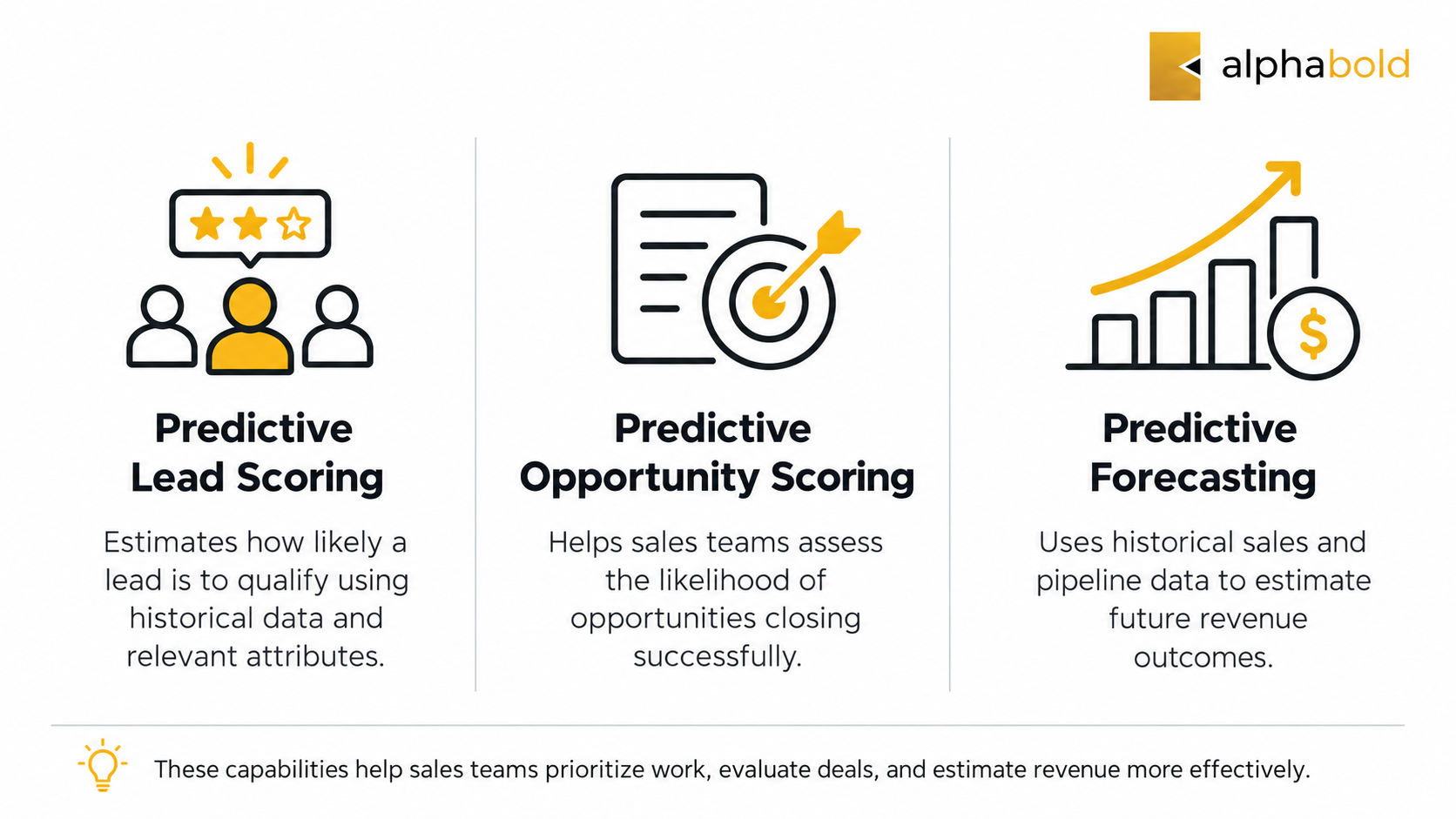
These capabilities should not be confused with ordinary pipeline reporting or generative AI summaries. Microsoft documents minimum historical-data requirements for predictive scoring. A lead scoring model generally requires at least 40 qualified and 40 disqualified leads, while an opportunity scoring model requires at least 40 won and 40 lost opportunities within the applicable training period.
Organizations must also meet the relevant licensing and feature configuration requirements. Predictive insights can help sales teams identify opportunities needing attention, but a high score does not guarantee a successful sale. To evaluate their effectiveness, businesses should monitor forecast accuracy, opportunity progression, sales-cycle duration, and the quality of underlying CRM records.
How AI in CRM Improves Business Outcomes
The benefits of AI-powered CRM depend on how effectively businesses apply its capabilities to existing processes. A successful implementation should solve identifiable operational problems and produce outcomes that can be measured against a baseline.
Improving Sales Productivity
AI-assisted lead qualification and predictive scoring can help sales representatives prioritize relevant opportunities and reduce time spent researching prospects. Businesses can evaluate results by tracking lead qualification time, opportunity progression, and sales-cycle duration.
Supporting More Efficient Customer Service
Case summaries, knowledge assistance, and automated workflows can reduce repetitive administrative tasks. Relevant metrics include average handling time, first-contact resolution, escalation rates, and customer satisfaction.
Enabling More Relevant Customer Engagement
Customer data unification and AI-assisted segmentation can help marketing teams design communications around customer interests and previous interactions. Organizations can measure campaign engagement, journey conversions, and customer response patterns.
Strengthening Operational Decision-Making
AI can make patterns in CRM data easier to identify, helping managers review performance and investigate potential issues. However, improvements should be assessed using reliable measurements rather than assuming that enabling AI automatically increases revenue or reduces costs. A practical evaluation starts by documenting existing performance, selecting measurable objectives, and monitoring results after implementation.
What Businesses Need to Consider Before Implementing AI in CRM
Implementing AI successfully requires preparation beyond selecting a platform feature. Organizations should evaluate the following areas before introducing advanced AI capabilities into their CRM environments.

1. Customer Data Quality
Incomplete records, duplicate customer profiles, and inconsistent sales information can limit the reliability of AI outputs.
Businesses should establish data ownership, improve record quality, and identify authoritative data sources before deployment.
2. Integration and System Readiness
AI features often depend on information stored across CRM applications, communication systems, and other enterprise platforms.
Organizations need to assess how these systems exchange information and whether existing integrations support the intended workflows.
3. Security, Privacy, and Governance
AI-assisted processes must respect user permissions, data access policies, and customer privacy requirements.
Autonomous agents require additional controls around the actions they can perform, including escalation procedures and human approval where appropriate.
4. Licensing and Feature Availability
Not all Microsoft Dynamics 365 AI capabilities are included in every subscription.
Some features require additional licensing, Copilot Studio capacity, administrative configuration, or specific regional availability.
Businesses should also distinguish generally available functionality from preview capabilities.
5. Employee Adoption and Performance Measurement
Employees need to understand how AI fits into their responsibilities, when to trust recommendations, and how to identify incorrect outputs.
Organizations should establish success metrics, provide training, and review performance regularly.
Further Reading: Top AI Implementation Challenges and How to Solve Them
Build an AI-Ready CRM Strategy with Dynamics 365
An effective AI-powered CRM strategy starts with identifying where better customer information, intelligent assistance, or workflow automation can produce measurable improvements. Businesses should evaluate their existing Dynamics 365 environment, prioritize use cases, assess implementation requirements, and establish clear performance indicators before scaling AI adoption.
As a Microsoft Dynamics 365 implementation partner, AlphaBOLD helps organizations modernize customer-facing operations through CRM implementation, integration, optimization, and intelligent automation. Its experience includes connecting service channels, improving customer data accessibility, and delivering production-ready Dynamics 365 solutions.
The objective is not to introduce AI into every process. It is to identify the activities where AI can create practical value while maintaining operational control.
Build Your AI-Ready Dynamics 365 Roadmap with AlphaBOLD
Whether you are exploring AI agents, improving CRM data readiness, or evaluating predictive capabilities, AlphaBOLD can help assess your existing environment and develop a practical implementation strategy aligned with your business priorities.
Request a ConsultationConclusion
AI in CRM is changing how organizations manage customer information, prioritize opportunities, and coordinate customer-facing activities.
Microsoft Dynamics 365 provides capabilities ranging from predictive analytics and Copilot assistance to task-focused AI agents. However, realizing their value requires reliable data, appropriate configuration, responsible governance, and measurable business objectives.
Organizations that approach AI adoption through clearly defined workflows and practical implementation strategies will be better positioned to improve customer experiences and operational efficiency.
FAQs
Microsoft Dynamics 365 provides AI capabilities across Sales, Customer Service, and Customer Insights. Depending on the application and licensing, these include Copilot assistance, predictive scoring, customer segmentation, content generation, and purpose-built AI agents.
Yes. Supported AI agents can perform activities such as researching leads, preparing outreach, and assisting with case management. Their level of autonomy depends on configuration, permissions, and the specific agent.
Some AI capabilities are included with eligible Dynamics 365 subscriptions, while others require additional licensing or capacity. Businesses should review Microsoft’s current licensing documentation before implementation.
AI-powered CRM requires reliable customer records, consistent business data, appropriate permissions, and suitable integrations. Predictive capabilities also require sufficient historical data to develop and evaluate models.
Explore Recent Blog Posts