Microsoft Fabric and Power BI: How Fabric Builds the Data Foundation for AI-Ready Analytics

Table of Contents
Introduction
Most Power BI deployments follow a common pattern: capable reports sitting atop fragile data infrastructure. Analysts spend more time reconciling numbers across systems than explaining what those numbers mean. Dashboards update with a delay. And when leadership asks for a new metric, IT raises a three-week backlog.
This isn’t a Power BI problem. It’s a data foundation problem.
Delayed reporting, inconsistent KPIs, and disconnected governance models make it harder for leadership teams to trust analytics during operational and financial decision-making.
Microsoft Fabric changes that equation. Instead of layering more tools on top of existing complexity, Fabric rebuilds the foundation, giving Power BI a unified, governed, and AI-ready data platform to operate from.
This blog explores how Microsoft Fabric and Power BI integration work in practice, why enterprises are consolidating fragmented analytics environments into OneLake, and what organizations should consider when building a scalable, AI-ready analytics architecture.
Understanding the Power BI and Microsoft Fabric integration isn’t just a technical exercise; it’s a strategic decision about how your organization produces and acts on insight.
Why Do Enterprise Analytics Environments Break Down Without a Shared Data Foundation?
Enterprise data environments accumulate infrastructure the way legacy systems accumulate technical debt, gradually, until the weight becomes undeniable. A data warehouse here, a data lake there, a handful of ETL pipelines managed by different teams, and a set of Power BI reports pulling from all of it with varying degrees of confidence.
The result is predictable: report inconsistencies that erode executive trust, governance gaps that complicate compliance, and an inability to scale analytics without scaling the complexity beneath it.
What organizations actually need is a single, coherent layer for ingesting, storing, transforming, and serving data, with Power BI connecting without the overhead of managing the infrastructure.
What Microsoft Fabric Actually Is?
Microsoft Fabric is an end-to-end analytics platform that unifies data engineering, data warehousing, real-time intelligence, data science, and business intelligence under a single SaaS experience. It is not a rebrand of existing tools. It is a redesign of how those capabilities connect within a governed analytics ecosystem.
The key components relevant to enterprise analytics teams include:
- OneLake: A single, tenant-wide data lake that eliminates redundant storage across tools and teams. All Fabric workloads read from and write to OneLake by default.
- Data Factory: Low-code pipelines for data integration and transformation that reduce dependence on fragmented ETL toolchains.
- Synapse Data Warehouse and Lakehouse: Flexible compute for structured and semi-structured data with shared governance built into the architecture.
- Real-Time Intelligence: Event-driven analytics for operational data streams, including IoT, telemetry, and transactional systems.
- Power BI: The reporting and visualization layer, now deeply integrated into Microsoft Fabric architecture instead of operating as a disconnected endpoint.
- Microsoft Purview: Governance, lineage tracking, and sensitivity labeling applied consistently across analytics and AI workloads.

For enterprise teams, this reduces the overhead of managing separate analytics platforms while improving consistency across reporting, governance, and AI operations.
Each of these capabilities shares the same identity layer, governance model, and storage foundation. That consistency is what makes Microsoft Fabric different from a collection of loosely connected analytics tools.
You may also like: Microsoft Fabric Data Agents Explained: Features, Use Cases & Setup
How Power BI and Microsoft Fabric Integration Work in Practice
Power BI has always depended on what sits beneath it. Reports are only as trustworthy as the data behind them. With Microsoft Fabric, that dependency becomes an advantage instead of a liability.
Direct Lake Mode:
One of the most important capabilities in Microsoft Fabric and Power BI integration is Direct Lake mode. Instead of importing data into Power BI or querying a live connection with each interaction, Power BI reads directly from OneLake Delta tables.
This allows reports to reflect current data without the performance penalties of DirectQuery or the freshness delays of scheduled imports.
For organizations struggling to balance dashboard performance against data currency, this represents a meaningful operational improvement.
In manufacturing environments, this can reduce the time lag between shop-floor telemetry ingestion and executive production reporting. In finance, it improves confidence in real-time intelligence, forecasting, and operational dashboards.
You may also like: Direct Lake Meets Databricks: Real-Time Analytics in in Fabric
Improve Power BI performance without rebuilding your reporting environment
AlphaBOLD helps organizations modernize analytics architecture using Microsoft Fabric, OneLake, and governed semantic models.
Request a ConsultationUnified Semantic Models:
Microsoft Fabric enables shared semantic models: a single, governed definition of key business metrics that reporting and AI workloads can consume consistently.
Instead of each department maintaining its own Power BI dataset and calculation logic, the organization works from a shared analytical foundation.
In practice, this means a revenue figure in a finance report matches the revenue figure in an executive dashboard, which also matches the revenue figure returned through a Copilot query. Achieving that level of consistency is difficult when semantic logic is distributed across disconnected datasets.
Copilot and AI-Assisted Analytics:
Microsoft Copilot integration in Fabric and Power BI allows users to query data in natural language, generate DAX measures, summarize report content, and identify anomalies, all grounded in governed data stored within OneLake.
The quality of those AI interactions depends entirely on the quality and structure of the underlying data foundation.
This is why AI-ready analytics require more than AI tooling alone. Copilot responses are only as reliable as the governance, semantic consistency, and data architecture beneath them.
Before and After: What Changes with Microsoft Fabric
| Role | Before Microsoft Fabric | After Microsoft Fabric |
|---|---|---|
|
Data pipelines |
Siloed ETL tools with fragmented ownership |
Unified pipelines within one governed workspace |
|
Storage |
Multiple warehouses with duplication risk |
OneLake as a centralized source of truth |
|
Power BI reports |
Connected to inconsistent datasets |
Direct Lake mode with current, high-performance reporting |
|
AI workloads |
Separate Azure ML environments |
Native Copilot and Azure AI integration |
|
Governance |
Manual policies across multiple platforms |
Microsoft Purview applied consistently |
|
Analytics ownership |
Split across BI, engineering, and IT teams |
Shared governance and centralized analytics operations |
What Implementation Actually Requires
The business case for Microsoft Fabric is relatively straightforward. The implementation path requires a realistic assessment of the organization’s current analytics environment.
In most Microsoft Fabric implementation projects, the early work involves:
- Inventory and rationalization: Identifying existing data sources, storage environments, and Power BI report dependencies.
- OneLake architecture design: Defining workspace structures, medallion architecture approaches, and access patterns before migrating workloads.
- Semantic model consolidation: Determining which datasets should become shared enterprise semantic models and what governance policies should apply.
- Capacity planning: Microsoft Fabric operates on F-SKU capacity. Proper sizing for interactive reports, real-time workloads, and batch processing directly affects cost and performance.
- Governance and security alignment: Mapping role-based access controls, compliance requirements, and sensitivity labels into a Purview-governed environment.
Organizations that treat Microsoft Fabric implementation as a simple lift-and-shift exercise often underachieve on the platform. The value comes from redesigning the analytics foundation rather than replicating legacy complexity in a new environment.
This is where implementation planning becomes critical. Architectural decisions made early in a Fabric deployment directly affect scalability, governance maturity, and long-term operating cost.
You may also like: Microsoft Fabric OneLake: Simplify Data Integration
Why Are Enterprises Shifting from Traditional Reporting to AI-Ready Analytics?
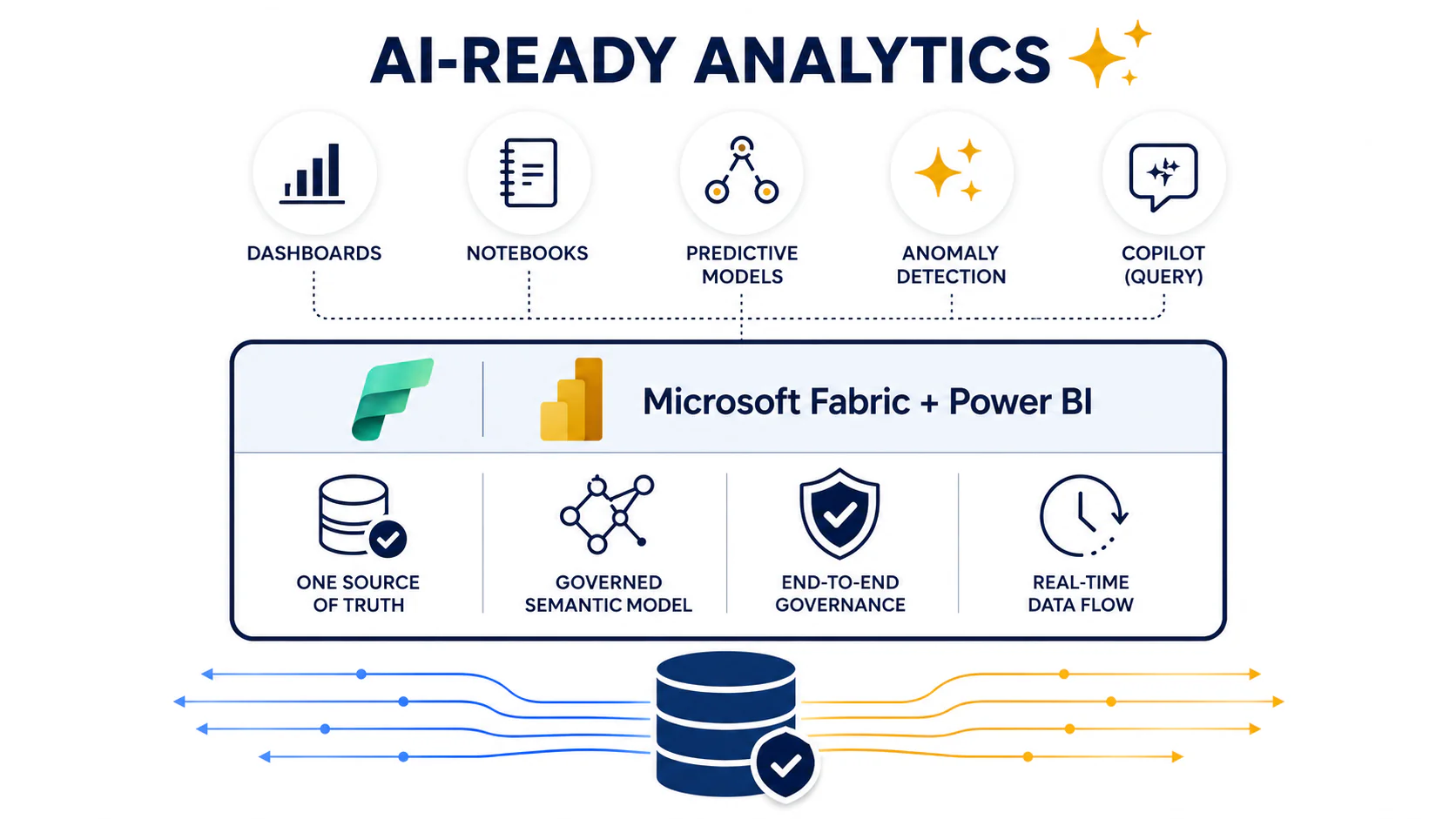
The phrase “AI-ready analytics” is often used loosely. In the context of Microsoft Fabric and Power BI, it has a more specific meaning. The infrastructure is designed so AI workloads, whether Copilot queries, predictive models, or automated anomaly detection, can operate on governed, current data without requiring separate preparation pipelines.
Most organizations are still operating with fragmented analytics environments. Common challenges include:
- Data science teams working in separate environments from BI and reporting teams
- AI experiments running on copied or isolated production datasets
- Governance policies stop at the dashboard layer instead of extending into notebooks, semantic models, and machine learning workflows
- Inconsistent business definitions across reporting and AI systems
- Delays caused by moving data between disconnected analytics platforms
Microsoft Fabric addresses these issues by creating a unified analytics architecture.
Key changes introduced through Microsoft Fabric include:
- Shared OneLake foundation: The same OneLake environment serving Power BI reports also supports Azure AI workloads and analytics processing.
- Unified governance: Governance policies applied to dashboards also extend to notebooks, machine learning models, and semantic layers through Microsoft Purview.
- Consistent semantic models: The same business definitions used in reporting also shape AI-generated insights and Copilot responses.
- Centralized analytics operations: Reporting, governance, engineering, and AI workloads run on a connected platform rather than in isolated environments.
Organizations that centralize analytics and governance are better positioned to operationalize AI across finance, operations, customer service, and supply chain workflows.
That architectural consistency is what separates organizations with isolated AI features from organizations with AI-capable operations.
Ready to Build Your AI-Ready Data Foundation?
If your organization is evaluating Microsoft Fabric or looking to strengthen the connection between your data infrastructure and Power BI, AlphaBOLD's consulting team can help you assess your current environment, design and implementation approach, and deliver a foundation built for scale.
Request a ConsultationConclusion
The value of Microsoft Fabric and Power BI together is not found in any single feature. It comes from what becomes possible when analytics, governance, data engineering, and AI operate from a shared foundation.
As enterprise AI adoption accelerates, the gap between organizations with governed, connected analytics environments and those managing fragmented data stacks will continue to widen. The challenge is no longer collecting data. It is creating a foundation that enables reporting, automation, and AI systems to operate from a single trusted source.
For enterprise teams that have spent years managing the complexity beneath their dashboards, Microsoft Fabric represents a genuine architectural reset that reduces operational overhead while expanding analytical capability.
The organizations that will realize the most value are the ones approaching the transition with implementation discipline: understanding their current environment, designing a scalable governance model, and treating analytics architecture as a long-term operational capability rather than a short-term reporting project.
FAQs
Microsoft Fabric is the unified analytics platform that provides data engineering, governance, storage, and AI capabilities, while Power BI serves as the reporting and visualization layer within the Fabric ecosystem.
No. Power BI remains a core component of Microsoft Fabric. Fabric expands the analytics architecture beneath Power BI by adding OneLake, Data Factory, governance, real-time analytics, and AI capabilities.
Direct Lake mode enables Power BI to query Delta tables directly in OneLake, without importing data into Power BI datasets or relying on DirectQuery connections. This improves report performance while maintaining near real-time data access.
AI systems require governed, current, and consistent enterprise data. Microsoft Fabric creates a shared environment where analytics, semantic models, governance, and AI workloads operate from the same trusted data foundation.
Yes. Many organizations adopt Microsoft Fabric to simplify fragmented analytics environments, centralize governance, and improve the scalability of existing Power BI reporting architectures.
Common challenges include consolidating disconnected data sources, redesigning semantic models, planning Fabric capacity usage, aligning governance policies, and restructuring analytics workflows to align with the OneLake architecture.