Table of Contents
Introduction
Many organizations have automated processes, yet few have achieved consistent efficiency and resilience. The reason is simple: automation without intelligence cannot scale. Microsoft Power Automate Desktop (PAD) addresses this gap by combining low-code design with AI-driven optimization to create a foundation for automation that adapts to changing business needs.
Through the 2025 Release Wave 1 and Wave 2, Microsoft has strengthened PAD with updates that improve both performance and governance. The platform now includes AI-based self-healing automation, Copilot-assisted flow creation, and parallel execution capabilities that reduce downtime and increase speed. New enhancements such as the Automation Center and advanced security controls provide leaders with deeper visibility into process performance and compliance.
Looking ahead to 2026, Power Automate Desktop is becoming a core part of Microsoft’s agentic automation strategy. Future releases will focus on autonomous workflows that interpret intent, optimize performance, and operate securely across cloud and on-premises environments. For executives, this shift represents more than operational efficiency. It signals the move from cost reduction to capability building, where automation enables faster decisions, stronger control, and sustainable business growth.
Tracing the Evolution of Power Automate Desktop
Microsoft Power Automate Desktop has evolved from a basic automation tool into a core component of Microsoft’s intelligent automation ecosystem. Originally launched as part of Microsoft Flow, PAD was designed to bridge the gap between cloud-based and on-premises automation. It gave organizations a way to integrate legacy applications, eliminate repetitive manual tasks, and build scalable automation frameworks that could operate across diverse systems.
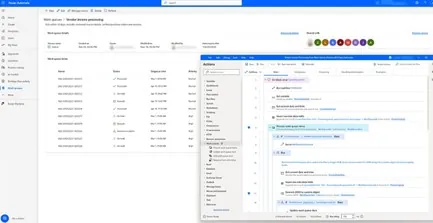
Today, PAD represents more than desktop automation. It enables enterprises to build resilient, AI-powered processes that operate seamlessly across departments and technologies. Microsoft’s 2025 enhancements have expanded its role from execution to intelligence, allowing automation to adapt dynamically and operate with greater efficiency, security, and control. Key advancements introduced in 2025 include:
- AI-Powered Automation and Self-Healing UI (April 2025): PAD now detects and repairs missing UI elements automatically, reducing workflow failures and downtime. IT teams spend less time on maintenance, while business units gain the freedom to automate critical processes independently.
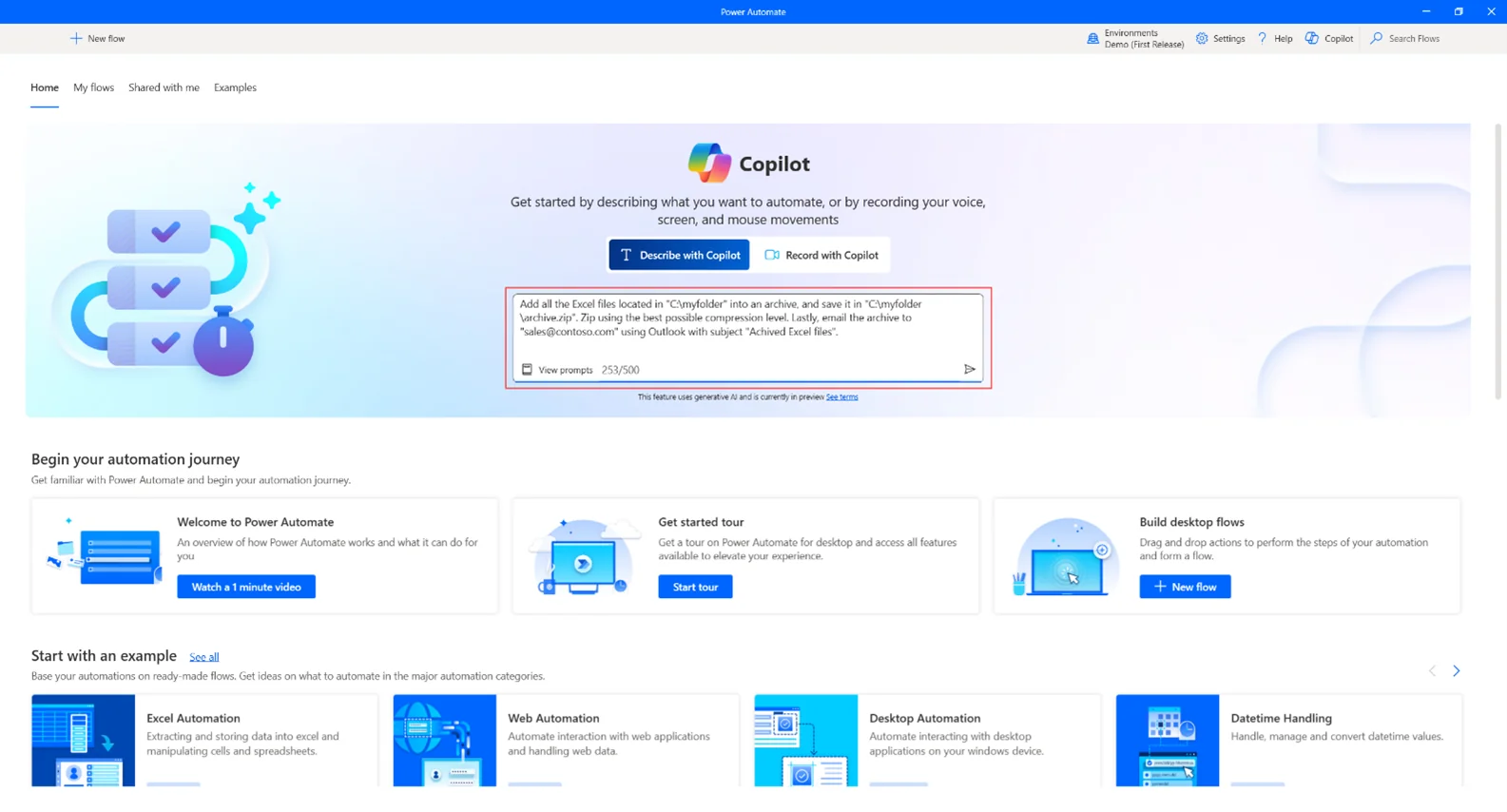
- Copilot Integration (2025 Updates): Copilot enhances automation development by enabling users to build, modify, and troubleshoot flows through natural language prompts. This makes automation more intuitive for non-technical staff and reduces dependency on IT resources.
- Schema Migration (2025): The shift to Schema v2 delivers faster performance, improved security, and stronger compliance. For leadership teams, this upgrade translates into more reliable automation environments and better governance oversight.
These updates reflect Microsoft’s commitment to transforming automation into a strategic capability that supports scale, resilience, and continuous improvement. Power Automate Desktop now stands as a foundational tool for enterprises aiming to modernize operations and prepare for the next phase of AI-driven automation.
Core Features
Built to streamline automation across both desktop and enterprise environments, Power Automate Desktop enhances productivity, reduces manual effort, and connects seamlessly with existing business systems. Beyond its latest AI-driven enhancements, the platform’s foundational capabilities continue to help organizations achieve efficiency, security, and consistency at scale. Key capabilities include:
- Desktop-Centric Automation
PAD supports end-to-end desktop automation, allowing organizations to handle repetitive workflows such as data entry, document management, and system integration across legacy and modern applications. This capability helps unify fragmented processes and reduces operational overhead. - Intuitive Visual Designer
The drag-and-drop interface enables both technical users and business professionals to design and deploy automations quickly. It simplifies complex logic creation while maintaining visibility and control through built-in validation and analytics. - Deep Integration Across the Microsoft Ecosystem
PAD integrates seamlessly with Power Apps, Power BI, SharePoint, Teams, and other Microsoft 365 applications. It also connects with third-party systems such as CRM, ERP, and accounting platforms, allowing businesses to create hybrid workflows that bridge desktop, cloud, and on-premises environments. - Enhanced Performance and Security
Microsoft continues to optimize PAD for enterprise reliability and compliance.
- Parallel Execution of Child Flows: Enables simultaneous execution of multiple desktop flows, reducing processing time and improving throughput.
- Improved Credential Governance: Strengthens security with centralized credential handling, policy enforcement, and integration with enterprise identity solutions.
- Automation Center and Real-Time Monitoring: Offers comprehensive visibility into automation performance, helping teams track execution times, identify failures, and optimize process efficiency.
- Refined User Experience (2025–2026): Updates to the interface and workflow designer have improved usability, accessibility, and development speed across devices and environments.
As of 2026, Power Automate Desktop continues to evolve into a mature, AI-supported automation platform that executes tasks and learns, analyzes, and scales with the business.
Ready to Evolve your Automation Strategy?
Speak with AlphaBOLD’s experts to explore how Power Automate Desktop can strengthen governance, improve performance, and prepare your business for AI-driven operations.
Request a DemoExpanding Library of Actions and Triggers
Microsoft Power Automate Desktop continues to evolve, introducing AI-driven capabilities, usability refinements, and an expanding library of actions that make automation more intelligent and adaptable. These advancements help organizations reduce manual work, improve data accuracy, and accelerate process execution across departments.
Latest Enhancements:
- AI-Enhanced Action Suggestions: Copilot now recommends actions and logic during flow creation based on user intent, improving design efficiency and reducing build time.
- Self-Healing UI Elements (2025): Adaptive UI automation detects and repairs missing or shifted UI components, keeping workflows stable and reducing downtime.
- Cross-Domain Web Automation (2025): Expanded support for complex browser environments allows interaction with embedded web apps and dynamic content in Microsoft Edge.
- Microsoft Access Actions (2025): Enables automated data extraction, reporting, and reconciliation. These actions are widely adopted in finance, accounting, and operations for structured data handling.
- Automation Center Integration (2026): PAD actions now generate richer telemetry, allowing users to track execution success, duration, and errors directly through centralized monitoring dashboards.
Extensive Library of Prebuilt Actions:
Power Automate Desktop now offers a growing library of more than 400 prebuilt actions, empowering teams to automate complex scenarios without writing code. These include:
- Conditional logic, loops, and validation controls to handle dynamic decision-making.
- Data extraction, text parsing, and file management to process both structured and unstructured data.
- System-level actions for keyboard, mouse, and application interactions.
- Cloud and on-premises connectors for seamless integration with Microsoft 365, Dynamics 365, and external business systems.
Together, these capabilities create a flexible automation environment that supports both routine workflows and advanced, AI-assisted processes. As Microsoft continues to expand the Power Automate ecosystem in 2026, the growing action library will remain central to building scalable, intelligent, and resilient enterprise automation.
Experience the transformation first-hand
Request a demo with AlphaBOLD to learn how Power Automate Desktop can help your organization improve reliability, scale securely, and accelerate decision-making.
Request a Demo NowConnecting Power Automate Desktop to Microsoft's Ecosystem
Power Automate Desktop is deeply integrated into Microsoft’s automation ecosystem, enabling seamless coordination between desktop, cloud, and hybrid environments. This connection allows organizations to unify operations, streamline data movement, and maintain full visibility across business workflows. Through recent releases, PAD has become a core link between Microsoft’s productivity tools and enterprise systems. The Automation Center, introduced in 2025 and expanded in 2026, now provides centralized monitoring for both desktop and cloud flows, giving IT and operations teams real-time insight into execution performance, success rates, and compliance metrics.
Latest Enhancements:
- Improved Cloud-to-Desktop Flow Execution: Optimized communication between Power Automate Cloud and Desktop ensures faster and more reliable triggering of desktop flows.
- Unified Connectors and Schema v2 Support: Updated connectors enhance performance and compatibility with Power Apps, Power BI, and SharePoint, while Schema v2 ensures consistent data handling and long-term stability.
- Copilot-Orchestrated Workflows: Users can now create, optimize, and document automations across the Microsoft ecosystem using Copilot, improving collaboration between technical and non-technical teams.
- Teams and Outlook Integration: Automated notifications, approvals, and scheduling actions can be managed directly through Teams and Outlook, improving workflow responsiveness and communication efficiency.
- Automation Center and Governance Dashboard: Expanded reporting tools allow leaders to track process efficiency, monitor errors, and enforce governance policies from a single interface.
For enterprises operating across multiple systems, these integrations eliminate silos and create a connected automation environment where cloud intelligence enhances desktop operations. By 2026, Power Automate Desktop functions not just as an RPA tool but as an integral layer of Microsoft’s agentic automation vision, enabling unified orchestration, security, and insight across the business.
Experience the Future of Microsoft-Powered Automation
Connect with AlphaBOLD to assess your current automation maturity and design a Power Automate Desktop roadmap that drives measurable business outcomes.
Request a Demo NowIntegration with External Apps
While Power Automate Desktop connects seamlessly across Microsoft’s ecosystem, most enterprises depend on additional tools such as CRMs, ERPs, and accounting systems. Microsoft has continued to expand PAD’s external integration capabilities to ensure automation reaches every layer of the technology stack. The result is a more connected, flexible, and secure automation environment that supports both cloud and on-premises applications.
Latest Enhancements:
- Expanded API-Based Integration: New and updated connectors allow faster, more reliable data exchange between PAD and third-party platforms, improving workflow efficiency and accuracy.
- Copilot-Assisted Integration Design: Copilot analyzes user actions and recommends optimal connectors, triggers, and data mappings, reducing setup time and minimizing configuration errors.
- AI-Powered Troubleshooting: PAD now detects and flags integration issues automatically, helping teams resolve connection or authentication errors before they disrupt business processes.
- Unified Governance and Security Controls: Enhanced monitoring within the Automation Center ensures all integrations meet organizational policies for access, credentials, and data handling.
Key Third-Party Integration Capabilities:
- Power Automate Desktop supports API-level connections with leading enterprise systems, enabling automation across:
- CRM systems (Salesforce, HubSpot, Zoho)
- ERP software (SAP, Oracle, NetSuite)
- Accounting platforms (QuickBooks, Xero, FreshBooks)
By 2026, these integrations have evolved from basic data connections into intelligent interoperability. With AI-driven orchestration and centralized oversight, organizations can automate cross-platform processes with greater accuracy, compliance, and operational speed.
Further Reading: Building Workflows with Copilot for Power Automate
Experience the Future of Microsoft-Powered Automation
Power Automate Desktop seamlessly integrates with Microsoft’s automation ecosystem, offering improved cloud connectivity, real-time monitoring, and advanced integration features. Enhance efficiency, scalability, and control over your automation processes.
Request a Demo NowEnhancing Automation Complexity with Power Automate Desktop
As organizations scale automation across departments, they need solutions that can handle complex, interconnected workflows with reliability and control. Power Automate Desktop continues to evolve to meet these demands, offering advanced capabilities that enable enterprises to automate at scale, improve security, and adapt to changing business conditions.
Latest Enhancements:
- Parallel Execution of Child Flows: Multiple desktop flows can now run simultaneously, allowing faster processing of high-volume tasks and improving overall throughput.
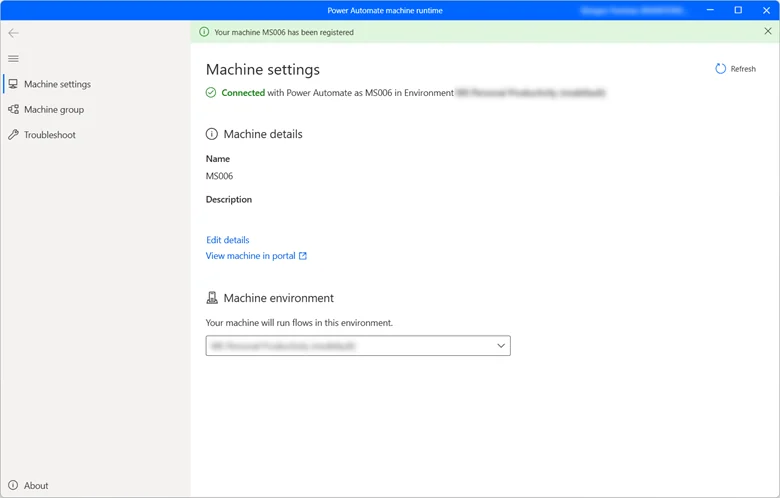
- Machine-to-Credential Mapping: Credentials can be securely assigned to specific machines, reducing manual input and improving access control across distributed environments.
- Adaptive UI Automation: Enhanced detection and handling of dynamic UI elements ensure automations remain stable even when applications are updated or redesigned.
- AI-Driven Error Detection: PAD now identifies potential issues during workflow creation and provides recommendations for correction, reducing manual troubleshooting.
Key Advanced Automation Capabilities:
Power Automate Desktop supports complex business scenarios that require flexibility, intelligence, and precision.
Conditional logic and exception handling allow workflows to make data-driven decisions and recover gracefully from errors.
Integration with Copilot simplifies complex flow configuration and documentation, ensuring both business and IT teams can collaborate effectively.
Real-time performance analytics within the Automation Center give leaders visibility into execution efficiency, enabling proactive optimization.
By 2026, Power Automate Desktop has become a strategic automation platform capable of handling enterprise-scale operations. It allows organizations to build secure, self-adjusting workflows that deliver consistent outcomes, reduce IT intervention, and strengthen governance across the automation landscape.
Simplifying Automation Creation with Screen Recording and Playback
Building automations should not require deep technical expertise. Power Automate Desktop continues to simplify the automation design process through enhanced screen recording and playback capabilities, allowing users to capture real interactions and convert them into reliable workflows within minutes.
Latest Enhancements:
- Copilot-Assisted Recording: Copilot now provides real-time guidance during recording sessions, helping users describe their actions in natural language while automatically generating corresponding automation steps. This makes process capture faster and more intuitive for non-technical teams.
- Improved Interaction Logging: Enhanced tracking of keyboard, mouse, and scrolling actions ensures that recorded workflows accurately reflect human behavior, improving precision and reliability in execution.
- Real-Time Validation: PAD now alerts users immediately if key steps or inputs are missing during recording, ensuring that every automation is complete and ready for deployment.
Further Reading: Benefits of Low-code Automation with Power Automate
Business Impact:
These capabilities help organizations expand automation beyond IT-led projects. Administrative, finance, and operations teams can independently record, refine, and deploy automations with minimal training. This reduces development time, accelerates adoption, and creates a more agile automation culture across the business.
By 2026, Power Automate Desktop has transformed automation creation into a guided, AI-assisted experience. It enables every employee to participate in process improvement while maintaining the structure, governance, and performance required by enterprise environments
Flexible Scheduling and Triggering Options
Efficient automation depends on timing. Power Automate Desktop provides flexible scheduling and event-based triggering capabilities that allow workflows to run automatically at the right moment, ensuring accuracy and operational consistency across business functions.
Latest Enhancements:
- SLA-Based Workflow Prioritization: Organizations can now assign priority levels to automation queues based on service-level agreements, ensuring that high-impact processes are executed first.
- Improved Authentication for Unattended Flows: Enhanced credential handling minimizes authentication errors in scheduled and background workflows, improving reliability for enterprise-scale automation.
- Expanded Event-Based Triggers: PAD can initiate workflows in response to real-time system or application events, enabling faster responses to operational changes or business inputs.
- Centralized Scheduling Management: Scheduling tools integrated within the Automation Center allow teams to monitor all running, pending, and completed automations from a single interface.
Key Scheduling & Triggering Capabilities:
Time-Based Scheduling for Automated Execution
- Automations can be set to execute at fixed intervals or during specific business hours, ensuring consistency in payroll, reporting, or compliance processes.
Event-Driven Triggers for Dynamic Workflows
- Workflows can react instantly to defined triggers such as data updates, user inputs, or alerts from connected systems.
Queue Prioritization and Governance:
- Execution order can be managed according to process importance, helping organizations align automation activity with business priorities.
Power Automate Desktop offers intelligent scheduling capabilities that integrate precision, governance, and responsiveness. Enterprises can rely on PAD to execute critical workflows automatically, maintain operational continuity, and support time-sensitive decision-making with confidence.
Further Reading: Microsoft Power Automate: A Low-Code Solution for Automating Your Processes
Bringing More Flexibility to Automation Execution
Effective automation requires both flexibility and control. Power Automate Desktop allows enterprises to design, deploy, and manage automations that adapt to business needs while maintaining security and compliance standards. Its flexible execution model allows organizations to optimize processes across departments and adjust automation strategies as operations scale.
As a Microsoft Partner, AlphaBOLD supports businesses in implementing, customizing, and managing Power Automate to meet specific operational goals. Our team helps companies connect PAD with their existing systems, build tailored automation frameworks, and integrate governance models that ensure performance and reliability.
Key Areas of Focus:
- Tailored Implementation: Designing automations that align with departmental workflows, whether in finance, IT, supply chain, or customer service.
- Seamless Integration: Connecting Power Automate with Microsoft 365, Dynamics 365, and third-party systems to enable unified process execution.
- Continuous Optimization: Using real-time insights from the Automation Center to measure efficiency, reduce errors, and adjust automations proactively.
- Compliance and Security: Implementing best practices for credential management, access control, and data governance across the automation lifecycle.
Get a Hands-On Experience with Power Automate Desktop
Whether you reduce manual effort, improve process efficiency, or integrate automation across cloud and on-premise applications, Power Automate delivers the tools needed to scale your automation strategy.
Request a DemoConclusion
Power Automate Desktop now stands as a cornerstone of Microsoft’s automation strategy. What began as a desktop-based process automation tool has become an intelligent platform that connects people, systems, and data across the enterprise. Through the 2025 Release Waves, PAD introduced AI-driven self-healing, Copilot-assisted flow design, and centralized governance tools that have redefined how automation is created and maintained.
As Microsoft advances its 2026 vision for agentic automation, Power Automate Desktop will continue to evolve toward autonomy, enabling workflows that learn, adapt, and optimize themselves. This next phase of automation allows organizations to move beyond cost and efficiency goals to focus on resilience, scalability, and long-term innovation.
For business leaders, the opportunity lies in building an automation strategy that combines intelligence with governance. By adopting Power Automate Desktop and aligning it with enterprise goals, companies can achieve measurable productivity gains, strengthen process visibility, and establish a foundation for future-ready operations.
Explore Recent Blog Posts