Table of Contents
Introduction
Canvas Apps have become a core part of how organizations execute digital workflows in 2026. As businesses look to streamline operations, reduce manual effort, and improve visibility across processes, low-code platforms like Microsoft Power Apps play an increasingly central role.
Enhanced with Copilot, modern controls, and deeper Dataverse integration, Canvas Apps enable teams to automate approval-heavy, paper-driven processes that were traditionally managed through spreadsheets and email. These manual approaches consume time, slow decision-making, and limit operational insight.
Within the Power Platform, Canvas Apps serve as a flexible execution layer that allows organizations to simplify workflows, reduce administrative overhead, and adapt processes quickly as business needs change. This article explores the top 15 canvas app ideas designed for decision-makers who want to move faster without sacrificing governance or scalability.
Are You Already Paying for Canvas Apps Through Microsoft 365?
Did you know that many companies are already paying for access to Canvas Apps without even realizing it? Organizations often already have partial access through their existing Microsoft 365 investments, but the real value lies in how those capabilities are scoped, architected, and governed.
Canvas Apps can often be deployed with low incremental licensing cost when built using standard connectors and aligned to existing entitlements. However, licensing efficiency in 2026 depends heavily on solution architecture decisions, including user roles, Dataverse usage, premium connectors, automation flows, and Copilot-enabled experiences.
- Executive note: Power Platform licensing is no longer a line-item decision. It is an architectural one.
This is why successful organizations take an architecture-first approach to Canvas App initiatives. By defining the data model, integration surfaces, security boundaries, and automation scope upfront, leaders can avoid unnecessary licensing expansion while ensuring the solution scales securely across departments.
When licensing is evaluated early and aligned with platform architecture, Canvas Apps become a cost-efficient execution layer within the broader Power Platform strategy, supporting predictable spend, enterprise governance, and long-term flexibility as business needs evolve.
How Do Canvas Apps Fit Into a Modern Power Platform Strategy?
In 2026, Canvas Apps are rarely implemented in isolation. Mature organizations treat them as the front-end execution layer within a broader Power Platform architecture, rather than standalone applications.
In this model, Canvas Apps handle user interaction and day-to-day execution, while the surrounding platform provides structure and scale. Dataverse serves as the governed data foundation, Power Automate orchestrates approvals and integrations, and Microsoft Fabric or Power BI delivers operational reporting and forecasting. Other surfaces, such as model-driven apps or Power Pages, are introduced where structured data management or external access is required.
This system-based approach allows organizations to move faster without creating disconnected solutions. Business teams can iterate on user experiences through Canvas Apps, while IT maintains control over data, security, automation, and compliance at the platform level.
Why Are Canvas Apps Becoming a Strategic Priority for Business Leaders in 2026?
C-level executives seek agile solutions to enhance efficiency and streamline business processes. Canvas apps have emerged as a pivotal technology in this context, offering a transformative approach to application development tailored to high-level business strategies. This section aims to explore the ascent of canvas apps, highlighting their evolution, current trends, and the role of innovation from a leadership perspective.
From Humble Beginnings to Widespread Adoption:
- Initial Launch: Introduced in 2016 within Microsoft Power Apps, canvas apps began as a straightforward platform, enabling the creation of basic mobile applications through a drag-and-drop interface. This simplicity laid the groundwork for a vital custom, enterprise-grade application development tool.
- Evolution: Thanks to continuous enhancements, canvas apps have grown into a robust platform, allowing the development of sophisticated solutions that meet complex business needs, transforming how organizations operate.
Further Reading: An Introduction to Canvas and Model-Driven Apps
What Trends Are Shaping the Canvas App Landscape for Executives?
Canvas Apps have evolved from simple mobile forms into operational execution layers within mature Power Platform environments. For C-level leaders, four trends define how to scale innovation without increasing technical debt.
Agentic AI:
- The Strategy: Using Microsoft Copilot Studio, organizations can design AI agents that monitor workflows, detect anomalies, and initiate actions across connected systems. Within Microsoft Power Apps, the app serves as the interface where AI-driven insights and exceptions are surfaced for review.
- Buyer Value: Routine validations and exception handling can be automated, shifting teams from manual processing to decision-focused work and reducing operational friction.
Enterprise-Grade UX:
- The Strategy: Modern Canvas Apps align with Microsoft’s Fluent design standards and reusable component models. With proper governance and design systems, organizations can deliver consistent, accessible experiences across devices.
- Buyer Value: Consistent UX improves adoption, reduces training overhead, and increases the likelihood that internal tools are fully utilized across field and office teams.
Scaling Innovation:
- The Strategy: The Fusion Team model allows business users to iterate on workflows while IT enforces guardrails through managed environments, DLP policies, and lifecycle governance. Tools such as the Power Platform Center of Excellence Starter Kit provide centralized oversight.
- Buyer Value: Innovation accelerates without creating shadow IT risk, preserving compliance, security, and data governance.
Real-Time Decision Intelligence:
- The Strategy: Integration with Microsoft Fabric and Microsoft OneLake allows Canvas Apps to operate closer to unified enterprise data. Insights and execution are connected within the same ecosystem.
- Buyer Value: Leaders gain faster operational visibility and can respond more quickly to utilization trends, exceptions, and performance signals.
Planning a Canvas App Project? Let’s Build the Right One Together
AlphaBOLD helps organizations turn app ideas into practical, scalable solutions that solve real business challenges. Whether you're modernizing legacy processes or empowering internal teams with low-code tools, our consultants provide strategic guidance, design expertise, and technical support from start to finish.
Request a DemoWhat Are the Most Valuable Canvas App Ideas for Businesses in 2026?
As a decision-maker, understanding the opportunities Canvas Apps offer across your business is crucial. From managing team attendance to monitoring project outcomes, Canvas Apps open vast operational possibilities.
Here are 15 trending canvas app ideas for 2026, each with a Copilot Studio angle to accelerate delivery and impact.
1. Timesheet App:
Problem statement:
Traditional timesheet processes rely heavily on manual entry, fragmented tools, and delayed approvals. Employees spend time recreating work already tracked elsewhere, while managers lack real-time visibility into project burn, utilization, and budget impact.
Summary of App:
A Timesheet Canvas App integrated with Dynamics 365 and Microsoft Teams centralizes time capture, approvals, and reporting within a single execution layer.
- Copilot Studio Agent: An embedded agent analyzes the user’s calendar, task status, and Sent items to suggest time entries. The user simply “Approves” rather than “Creates.”
- Dataverse & OneLake Foundation: Time data stored in Dataverse syncs instantly to Microsoft Fabric, enabling real-time margin and burn reporting for leadership.
Benefits:
- Reduced approval cycle times through automated routing and exception-based reviews
- Fewer manual corrections via prefilled entries and validation rules
- Improved forecasting accuracy with real-time actuals vs. planned hours
- With lower IT dependency, business teams adjust forms and approval logic within governance boundaries.
Industry Example: AEC Time Tracking at Scale:
In Architecture, Engineering, and Construction environments, time tracking must align with projects, cost codes, and field conditions. Canvas Apps enable mobile-first time capture for field teams, offline submissions when connectivity is limited, and synchronized approvals once online.
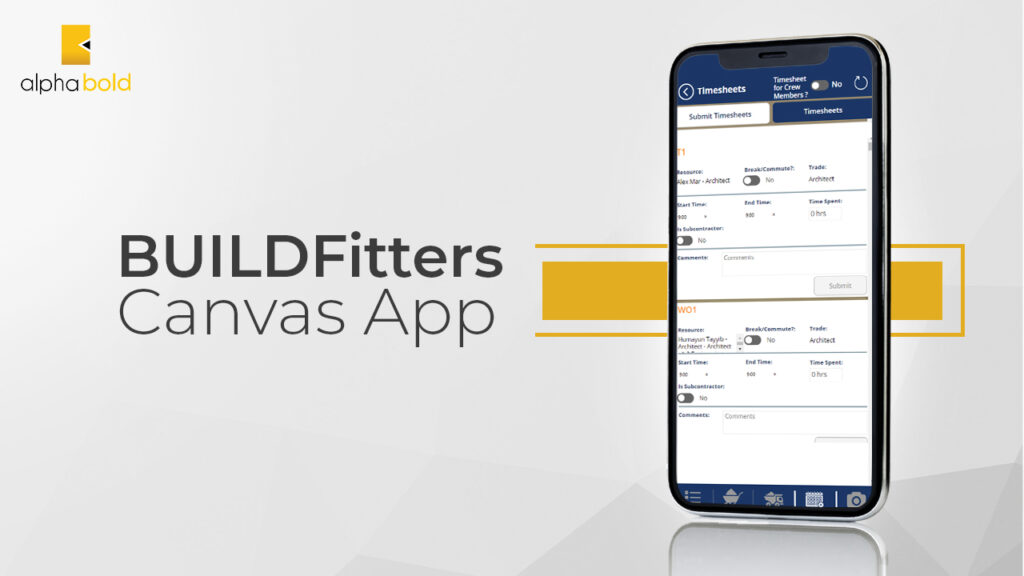
For example, solutions like BUILDFitters use Canvas Apps to consolidate time tracking across office and field roles, reducing manual corrections and improving utilization reporting across complex project portfolios.
2. Site Inspection Forms App:
Problem Statement: Manual site inspections often involve a lot of paperwork, resulting in data loss, delayed reporting, and inefficient follow-up on identified issues. Coordinating across different teams and locations compounds the problem.
Summary of App:
A Canvas App that modernizes field operations by replacing manual friction with a centralized, AI-enabled execution layer.
- Intelligent Data Capture: Inspectors describe findings conversationally; the agent structures and categorizes the report, suggests severity levels, and triggers the appropriate follow-up workflow automatically.
- Offline-First Resilience: Built on Dataverse with full capability in low-connectivity environments, secure background synchronization restores data once reconnected.
- AI Builder Integration: Auto-tags defects and severity via image capture; GPS coordinates are logged automatically for audit accuracy.
Benefits:
- Zero-loss documentation with 100% audit readiness in Dataverse and SharePoint
- Accelerated incident response, high-risk findings trigger real-time alerts to safety teams via Power Automate
- Predictive operational intelligence via a live “Risk Heatmap” across all project locations in Microsoft Fabric
3. Expense Management App:
Problem Statement: Manual expense management is a significant source of administrative friction and financial gray areas. Traditional processes that rely on physical receipts, spreadsheet tracking, and manual email approvals frequently result in lost documentation, human error in data entry, and delayed reimbursements.
Summary of App: This app transforms the expense cycle into a streamlined, AI-driven workflow that integrates directly with existing finance systems.
- Intelligent Data Extraction: Employees describe expenses conversationally; the agent extracts fields, checks against policy, flags anomalies, and routes for approval, all without form-filling.
- AI Builder Receipt Processing: Snap a photo; the app automatically extracts vendor, date, currency, and amount.
- Seamless Teams Integration: Managers approve via Adaptive Cards directly in Teams.
Benefits:
- Improved financial accuracy through centralized Dataverse data as a single source of truth
- Accelerated reimbursement cycles by eliminating manual email bottlenecks
- Enhanced budget visibility via real-time Power BI dashboards showing department spending trends
4. Leave Request System:
Problem Statement: Traditional leave management systems can be inefficient and lack transparency for both employees and managers, which may lead to scheduling conflicts and under-resourced periods.
Summary of App: A Leave Request Canvas App, fully integrated with HR systems like Dynamics 365 HR, allows employees to request time off and managers to approve it, all within a unified system.
- Copilot Studio Agent: Employees can ask “How many days of PTO do I have left?” or “Request next Friday off” in natural language, and the agent handles the rest, including policy checks and manager notifications.
Benefits:
- Improved planning and scheduling with real-time staffing forecasts
- Employee self-service with Copilot-guided submission experience
- Regulatory compliance with built-in policy validation and labor law alignment

5. Desk Booking and Reservation App:
Problem Statement: As flexible working arrangements become more common, efficiently managing office space and desk reservations is increasingly complex and operationally critical.
Summary of App: A Canvas App that facilitates the reservation of desks and workspaces, offering features such as booking calendars, desk availability maps, and integration with office management systems.
- Copilot Studio Agent: Employees say, “Book me a quiet desk near the finance team on Thursday,” and the agent checks availability, preferences, and proximity, then confirms the booking.
Benefits:
- Maximized Space Utilization across dynamic work environments.
- Enhanced Flexibility with Real-time availability updates across all devices.
- Health and safety guidelines enforcement is built directly into the booking logic.
6. Shoutout / Kudos App:
Problem Statement: Employee recognition is vital for morale, but it’s often done inconsistently or lost in daily business operations. Celebrating achievements can be overlooked without a dedicated system.
Summary of App: A Shoutout / Kudos Canvas App provides a real-time platform where employees can give and receive recognition. Integrated with the company’s internal social network.
- Copilot Studio Agent: Managers describe what an employee did; the agent drafts a personalized recognition message, suggests relevant company values to tag, and publishes to the feed.
Benefits:
- Boosted morale and engagement through frequent, visible recognition
- Real-time notifications ensure recognition is timely and company-wide
- Built-in analytics help HR identify recognition trends and strengthen engagement initiatives
Planning AI-Powered Apps with Copilot Studio?
Build governed, enterprise-ready apps that combine Canvas Apps, Dataverse, Copilot Studio, and Power Automate into a connected operational system.
Request a Demo7. Meeting Notes Power App:
Problem Statement:
critical outcomes, decisions, and action items are scattered across email threads, chat logs, and personal notebooks, creating accountability gaps, duplicated effort, and stalled project momentum.
Summary of App: This Canvas App serves as a centralized intelligence hub that bridges the gap between meeting discussions and operational action.
- Copilot Studio Agent: The agent joins scheduled meetings, generates a draft summary and action item list, assigns owners based on discussion context, and pushes tasks to Planner, all before the meeting room is empty.
- Closed-Loop Accountability: Action items are turned into active workflows in Microsoft Planner or To Do via Power Automate.
Benefits:
- Centralized decision audit trail with all minutes and decisions stored in Dataverse
- Increased execution velocity, teams move immediately into action, no “day after” delay
- Power BI dashboards provide leadership visibility into action item completion rates across departments
8. Task Management App:
Problem Statement: Fragmented task delegation drives operational drift. Without a centralized orchestration system, priorities misalign, deadlines are missed, and leadership lacks real-time project health visibility. This reliance on manual status updates and siloed spreadsheets creates a reactive culture that slows down strategic delivery.
Summary of App:
A unified orchestration layer that organizes work by project, priority, and deadline, integrated with your enterprise ecosystem.
- Copilot Studio Agent: “Create a high-priority task from this email thread and assign it to the project team,” and the agent structures, assigns, and sets deadlines based on historical project velocity.
- Intelligent Bottleneck Detection: AI Builder and Power Automate monitor task aging, and proactively flag stalled high-priority items before they impact timelines.
Benefits:
- Automated real-time dashboards eliminate manual status reporting
- Optimized resource allocation with instant visibility into team capacity
- Microsoft Fabric integration transforms task data into strategic insights for leadership
9. Resource Allocation and Forecasting App:
Problem Statement:
“Resource Blindness,” a lack of real-time visibility into asset availability, creates cascading project delays, unnecessary capital expenditure, and missed market opportunities.
Summary of App: A unified “Command Center” for real-time tracking and strategic forecasting of enterprise resources.
- Copilot Studio Agent: Ask “What’s the nearest available excavator to Site B this Thursday?” and the agent queries live asset data, checks maintenance schedules, and surfaces the optimal recommendation.
- AI-Driven Demand Forecasting: AI Builder analyzes historical utilization patterns to predict future shortages before they occur.
Benefits:
- Minimized operational downtime through automated alerts and next-best-action logic
- Asset utilization efficiency via Microsoft Fabric analytics, identifying underutilized inventory
- Scenario modeling for proactive strategic planning rather than reactive firefighting
10. Compliance and Risk Management App:
Problem Statement: Navigating compliance in finance, healthcare, and manufacturing is particularly challenging when regulations are stringent and frequently updated. Failure to comply results in fines, legal consequences, and reputational damage.
Summary of App:
A compliance and risk management hub that centralizes tracking, evaluation, and reporting across regulated industries.
- Copilot Studio Agent: Automatically monitors regulatory update feeds, summarizes changes relevant to your industry, and flags affected workflows for review, keeping compliance teams informed without manual research.
Benefits:
- Comprehensive compliance tracking with automatic updates for GDPR, HIPAA, SOX, and other frameworks
- AI-assisted risk assessment highlights vulnerabilities before they escalate
- Copilot-generated summaries deliver clear, actionable insights for stakeholder reporting
Modernize Manual Processes Without Expanding Development Backlogs
Our experts help business and IT teams deliver scalable low-code apps with the governance and architecture needed for enterprise adoption.
Request a Demo11. Onboarding and Training Tracker App:
Problem Statement:
Onboarding is often fragmented across HR, IT, and line management, with no single view of where a new hire stands, what’s pending, and who owns which step. This extends time-to-productivity and creates a poor first impression.
Summary of App:
A structured onboarding execution layer that coordinates tasks across HR, IT, and managers, all within a single Canvas App.
- Copilot Studio Agent: New hires interact with an onboarding assistant that answers policy questions, guides them through setup steps, collects required forms, and automatically escalates blockers to the right team.
- Progress Tracking: Real-time dashboards give HR and managers visibility into onboarding completion rates, pending actions, and days-to-productivity benchmarks.
Benefits:
- Faster time-to-productivity through structured, automated onboarding workflows
- Consistent experience across roles, locations, and departments
- Reduced HR admin burden with automated reminders and task routing via Power Automate
12. Vendor and Contract Management App:
Problem Statement:
Contract management is frequently handled through shared drives and email threads, with no audit trail, inconsistent renewal tracking, and significant risk of missed deadlines.
Summary of App:
A Canvas App that centralizes vendor records, contract lifecycle tracking, and renewal workflows within a governed Dataverse environment.
- Copilot Studio Agent: “Summarize all contracts expiring in the next 60 days and flag any with auto-renewal clauses,” the agent queries Dataverse, generates a summary, and initiates renewal review workflows.
- AI Builder Document Processing: Extracts key terms, dates, and obligations from uploaded contract PDFs automatically.
Benefits:
- Complete contract visibility across all vendors, departments, and renewal dates
- Reduced legal risk through automated deadline alerts and policy-enforced approval workflows
- Faster contract reviews with AI-extracted metadata, reducing manual document analysis
13. IT Help Desk and Asset Tracker App:
Problem Statement:
IT support teams are overwhelmed by repetitive tickets, and asset management relies on outdated manual spreadsheets. This creates response delays and untracked infrastructure risk.
Summary of App:
A Canvas App serving as a self-service IT portal and live asset registry, reducing ticket volume and improving response time.
- Copilot Studio Agent: Employees describe their issue in natural language; the agent diagnoses common problems, provides guided resolution steps, and escalates only to the IT team if self-service fails, deflecting a significant portion of Tier 1 volume.
- Asset Lifecycle Tracking: Devices, licenses, and peripherals are tracked in Dataverse with automated alerts for warranty expiry, refresh cycles, and compliance checks.
Benefits:
- Reduced Tier 1 ticket volume through AI-powered self-service resolution
- Complete, always-current asset registry with zero manual update effort
- Faster incident response with automated routing based on issue type, severity, and team availability
14. Customer Feedback and NPS Collection App:
Problem Statement:
Customer feedback is collected inconsistently via email surveys, manual outreach, or third-party tools that don’t integrate with operational data, making it difficult to link satisfaction trends to specific interactions or teams.
Summary of App:
A Canvas App that centralizes feedback collection, sentiment analysis, and NPS tracking in a closed-loop workflow connected to CRM data.
- Copilot Studio Agent: After a service interaction, the agent proactively sends a personalized follow-up, collects feedback, categorizes sentiment, and flags negative responses for immediate review by the account team.
- AI Builder Sentiment Analysis: Automatically classifies open-text responses by theme and sentiment, surfacing actionable patterns without manual tagging.
Benefits
- Faster closed-loop resolution, negative feedback triggers immediate follow-up workflows
- NPS trend visibility across accounts, regions, and service lines via Power BI
- CRM-connected insights link satisfaction data to specific deals, interactions, and representatives
15. Field Service Management App:
Problem Statement:
Field service operations suffer from scheduling inefficiencies, parts unavailability, and poor communication between dispatchers, technicians, and customers, leading to missed SLAs and unnecessary repeat visits.
Summary of App:
A mobile-first Canvas App that gives field technicians, dispatchers, and customers real-time visibility into job status, parts availability, and scheduling.
- Copilot Studio Agent: Dispatchers describe a new job; the agent checks technician availability, proximity, and skill match, then assigns and notifies, generating the work order and customer notification in one step.
- Offline-First Capability: Technicians complete job forms, capture photos, and collect signatures without connectivity; data syncs automatically on reconnection.
Benefits:
- Improved first-time fix rates through better parts and skill matching before dispatch
- Reduced SLA breaches with automated escalation when jobs exceed time thresholds
- Customer-facing notifications and real-time ETA updates improve satisfaction without additional effort from the service team.
What Innovations in Canvas App Design Matter Most in 2026?
In 2026, Canvas Apps are being designed less as standalone forms and more as governed execution apps that sit on top of enterprise data and workflows. The most valuable apps reduce manual effort, enforce policy by design, and produce operational data usable for reporting and planning.
1. AI-Embedded App Experiences
AI in Canvas Apps is increasingly built into how apps are created and used. Copilot in Power Apps supports app building, and Copilot Studio enables in-app agent experiences that go beyond UI assistance.
For design leaders, the 2026 takeaway is practical: define where AI reduces repetitive work (summaries, data capture assistance, exception prompts), and pair it with governance so AI features are enabled only where data access and outcomes are controlled.
2. Fusion Teams With Enforced Governance
Scaling app delivery requires a fusion model where business teams iterate quickly, and IT sets standards for security, data access, environments, and lifecycle management. Microsoft’s Power Platform Center of Excellence Starter Kit is a reference implementation designed to help organizations build governance, monitoring, and adoption practices using the platform itself.
In 2026, the differentiator is not whether a company has a CoE. It is whether the CoE has clear ownership, an environment strategy, DLP policies, and oversight that prevents unmanaged growth.
In 2026, the differentiator is not whether a company has a CoE. It is whether the CoE has clear ownership, environment strategy, DLP policies, and oversight that prevents unmanaged growth.
3. Standardized UX With Fluent 2 Based Controls
Canvas Apps design maturity is now closely tied to modern controls and consistent UI patterns. Microsoft’s modern controls are based on the Fluent 2 design system and are positioned around accessibility, usability, and a cohesive end-user experience.
For executives, the business impact is straightforward: consistent UI reduces training time, improves adoption, and makes it easier to scale a portfolio of internal apps without every team inventing a new design language.
4. Dataverse and Fabric Alignment for Real-Time Operational Reporting
A major 2025 development was Microsoft’s native Dataverse and Fabric integration, described as zero-copy and real-time, aimed at combining operational and analytical data without traditional ETL replication.
Microsoft also documents “Link to Microsoft Fabric” in Power Apps as a way to make Dataverse data available in OneLake.
In 2026 terms, this strengthens a simple design pattern: Canvas Apps capture governed operational data in Dataverse, and Fabric makes that data usable for near real-time reporting, trend analysis, and forecasting.
What Are the Strategic Implications for Decision Makers?
- Agentic workflows require guardrails. Treat AI as part of workflow design, not a UI feature. Define which actions are allowed, what data is accessible, and where human approval is required. Copilot Studio provides the tooling; outcomes depend on governance and process design.
- Plan governance and environment strategy before scaling. Use CoE practices to manage ownership, security posture, and lifecycle controls as the app portfolio grows.
- Design for UX consistency. Standard controls and Fluent 2-based UI reduce support burden and improve adoption across departments.
- Treat Dataverse data as a finance-and-operations asset. With Fabric alignment, operational app data supports tighter forecasting and faster course correction at the leadership level.
How Does AlphaBOLD Approach Power Apps Consulting?
As a distinguished Microsoft Power Apps consulting firm, AlphaBOLD is dedicated to placing our clients at the heart of our operations. With years of experience and a team of Microsoft-certified experts, here is what sets us apart:
- 24/7 Support: Help is always available, anywhere.
- Cross-Industry Expertise: Solutions tailored to your sector’s specific needs.
- Time Efficiency: Streamlined processes that free up resources for growth.
- Customized Solutions: End-to-end solutions built around your operations.
- Certified Success: Proven results as a certified Microsoft Partner.
Let's Build the Right App Together
Whether you're starting from scratch or scaling an existing Power Platform investment, AlphaBOLD's consultants bring architecture-first thinking to every engagement. Tell us what you want to build, and we'll show you how to do it right.
Request a DemoConclusion
Canvas Apps are most effective when applied to real operational challenges with clear ownership and governance. The examples covered in this article show how the top 15 canvas app ideas can streamline workflows, improve visibility, and reduce manual effort across teams.
For decision makers, success depends less on features and more on architecture, data alignment, and execution at scale. When built within a structured Power Platform strategy, Canvas Apps become reliable execution tools rather than isolated solutions.
If you are evaluating your next Canvas App initiative, an architecture-first approach ensures scalability, security, and measurable impact. Request a demo to explore how AlphaBOLD helps organizations design and deliver apps that support long-term business goals.
FAQS
In 2026, AI in Canvas Apps is primarily used to reduce operational friction rather than replace decision-making. Common applications include pre-filling data from existing systems, summarizing exceptions for managers, guiding users through complex forms, and highlighting delays or anomalies in workflows. The goal is faster execution with fewer manual steps.
Our process typically involves initial consultation, requirement gathering, prototyping, development, testing, deployment, and ongoing support.
The development timeline depends on the complexity of the app. Simple apps can be built in weeks, while complex applications may take several months.
Yes, we can leverage pre-built templates as a starting point to customize an app that meets your specific needs. This can significantly reduce development time. However, we do have experts who can help you with various app ideas for canvas apps that fit your exact needs as well.
The cost varies depending on the app’s complexity, features, and development time. We offer flexible engagement models to fit your budget.
Canvas Apps can integrate with various data sources like SharePoint, Excel, Dynamics 365, and third-party applications.
Microsoft Power Apps provides robust security features like role-based access control and data encryption to ensure your app data is secure. Any app idea for canvas apps is secure and doable!
Limited offline functionality is available depending on the app’s design. However, most functionalities require an internet connection.
App ideas for canvas app are endless. We can develop a wide range of apps for various purposes, including internal tools, customer-facing applications, data collection forms, and workflow automation solutions.
We can help you integrate analytics into your app to track usage metrics, user engagement, and key performance indicators (KPIs) relevant to your business goals.