
Table of Contents
Introduction
Migrating data from on-premises sources is often complicated. Companies face a range of challenges, including complex setups, performance bottlenecks, frequent maintenance, and data refresh limits—all of which hinder data flow and analytics. To address these issues, this blog explores Power BI’s on-premises data gateway features and updates. We’ll show how these new capabilities simplify data migration, enhance communication, and streamline data management processes.
The Microsoft Power BI service (SaaS) allows users to connect to a wide variety of data sources, including those that are accessible via the internet and private data sources hosted in environments like Amazon VPC. For connecting to private, on-premises, or non-internet-accessible data sources, Microsoft provides the on-premises data gateway, a crucial application component that securely bridges Power BI and these private data sources.
Power BI latest features updates and on-premises data gateway address all relevant challenges head-on. Power BI on-perm data gateway minimizes operational friction with token renewal for long-running dataflows, faster speed, and wider compatibility. Let’s start with a quick recap of what Power BI on-premises data gateway is and how it works.
Power BI On-Premises Data Gateway Features Overview
An on-premises data gateway is a Windows client app that you install locally, acting as a conduit between your local data sources and Microsoft cloud services such as (Azure Analysis Services, Azure Data Factory, Azure Logic Apps, Microsoft Fabric, Power Apps, and Power Automate). Unlike competitors, the on-premises data gateway doesn’t require any incoming ports on your network to transmit data; instead, it only needs outbound ports to connect with the Azure web service. This allows users to securely maintain their databases and other data sources within their on-premises networks, while still leveraging that on-premises data in cloud services.
Frequent Power BI feature updates, alongside advancements in the on-premises data gateway, address key challenges like ensuring seamless data connectivity, improving performance, and enhancing compatibility across diverse data environments. The gateway also helps reduce operational friction by managing token renewals for long-running queries and refreshes, ensuring continuous connectivity and smoother dataflows. With faster processing speeds and broader support for a wide range of data sources, it minimizes delays and operational inefficiencies.
Now, let’s dive into an overview of Power BI on-premises data gateway’s features and why it’s essential for modern businesses that rely on both cloud and on-premises data integration.
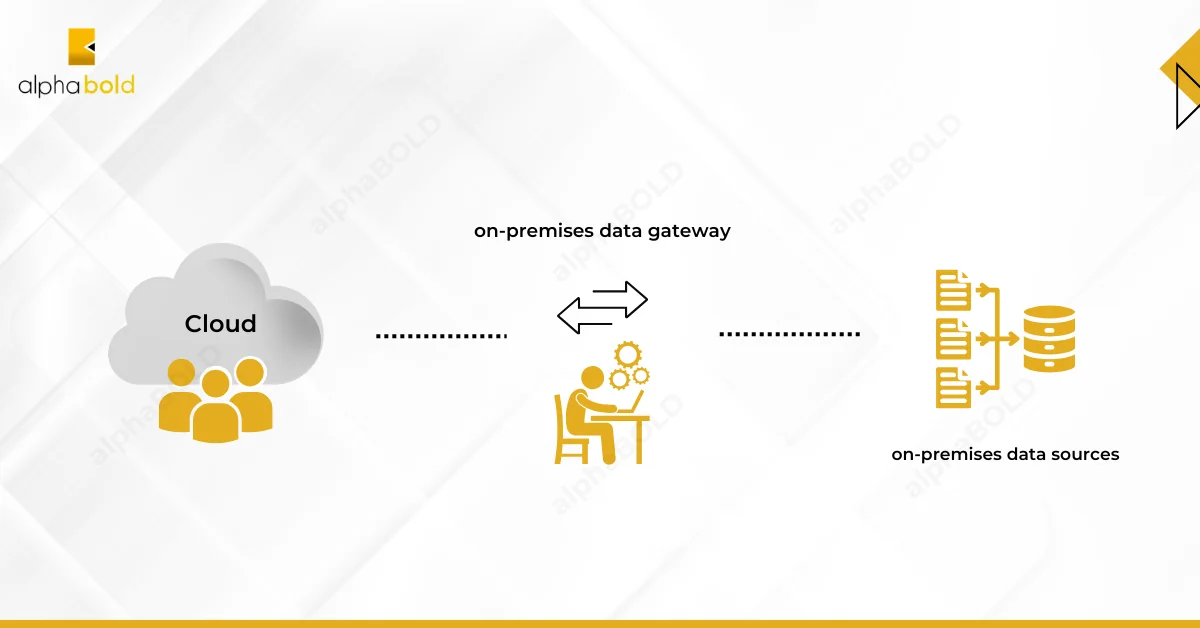
Power BI On-Premises Data Gateway Features & Types:
Microsoft offers three types of Power BI data gateways to connect with on-premises sources, each tailored to a specific use case:
- On-premises data gateway: with this data gateway, Users can connect with various on-premises data sources. You can connect an on-premises data gateway to all the supported services by setting up one gateway. This gateway works best in complex situations where several users access various data sources.
- On-premises data gateway (personal mode) enables only individual users to establish a connection to data sources; it is not accessible to other users. The on-premises data gateway in personal mode is specifically designed for use with Power BI. This gateway works great for situations where you’re the sole report creator, and there’s no need to share data sources with anyone else.
- Virtual network (VNet) data gateway: The virtual network data gateway connects Azure and other data services to Microsoft Fabric and the Power Platform for secure data source communication, query execution, and service response. You can execute Dataflow Gen2, Power BI Semantic Models, Platform Dataflows, and Paginated Reports on a virtual network data gateway. The virtual network data gateway may be used with Azure data source private endpoints to secure traffic from public endpoints.

Power BI On-Premises Data Gateway Features & Updates
1. Fabric Pipeline Integration in General Availability (GA):
The latest version of the on-premises data gateway is all set to help your production Pipelines connect with on-premises data sources. Microsoft has hit an important milestone in enhancing Power BI data integration capabilities. Users can now leverage the Copy Activity with on-premises sources.
- Impact: With its seamless production-level connection, enterprise-scale data pipelines can now function without workarounds.
- Use Case: This version is perfect for organizations that use a combination of cloud and on-premises settings. It makes data processing and transfer easier between on-site servers and cloud services like Azure Synapse and Power BI.
Experience the Benefits of On-Premises Data Gateway Firsthand!
Catapult your business with these Power BI On-Premises data gateway features. Partner with AlphaBOLD and leverage the full potential of the Power BI data gateway.
Request a Demo2. SQL Server Certificate Changes:
This version contains a significant SQL Server connection security upgrade using self-signed certificates. User login issues may occur while connecting to SQL Server using Power BI Desktop or the On-Premises Data Gateway. The error usually says: “The certificate chain was issued by an authority that is not trusted.”
This problem occurs because SQL Server’s self-signed certificates are distrusted by Power BI Desktop and the gateway by default. This security upgrade ensures that the links between Power BI and SQL Server follow the best practices for handling SSL (Secure Socket Layer) certificates. Users need to tweak their gateway settings to trust certain SQL Servers explicitly.
Steps to resolve login issues:
- Go to C:\Program Files\On-premises data gateway, which is the installation directory.
- Make a backup and update the Microsoft.PowerBI.DataMovement.Pipeline.GatewayCore.dll.config file.
- Make sure to update the SqlTrustedServers setting with the names of your trusted SQL servers. Wildcards (*) are handy for setting up broader server trust relationships.
If you’re using Power BI Desktop and running into this issue, altering the PBI_SQL_TRUSTED_SERVERS environment variable can resolve this issue. Using certificates from reliable authorities rather than self-signed ones also helps avoid this error.
Impact: On-premises SQL Servers, Power BI, or the On-Premises Data Gateway can communicate securely using current SSL standards. This update offers a straightforward approach to operate a trusted SQL Server.
3. Power BI Desktop Compatibility:
This release supports the latest Power BI Desktop September 2024 version. The on-premises data gateway uses the same query execution methodology and runtime environment as Power BI Desktop August 2024. Reports and dataflows prepared in Power BI Desktop and updated via the gateway will use the same query execution procedures, maintaining consistency.
Impact: Query execution alignment between Power BI Desktop and the On-Premises Data Gateway reduces data refresh behavior differences. In Power BI Desktop, users can create reports that will perform the same when updated in the Power BI Service via the gateway.
Use Case: Organizations that often create or update reports using Power BI Desktop, or the cloud service can seamlessly refresh data. Additionally, this update reduces overall troubleshooting and improves report dependability.
Are you interested in discovering 2024 Power Platform features and updates? Our detailed blog post “New Microsoft Power Platform Features: 2024 Release Wave 1” will bring you up to speed.
In addition to the major updates, this release continues to bring enhancements and bug fixes that improve the overall stability and performance of the On-Premises Data Gateway. Users are encouraged to keep their gateways updated to benefit from these optimizations.
Leverage Partner Support
How AlphaBOLD Transformed Netronix’s Business Operations
Don’t just take my word for it, read a case study on Netronix’s experience with AlphaBOLD.
Read the Full Story!Conclusion
Data integration, security, and compatibility have been significantly improved with the September 2024 version of the On-Premises Data Gateway. Enterprise users can now easily simplify their production pipelines with Fabric Pipelines fully integrated into the gateway. Furthermore, resolving the SQL Server certificate problem strengthened communication security among cloud-based tools and on-premises SQL Servers, while compatibility with the latest Power BI Desktop ensures that query execution remains consistent across platforms. These updates position Power BI data gateway as a leading platform for hybrid data environments, catering to performance and security needs. Want to connect your on-perm data sources with PBI data gateway? Request a demo!
Explore Recent Blog Posts