Microsoft’s Support for Power BI: What Can You Expect?

Fatima Tahir
Table of Contents
Introduction:
As we move into 2026, organizations face a critical decision that extends far beyond simple technical support—it’s about choosing between reactive troubleshooting and strategic transformation. With Microsoft Fabric’s integration revolutionizing Power BI, AI-powered Copilot capabilities reshaping data analysis, and enterprise demands for real-time insights accelerating, the support model you choose today determines your competitive position tomorrow.
Microsoft’s Power BI offers remarkable capabilities for organizations ready to harness the full potential of their data. However, navigating Power BI’s increasingly sophisticated features, from Microsoft Fabric integration to AI-driven analytics and Direct Lake mode, requires more than standard support channels. Success demands strategic guidance that transforms complexity into competitive advantage.
This is where the choice between Microsoft Direct Support and Power BI managed services becomes mission-critical. While Microsoft provides standardized solutions engineered at scale, managed services partners like AlphaBOLD deliver customized expertise that aligns Power BI’s capabilities with your unique business objectives, ensuring you don’t just use the technology, you master it.
The Importance of Power BI Support:

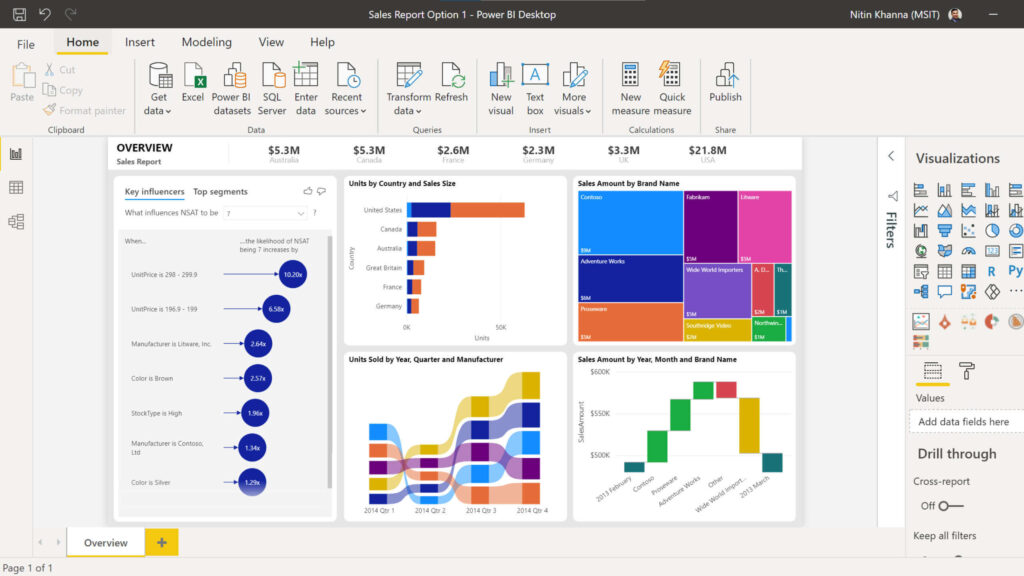
The digital age has brought with it a deluge of data, transforming the business landscape over the past decade. Data visualization, consequently, has become paramount, enabling businesses to glean actionable insights from vast datasets. Amidst this shift, Power BI has emerged as a champion of visualization, leading with its superior features and functionalities. However, with advanced capabilities comes a natural complexity that may challenge even the most experienced professionals.
Whether it’s the integration of diverse data sources, crafting custom visualizations, or upholding rigorous security standards, users often find themselves at a crossroads. These aren’t mere operational hiccups. Such challenges, when unchecked, can throttle critical business decisions and obstruct the smooth flow of insights.
Here in lies the pivotal decision: Do users solely rely on Microsoft Support or align themselves with Power BI managed services partners? While Microsoft offers direct, standardized solutions, a partner like AlphaBOLD provides a more tailored, hands-on approach, to understanding the nuances of individual business needs. A robust support system, be it direct from Microsoft or via a specialized partner, isn’t a luxury, it’s essential. It ensures that no user is left stranded. This is more than just about resolving glitches; it’s about fully harnessing Power BI. It is about transforming raw data into decisive insights promptly and proficiently.
The Microsoft Fabric Integration Revolution: What Decision-Makers Must Understand
Microsoft Fabric represents the most significant architectural shift in Power BI’s history, and understanding this integration is essential for strategic planning in 2026. Fabric isn’t simply an upgrade, it’s a complete reimagining of how organizations approach data analytics, bringing together Power BI, Azure Synapse, Data Factory, and real-time analytics into a unified SaaS platform.
What Microsoft Fabric Changes for Power BI Users:
End-to-End Data Lifecycle Management: Power BI is no longer just the endpoint for visualization—it’s integral to the entire data process. Organizations can now build pipelines, prepare data in Dataflows Gen2, store it in OneLake (Microsoft’s unified data lake), and visualize it directly without exporting, importing, or managing separate platforms.
Direct Lake Mode Performance: This breakthrough technology delivers query performance on par with Import mode while maintaining the real-time nature of DirectQuery. By standardizing on open data formats (Delta Lake and Parquet), organizations avoid vendor lock-in and achieve incredible performance directly against OneLake with zero data movement.
Unified Collaboration Environment: Data engineers, data warehousing professionals, data scientists, analysts, and business users can now collaborate seamlessly within a single workspace, on the same copy of data, with centralized administration, governance, and compliance tools including data lineage, impact analysis, and sensitivity labels.
The Strategic Business Impact:
For decision-makers, Fabric integration delivers quantifiable advantages:
Cost Optimization: Eliminate data duplication across systems, reduce storage costs through unified OneLake architecture, and minimize integration expenses by consolidating multiple point solutions into Fabric’s comprehensive platform.
Accelerated Time-to-Insight: Real-time analytics capabilities mean decisions are based on current data, not yesterday’s reports. Direct Lake mode provides blazing-fast query performance without traditional refresh cycles.
Scalability Without Complexity: As your data volumes grow, Fabric’s architecture scales seamlessly without the traditional pain of managing multiple disconnected systems and ensuring they work together.
Future-Proof Foundation: Fabric represents Microsoft’s strategic direction for all analytics. Organizations building on this foundation position themselves to leverage future innovations immediately rather than facing costly migrations.
The Implementation Challenge:
Here’s the critical reality: Fabric integration introduces substantial complexity. Organizations must navigate:
- Architectural Migration: Moving from traditional Power BI implementations to Fabric-native architectures requires strategic planning and expertise
- Dataflows Gen2 Adoption: The shift from legacy dataflows to Gen2 requires rearchitecting data pipelines and understanding lakehouse integration
- Skill Gap Management: Teams trained on traditional Power BI need upskilling on Fabric’s expanded capabilities
- Governance Framework Updates: Fabric’s unified environment requires updated security, compliance, and governance policies
The Managed Services Advantage: Navigating Fabric integration successfully requires deep expertise across data engineering, Power BI development, Azure services, and business strategy. Managed services partners provide:
- Strategic Roadmap Development: Tailored Fabric adoption plans aligned with business objectives
- Technical Migration Support: Expert guidance on moving existing Power BI implementations to Fabric-native architectures
- Training and Enablement: Comprehensive programs ensuring your team masters Fabric’s capabilities
- Ongoing Optimization: Continuous improvement as Microsoft releases new Fabric features and capabilities
For organizations still on traditional Power BI implementations, the message is clear: Fabric represents the future, and strategic migration planning must begin now to avoid being left behind as Microsoft accelerates Fabric-centric development.
AI-Powered Analytics: Copilot's Impact on Power BI Support Requirements
Copilot in Power BI represents a paradigm shift in how organizations interact with data, but it also fundamentally changes support requirements. As AI becomes central to Power BI workflows in 2026, understanding these capabilities, and their support implications, is critical for success.
Copilot's Transformative Capabilities:
Conversational Report Creation: Describe the insights you need in natural language, and Copilot analyzes data and generates comprehensive reports in seconds. This democratizes analytics, enabling business users to create sophisticated visualizations without technical expertise.
AI-Generated DAX Calculations: Instead of wrestling with complex DAX formulas, users describe their calculation needs conversationally, and Copilot generates optimized, validated code. This accelerates development while reducing errors.
Intelligent Data Summarization: Copilot creates narrative summaries that transform complex data patterns into easily understandable text, making insights accessible to non-technical stakeholders and accelerating decision-making.
Dynamic Visual Generation: Request bar charts, pie charts, maps, tables, or scatter plots through natural language, and Copilot creates appropriate visualizations that reveal patterns and relationships in your dataset.
Verified Answers and AI Instructions: Organizations can configure Copilot with trigger phrases that return pre-approved visuals, and provide AI instructions that embed business context, ensuring responses align with organizational standards and domain-specific logic.
The New Support Paradigm:
AI-powered capabilities introduce entirely new support challenges that traditional Microsoft support channels aren’t equipped to handle strategically:
AI Governance Frameworks: Organizations need policies governing AI-generated content, validation workflows for AI-created calculations, and guidelines ensuring Copilot responses align with business requirements. Without expert guidance, AI implementation becomes chaotic rather than transformative.
Model Optimization for AI: Semantic models optimized for traditional reporting aren’t necessarily optimized for AI. Managed services partners help organizations simplify data schemas, configure verified answers, and implement AI instructions that maximize Copilot’s effectiveness for specific business contexts.
Validation and Quality Assurance: How do you verify AI-generated DAX is accurate and compliant? What processes ensure Copilot summaries reflect business reality? Professional support establishes testing frameworks and validation protocols that maintain data integrity while leveraging AI acceleration.
User Adoption and Training: AI capabilities are only valuable if users adopt them confidently. Managed services provide comprehensive training programs that help teams understand when to use Copilot, how to validate results, and how to maximize AI-powered productivity gains.
Integration with Existing Governance: Copilot must work within existing data governance, security, and compliance frameworks. This requires sophisticated configuration—precisely the expertise managed services partners provide.
The ROI of AI-Optimized Support:
Organizations implementing Copilot with expert support report:
- 60-80% reduction in report creation time for common analyses
- 50% decrease in DAX development errors through AI-generated, validated calculations
- 40% improvement in business user engagement with data through conversational interfaces
- Faster decision-making as narrative summaries make insights immediately accessible to executives
The competitive advantage flows to organizations that implement AI capabilities strategically with expert guidance, not those that simply enable Copilot and hope for the best. As Microsoft accelerates Copilot development—with standalone experiences, app-scoped Copilot, and enhanced modeling capabilities all launching through 2026, the support gap between do-it-yourself and managed services approaches will only widen.
The 2026 Support ROI Calculation: Why Managed Services Pay for Themselves
For decision-makers evaluating Power BI support options, the question isn’t whether managed services cost more initially—it’s whether your organization can afford the hidden costs of inadequate support. In 2026’s competitive landscape, the ROI calculation is unambiguous.
The Hidden Costs of DIY Support:
Organizations relying solely on Microsoft Direct Support and internal resources face quantifiable expenses:
Delayed Implementation: Internal teams navigating Fabric integration, Copilot deployment, or complex data architecture challenges without expert guidance spend 40-60% longer reaching production than organizations with managed services support. Time-to-value delays translate directly to competitive disadvantage.
Suboptimal Configuration: Power BI implementations without strategic guidance typically utilize only 30-40% of available capabilities. Organizations pay for premium features (Fabric capacity, Copilot licenses) but fail to maximize their investment, leaving massive value unrealized.
Technical Debt Accumulation: Quick fixes without architectural expertise create technical debt that becomes increasingly expensive to remediate. Organizations eventually face costly rearchitecture projects that proper initial guidance would have prevented.
Security and Compliance Gaps: Improper configuration of Fabric governance, sensitivity labels, or AI guardrails creates risk exposure that can result in data breaches, compliance violations, or regulatory penalties—costs that far exceed managed services investment.
Opportunity Cost: While internal teams struggle with technical challenges, they’re not focused on strategic initiatives that drive business value. The opportunity cost of misdirected IT resources is often the highest hidden expense.
The Managed Services ROI Framework:
Professional Power BI managed services deliver measurable returns across multiple dimensions:
Accelerated Time-to-Value: Expert-guided Fabric migrations and Copilot implementations reach production 50-70% faster than internal efforts, compressing the timeline from investment to business impact.
Maximized Capability Utilization: Organizations with managed services support leverage 70-90% of Power BI’s capabilities compared to 30-40% for self-supported implementations, dramatically improving return on licensing investment.
Reduced Operational Costs: Proactive monitoring, optimization, and support prevent costly outages and performance issues. Organizations typically report 30-50% reduction in Power BI-related IT support tickets.
Risk Mitigation: Expert governance implementation and security configuration reduce compliance risk and prevent the catastrophic costs associated with data breaches or regulatory violations.
Strategic Innovation Capacity: When expert partners handle technical complexity, internal teams focus on business-value initiatives. This reallocation of resources often delivers 2-3x ROI through innovation capacity freed up.
Real-World ROI Examples:
Financial Services Client: $2.8M annual Power BI license investment. Engaged AlphaBOLD managed services at $180K annually. Results:
- 60% faster Fabric migration (6 months vs. projected 15 months internal)
- Eliminated $400K in planned consultant fees for specialized projects
- Increased business user adoption from 35% to 82%, maximizing license ROI
- Total 3-year ROI: 340%
Healthcare Organization: Struggling with Copilot implementation, spending $250K in internal resources with poor results. Switched to managed services at $150K annually. Results:
- Successful Copilot deployment within 90 days
- 70% reduction in report creation time across analytics team
- $500K annual savings from automated reporting previously done manually
- Payback period: 4 months
The Strategic Calculation:
The ROI question isn’t about direct cost comparison, it’s about strategic impact. Organizations that view Power BI support as a cost center miss the fundamental reality: in 2026’s data-driven competitive landscape, analytics capability is a strategic differentiator.
Managed services transform Power BI from a visualization tool into a competitive weapon. The organizations dominating their industries aren’t those minimizing support costs—they’re those maximizing analytics impact through strategic partnerships that accelerate innovation, optimize implementations, and ensure they’re always leveraging the latest capabilities.
For decision-makers, the calculation is simple: Can you afford to have your Power BI investment deliver only 30-40% of its potential value? Or does strategic partnership that maximizes that investment deliver exponentially greater returns?
Power BI Support vs. Power BI Managed Services
The quality of support accompanying data visualization tools like Power BI can be the difference between surface-level insights and deep, actionable intelligence. Both Microsoft Direct Support for Power BI and Power BI managed services from a Microsoft partner offer distinct avenues of assistance. However, one often emerges as the superior option for organizations aiming for peak performance.
Microsoft Direct Support:
Advantages:
- Standardized Solutions: Coming directly from Power BI’s developers, this support is inherently in sync with the platform’s foundational principles.
- Direct Updates: Users benefit from firsthand updates and patches, ensuring they’re always in the loop about Power BI’s evolutions.
Limitations:
- One-size-fits-all: Often, the solutions cater to a broader audience and may not always align with unique business-specific needs.
- Response Delays: With its massive global user base, there might be longer turnaround times, especially during high-demand periods.
- Limited Flexibility: Direct support might fall short when users require custom solutions or integrations beyond standard Power BI offerings.
Power BI Managed Services Support:
Advantages:
- Bespoke Solutions: Managed services stand out with their ability to customize, catering to an organization’s unique needs and ensuring a fit-for-purpose approach.
- Rapid, Dedicated Responses: Many managed services allocate dedicated teams, ensuring prompt support that understands your business’s context.
- Holistic Tech Integration: Beyond Power BI, they often provide solutions that integrate seamlessly with a company’s broader tech stack.
- Empowerment Through Training: Partners like AlphaBOLD often enhance an organization’s internal capabilities, offering training sessions and workshops.
Limitations:
- Cost Considerations: While they deliver superior value, the initial investment might be higher compared to standard direct support. However, the ROI, given the depth of support and customization, often justifies the cost.
The Decisive Factor
While Microsoft Direct Support offers a consistent and standardized support framework, third-party managed services typically go several steps further. They don’t just solve issues; they empower businesses, tailoring Power BI to precisely fit organizational needs. They ensure a more fluid and responsive support experience. For businesses that see data not just as numbers but as a strategic asset, Power BI managed services frequently emerge as the preferred choice.
Making the Right Choice: Navigating Power BI's Official Support Channels with Enhanced Guidance from Managed Services
While Microsoft’s official support channels offer essential assistance to all Power BI users, fully utilizing these resources can be daunting. This is where the expertise of Power BI managed services providers shines. They not only help navigate these channels more effectively but also enhance their potential by providing tailored guidance. This ensures that businesses extract maximum value from their investments. Before exploring the benefits of managed services, it’s crucial to understand the basic support offerings Microsoft provides for Power BI.
Power BI Community:
- Overview and Benefits of Joining: The Power BI Community is a dynamic, user-centric platform where professionals from all over the world converge. They discuss, share, and solve challenges related to Power BI. By joining, users gain access to a wealth of experience and knowledge, accelerating their learning curve and fostering collaboration.
- Types of Content and Support: The community is rife with varied content. Active forums allow users to post queries and receive answers from fellow users and Microsoft experts. Regularly updated blogs keep users informed about the latest developments and best practices. Webinars provide deep dives into specific features, ensuring users have both breadth and depth in their understanding.
Power BI Support Center:
- Detailed Guidance on Common Issues: The Support Center serves as a hub for addressing frequently encountered problems. Whether you’re dealing with integration woes, data modeling challenges, or visualization glitches, the center provides step-by-step solutions.
- Self-help Resources: Beyond troubleshooting, the center is equipped with a plethora of articles, tutorials, and FAQs. These resources empower users to master Power BI’s functionalities, ensuring they make the most of the software.
Power BI Service Support:
- Direct Support for Power BI Service Issues: This channel provides specialized support for issues related to the Power BI Service. Expert assistance ensures that users can seamlessly operate the cloud-based service without hiccups.
- How to Raise a Support Ticket: Users can log into their Power BI account, navigate to the ‘Help & Support’ section, and follow the prompts to detail their issue. Once submitted, Microsoft’s team jumps into action, providing timely and efficient solutions.
Power BI Mobile & Desktop Support:
- Differences in Support for Different Versions: While the core functionalities remain consistent, the mobile and desktop versions of Power BI have nuanced differences. Support for each version is tailored to address these unique challenges.
- Tools and Resources: Microsoft offers specialized tools, such as diagnostic utilities, to help troubleshoot issues on these platforms. Additionally, platform-specific documentation ensures users have a clear roadmap to navigate any challenges.
Microsoft Fabric Support:
- Holistic Cross-Product Support: Microsoft Fabric is an innovative support system that integrates with Power BI and other Microsoft products. It is designed to provide solutions specific to Power BI and in scenarios where users are working across multiple Microsoft platforms.
- Real-time Assistance: Using advanced AI and machine learning algorithms, Microsoft Fabric can offer real-time troubleshooting solutions, significantly reducing the time spent resolving issues.
- Unified Dashboard: With Microsoft Fabric, users can manage all their support tickets, queries, and issues across different Microsoft products from a single dashboard, ensuring a streamlined experience.
Additional Power BI Support Options:
While Microsoft’s official channels provide a solid foundation for Power BI support, there are additional avenues that users can tap into. These supplementary options are designed to cater to specialized needs, enhance learning experiences, and ensure that users have a holistic support system at their fingertips. These include:
Guided Learning:
Overview of Microsoft’s Official Training and Tutorials: Microsoft offers an array of training modules ranging from beginner to expert levels. These modules cover everything from basic dashboard creation to advanced DAX formulae, ensuring users are always up-to-speed.
Power BI Documentation:
- Comprehensive Manuals and User Guides: Power BI’s extensive documentation is a ready reference whether for experienced and new users. Detailed guides, replete with examples, elucidate every feature of the software.
- Updated Release Notes and Feature Summaries: Keep up with the latest updates, enhancements, and bug fixes with regularly updated release notes.
Consulting Services:
- When to Consider External Consultants: While Microsoft’s Power BI Support is comprehensive, there are instances when businesses may require specialized assistance, especially for large-scale deployments or integrations.
- Microsoft’s Partner Network: Microsoft has nurtured a vast network of certified partners such as AlphaBOLD. As experts in the field, we provide personalized consulting services, allowing businesses to harness Power BI’s capabilities in a manner that precisely aligns with their unique requirements. Expanding on our expertise, AlphaBOLD assists organizations in optimizing their data analysis strategies, configuring Power BI to meet specific business goals, and designing tailored solutions that empower informed decision-making. Our aim is to enhance efficiency, drive productivity, and facilitate a seamless integration of Power BI into the existing operational framework.
Through our collaboration with Microsoft and deep-rooted knowledge of Power BI’s intricacies, we bridge the gap between complex data and actionable insights. By engaging with us, businesses unlock the full potential of Power BI, transforming their data into a powerful tool for growth and competitive advantage in today’s data-centric landscape.
Unlock the Power of Power BI with Expert Guidance!
Enhance your data analytics journey with expert support for Power BI. Request a support consultation today to unlock the full potential of Power BI managed services for your business..
Request Support ConsultationThe Inherent Value of Power BI Managed Services
Navigating the complexities of data visualization and business intelligence in today’s fast-paced corporate world isn’t a walk in the park. It’s more than just ongoing support. Managed services evolve with your needs, providing adaptive solutions that address both anticipated and unforeseen scenarios. Let’s explore some typical challenges organizations face and understand why Power BI managed services might be the answer:
Top-down Requests:
Imagine being tasked with delivering sophisticated mobile dashboards within a tight deadline. Without a well-defined strategy or the right talent, it’s a race against time. Managed services bring both the expertise and bandwidth to translate such top-down mandates into reality, ensuring deliverables that impress even at the highest levels.
Handling Seasonal Peaks:
Certain times of the year might demand heightened BI capabilities, especially during peak business periods. Rather than exhaust internal resources or scramble for external talent, a managed service is geared to scale, ensuring timely deliverables without compromising quality.
Utilizing Spare Budgets:
When you find yourself with a surplus budget and an interest in exploring Power BI further, managed services can quickly transform those funds into a valuable proof of concept or pilot project.
Preventing Skills Stagnation:
In an ever-evolving BI landscape, relying solely on age-old processes can hinder growth. Managed services bring fresh perspectives, introducing best practices and novel strategies to rejuvenate your BI processes.
Innovation on Your Terms:
If you’ve ever felt the itch to customize or experiment but lacked the expertise, managed services fill that gap. They bring the development know-how, ensuring that innovative ideas are executed efficiently.
Adapting to New Influences:
Organizations evolve, and with new leadership can come new preferences or requirements in BI. Managed services ensure that these transitions are smooth, adapting to new tools or features as needed, without disrupting your team’s rhythm.
Why Choose AlphaBOLD’s Managed Services for Power BI?

Our Power BI consultants have years of experience in the field and are ready to handle all the situations highlighted above and more. We pride ourselves on flexibility, offering both pay-as-you-go models favored by smaller organizations and comprehensive managed services that encompass proactive support, regular check-ins, usage reviews, and continuous improvement recommendations. Our profound understanding of Power BI’s intricacies and the broader business intelligence landscape positions us as the ideal partner for businesses aiming to redefine their data strategies. At AlphaBOLD, it’s not just about resolving technical challenges—it’s about envisioning and realizing the full spectrum of what’s possible with Power BI. From bespoke integrations to strategic data consultancy, our mission is to help businesses navigate the data revolution confidently and competently.
Unlock the Power of Power BI with Expert Guidance!
Enhance your data analytics journey with expert support for Power BI. Request a support consultation today to unlock the full potential of Power BI managed services for your business..
Request Support ConsultationConclusion
As this article has demonstrated, organizations that view Power BI support as a cost center fundamentally miss the opportunity. In today’s competitive landscape, analytics capability isn’t optional, it’s existential. The organizations dominating their industries aren’t those minimizing support costs; they’re those maximizing analytics impact through strategic partnerships.
With industry experts guiding each step, challenges become opportunities, and potential hurdles transform into growth levers. The question facing decision-makers is simple: Can you afford to leverage only 30-40% of your Power BI investment’s potential, or does strategic partnership that maximizes that investment deliver exponentially greater returns?
As you consider Power BI’s expansive capabilities and the transformative potential of Microsoft Fabric and AI-powered analytics, remember the unparalleled advantage of having experts like those at AlphaBOLD accompanying you. Don’t navigate the complexity alone.
Embark on your Power BI journey with AlphaBOLD as your guide. Request your consultation today and transform how you visualize, analyze, and leverage data for competitive advantage!
Explore Recent Blog Posts