Best CRM for Manufacturing in 2026: A Practical Buyer’s Guide

Fatima Tahir
Table of Contents
Introduction
A CRM for manufacturing helps businesses manage long sales cycles, complex quoting, distributor relationships, and post-sale service within a connected customer-management system. Yet many implementations underperform because the platform was selected for general sales management rather than the realities of industrial B2B operations.
Manufacturing CRM platforms are increasingly incorporating AI agents, connected service workflows, and tighter CRM-ERP integration. However, capabilities vary significantly by platform, licensing, region, and release status.
This guide explains what manufacturers should look for in a CRM, how the leading platforms compare, and how CTOs and CFOs can evaluate platform fit, implementation complexity, and long-term cost.
Why Is CRM a Structural Requirement for Manufacturers?
Many manufacturing sales cycles extend across several months and involve stakeholders from sales, engineering, procurement, operations, logistics, and finance. Without a CRM that connects customer activity with relevant operational data, teams may rely on incomplete information, delay follow-ups, and struggle to forecast demand accurately.
What a manufacturing CRM actually changes:
- Pipeline accuracy: Reps stop working from spreadsheets. Leadership gets a real-time view of opportunity status, deal value, and close probability tied to actual order data.
- Forecasting that feeds production: When CRM pipeline data connects to ERP, demand planners can adjust procurement and scheduling before shortages develop rather than after.
- Distributor and channel visibility: Manufacturers managing dealer or distributor networks get account-level visibility into sellout performance, not just shipment data.
- Post-sale retention: Service cases, warranty claims, and maintenance schedules live alongside the customer record, so the service team never starts from scratch.
- Improved demand planning: When CRM pipeline and customer-demand data is connected to ERP and planning systems, manufacturers can identify demand changes earlier and adjust procurement, inventory, and production plans more effectively.
For a broader view of how technology is reshaping manufacturing end-to-end, see AlphaBOLD’s Manufacturing Industry Solutions overview, which covers the full stack from ERP to IoT to AI-driven automation.
How Are AI Agents Changing Manufacturing CRM?
Agentic AI is becoming a more significant part of enterprise software, although adoption and product maturity remain uneven. According to Gartner’s 2026 CIO and Technology Executive Survey, only 17% of organizations have deployed AI agents, while more than 60% expect to do so within the next two years. Gartner also notes that most current deployments remain narrowly scoped and that fully autonomous agents are not yet ready for most enterprise use cases.
Microsoft is also rolling out additional agentic capabilities across Dynamics 365 during its 2026 release wave 1, which covers features releasing from April through September 2026. Because the release plan includes capabilities that may still be planned or in preview, manufacturers should confirm availability by application, region, licensing requirements, and general availability date before including them in a CRM roadmap.
Depending on the applications, integrations, data quality, and governance controls in place, manufacturers can use AI agents to support workflows such as:
- Demand planning and replanning: Agents can analyze demand, supply, capacity, and cost signals to identify disruptions, support scenario analysis, and recommend operational adjustments. Approved actions may then flow into planning, procurement, production, or fulfillment workflows. Microsoft demonstrated agentic ERP scenarios at Hannover Messe 2026 that focused on faster replanning and better production trade-offs, but the level of automation depends on how Dynamics 365 Supply Chain Management and connected systems are configured.
- Proactive service coordination: Connected equipment can generate IoT alerts that are converted into Dynamics 365 Field Service work orders and assigned to technicians. More advanced workflows may also use asset history, inventory availability, service priorities, and customer information, but these require connected device data, Field Service configuration, system integration, and defined approval rules.
- Intelligent sales prioritization: Dynamics 365 Sales capabilities can research leads, identify high-intent opportunities, surface recommended next actions, and help sellers act within their existing workflow. However, some agent-led Sales capabilities remain in preview or have general availability dates later in the 2026 release wave, so their status should be verified before implementation.
The value of agentic AI is not autonomous action for its own sake. It comes from connecting customer, sales, service, and operational data so that teams can identify issues earlier, complete approved tasks faster, and retain human oversight where decisions affect customers, finances, production, or compliance.
Align Your CRM With Your Business Goals, Not Just Features
From pipeline visibility to post-sales operations, we configure CRM like Dynamics 365 to support the outcomes your leadership team cares about.
Request a DemoWhat Should a Manufacturing CRM Include?
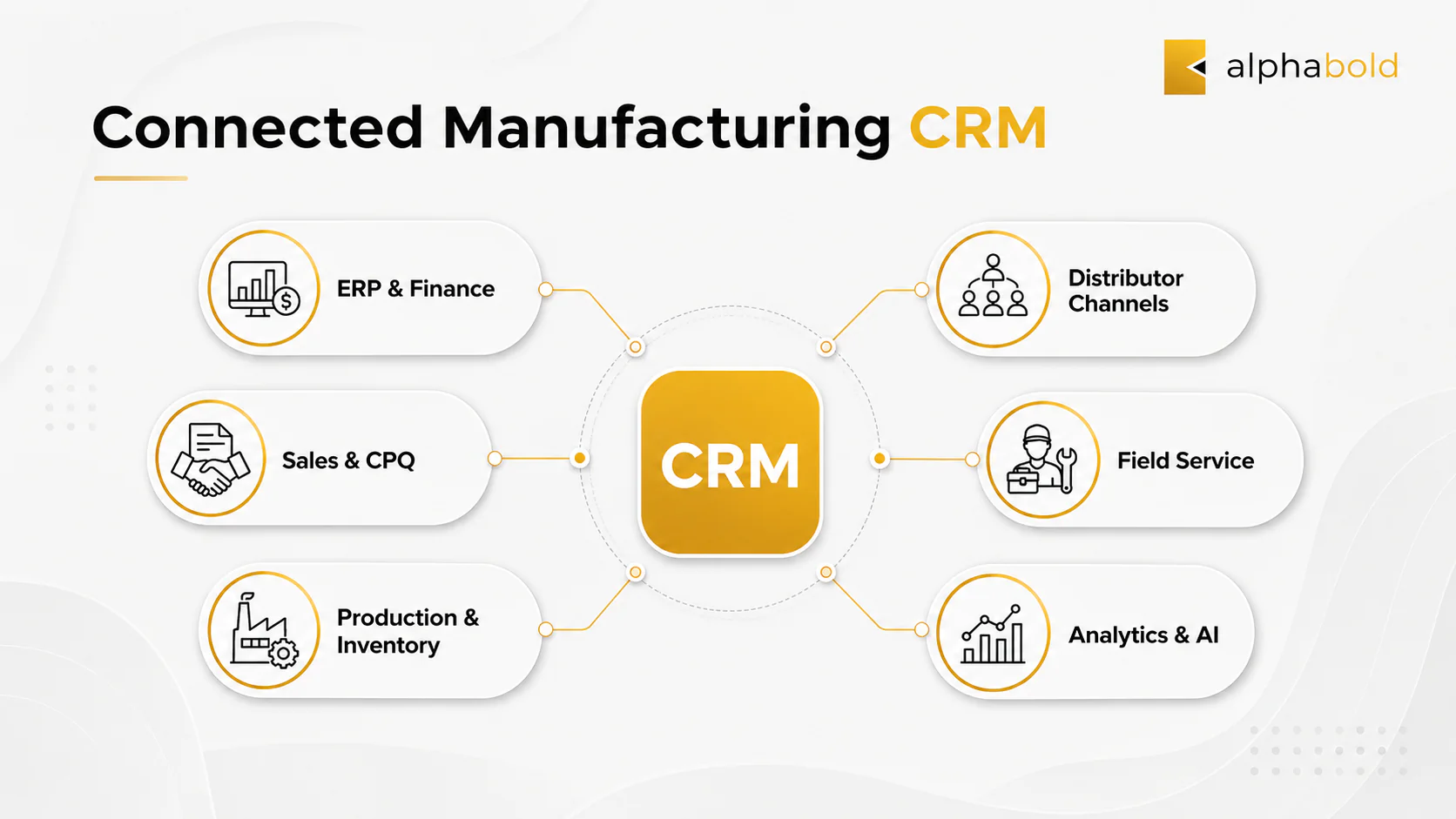
The right CRM for manufacturing should support the processes that connect customer demand with quoting, order management, production, delivery, and post-sale service. Buyers should evaluate how well each platform supports the following requirements:
- CRM-ERP integration depth: The platform should support reliable data exchange for relevant customer, product, pricing, order, inventory, invoice, and service records. Data ownership, synchronization direction, frequency, validation, and conflict handling should be defined for each entity rather than assuming every record will move between systems in real time.
- Configure, price, quote capabilities: Manufacturers with complex or configurable products need quoting processes that support pricing rules, product dependencies, approval workflows, and ERP handoffs. Standard CRM quoting may be sufficient for straightforward scenarios, while more complex requirements may need a dedicated CPQ platform.
- AI and automation aligned with the use case: Manufacturers should evaluate whether a platform can support practical workflows such as lead research, service coordination, demand analysis, record summarization, and task automation. Agentic capabilities should be assessed alongside data readiness, security, governance, licensing, and human approval requirements.
- Multichannel sales support: Direct sales, distributor networks, dealers, and partner channels may require different pipelines, account structures, pricing models, and portal experiences within the same customer-management environment.
- Field service integration: Manufacturers that provide installation, inspection, maintenance, warranty, or repair services need sales, customer service, and field teams to work from connected customer, asset, work-order, and service-history information.
- Mobile and offline access: Sales representatives and field technicians often work on shop floors or at customer sites. The platform should provide mobile access and, where required, offline functionality for essential records and tasks.
- Security and governance: Role-based access, audit history, environment management, approval controls, data policies, and deployment governance should be evaluated before implementation rather than added after go-live.
- Scalability and extensibility: The CRM should be able to accommodate new products, business units, locations, channels, integrations, analytics, and automation requirements without requiring the organization to replace the platform as it grows.
Questions to Answer Before Building a Vendor Shortlist:
Choosing the right CRM for manufacturing requires more than comparing feature lists. CTOs and CFOs need to agree on the business problems the platform must solve, how it will connect with existing systems, and what the total investment will include beyond licensing.
Questions to answer before building a vendor shortlist:
- What is failing today? Pipeline blind spots, slow quoting, poor service follow-through, weak distributor visibility, and disconnected customer data point to different platform requirements. Define the operational problem before evaluating software.
- What does your ERP environment look like? Manufacturers using Business Central or Dynamics 365 Finance may benefit from a more direct integration path with Dynamics 365 Sales. SAP, Oracle, and mixed-vendor environments may require a different connector, middleware, or API architecture.
- Which outcomes should the CRM improve? Agree on measurable goals such as shorter quote turnaround, better forecast accuracy, stronger sales follow-up, fewer service delays, improved distributor visibility, or reduced manual data entry.
- What is the full cost of ownership? Licensing is only one part of the investment. CFOs should also account for implementation, data migration, integration, customization, testing, training, support, upgrades, and ongoing administration.
- What does the CTO require for security and governance? Data residency, role-based access, audit history, identity management, environment controls, integration security, and deployment governance should be evaluated before implementation.
- How complex are the quoting and approval processes? Standard CRM quoting may be sufficient for straightforward products. Manufacturers with configurable products, customer-specific pricing, engineering rules, or multilevel approvals may need a dedicated CPQ solution.
- Which system should own each type of data? Decide whether CRM, ERP, or another platform will own customer records, products, pricing, orders, invoices, inventory, assets, and service history. This prevents duplicate records and integration conflicts later.
- How will adoption be supported? Low adoption weakens data quality, forecasting, process consistency, and return on investment. Evaluate usability carefully and define training, communication, and change-management requirements before go-live.
- Can the platform scale with the business? The selected CRM should support new locations, products, channels, integrations, service models, analytics, and automation requirements without forcing another platform replacement.
Use our CRM Software Selection: A Step-by-Step Guide to define business requirements, evaluation criteria, data ownership, and integration scope before building your shortlist.
Which CRM Platforms Should Manufacturers Consider?
The platforms below are evaluated on manufacturing-specific criteria: ERP integration depth, AI capability, sales cycle fit, and total cost of ownership. General-purpose CRM rankings by feature count are not useful in a manufacturing context.
Salesforce Manufacturing Cloud:
Salesforce Manufacturing Cloud is designed for manufacturers that need greater visibility across customer agreements, account forecasts, opportunities, orders, and partner relationships. It is particularly relevant to organizations already using Salesforce Sales Cloud, Service Cloud, or other Salesforce applications.
Key considerations include:
Sales agreements for tracking planned and actual customer commitments.
Advanced account forecasting based on opportunities, orders, agreements, historical activity, and other business measures.
Support for distributor, partner, and account-management workflows.
Agentforce capabilities for tasks such as managing sales agreements, generating performance summaries, converting forecasts into opportunities, and supporting asset-service estimation.
A broad partner ecosystem for integration, CPQ, field service, and industry-specific extensions.
Additional configuration and integration may be required to connect Salesforce with ERP, production, inventory, and financial systems.
Best fit: Midmarket and enterprise manufacturers that already use Salesforce or prioritize customer, channel, agreement, and forecasting capabilities.
SAP Sales Cloud With SAP S/4HANA Integration:
SAP Sales Cloud is best suited to large manufacturers already operating within the SAP ecosystem. It supports customer, account, opportunity, forecasting, and sales workflows, while integration with SAP S/4HANA connects sales activity with finance, inventory, supply-chain, and manufacturing operations.
Key considerations include:
- Strong alignment with SAP ERP and enterprise data environments.
- Support for complex account structures, sales forecasting, and guided selling.
- Integration with operational data held in SAP S/4HANA.
- Suitable for large, global, or compliance-heavy manufacturing organizations.
- Implementation complexity and total cost may be higher than for midmarket CRM platforms.
Best fit: Large and global manufacturers already using SAP S/4HANA that require closely aligned enterprise sales, finance, supply-chain, and manufacturing processes.
Oracle NetSuite:
Oracle NetSuite is well suited to growing midmarket manufacturers that want CRM, ERP, financial management, inventory, procurement, order management, and production workflows within one cloud-based business suite.
Key considerations include:
- Unified customer, order, inventory, financial, and operational data.
- Support for lead management, opportunities, quotes, orders, customer service, and partner relationships.
- Manufacturing capabilities covering procurement, production planning, work orders, inventory, and fulfillment.
- A modular structure that allows organizations to add capabilities as their requirements grow.
- CRM functionality may be less specialized than platforms designed primarily for complex enterprise sales, service, and channel-management processes.
- Buyers should evaluate whether NetSuite’s CRM depth is sufficient for their sales and service requirements rather than comparing platforms only by their overall AI capabilities.
Best fit: Growing midmarket manufacturers seeking a unified ERP and CRM suite with strong financial, inventory, and order-management capabilities.
Zoho CRM:
Zoho CRM is a practical option for smaller manufacturers that need straightforward lead management, pipeline visibility, customer tracking, and workflow automation without the cost or implementation complexity of a larger enterprise platform.
Key considerations include:
- Lead, account, contact, opportunity, and pipeline management.
- Integration with Zoho Inventory, Zoho Desk, Zoho Analytics, and other applications in the Zoho ecosystem.
- Zia capabilities for predictive scoring, forecasting, recommendations, anomaly detection, and workflow support.
- Accessible licensing and a relatively simple interface for smaller teams.
- Fewer manufacturing-specific capabilities for complex quoting, distributor management, field service, and ERP-connected workflows.
- Additional integration or customization may be required as operational complexity grows.
Best fit: Small and lower-midmarket manufacturers with relatively simple sales processes, limited integration requirements, and tighter software budgets.
Microsoft Dynamics 365: Best for Connected Manufacturing Operations:
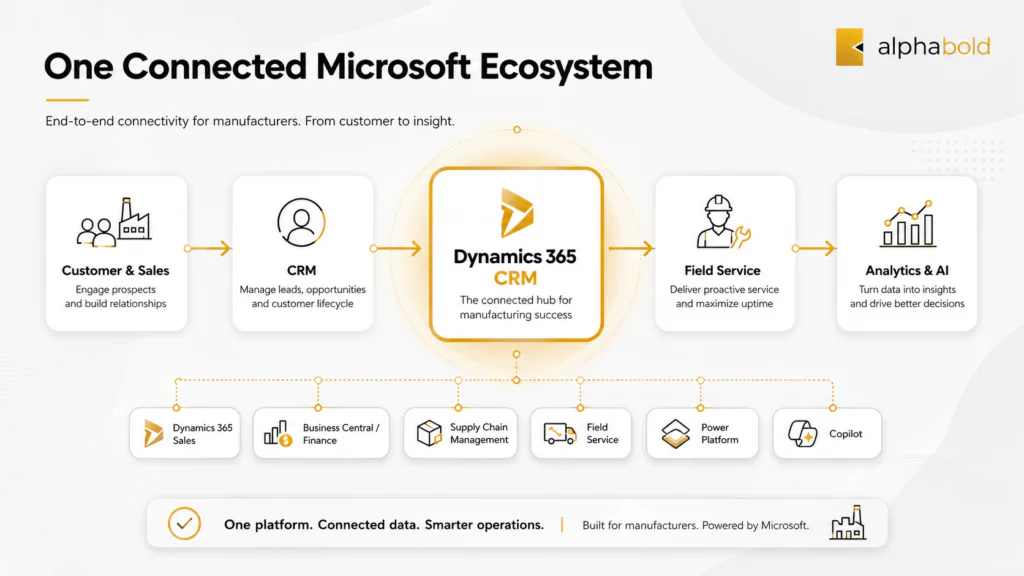
Among the platforms evaluated, Microsoft Dynamics 365 stands out for manufacturers that want customer-facing processes and operational systems to work within one connected technology ecosystem. Rather than treating CRM as an isolated sales tool, Dynamics 365 can connect sales, customer service, field operations, finance, supply chain, analytics, collaboration, and automation around shared business processes.
For manufacturers already invested in Microsoft technology, this combination makes Dynamics 365 a particularly compelling choice. It provides the flexibility to begin with a focused CRM implementation and expand into a broader connected platform as operational requirements evolve.
Key considerations include:
- Connected CRM and ERP capabilities: Dynamics 365 Sales, Customer Service, and Field Service can work alongside Business Central, Finance, and Supply Chain Management to support processes extending from initial customer engagement through quoting, order management, fulfillment, and post-sale service.
- Strong Microsoft-native integration: Dynamics 365 Finance and Supply Chain Management can connect with Dataverse through dual-write for eligible entities and processes. Business Central can integrate with Dynamics 365 Sales through Dataverse, standard mappings, record coupling, and configurable synchronization.
- A connected prospect-to-service lifecycle: Manufacturers can bring sales, order, financial, inventory, and service information closer together, reducing the handoff gaps that commonly occur when CRM, ERP, and field-service platforms are implemented separately.
- Significant AI and agentic momentum: Microsoft continues to expand Copilot and agent capabilities across sales, customer service, field service, finance, and supply-chain applications. These capabilities can support research, recommendations, record summaries, workflow automation, service preparation, and operational decision-making. Availability should still be confirmed by application, license, region, and release status.
- Advanced field-service capabilities: Dynamics 365 Field Service combines work-order management, scheduling, workflow automation, mobile tools, asset information, and Copilot-assisted experiences. This is a major differentiator for manufacturers whose customer relationships depend on installation, maintenance, warranty, and onsite service.
- Extensibility through Power Platform: Power Apps, Power Automate, Power BI, Dataverse, and Copilot Studio allow manufacturers to extend workflows, build role-specific applications, automate repetitive tasks, develop analytics, and introduce custom agents without rebuilding the core platform.
- Integration with everyday productivity tools: Connections with Outlook, Teams, Excel, and Microsoft 365 can make CRM information easier for sales, service, and operational teams to access within the tools they already use.
- A platform that can evolve with the business: Its modular structure allows manufacturers to adopt the applications they need now while maintaining a path toward more connected sales, service, ERP, data, and AI capabilities over time.
Where Dynamics 365 becomes especially compelling is not one isolated feature. Its strength comes from the ability to connect customer relationships with the operational systems responsible for pricing, inventory, production, delivery, and service. For manufacturers trying to reduce fragmented processes without replacing every system at once, that connected foundation can provide a significant long-term advantage.
Best fit: Midmarket and enterprise manufacturers using Microsoft technology that need a scalable platform connecting CRM, ERP, field service, analytics, collaboration, automation, and emerging AI capabilities.
How Should Manufacturers Integrate CRM and ERP?
CRM-ERP integration is one of the most important architectural decisions in a manufacturing CRM implementation. When customer, product, pricing, inventory, order, invoice, and service data remain divided across disconnected systems, teams must reconcile information manually and may make decisions using incomplete or outdated records.
The right integration method depends on the CRM and ERP platforms involved, transaction volumes, latency requirements, business rules, security controls, and which system owns each type of data. The most common approaches include:
Microsoft-Native Integration:
Microsoft provides different native integration options depending on which Dynamics 365 ERP application a manufacturer uses.
Dynamics 365 Finance and Supply Chain Management can connect with Dataverse and customer engagement applications through dual-write. Dual-write supports near-real-time data exchange for eligible tables and processes, helping connect customer-facing workflows with finance, supply-chain, and operational data.
However, dual-write does not provide universal two-way synchronization for every record. The implementation team must review the available mappings and define the source system, synchronization direction, validation rules, ownership model, and conflict-handling process for each data entity.
Business Central uses a different integration framework. It connects with Dynamics 365 Sales through Dataverse using integration table mappings, field mappings, record coupling, synchronization rules, and scheduled or manual synchronization. Depending on the record type and configuration, information may flow from Business Central to Dataverse, from Dataverse to Business Central, or in both directions.
These Microsoft-native integration options can reduce friction for manufacturers already using Dynamics 365, but they still require careful data mapping, security configuration, testing, monitoring, error handling, and governance.
Middleware-Based Integration:
When CRM and ERP applications come from different vendors, an integration platform can provide a controlled layer between them. Technologies such as Azure Integration Services, MuleSoft, and Boomi can manage data transformation, workflow orchestration, authentication, API calls, retries, conflict resolution, error logging, and monitoring.
Middleware is often appropriate when:
- Several business applications must exchange data.
- CRM and ERP use different data models or business rules.
- Records must be validated or transformed before reaching another system.
- Integration failures require centralized monitoring and recovery.
- The organization expects the integration architecture to expand over time.
- Sensitive transactions require additional security and governance controls.
This approach usually requires more architecture and management than a standard connector, but it can provide greater scalability and control in complex, multi-system manufacturing environments.
API-Based Point-to-Point Integration:
Direct API connections may be appropriate when the integration scope is limited and only a small number of clearly defined transactions must move between systems.
For example, a manufacturer may use an API to retrieve current inventory availability during quoting or transfer an approved sales order from CRM to ERP.
However, point-to-point integrations can become difficult to maintain as the number of applications, data entities, transformations, authentication methods, error scenarios, and business rules increases. Each connection may develop its own monitoring, retry, support, and change-management requirements.
Before choosing an integration method, manufacturers should identify the records that must move between CRM and ERP, including:
- Customer and account records
- Contacts
- Product catalogs
- Pricing and discount information
- Quotes and sales orders
- Inventory availability
- Invoice and payment status
- Assets, warranties, and service history
For each data entity, the project team should determine which application owns the record, which systems can update it, how frequently it must be synchronized, and what should happen when records conflict or an integration fails. These decisions should be made during solution design rather than after implementation begins.
How Does CPQ Support Manufacturing Sales?
Configure, price, quote capabilities are particularly important when manufacturers sell products with complex options, dependencies, pricing rules, volume discounts, customer-specific agreements, or approval requirements.
Dynamics 365 Sales provides product catalogs, product families, bundles, price lists, volume and manual discounts, quotes, orders, and invoices. These capabilities can support relatively straightforward product and quoting scenarios within the standard sales process.
However, standard quoting functionality should not automatically be treated as a complete manufacturing CPQ solution. Manufacturers may require additional capabilities such as:
- Guided product configuration
- Compatibility and dependency rules
- Engineering constraints
- Customer-specific and channel-specific pricing
- Automated approval routing
- Bill-of-material or production-ready outputs
- Document generation
- Quote-to-order integration with ERP
For more complex product configurations, Dynamics 365 can be extended with a dedicated CPQ platform such as Experlogix. Experlogix offers embedded Dynamics 365 Sales and Finance and Supply Chain Management integrations for guided configuration, pricing, approvals, and ERP-ready handoffs.
A useful test is to ask each shortlisted vendor to demonstrate a realistic manufacturing quote. The scenario should include multiple configuration options, a volume-based price adjustment, a customer-specific discount, and a multilevel approval requirement.
Evaluate how many applications and screens the sales representative must use, how invalid configurations are prevented, how approvals are recorded, and how an accepted quote moves into order processing. This reveals whether CPQ is genuinely connected to the sales and operational workflow or simply appears on the feature list.
Why Manufacturers Choose Dynamics 365 With AlphaBOLD?
Dynamics 365 stands out when manufacturers need more than an isolated sales database. Its broader value comes from connecting customer engagement with ERP, field service, analytics, collaboration, workflow automation, and emerging AI capabilities across the Microsoft ecosystem.
This makes Dynamics 365 a particularly compelling choice for manufacturers that want to modernize customer-facing operations without adding another disconnected technology layer. Organizations can begin with a focused sales or service implementation and expand the platform as requirements for ERP integration, field operations, analytics, automation, and AI mature.
However, the strength of the platform does not remove the need for disciplined implementation. Successful outcomes depend on selecting the right applications, defining data ownership, designing integrations correctly, configuring workflows around real manufacturing processes, and supporting users after go-live.
AlphaBOLD helps manufacturers turn Dynamics 365 into a connected operating environment rather than a collection of separately implemented applications.
Our manufacturing CRM engagements can include:
- CRM-ERP alignment from the beginning: Business Central, Dynamics 365 Finance and Supply Chain Management, or third-party ERP integration is considered during solution design rather than postponed until after CRM go-live.
- Manufacturing-specific process configuration: Sales stages, account structures, quoting, approval routing, distributor management, order handoffs, service workflows, and escalation rules are configured around how the business operates.
- Connected sales and service experiences: Customer, opportunity, order, asset, warranty, and service information can be brought closer together so teams have better context throughout the customer lifecycle.
- CPQ and complex quoting support: AlphaBOLD can help determine whether standard Dynamics 365 quoting is sufficient or whether the organization requires a dedicated CPQ platform, custom workflow, or ERP-connected configuration process.
- Copilot and agent readiness: AI capabilities are evaluated against business value, data quality, security, licensing, governance, and release availability before being introduced into production workflows.
- Power Platform extensibility: Power Apps, Power Automate, Power BI, Dataverse, and Copilot Studio can extend the solution with role-specific applications, workflows, analytics, integrations, and agents without unnecessarily modifying the core platform.
- Security and governance: Roles, access controls, environments, audit requirements, approvals, data policies, and deployment processes are defined as part of the implementation rather than treated as post-launch cleanup.
- Training and adoption planning: Users are prepared to work with the system consistently so CRM data becomes more complete, reliable, and useful for forecasting and decision-making.
- Ongoing optimization and support: The platform can continue to evolve as products, processes, integrations, teams, and AI capabilities change.
For manufacturers already working within the Microsoft ecosystem, Dynamics 365 offers a powerful path toward connected sales, service, ERP, data, and automation. AlphaBOLD helps translate that potential into a practical solution aligned with the organization’s processes, priorities, and long-term technology roadmap.
Build a Connected CRM Strategy for Manufacturing
AlphaBOLD helps manufacturers select, implement, integrate, and optimize Dynamics 365 around real sales, service, ERP, and operational requirements. Work with our consultants to define the right architecture, implementation roadmap, and adoption plan for your business.
Request a DemoConclusion
CRM decisions in manufacturing are changing now. The question is no longer whether a system can store customer records, but whether it can support the full lifecycle, from quoting and production planning to billing, service, and long-term account management. What matters is how well a CRM fits into existing operations without forcing teams to work around it.
For enterprise decision-makers, selecting the right CRM involves looking beyond feature checklists. It requires understanding how the system integrates with finance and operations, the level of control it allows over customization, and whether it can support growing requirements for data, compliance, and automation.
Dynamics 365 is often considered because it integrates closely with many core enterprise systems. But the real value depends on how it is implemented, governed, and evolved over time. Strong CRM outcomes stem from clear operational priorities and disciplined execution, not solely from software.
As manufacturers reassess their CRM strategy, the focus should be on long-term fit, operational clarity, and the ability to support change without repeated disruption. Organizations that approach CRM this way are better positioned to make deliberate, confident decisions rather than reactive ones.
FAQs
A CRM for manufacturing should support more than lead and opportunity tracking. It should connect sales with quoting, distributor management, order information, inventory visibility, field service, warranties, and post-sale support. The right platform should also integrate reliably with ERP systems, support complex approval and CPQ requirements, provide mobile access, and accommodate the manufacturer’s security, governance, and reporting needs.
CRM and ERP should exchange the customer and operational data required to complete shared business processes. This may include accounts, products, pricing, quotes, orders, inventory, invoices, assets, and service history. Manufacturers should define which system owns each record, how frequently data is synchronized, which direction it moves, and how errors or conflicts are handled. The integration method may involve native Microsoft tools, middleware, or direct APIs.
Microsoft Dynamics 365 is a strong choice for manufacturers that want to connect sales, customer service, field service, ERP, analytics, collaboration, and automation within the Microsoft ecosystem. It can work with Business Central, Dynamics 365 Finance, Supply Chain Management, Power Platform, Microsoft 365, and Azure. Its modular structure also allows manufacturers to begin with priority CRM requirements and expand the platform as their operational, integration, service, and AI needs evolve.
Explore Recent Blog Posts

Related Posts